

A laptop that works perfectly at your Sydney conference can still create problems two weeks later in Melbourne.
The issue is rarely that the second laptop is slower. More often, somebody has sourced a different model, an adapter is missing, the software version has changed, or the presentation team discovers that the venue's display setup expects a connection nobody planned for.
For events running across several Australian cities, choosing between Windows laptops and MacBooks is therefore only part of the decision. The bigger question is whether you can reproduce the same working technology environment at every stop.
Turn Your Device Choice Into a Repeatable Specification
Once you have chosen the operating system, do not stop at "20 MacBooks" or "30 Windows laptops".
Create a specification that another team could pick up in another city and reproduce without needing to ask what you meant.
For organisations standardising Apple devices across several event locations, using one source for macbook hire can also help reduce differences between device models and configurations. The same principle applies to Windows fleets: consistency matters more than simply having enough laptops.
What should the specification record?
At minimum, document:
- device type and required performance level
- operating system and version requirements
- installed applications and software versions
- user accounts, permissions and login process
- browser settings and required bookmarks
- Wi-Fi or network configuration
- chargers, docks, mice and keyboards
- HDMI, USB-C or other display adapters
- asset labels and device numbering
- presentation or demonstration files
- spare devices and spare accessories
- testing steps that must be completed before dispatch
Think of this as the conference's technology blueprint.
If Device 07 is a registration laptop in Sydney, Device 07 in Brisbane should ideally arrive ready to perform the same job.
Start With the Job the Laptop Has to Do
Choosing devices based on brand preference is an easy mistake. Start with the workload instead.
A registration desk running a browser-based check-in platform has different requirements from a presenter playing high-resolution media. Likewise, an exhibitor demonstrating Windows-specific software may have very different needs from a creative team that has built an entire keynote around macOS.
A useful starting point is to map each device to a role.
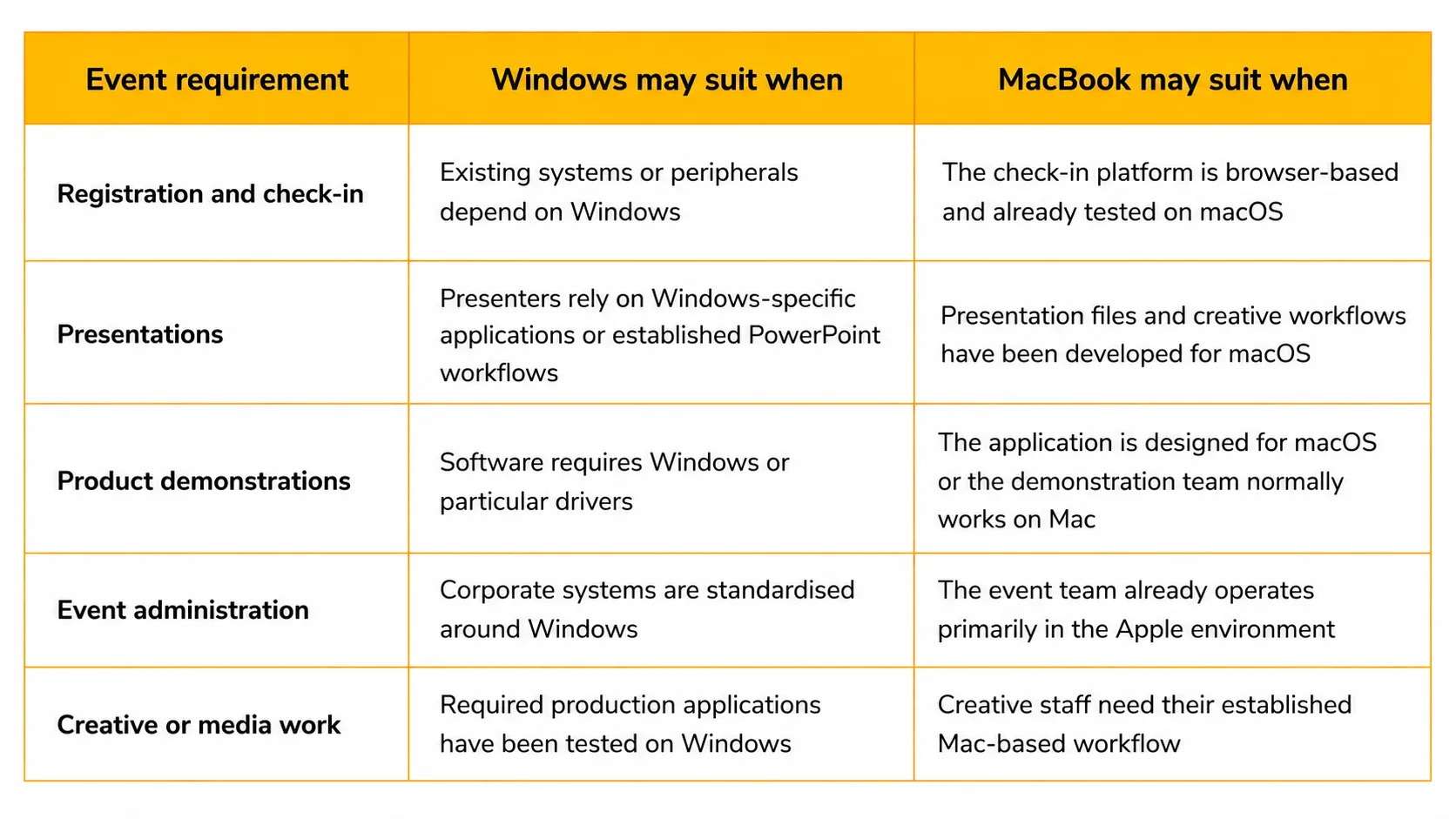
The important phrase is already tested. An event is not the right place to discover whether a critical application, font, plug-in, security setting or peripheral behaves differently on another operating system. Aligning device configurations with the ACSC Essential Eight security strategies ensures all check-in terminals meet Australian data protection standards.
Don't Separate Laptop Planning From AV and Connectivity
Laptop decisions often get made by the IT team while screens, projectors and venue AV are handled elsewhere. That separation can create problems during bump-in.
The device and the room need to be planned as one system.
Before finalising equipment, confirm how laptops will connect to presentation screens, LED displays, projectors, printers, scanners and other peripherals. Check whether adapters or docking stations are required and whether the same connections will be available at every venue.
Connectivity needs the same treatment.
A cloud-based registration platform, live polling tool or browser application may perform perfectly during office testing but depends on reliable venue connectivity during the conference. Identify which devices require internet access, which functions could continue temporarily without it, and whether wired connectivity or another contingency is appropriate for critical stations.
Standardise the Core, Not Every Venue Detail
Repeatability does not mean pretending every conference venue is identical.
A ballroom in Sydney might use a different AV system from a convention space in Perth. Loading access, network arrangements and presentation infrastructure can also change.
The goal is to standardise the core setup while documenting the variables.
Imagine a four-city conference in Sydney, Melbourne, Brisbane and Perth. Registration uses six laptops, presenters use two, and the operations team uses four.
Keep those roles, software builds, accessories, labels and testing procedures consistent. Then create a short venue-specific addendum covering matters such as network credentials, AV connections, delivery access and bump-in times.
This approach is far easier to manage than redesigning the technology plan from scratch at every stop.
Test the Exact Workflow, Not Just Whether the Laptop Turns On
A powered-on laptop is not a tested event laptop.
Testing should reflect what will actually happen on the day.
For a registration device, open the check-in platform, connect the required scanner or printer, complete a test registration and confirm network access.
For a presentation machine, load the real presentation, play embedded media, test the display output and check the adapters that will travel with it.
For demonstration devices, run the actual software and work through the demonstration sequence.
Then record the test. A simple checklist against each numbered device makes it much easier to identify what has been verified and what still needs attention.
Build Spares Into the Specification
Multi-city events leave little room for improvised replacements.
Rather than treating spare equipment as an afterthought, specify it at the planning stage. A spare laptop should ideally carry the same software, settings and files as the device it may replace. Spare chargers and critical adapters deserve the same attention.
This is where standardisation pays off.
If a registration device has to be swapped shortly before doors open, the replacement should not require someone to spend twenty minutes installing software, finding credentials and changing settings.
When Renting Can Simplify a Multi-City Event
Transporting an organisation's own laptops around Australia can appear straightforward until freight schedules, device preparation, storage, return logistics and internal IT workload are added to the plan.
Technology rental can be useful when equipment is only needed for the conference period or when the same requirement must be reproduced in several locations.
Rather than treating each city as a separate equipment order, work from one master specification. Confirm quantities, configurations, accessories, delivery windows, collection arrangements and spare requirements for the entire event series.
That shifts the conversation from "What laptops are available in Melbourne?" to "How do we reproduce the approved conference build in Melbourne?"
That is a much better operational question.
Frequently Asked Questions
Is Windows or MacBook better for a business conference?
Neither platform is automatically better. Choose according to the software, peripherals, presentation requirements and workflows used at the event. The best choice is the platform that has been tested for the intended task and can be consistently reproduced across the required devices.
Can Windows laptops and MacBooks be used at the same event?
Yes. Mixed environments can work well when there is a clear reason for using each platform. For example, registration devices might use Windows while a creative presentation team uses MacBooks. Document the purpose and configuration of each group rather than mixing operating systems without a specific need.
What should be standardised for a multi-city conference?
Standardise device roles, operating systems, applications, user settings, accessories, file versions, labelling, spare equipment and testing procedures. Venue-specific details such as network credentials and AV connections can then be documented separately.
Should event laptops be tested before each conference location?
Yes. Test the real workflow rather than carrying out only a basic hardware check. Open the required applications, test internet access, connect relevant peripherals and displays, verify files and confirm that spare devices can replace primary units if necessary.























Sign in to leave a comment.