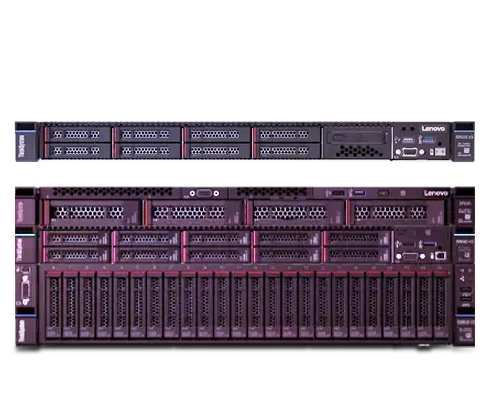

Virtualization helps you run many systems on one physical machine. Businesses use it to save space, reduce costs, and manage workloads in a smarter way. A single rack-mountable server can host several virtual machines that run apps, databases and testing environments at the same time.
Yet virtualization works well only when the hardware is strong enough. Weak hardware creates slow performance, system crashes and frustrated users. The right hardware makes your server stable, fast and ready for growth.
Many people focus only on storage or processor speed when they buy a server. Virtualization needs a more balanced approach. Every part of the server plays a role in performance. CPU, memory, storage, networking and cooling all affect how well the system handles multiple virtual machines.
Here are seven important hardware specs you should prioritize when building or buying rack-mountable servers for virtualization.
1. Choose a Powerful Multi-Core CPU
The processor handles the workload of every virtual machine. When several operating systems run on the same server, the CPU must divide its power between them.
A processor with more cores helps the server manage multiple tasks at the same time. Each virtual machine can use its own share of processing power. This keeps applications responsive and prevents the system from slowing down.
Server-grade processors also include built-in virtualization support. These features help the hypervisor manage resources efficiently. As a result, the server runs more virtual machines without heavy performance loss.
When you choose a rack-mountable server, focus on processors with higher core counts and strong reliability. This decision directly affects how many virtual machines the system can handle.
2. Prioritize High Memory Capacity
Memory is one of the most important resources in virtualization. Every virtual machine requires RAM to run its operating system and applications.
When memory becomes limited, the server starts to struggle. Applications slow down and the system may begin using disk storage as temporary memory. This process reduces performance quickly.
A virtualization server should support large memory capacity. Even if you start with a smaller amount of RAM, it helps to have empty memory slots for future upgrades.
More memory gives you flexibility. You can run more virtual machines and handle workload spikes without system stress. For virtualization environments, RAM often becomes the main factor that determines how many workloads a server can support.
3. Look for Fast and Reliable Storage
Storage performance affects how quickly virtual machines start and run applications. Slow drives can create delays when users open programs or access files.
Solid-state drives improve performance in virtualization environments. They offer faster read and write speeds compared with traditional hard drives. This speed helps virtual machines boot faster and respond quickly to user actions.
Reliability also matters. Virtualization servers often host important workloads. A storage failure can interrupt many systems at once. RAID support helps protect data and improve uptime.
Many modern rack-mountable servers support NVMe drives. These drives provide very high performance and reduce storage delays during heavy workloads.
4. Make Sure the Server Supports ECC RAM
ECC RAM helps detect and correct memory errors. This feature improves server stability and reduces the risk of crashes.
In a virtualization environment, a small hardware issue can affect several virtual machines. Memory errors may cause application failures or data corruption. ECC memory helps prevent these problems.
Businesses often rely on virtual machines for critical services. Stability becomes extremely important in such environments. ECC RAM adds an extra layer of reliability that protects workloads and keeps the server running smoothly.
Choosing a server that supports ECC memory helps maintain consistent performance and reduces unexpected downtime.
5. Focus on Strong Network Connectivity
Virtual machines often communicate with users' databases and other servers through the network. Strong network performance helps maintain smooth operations.
Rack-mountable servers designed for virtualization usually include multiple network ports. These ports allow administrators to separate different types of traffic. Management traffic, storage access, and user requests can travel through different connections.
Higher-speed network ports improve performance when large amounts of data move across the network. This becomes important when many users access applications hosted on virtual machines.
Reliable networking also supports redundancy. If one connection fails another link keeps the system online.
6. Pick a Server with Expansion Room
Virtualization needs often grow quickly. A server that works well today may require upgrades in the future.
Rack-mountable servers with expansion capacity allow you to add more memory storage or network cards later. This flexibility helps businesses scale their infrastructure without replacing the entire system.
Additional drive bays allow storage upgrades. Extra PCIe slots support network cards or storage controllers. Memory slots allow future RAM expansion.
Expansion support protects your investment. It allows the server to grow along with business needs.
7. Pay Attention to Cooling and Power Efficiency
Virtualization workloads can run continuously throughout the day. This creates heat and increases power consumption.
Good cooling systems keep the hardware stable under heavy workloads. When servers overheat they reduce performance to protect internal components. This process slows down applications and affects virtual machines.
Efficient cooling improves reliability and extends hardware lifespan. Power-efficient components also reduce electricity costs over time.
Rack-mountable servers designed for data center environments often include optimized airflow and efficient power supplies. These features help maintain stable performance during long operating hours.
Conclusion
Virtualization allows businesses to run many workloads on a single rack-mountable server. This approach saves space, improves efficiency, and simplifies infrastructure management.
The success of virtualization depends heavily on hardware selection. A powerful processor, strong memory capacity, fast storage, reliable ECC RAM, robust networking expansion support, and efficient cooling create a solid foundation for virtual machines.
When these hardware specs work together, the server becomes capable of handling demanding workloads without stress. Careful hardware planning helps build a stable virtualization environment that supports business growth for years.
























Sign in to leave a comment.