

Document processing often looks manageable until volume, variation, and exceptions begin to expose the limits of manual work. Teams start re-keying the same information, correcting extraction errors, checking folders for missing files, and spending more time validating documents than using the information inside them. As volumes rise, these small inefficiencies become operational bottlenecks.
That is where intelligent document processing becomes relevant. It combines document intake, classification, extraction, validation, and routing so information can move through business processes with less manual intervention.
This article covers eight warning signs that indicate a document workflow may have outgrown basic OCR or manual processing, where IDP fits, and how to assess whether your organization is ready for it.
What Is Intelligent Document Processing and Where Does It Fit in a Document Workflow?
Intelligent document processing uses AI, OCR, machine learning, and document understanding methods to capture, classify, interpret, validate, and route information from business documents.
It usually sits between document intake and downstream business systems, converting incoming files into validated, structured data that can be used by finance, lending, insurance, operations, and compliance teams.
How Intelligent Document Processing Goes Beyond OCR and Basic Data Capture
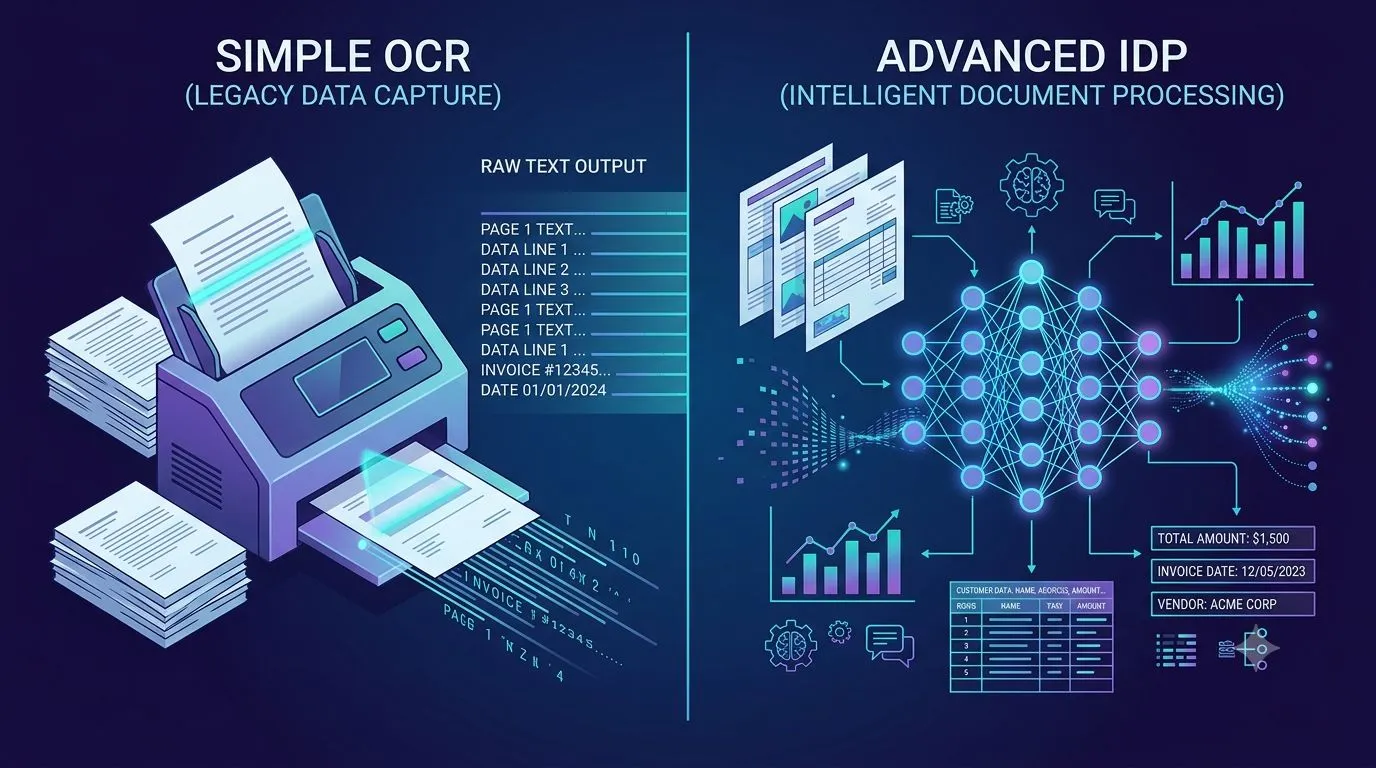
OCR converts scanned or image-based text into machine-readable characters. IDP goes further by identifying document types, understanding context, extracting relevant fields, checking relationships, validating values, and managing exceptions.
The difference becomes important when documents vary in layout or contain information that cannot be understood from characters alone.
What IDP Does Across Document Intake, Classification, Extraction, Validation, and Routing
IDP can receive documents from email, portals, shared storage, scanners, or business applications. It then classifies each document, extracts relevant data, applies validation rules, assigns confidence levels, and routes validated information or exceptions to the appropriate destination.
8 Signs Your Document Processing Workflow Needs Intelligent Document Processing
The need for IDP usually becomes visible through repeated operational symptoms rather than a single failure.
1. Manual Data Entry Still Sits at the Center of Document Processing
If employees still read documents and manually enter values into ERP, CRM, loan, claims, or accounting systems, processing speed remains tied directly to human capacity.
This also creates repeated opportunities for typing errors, omissions, and inconsistent formatting.
2. Growing Document Volumes Are Creating Backlogs and Longer Processing Times
Increasing document volumes can quickly overwhelm workflows that depend on manual review. Backlogs often appear during month-end, seasonal peaks, loan surges, claims events, or rapid business growth.
If processing capacity increases only by adding staff, the workflow may no longer scale efficiently.
3. Different Document Formats and Layouts Keep Breaking Rules and Templates
Traditional template-based processing works well when documents follow predictable layouts. Problems arise when suppliers, customers, borrowers, or partners use different formats.
IDP can identify fields based on context and document structure rather than relying entirely on fixed coordinates.
4. Data Errors, Re-Keying, and Repeated Corrections Are Becoming Routine
Repeated corrections often indicate that document capture is producing data without sufficient validation.
If teams regularly re-enter information, fix misplaced values, or compare extracted data manually against source documents, the workflow is creating avoidable rework.
5. Employees Spend More Time Validating Extracted Data Than Acting on It
Automation provides limited value if employees still need to verify nearly every extracted field.
A mature document workflow should distinguish between high-confidence information and cases that genuinely require review, allowing staff to focus on exceptions instead of checking every document.
6. Documents Move Through Email, Shared Folders, and Disconnected Business Systems
Document processing becomes difficult to control when files are downloaded from inboxes, renamed manually, saved to folders, uploaded into another application, and then copied into a business system.
IDP can connect document intake with downstream processing so fewer manual handoffs are required.
7. Audit Trails, Source Verification, and Compliance Checks Require Too Much Manual Work
If employees must repeatedly search for original files, supporting records, or previous approvals, audit preparation becomes slow and inconsistent.
Document processing should preserve the connection between extracted data, source documents, validation results, and review actions.
8. Document Processing Costs Rise Almost in Direct Proportion to Volume
A workflow that requires nearly twice as many people to process twice as many documents has limited operational scalability.
One of the main benefits of intelligent document processing is the ability to process increasing volumes without requiring staffing levels to rise at the same rate.
Why Traditional OCR and Rule-Based Document Processing Start to Fall Short
OCR and rule-based methods remain useful, but their limitations become more visible as document variety and business requirements increase.
OCR Can Read Text Without Understanding Its Business Context
OCR may correctly capture "$25,000" without knowing whether it represents revenue, an invoice total, insured value, loan balance, or contractual threshold.
Context determines how extracted information should be interpreted.
Fixed Templates Struggle as Document Layouts and Data Locations Change
Coordinate-based templates depend on fields appearing in expected locations. A new supplier format, revised form, or shifted table can cause extraction failures even when the required information is still present.
Rules Become Harder to Maintain as Document Types and Exceptions Increase
Rule sets can expand rapidly as organizations add document types, suppliers, regions, and business processes. Maintaining these rules becomes increasingly difficult when each new variation requires another condition.
Extracted Data Still Needs Validation Before It Can Enter Business Systems
Extraction alone does not confirm whether a value is accurate or acceptable. Data may need to be compared against system records, expected ranges, reference documents, or business policies before use.
The Less Obvious Warning Sign: Your Extraction Works, but the Workflow Still Depends on People
Some organizations automate extraction but leave most of the surrounding document process unchanged.
Manual Classification Can Keep the First Stage of Document Processing Human-Dependent
If employees must open each file and decide whether it is an invoice, statement, application, contract, or supporting record, automation still begins with manual effort.
Exception Handling Can Become the New Bottleneck After Extraction Is Automated
As extraction improves, unresolved exceptions often become the largest source of processing effort.
Without clear routing and prioritization, employees may spend significant time deciding who should review each case.
Human Review Expands When Confidence Scores Do Not Reflect Business Risk
A low-confidence postal code and a low-confidence invoice total should not necessarily receive the same attention.
Review logic should consider both extraction confidence and the business impact of an incorrect value.
Downstream Teams Still Recheck Data When Source Traceability Is Missing
Users are less likely to trust extracted information if they cannot trace it back to a page, field, clause, or table.
Source-level references reduce repeated checking and make exceptions easier to investigate.
How Intelligent Document Processing Addresses These Workflow Problems
IDP connects document recognition with contextual interpretation, validation, and downstream processing.
AI-Based Classification Identifies Documents Without Fixed Naming or Filing Rules
AI-based classification can identify document categories from content and structure even when filenames or storage locations are inconsistent.
Context-Aware Extraction Handles Structured, Semi-Structured, and Unstructured Documents
IDP can process standardized forms, invoices, statements, contracts, reports, and other documents where information may appear in different positions.
Validation Compares Extracted Information With Business Rules and System Records
Extracted values can be checked against master data, transaction records, policies, thresholds, or related documents before acceptance.
Confidence-Based Review Sends Uncertain or Material Cases to the Right People
Rather than reviewing everything, organizations can direct uncertain, conflicting, or high-value cases to employees with the appropriate authority.
Document Data Can Move Directly Into ERP, CRM, LOS, Claims, and Other Business Systems
Validated information can be passed into connected applications, reducing repeated data entry and manual file movement.
Which Document Workflows Are Strong Candidates for Intelligent Document Processing?
Document-heavy processes with high volumes, variable formats, repeated validation, or significant manual review are usually strong candidates.
Invoice and Accounts Payable Document Processing
IDP can capture supplier, invoice, PO, tax, line-item, and payment information before validation and approval.
Loan and Mortgage Document Processing
Applications, statements, tax records, identity documents, and supporting schedules can be classified and processed as part of underwriting workflows.
Insurance Claims and Policy Document Processing
Claims forms, reports, invoices, policies, and supporting evidence can be processed together.
Customer and Vendor Onboarding Documents
IDP can extract and validate identity, tax, registration, banking, and compliance information.
Financial Statements and Credit Documents
Financial information can be captured across statements, schedules, and borrower documents for further analysis.
Contracts, Agreements, and Compliance Records
AI can identify clauses, dates, parties, obligations, and other information that must be reviewed or tracked.
How to Decide Whether Your Organization Is Ready for Intelligent Document Processing
Readiness should be based on measurable workflow problems rather than document volume alone.
Measure Document Volume, Processing Time, and Manual Touchpoints
Record how many documents arrive, how long they take to process, and where employees intervene.
Identify the Document Types Producing the Most Exceptions
Focus first on document categories that create frequent delays, validation failures, or manual corrections.
Track Error Rates, Rework, and Time Spent on Validation
These measures show where processing effort is being lost after initial data capture.
Map Where Extracted Data Needs to Go After Processing
Identify which ERP, CRM, LOS, claims, accounting, or operational applications consume the final data.
Define Which Decisions Require Human Review
Set clear criteria for material values, uncertain fields, policy exceptions, and cases requiring approval.
What Should You Expect After Moving From Manual Processing to IDP?
The effect should appear across processing capacity, data quality, exception handling, and operational control.
Less Manual Data Entry and Repetitive Document Handling
Employees spend less time copying values, renaming files, and transferring information between systems.
Faster Processing Without Adding Staff at the Same Rate as Volume
Higher volumes can be processed without requiring proportional increases in manual processing capacity.
More Consistent Data Across Downstream Systems
Automated extraction and validation reduce variation caused by manual entry and inconsistent formatting.
Clearer Exception Management and Source-Level Traceability
Exceptions can be routed according to confidence, value, risk, or document type while preserving supporting evidence.
Greater Capacity to Process New Document Types and Layout Variations
Context-based extraction makes it easier to accommodate document variation without creating a separate fixed template for every format.
Conclusion: IDP Becomes Necessary When Document Processing Problems Move Beyond Data Entry
The strongest signal that a business needs IDP is not simply that employees type information manually. It is that document processing has become a connected problem involving classification, interpretation, validation, exceptions, traceability, and system integration.
Once basic OCR or fixed templates require increasing amounts of human checking, IDP offers a more scalable processing model. It allows routine documents to move automatically while directing uncertain or material cases to people.
The objective is not to remove human judgment. It is to apply that judgment where it carries the most value.





























Sign in to leave a comment.