
TABLE OF CONTENTS
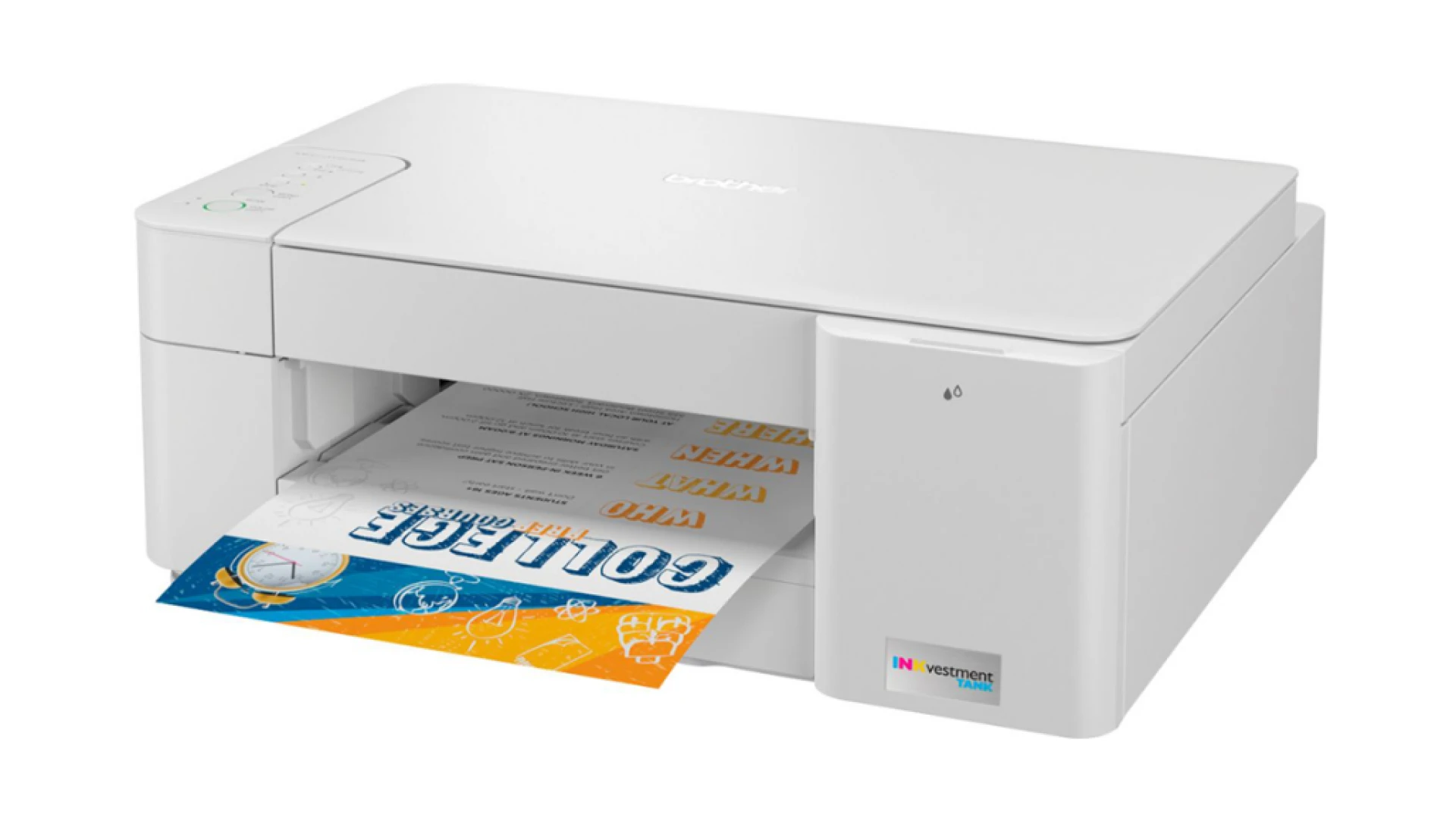
DesignSoftware and Connectivity OptionPrint, Copy & Scan SpeedOutput QualityFAQsWhat is the running cost of Brother MFC-J1205W?How long can the MFC-J1205W cartridges last?Is MFC-J1205W worth buying?Brother mfc-j1205w :-The Brother MFC-J1205W is a budget multifunction inkjet printer that admirably handles most of your everyday printing tasks. Unlike its competitors shifting towards ink tanks filled with bottles, Brother is sticking with ink cartridges for now. The printer has a USB port and Wi-Fi connectivity. It’s a low-volume printer, copier, and scanner but doesn’t have faxing capabilities.
The Wireless Multifunction Color Inkjet Printer comes with reengineered cartridges and reformulated inks. The company claims the ink can last a year and offers competitive running expenses. But as we know, no machine is perfect; that same goes with MFC-J1205W; it does have some flaws, which we will discuss in this blog.
DESIGN
Brother printers are famous for their quality and longevity but won’t win any awards for their design. The same can be said about MFC-J1205W; its design is a little to look at, but it does feature an understated and minimalist design free of clutter. The body measures 6.3’’x17.1’’x14.1″ (HWD), a somewhat average size. It’s a light and petite printer that weighs 12.3 pounds. The depth is increased to 18.1 inches when you extend its 50-sheet output tray. The output tray rests on the input paper drawer, which holds 150 sheets. To print on 4×6″ photo paper, flip up a tongue on the bottom of the drawer and slide in the drawer guides.
The MFC-J1205W multifunction printer includes a flatbed scanner for scanning and copying everyday documents and images. But the printer lacks an automated document feeder (ADF), so you must manually place pages on the glass. The control panel rests on the printer’s top, to the left of the scanner lid. The control panel does not have an LCD but has five physical buttons: power/stop, wireless on/off, paper size, monochrome copy/scan, and color/scan. Also, the printer is missing an error indicator light and a low-ink light.
The multifunction printer can easily handle various walk-up tasks, including monitoring consumables, making copies, customizing individual user and group or department security settings, and creating security and usage reports. The Brother printer features a built-in online gateway or interface for jobs too sophisticated for the control panel, such as customizing security, monitoring consumables, and creating reports.
Using any web browser, you can access the portal through your local area network (LAN). With a single 150-sheet tray, paper handling is limited. The maximum monthly duty cycle of the printer is 2,500 pages, with a recommended monthly print and copy volume of 1,000 pages.
SOFTWARE AND CONNECTIVITY OPTION
If you trust the sources, then according to them, along with the printer, the only software you get is Brother’s iPrint&Scan. The company’s cross-platform combination driver and interface utility was initially started as a capable AIO interface. Over the years, it has evolved into a handy tool that simplifies scanning and copying documents and photos. But iPrint&Scan can’t do everything; it can’t perform as a standalone interface with multiple users.
Luckily, the company offers an array of free productivity and convenience apps so that you don’t have to rely solely on iPrint&Scan. These apps include Kofax PaperPort, an integrated document management solution that scans, searches, shares, and organizes your documents. Kofax PaperPort also provides OCR, a utility for creating and editing PDFs; it converts scanned pages to editable or searchable text and supports several file-naming conventions. A wireless setup assistant helps manage your Wi-Fi network, and a connection repair tool helps to keep all your network healthy.
If you trust the sources, then according to them, along with the printer, the only software you get is Brother’s iPrint&ScanFor connectivity, the multifunction printer boasts a USB 2.0 port, 802.11b/g/n Wi-FI, and Wireless Direct, which is equally good as Wi-Fi Direct. Last but not least is its peer-to-peer networking protocol that enables you to connect your mobile devices to the printer, even if both devices are not on the same network or connected to the same router. In addition to that, the printer also supports Brother Mobile Connect, Mopria, and Apple AirPrint.
PRINT, COPY & SCAN SPEED
The multifunction printer has a respectable printing speed of 16 monochrome ppm. During our tests, the printer churned out a 12-page Microsoft Word text document at 19.4ppm. The MFC-J1205W printed a collection of colorful and complex business documents at an average speed of 19.4ppm. The MFC-J1205W printed out colorful and detailed 4’’x6″ snapshot with a border in an average of 38 seconds. You must use the Brother iPrint&Scan software to create a borderless print.
The MFC-J1205W is one of the fastest printers at making black-and-white copies. The printer churned out a monochrome copy in 10.8 seconds, whereas it churned out a color copy in 28.1 seconds. Similarly, the printer has an impressive scanning speed. The printer captured a high-resolution 600 DPI color JPEG scan of an 8×10-inch photo in 37.5 seconds. To make a 300 DPI monochrome scan to PDF format took the printer 9.1 seconds.
OUTPUT QUALITY
The letterforms of the text prints were sufficiently dark and looked sharp with slightly crispier edges. The graphics also turned out well, with a fair amount of detail and accurate colors. However, the prints containing faces looked too bright and thus lost contour. The text in the graphics in PDF looked sharp. The Brother printer accurately reproduced text and graphics.
Its scan quality is also high. The printer bumped up the exposure for the graphics print containing faces, which led to a loss of some mid-tone transitions in prints on plain paper. The printer kept sharp shadows on faces in the midday light from looking unappealingly dark in photo scans.
FAQS
WHAT IS THE RUNNING COST OF BROTHER MFC-J1205W?
The MFC-J1205W is the smallest INKvestment Tank model but is also one of the most expensive. Using the standard-yield cartridge will cost you about 10 cents per black page and 21.2 cents per color. High-yield cartridges cost you 6.2 cents per text and 15.7 cents per color print.
HOW LONG CAN THE MFC-J1205W CARTRIDGES LAST?
As the company claims, the four ink cartridges in the box can last for a whole year. Note that ink cartridges can last only a year if your annual print and copy volume is under 750 pages.
IS MFC-J1205W WORTH BUYING?
MFC-J1205W is a solid entry-level multifunction printer with a price tag of $99.99. The printer offers high image quality and a lot of speed. The printer does not come with an auto-duplexing ADF; it’s a deal breaker to some
Source:-https://theyourtechexpert.42web.io/2023/07/06/brother-mfc-j1205w-review-is-it-worth-the-investment/























Sign in to leave a comment.