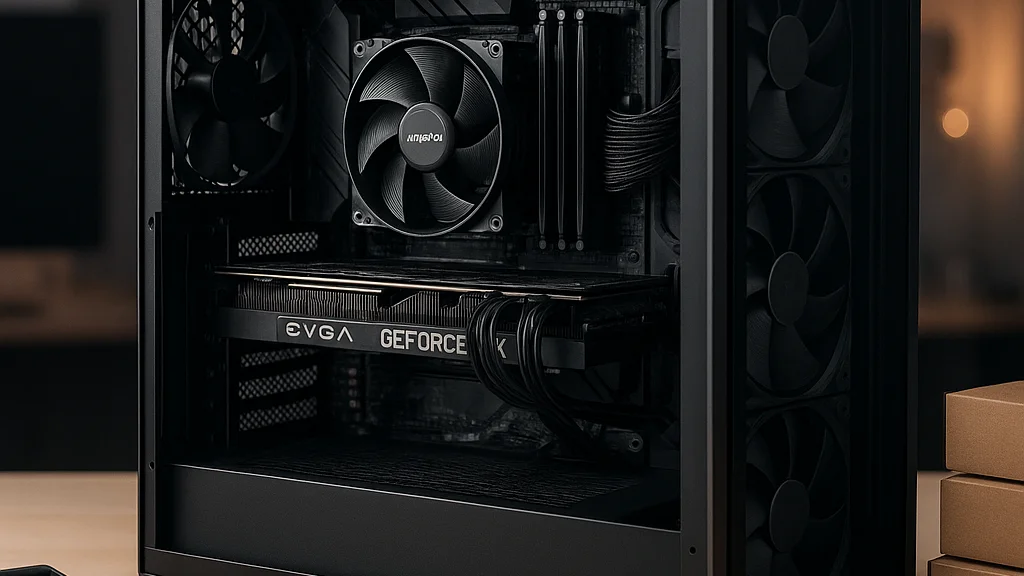

The budget build begins with a hard truth
A cheap gaming PC that feels expensive, that is the little miracle most builders are chasing. You can hear it in the late-night searches, in the forum posts, in the quiet click of a calculator beside a product page. Someone has saved for months, maybe longer, and now the question arrives with the weight of a train pulling into a station at midnight: what actually matters, and what is just shiny distraction. The answer in 2026 is clearer than it was a few years ago, but it is not simpler. Prices move like weather. New graphics cards arrive with the promise of light and speed, then sell out, then settle. Older parts become bargains for a season, then vanish. A budget build is not a pile of compromises, though. Done properly, it is an exercise in proportion.
The strongest budget gaming PCs are not built around the cheapest parts on a shelf. They are built around balanced spending. That means choosing the GPU first, pairing it with a CPU that will not choke it, buying enough memory for modern games, and refusing to overspend on decorative extras before performance is secured. According to Steam Hardware Survey trends over recent years, mainstream resolutions and midrange hardware still define the broad PC gaming audience, which tells you something important: most players do not need halo products to enjoy smooth frame rates. They need sensible parts, clean airflow, and a plan.
That is also the thread running through practical guides such as Budget Gaming PC Build Guide: What You Really Need to Know and Common Mistakes in a Budget Gaming PC Build Guide. The smartest budget build is rarely the one with the loudest case fans or the brightest RGB wash. It is the one that spends where the frames live.
A budget gaming PC is not about buying less computer. It is about buying the right computer, with almost nothing wasted.
Think of the process like arranging a room with limited light. Place the mirror well, and the whole space opens. Place it badly, and everything feels smaller than it should. A budget build works the same way. One good decision multiplies the value of the next.
Where your money should go, and where it should not
If you are building for gaming first, the graphics card remains the center of gravity. Even in 2026, despite upscaling technologies and better CPU efficiency, the GPU does most of the visible heavy lifting at 1080p high settings and especially at 1440p. That is why budget allocation matters more than brand loyalty. For a total system budget around the entry-to-midrange sweet spot, roughly 35 to 45 percent of the spend often belongs on the graphics card. The CPU usually lands in the 20 to 25 percent range. Memory, storage, motherboard, case, and power supply must then fit around those priorities without turning into hidden traps.
There is a reason experienced builders keep repeating the same warning: do not buy a weak GPU just to afford an overbuilt motherboard or a liquid cooler you do not need. A budget machine should be practical, not theatrical. Recent mainstream advice from Geeky Gadgets and broad consumer roundups like the one from TechTimes circle the same point from different angles: performance per dollar is won by prioritizing the core silicon, then avoiding weak links.
A practical budget split often looks like this:
- GPU: 35–45% of total budget
- CPU: 20–25%
- Motherboard: 10–15%
- RAM: 7–10%
- Storage: 5–10%
- PSU: 7–10%
- Case and cooling: 5–10%
Those ranges are not laws. They are guardrails. If you already own an SSD, the money can shift. If a CPU bundle is discounted, you can lean into it. But the logic stays firm. Spend on frame-rate impact first.
Where should you resist temptation? Four places, usually. First, premium motherboards with features you will never use, such as advanced overclocking support for a locked or non-tuned chip. Second, 64GB of memory for a pure gaming machine when 16GB or 32GB is more sensible. Third, oversized power supplies bought out of fear rather than actual wattage needs. Fourth, expensive aesthetics, glass-heavy cases, RGB ecosystems, and branded fans, before the GPU is settled. The machine should run cool and quiet, yes, but a budget build is not a showroom installation.
If one part is dramatically stronger than the rest, you may have built a benchmark screenshot, not a well-rounded gaming PC.
That is the budget builder’s discipline, almost like editing a poem. Remove what does not serve the line.
The best-value parts strategy in 2026
The market in 2026 rewards builders who are flexible about platform age. That may sound unromantic, but it is where value hides. Chasing only the newest socket, the newest chipset, the newest memory standard, that is how a modest build quietly becomes an expensive one. A better approach is to compare three lanes: current-gen budget parts, previous-gen discounted parts, and lightly used components from reputable sellers. The winner changes by week and by region.
For CPUs, the budget sweet spot is often found in six-core processors with strong single-threaded performance. Modern games still benefit from more cores in some scenarios, especially with background tasks, but the leap from six to eight cores matters less than the leap from an old weak architecture to a newer efficient one. A six-core Ryzen 5 or Core i5 class chip, depending on local pricing, is frequently enough for a build centered on 1080p and 1440p gaming. The motherboard should support the CPU cleanly, offer at least one fast NVMe slot, decent VRM quality, and a BIOS ecosystem that is stable. Beyond that, many “premium” features are luxuries.
Memory is one of the clearest places where builders either save wisely or spend sloppily. In 2026, 16GB remains the floor for a gaming PC, while 32GB is increasingly attractive if the price gap is small, especially for newer open-world games, multitasking, streaming, or keeping the system comfortable over several years. What matters almost as much as capacity is configuration. Two sticks in dual channel are still the sensible route for most builds.
Storage has become less glamorous and more essential. Many new games are simply too large, too texture-heavy, too impatient for a tiny drive. A 1TB NVMe SSD is often the practical minimum if the machine is meant to hold several modern titles at once. A 500GB drive can work, but it feels cramped quickly, like trying to pack a winter coat into a small carry-on. Load times, patch sizes, shader caches, system files, all of it accumulates.
The power supply is where thrift can turn dangerous. Buy quality, not just wattage. A reliable 550W to 650W unit from a reputable series is enough for many budget and lower-midrange builds, provided it has the right connectors and efficiency certification. What matters is not just whether the PC turns on, but whether it remains electrically stable under sustained gaming loads.
For cases, airflow has finally won the argument. Mesh-front designs and sensible fan placement have become standard even in lower price bands. The practical lesson from hands-on assembly coverage, including MSN’s budget build review in the MSI Vampiric 010, is that thermals, cable routing, and ease of assembly matter more than marketing copy. A budget case that breathes is better than a prettier case that traps heat behind tinted glass.
- Choose a GPU tier that matches your target resolution first.
- Pick a CPU that will not bottleneck that GPU in the games you actually play.
- Buy 16GB minimum RAM, 32GB if pricing is favorable.
- Install at least a 1TB NVMe SSD if possible.
- Use a trusted PSU, even if it means trimming cosmetic spending.
That sequence saves money because it saves regret.
1080p, 1440p, and the myth of “future-proof” budgeting
Many first-time builders make the same expensive mistake: they shop for a fantasy machine instead of a target. They say they want “future-proof,” which usually means they are afraid of buying wrong. The trouble is that future-proofing on a budget often becomes present-day overspending. A better question is simple and concrete: what resolution, what refresh rate, what games. Build for that.
If your target is 1080p at high settings, especially for esports titles such as Counter-Strike 2, Valorant, Rocket League, Fortnite, or Apex Legends, you can build a very capable machine without chasing upper-tier hardware. These games often reward CPU responsiveness and stable frame delivery, but they do not demand the kind of graphics horsepower that modern ultra settings at 1440p or 4K require. A balanced six-core CPU, a competent midrange GPU, and fast enough RAM can deliver a smooth, competitive experience.
For 1440p, the conversation changes. Here the GPU matters more, and the cost curve steepens. This is why some budget builders do better by assembling a strong 1080p system now rather than a weak 1440p system that constantly asks for setting compromises. The article from Manchester Evening News, focused on parts under a defined budget, reflects this broader reality in consumer buying: every pound or dollar has to be made visible on screen.
There is also the upscaling question. Technologies such as DLSS, FSR, and XeSS have changed budget planning because they can extend the useful life of midrange cards. That does not mean raw GPU performance no longer matters. It means builders have one more lever to pull. If a card performs well enough at native 1080p and supports good upscaling options, it may handle 1440p more gracefully than older value models did. Yet upscaling is not magic. Image quality varies by game, and lower-end cards still struggle when visual settings are pushed too far.
Here is a more honest way to think about budget longevity:
- Good longevity: buying a platform that can accept a later CPU or GPU upgrade
- Poor longevity: overspending now on features you may never use
- Realistic longevity: targeting one resolution well, not three resolutions badly
- Useful flexibility: leaving PSU headroom for a future graphics card step-up
Future-proofing is a seductive phrase because it sounds like certainty. Budget building has very little certainty. It has timing, trade-offs, and the quiet art of knowing when “enough” is truly enough.
What changed recently, and why 2026 buyers should care
The budget PC equation in 2026 is shaped by three recent developments: broader availability of capable used hardware, more mature upscaling ecosystems, and a widening gap between sensible mainstream components and prestige-tier parts. That gap matters because it has made the middle of the market more strategic. Builders no longer need to imitate flagship reviews to get a satisfying result.
One clear shift is that previous-generation GPUs and CPUs are often more appealing than brand-new entry-level launches. New low-end products sometimes arrive with narrow memory buses, constrained VRAM, or pricing that feels ambitious rather than generous. Meanwhile, a discounted older midrange card can still offer stronger raster performance. Buyers who compare benchmarks instead of release dates tend to get better value. Coverage such as The Daily Illini’s overview of budget gaming setups captures this consumer reality well: overspending is often a product of impatience, not necessity.
Another change is that software matters more than it used to. Driver maturity, frame generation support in some ecosystems, and game optimization can all alter the experience of a budget rig. A card that looked merely adequate on launch can become more compelling after months of updates, while a theoretically strong part can disappoint in the wrong game mix. That is why builders should consult recent benchmarks from trusted reviewers before buying, not rely on old launch-day impressions floating around social media.
Then there is the used market, which in 2026 remains one of the most powerful tools for builders with discipline. A used GPU can transform a budget build, but only if you inspect carefully, verify model details, confirm cooling condition, and test under load if possible. Mining-era fears have not vanished entirely, though the market has matured and many cards are perfectly serviceable. The real risk is less about mythology and more about ordinary wear, poor seller disclosure, or lack of return protection.
For builders who want a broader framework, Inside a Budget Gaming PC Build That Actually Makes Sense and Budget Gaming PC Build Guide: Smart Parts, Better FPS are useful companion reads because they reinforce the same 2026 lesson from another angle: the market rewards patience, comparison, and a willingness to buy one generation behind if the performance is still there.
That is the feeling of this year’s budget scene, really. Less glamour, more clarity. Like rain on a window making the city lights blur, then somehow look sharper.
A sample budget blueprint that actually makes sense
Rather than chase one rigid parts list, it is smarter to think in tiers. Prices vary too much across regions for a universal shopping cart to stay accurate for long. Still, a blueprint helps, especially for builders staring at dozens of tabs and slowly losing the plot.
Tier one, the entry gaming build, should target 1080p medium to high settings with a focus on esports and lighter AAA play. Here, a six-core CPU, 16GB RAM, a 1TB SSD if affordable, and a value GPU with enough VRAM to avoid immediate pain are the pillars. The case should have front airflow, and the PSU should come from a trusted line, even if modular cabling is sacrificed. This build is for the player who wants smoothness first, spectacle second.
Tier two, the mainstream sweet spot, is where most budget-conscious enthusiasts should linger. This is the build for 1080p ultra or 1440p medium to high, depending on the game. It likely includes a stronger midrange GPU, either new on discount or previous-gen, 32GB RAM if the budget stretches comfortably, and a motherboard with enough upgrade room to make a future CPU swap plausible. This is the machine that feels less like a compromise and more like a quiet victory.
Tier three, the stretched budget build, is where caution is needed. If you have to cut too many corners elsewhere to afford a significantly stronger graphics card, the system can become brittle. A bargain GPU loses its charm if paired with a low-grade power supply, poor cooling, and a tiny SSD that forces constant uninstalling.
When evaluating your own draft, ask these questions:
- Will this GPU deliver the frame rate I want at my monitor’s resolution?
- Is the CPU strong enough that I am not wasting GPU money?
- Do I have at least 16GB RAM, ideally in dual channel?
- Is the SSD large enough for the games I actually play?
- Is the PSU from a reliable manufacturer and series?
- Am I paying extra for looks before performance is secured?
If the answers are honest, the build usually reveals itself. Budget systems fail less from lack of money than from lack of hierarchy. Every component wants to be chosen first. Only one can be.
The mistakes that quietly ruin a cheap build
The worst budget PC errors are rarely dramatic. They do not announce themselves like smoke. They arrive as stutter, heat, noise, instability, and the sinking feeling that the machine cost more than it should have for what it does. One common mistake is buying a CPU cooler before confirming whether the included cooler is already sufficient. Another is choosing a motherboard solely by chipset name, then discovering it lacks BIOS readiness, enough fan headers, or the storage support you assumed was standard.
Memory mistakes are equally common. Builders buy one stick instead of two to “upgrade later,” then spend months leaving performance on the table. Or they pay a premium for extreme memory speeds that offer marginal gaming benefit compared with simply buying a better GPU. Storage errors are almost poetic in their predictability: a fast but tiny drive, full within weeks, forcing a dance of deletion and reinstallation every time a major game updates.
Case selection can also sabotage a budget build. Some low-cost enclosures look good in product photos yet arrive with poor airflow, awkward cable management, or fan support that makes cooling an afterthought. The result is a hotter GPU, louder fans, and lower sustained performance. Then there is the power supply problem, still the most serious of the lot. A no-name PSU can undo every careful decision around it.
Experienced builders also warn against spending too early. Prices fluctuate. Bundles appear. Open-box deals surface. If you buy one component at a time over many months, you risk missing return windows and ending up with incompatible parts. It is usually better to plan thoroughly, then buy in a tighter window once the configuration is settled.
The cheapest part in a budget PC should never be the one responsible for keeping every other part alive.
That line may sound severe, but it is earned. A budget build should feel lean, not fragile. There is a difference.
How to buy smart, assemble cleanly, and upgrade later
The final layer of a good budget build is not the parts list. It is the method. Smart buyers track prices for a few weeks, compare bundles from major retailers, and stay open to alternatives. If one CPU suddenly rises in price, a competing platform may become the better answer overnight. If a used GPU appears from a trustworthy local seller with proof of operation, the whole budget can breathe. Flexibility is not indecision, it is strategy.
During assembly, the basics matter more than drama. Update the motherboard BIOS if needed. Enable the correct memory profile. Make sure the cooler is mounted properly, thermal paste applied correctly if required, and front-panel connectors seated with patience. Route cables for airflow rather than perfection. Install chipset and GPU drivers from official sources by name, even if you are not linking them. Then test. Use a few games you know well, monitor temperatures, and listen. A healthy PC has a certain rhythm, fans rising and falling like measured breath, not frantic turbulence.
Upgrades should also be planned with restraint. The best first upgrade for many budget systems is often the GPU, followed by RAM or storage if those were constrained at launch. CPU upgrades make sense when the platform allows them cheaply and when your actual games show the need. Replacing everything at once defeats the whole point of building on a budget.
There is a quiet confidence in a well-built affordable machine. It does not need to announce itself. It boots quickly, loads the map, holds the frame rate, and lets the player disappear into the game. That is the real luxury, not chrome-plated branding or a rainbow of fans reflected in tempered glass.
If you want one final principle to keep beside you while shopping, let it be this: build for the screen you own, the games you play, and the money you truly have. Not the screen you might buy someday, not the benchmark chart that flatters someone else’s budget, not the fantasy of a perfect future. A good budget gaming PC is like a favorite jazz record, warm, precise, unshowy, and exactly enough when the needle drops.




























Sign in to leave a comment.