
In the ever-evolving world of e-commerce, integrating live streaming with platforms like WooCommerce can significantly enhance customer engagement and drive sales. Unlike Shopify live streaming, WooCommerce offers flexibility with its vast range of plugins and customizations. Leveraging a live streaming API for your e-commerce website can create immersive shopping experiences, allowing real-time interactions and personalized showcases of products. This seamless integration can not only boost viewer engagement but also transform how customers connect with your brand, making it a must-try strategy for innovative online retailers.
Understanding the Benefits of Live Streaming in E-Commerce
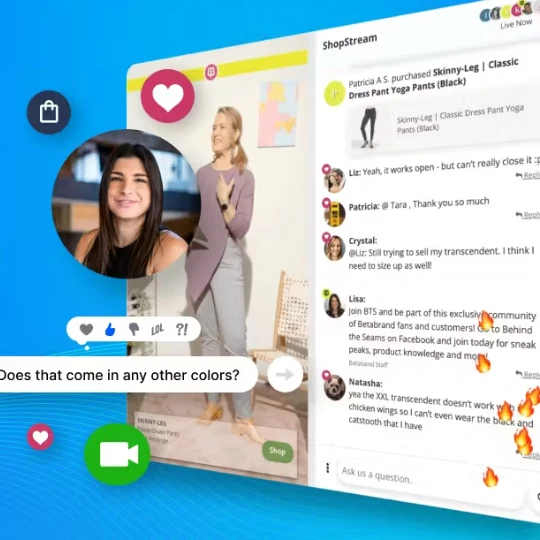
Live streaming has become a powerful tool in the e-commerce industry, enabling brands to interact with their customers in real-time. This direct form of communication allows for a more personalized shopping experience, where customers can see products in action, ask questions, and receive immediate responses. The dynamic nature of live streaming also helps to build trust and authenticity, as it offers a transparent view of the products and services.
Comparing WooCommerce and Shopify Live Streaming
While Shopify live streaming is a popular option for many online retailers, WooCommerce provides a distinct advantage with its open-source nature. WooCommerce's extensive range of plugins and customizations allows for a more tailored approach to integrating live streaming. This flexibility is crucial for businesses that need specific functionalities or wish to maintain a unique brand identity.
Setting Up Live Streaming on WooCommerce
Choose the Right Live Streaming APISelecting the appropriate live streaming API for your e-commerce website is the first step. APIs such as YouTube Live, Facebook Live, or specialized services like StreamYard and OBS Studio offer various features tailored for e-commerce needs. Consider factors like ease of use, integration capabilities, and viewer interaction options when making your choice.
Integrate the Live Streaming API with WooCommerceOnce you’ve selected your live streaming API, the next step is integration. Many APIs provide detailed documentation and plugins that can simplify the process. For example, you can use the WP Livestream plugin for seamless integration with platforms like YouTube Live. Ensure that the API you choose supports real-time interaction features, such as live chat and reactions, to maximize viewer engagement.
Optimize Your Streaming SetupHigh-quality video and audio are essential for a successful live stream. Invest in a good camera, microphone, and stable internet connection to ensure a professional presentation. Additionally, create a visually appealing and brand-consistent backdrop to maintain viewer interest and reinforce brand identity.
Promote Your Live StreamPromotion is key to attracting viewers to your live stream. Utilize social media, email newsletters, and your website to announce upcoming live events. Creating a sense of urgency and exclusivity can also help drive attendance. Consider offering special discounts or giveaways during the live stream to incentivize participation.
Engage with Your AudienceInteractivity is the cornerstone of live streaming. Encourage viewers to ask questions, provide feedback, and share their experiences during the stream. Use polls, Q&A sessions, and live demonstrations to keep the audience engaged. Responding to comments and questions in real-time fosters a sense of community and builds stronger customer relationships.
Measuring Success and Optimizing Future Streams
After your live stream, it’s important to analyze its performance to understand what worked and what didn’t. Key metrics to track include viewer count, engagement rate, and conversion rate. Use this data to refine your future live streaming strategies. Experiment with different formats, times, and promotional tactics to discover what resonates best with your audience.
Conclusion
Integrating live streaming into your WooCommerce store can revolutionize your e-commerce strategy, providing a dynamic and interactive shopping experience that sets you apart from the competition. By choosing the right live streaming API for your e-commerce website and following best practices for setup, promotion, and engagement, you can create compelling live streams that drive sales and build lasting customer relationships. Whether you’re just starting or looking to enhance your existing setup, these tips and tricks will help you make the most of live streaming in your WooCommerce store.



























Sign in to leave a comment.