
Apple’s Vision Pro has opened new frontiers in spatial computing, and for developers wanting to stay ahead, the question isn’t whether to enter, but when. What’s exciting is that you don’t need to start from scratch—you can convert an existing iOS app to visionOS for Vision Pro and take it from flat to immersive.
This guide walks you through the journey—why conversion is powerful, what to watch out for, and how to make your iOS app shine in a spatial environment.
1. Why Convert Instead of Rebuild?
The opportunity to update existing iOS apps for Vision Pro is a game-changer:
- Faster time to market: You’re not starting from zero—conversion often means recompiling existing code with minimal changes.
- Broader reach: Your app becomes available in the visionOS ecosystem, instantly accessible to Vision Pro users.
- Spatial capabilities unlocked: Users see your UI floating in their space, create depth-enhanced interactions, and engage in a way that apps on flat screens simply can’t match.
In short, conversion amplifies your app’s impact with little reinvention needed.
2. Core Steps to Conversion
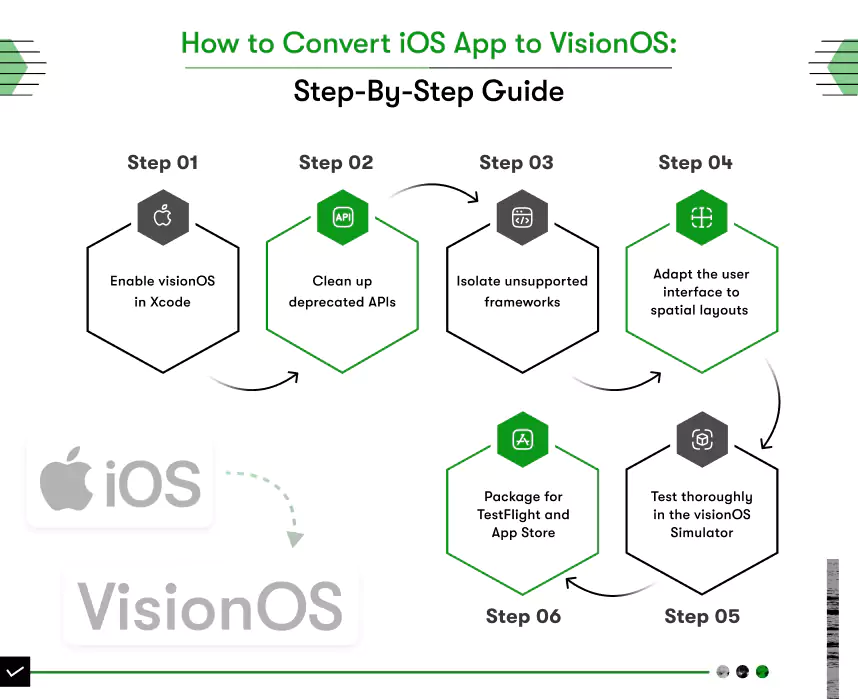
A. Add visionOS as a build target
Begin by opening your project in Xcode and adding “Apple Vision” under Supported Destinations. This small but critical step prepares your code to compile against the visionOS SDK, laying the foundation for further enhancements.
B. Clean Deprecated APIs
VisionOS removes APIs deprecated in older iOS versions. Warnings in Xcode are your cues—follow its guidance to replace deprecated APIs cleanly. This step prevents runtime errors and ensures smooth compatibility.
C. Isolate Unsupported Features
Certain iOS frameworks—such as ActivityKit, AdSupport, or HomeKit—may be unavailable in visionOS. Use platform checks or modular file separation to safely bypass unsupported functionality
D. Embrace VisionOS-Specific UI
To convert existing apps into truly immersive experiences:
- Move beyond 2D storyboards. Adopt SwiftUI for support of floating, depth-aware UI that blends into the user’s environment.
- Incorporate RealityKit for 3D objects and interactions.
- Reimagine interfaces to anchor windows around the user in physical space.
Just recompiling gives you a window, but redesigning gives you presence—and real UX.
E. Upgrade Your Visual Assets
Floating UI needs visuals that stay crisp up close and afar:
- Prefer vector graphics for scalable icons and logos.
- Use high-resolution raster images wherever necessary (preferably @2x or higher).
- Apply Apple’s Human Interface Guidelines to ensure polished spatial design.
Visual fidelity matters in 3D—don’t overlook it.
F. Validate Your Compatibility
Not every iOS app will run as-is—test it early:
- Use the Xcode visionOS simulator to catch early issues.
- Run your app on actual Vision Pro hardware if available.
- Note missing capabilities like Core Motion or iPhone-specific APIs and plan fallbacks.
- Test critical user scenarios like in-app purchases, subscription flows, or authentication.
Grading compatibility before going live reduces friction for your users.
3. What Works Effortlessly?
- UIKit or SwiftUI apps transition gracefully—floating in space and gaining native VisionOS look and feel.
- With Xcode 15.2, many existing apps work with merely a recompile.
- Basic iPad apps may already run on Vision Pro unless based on missing capabilities.
These are low-hanging fruit ready for near-instant porting.
4. Where You’ll Need More Work
Look out for:
- Third-party dependencies that haven’t been updated for visionOS.
- Frame-based logic that assumes 2D touch interaction.
- Stateful components expecting hardware that Vision Pro doesn’t provide.
- API differences in areas like motion, spatial audio, or gestures.
Identify these early to avoid runtime surprises.
5. Real-World Insight
Early adopters report porting a SwiftUI app in a few hours by adding the Vision target and addressing minimal incompatibilities. UIKit apps, while not fully spatial, still gain floating 3D windowing by porting—enough to enter the Vision Pro ecosystem quickly.
6. visionOS 2 and Future Potential
The visionOS 2 update unlocks even more possibilities:
- Spatial photos and improved gestures
- Enhanced productivity tools like Mac virtual displays
- APIs for barcode scanning, real-time environment interaction, and shared multi-user content
These tools give you scope to enrich your app post-port.
7. Developer Workflow Tips
- Start simple: Port, test, fix—then expand interfaces.
- Modularize unsupported features early.
- Use conditionals to maintain cross-platform logic.
- Prioritize UX: Floating windows should be usable, comfortably sized, and accessible.
- Pilot with your core features, then layer in visionOS benefits.
Iterate toward full spatial enhancement.
8. Competitive Advantage Through Conversion
Moving into visionOS early gives you:
- Fresh visibility on the VisionOS App Store
- A reputation for innovation
- First-mover status with immersive interfaces
- A platform for deeper user engagement
This conversion path isn’t just technical—it’s strategic.
Final Thoughts
Converting existing iOS apps to visionOS for Vision Pro isn’t just possible it’s streamlined by Apple and rich with upside. With thoughtful modularization, UI adaptation, and adherence to spatial design principles, even simple apps can gain new life in immersive form.
Whether it’s a media app, educational tool, or productivity utility, spatial computing awaits. When you’re ready to bridge the screen into space, start with conversion and build from presence.


























Sign in to leave a comment.