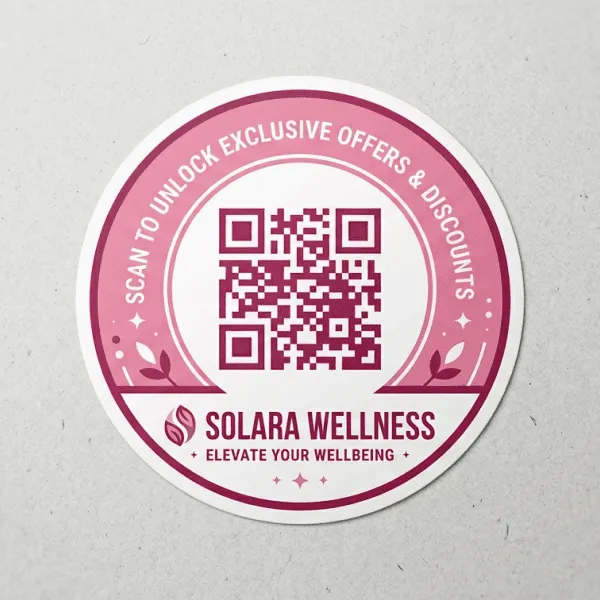

Walk into any market in India today and you'll spot them everywhere — a small black-and-white square stuck on a chai cup, a product box, a restaurant table, even a delivery parcel. Custom QR code stickers have quietly become one of the simplest ways businesses connect their physical products with the digital world, and honestly, most owners stumble into using them before they even understand why they work so well.
If you're running a shop, a cafe, a D2C brand, or even a small manufacturing unit, this guide will walk you through what custom QR code stickers actually do, where they make the most sense, and how to get them printed properly so they don't end up looking cheap or scanning badly.
What Are Custom QR Code Stickers, Really?
At their core, QR code stickers are printed labels with a scannable code that takes a customer straight to a link — your website, a menu, a payment page, a video, an Instagram profile, anything you want. The "custom" part is what separates a generic black-and-white code off a free generator from something that actually represents your brand.
Custom QR stickers usually include your brand colors, a logo in the center, rounded or shaped edges instead of a plain square, and sometimes a short call-to-action printed alongside the code, like "Scan for Menu" or "Scan to Review Us." Small details, but they make a sticker look intentional rather than slapped on as an afterthought.
Why Businesses Are Switching to QR Stickers in 2026
A few years back, QR codes felt like a pandemic-era habit that would fade out. Instead, the opposite happened. UPI payments normalized scanning as a daily action for almost everyone in India, and businesses realized customers were already comfortable pulling out their phones for a quick scan.
This shift has pushed QR code stickers for business well beyond just payments. Restaurants use them for digital menus to cut printing costs every time prices change. Retailers stick them on products to link directly to reviews or warranty registration. Event organizers print them on entry passes for quick check-ins. Even small manufacturers are now adding QR codes to packaging so customers can verify authenticity or watch a how-to-use video.
The appeal is obvious once you think about it: one small sticker, printed once, can be updated endlessly on the backend without reprinting anything — as long as you're using a dynamic QR code rather than a static one.
Static vs Dynamic QR Codes — Which One Should You Print?
This is where a lot of businesses get tripped up, so it's worth slowing down here.
A static QR code is locked to one destination forever. Once it's printed, the link inside it can never change. It works fine for something permanent, like a fixed Google review link or a one-time event page.
A dynamic QR code, on the other hand, points to a redirect URL that you can update anytime from a dashboard — without changing the sticker itself. So if your menu changes next month, or your offer page moves, the same printed sticker keeps working with the new link behind it. For most ongoing business use, dynamic codes are worth the slightly higher setup effort because reprinting stickers every time something changes gets expensive fast, especially at scale.
Where Custom QR Code Stickers Work Best
QR stickers earn their place when they remove friction between a physical object and a digital action. A few situations where they genuinely add value:
On product packaging, a QR sticker can link to ingredient details, usage instructions, or an authenticity check — particularly useful for food, cosmetics, and pharma products where customers want quick verification.
On restaurant tables or menus, a scan-to-order or scan-to-view-menu setup saves on reprinting laminated menus every time a dish or price changes.
On business cards and visiting cards, a small QR code can save your contact details directly into someone's phone instead of them typing it manually, which is why more premium visiting card designs are starting to include one by default.
On delivery packaging and courier boxes, a QR sticker can link to order tracking, return policies, or a quick feedback form right after delivery, when customer sentiment is freshest.
On retail counters, a QR sticker next to the billing area makes it effortless for customers to leave a Google review on the spot, which genuinely moves the needle on local search ranking over time.
Printing Custom QR Code Stickers the Right Way
A QR code that doesn't scan is worse than no QR code at all — it just looks broken and reflects poorly on the brand. A few printing basics matter more than people expect.
Size matters more than it seems. A code smaller than 2x2 cm tends to struggle on textured or curved surfaces, especially in low light. For packaging and tabletop use, 3x3 cm or larger is a safer bet.
Contrast needs to stay clean. Dark code on a light background scans reliably; light-on-dark or low-contrast color combinations often fail, even when they look fine to the human eye.
Material should match where it's going. Matte or glossy paper stock works for indoor use like menus and visiting cards, but for product packaging or anything that might face moisture, a laminated or vinyl sticker holds up far better over time.
Always test print before bulk ordering. Scan the proof copy with two or three different phones before approving a full print run — it takes two minutes and saves an entire batch from going to waste.
Common Mistakes to Avoid
Two mistakes show up again and again with QR sticker orders. The first is going with a static code for something that's bound to change, like a seasonal menu or an offer page, and then having to scrap and reprint the whole batch. The second is making the code too small to fit a tight design, prioritizing how it looks over whether it actually scans — and a code that doesn't scan defeats the entire purpose of printing it.
Getting Custom QR Code Stickers Printed with Tagsen
At Tagsen, custom QR code stickers are printed on durable, scratch-resistant material designed to hold up whether they're going on a product box, a café table, or a delivery parcel. Brand colors, logo placement, and shape can all be customized so the sticker fits naturally with the rest of your packaging instead of looking like a separate add-on. Bulk pricing makes it practical for businesses ordering in volume, whether that's a few hundred stickers for a single product line or a few thousand for a packaging rollout across multiple SKUs.
If a QR sticker setup feels new, the simplest place to start is one use case — table menus, product boxes, or visiting cards — get it working well, and expand from there once the workflow feels natural.























Sign in to leave a comment.