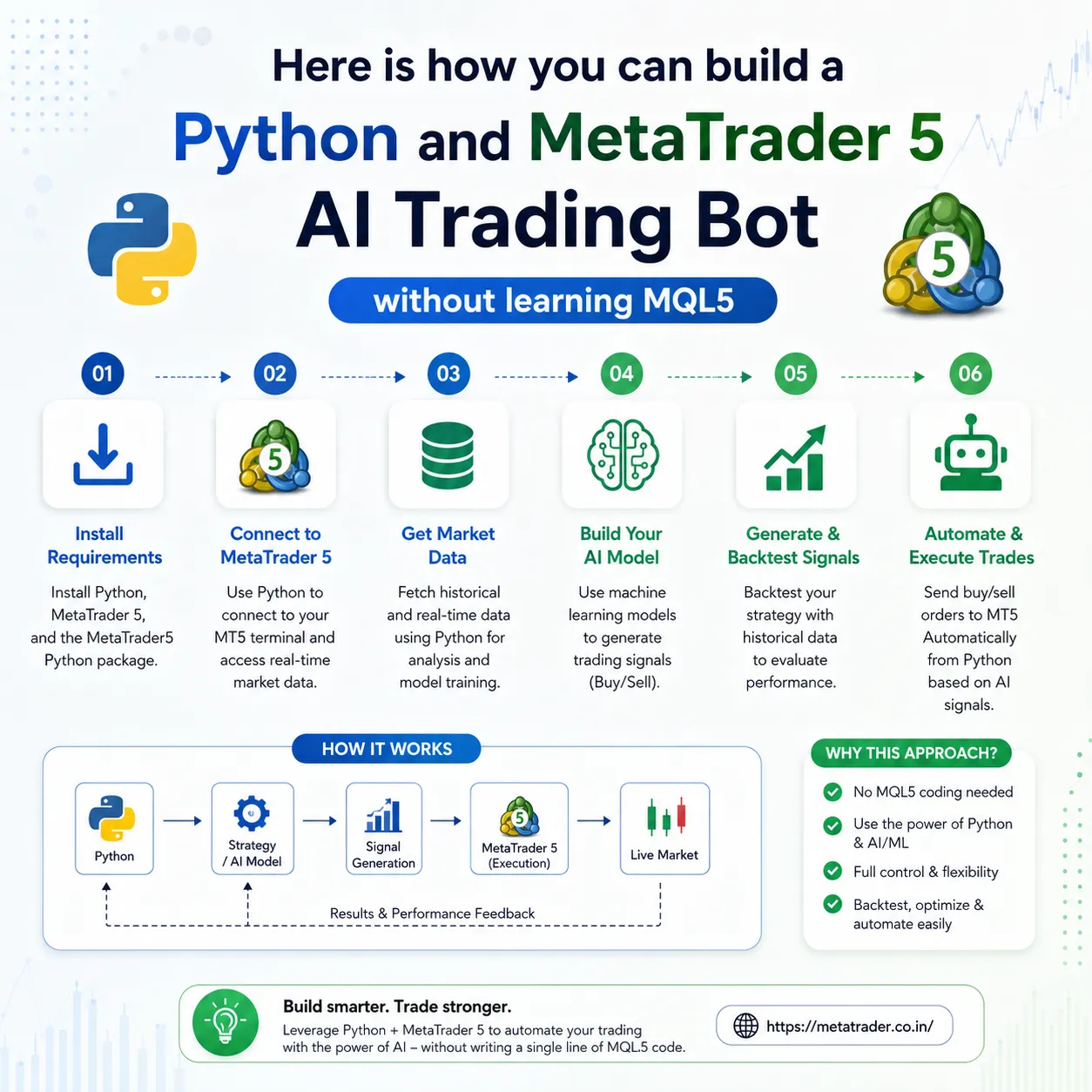

For a time , building an Expert Advisor on MetaTrader required learning MQL4 or MQL5. These are C++-like languages that're very hard to learn. While MQL is very powerful it does not have access to modern data science frameworks like Pandas, NumPy, scikit-learn and PyTorch.
With MetaTrader 5s Python integration you do not need to write a single line of MQL syntax to automate your trading. By combining Python’s data analysis ecosystem with the high-speed execution of MetaTrader 5 you can train AI models, analyze live market feeds and execute orders automatically.
If you are looking to get started with platform downloads, technical setups and broker configurations visit MetaTrader India for localized guides and platform resources.
Why connect Python to MetaTrader 5?
While MetaTrader 4 relied heavily on third-party DLL wrappers to interact with code MetaTrader 5 offers a native high-speed Python API.
Key advantages of Python and MetaTrader 5
| Feature | Standard MQL5 EA | Python + MT5 Bridge |
| Language Complexity | High (Strict Object-Oriented C++ style) | Low to Medium (Clean Python syntax) |
| Machine Learning Support | Very limited / custom implementations | Direct access to TensorFlow, PyTorch, Scikit-Learn |
| Data Processing | Manual array manipulation | Native Pandas DataFrames & NumPy arrays |
| Multi-Asset Capabilities | Native | Native (Stocks, Indices, Forex, Commodities) |
| Development Speed | Slow prototyping | Rapid prototyping and quick testing |
Here is a step-by-step guide to setting up Python and MetaTrader 5:
Step 1: Install required Python packages.
You need to have Python 3.8 or higher installed. Open your terminal. Command prompt and install the official MetaTrader 5 library along with Pandas and data science packages.
Step 2: Initialize connection to MetaTrader 5.
To establish a link launch your MetaTrader 5 desktop terminal and run the following Python script:
Step 3: Fetching real-time market data into Pandas.
Once connected you can pull candles or live tick data directly into a Pandas DataFrame for analysis.
Step 4: Generating AI trading signals.
For traditional indicator crossovers you can train a simple Random Forest Classifier to predict whether the next candle will close higher or lower based on recent price action and volatility features.
Step 5: Executing orders automated via Python.
When your model generates a signal you can send trade execution requests directly to your broker through MetaTrader 5 using the mt5.order_send() function.
Best practices for Python trading on MetaTrader 5:
Always use demo accounts first.
Never deploy Python scripts directly to live market accounts. Validate your logic in demo environments provided by your broker or through setup guides on MetaTrader India.
Deploy on a low-latency VPS.
Running an automated Python script on your computer can lead to execution delays if your internet disconnects. A Virtual Private Server near your broker's server ensures 24/7 uptime.
Handle slippage and execution errors.
Always include check-loops for retcode responses from mt5.order_send() to ensure market orders execute under high volatility.
Implement risk management.
Ensure your Python script hardcodes position limits daily stop losses and proper position sizing relative to your account equity.
Combining Python with MetaTrader 5 eliminates the barrier of learning MQL5 while unlocking artificial intelligence machine learning and data visualization tools for your trading setup.
To download MetaTrader terminals, compare MT4 vs MT5 features or explore automated trading resources tailored for Indian and global markets visit MetaTrader India.
Asked questions:
1. Can I use Python with MetaTrader 4? Is it only available for MetaTrader 5?
Native Python integration is only available on MetaTrader 5. MetaTrader 4 does not have a native Python API. To connect Python to MetaTrader 4 you would need third-party wrappers, socket connections or DLL bridge files, which add latency. MetaTrader 5 provides a MetaTrader 5 Python package for fast execution and data extraction.
2. Do I need to keep the MetaTrader 5 desktop app running while my Python script runs?
Yes. The official Python MetaTrader 5 package acts as a communication bridge to the MetaTrader 5 terminal running on your machine. The MetaTrader 5 client terminal handles order execution, broker authentication and live price feeds. For 24/7 trading run both the MetaTrader 5 terminal and your Python script on a low-latency Virtual Private Server.
3. Is Python fast enough for frequency automated trading on MetaTrader 5?
For algorithmic trading swing strategies and automated day trading strategies Python’s execution speed via the MetaTrader 5 API is virtually instantaneous. However for -low latency, microsecond High-Frequency Trading, native compiled languages like MQL5 or C++ are technically faster. For 95% of traders Python’s speed combined with MetaTrader 5 execution is more than sufficient.
4. Does the MetaTrader 5 Python package work on macOS and Linux?
The official MetaTrader 5 Python library is built to interact directly with the Windows version of the MetaTrader 5 terminal. If you are using macOS or Linux you can run MetaTrader 5 and Python inside a Windows machine using Wine/Crossover or deploy your setup on a Windows-based cloud VPS.
5. Can I backtest my Python AI strategy using MetaTrader 5 data?
Yes. You can use the mt5.copy_rates_from_pos() function to pull years of tick data or historical OHLC candles directly into a Pandas DataFrame. You can then backtest your strategy in Python using libraries like Backtrader, bt or custom vectorized backtesting frameworks before executing trades.
6. Where can I download MetaTrader 5 terminals and learn more about trading in India?
To get desktop downloads, platform setup documentation, broker compatibility checks and localized trading guides visit MetaTrader India.




























Sign in to leave a comment.