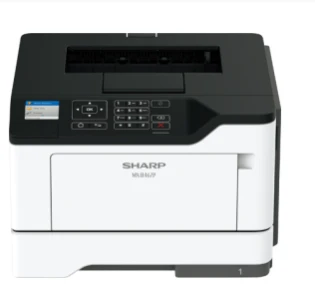

Choosing the right printer can feel overwhelming. With so many models, features, and specifications to consider, it’s easy to become unsure about which decision makes the most sense for your needs. When it comes to Sharp printers, the choice becomes a bit easier thanks to a wide range of reliable, high‑quality options designed for both home and office use. This guide will walk you through the key factors you should consider to ensure you end up with the right Sharp printer for your specific requirements.
Understand Your Printing Needs
The first step in choosing the right Sharp printer is to clearly understand how you plan to use it. Are you looking for something compact and affordable for light personal use at home? Or do you need a robust, high‑speed machine capable of handling large volumes of printing for a busy office? Identifying your needs up front will help you narrow down your options and avoid paying for features you won’t use.
For home use, consider how often you print and what types of documents you produce. If you mostly print web pages, school assignments, or occasional photos, a basic monochrome or color laser printer might be sufficient. If you’re a creative professional or someone who prints high‑resolution images frequently, you may want a model with advanced color management.
For office use, think about overall volume, speed, and multifunction capabilities. Offices often benefit from printers that can also copy, scan, and fax. If your team prints hundreds or thousands of pages per month, look for a Sharp printer with high capacity trays and fast print speeds to keep up with demand.
- Check Printer Types: Laser v/s Inkjet: Sharp offers several types of printers, and choosing the right technology is vital:
- Laser Printers: Laser printers are often the preferred choice for both business and home professionals who need crisp text and fast output. They use toner instead of ink, which generally translates to lower cost per page and sharper text quality. Laser printers are especially useful for offices with heavy printing needs due to their speed and reliability.
- Inkjet Printers: Inkjet printers use liquid ink to produce images and text. They are typically better for printing high‑quality photos or graphics, making them a great choice if image quality is a priority. However, they can be slower and the ink may cost more over time, especially with frequent color printing.
Sharp provides options in both categories, so choose based on what you’ll print most often—text‑focused documents or image‑rich media.
Evaluate Print Speed and Volume
Print speed is measured in pages per minute (PPM) and varies significantly between models. For a home environment, a printer that delivers 20–30 PPM might be more than adequate. In contrast, offices with multiple users or heavy workloads should consider printers capable of 40 PPM or more to avoid long wait times.
Equally important is duty cycle, which refers to the maximum number of pages a printer can handle per month without stress. If your expected use approaches or exceeds the duty cycle regularly, you might shorten the printer’s lifespan. Make sure to choose a Sharp printer with a duty cycle comfortably above your average monthly print volume.
Look for Multifunction Capabilities
Many Sharp printers are multifunction devices (MFDs), combining printing, scanning, copying, and sometimes faxing in one machine. These models are particularly valuable in office settings where space is limited and efficiency is key. Even in a home office, an all‑in‑one printer can reduce the number of devices you need and streamline document workflows.
When evaluating multifunction printers, consider features such as:
- Automatic Document Feeders (ADF) for scanning or copying multiple pages at once
- Duplex printing (double‑sided) to save paper
- Wireless connectivity for printing from multiple devices
Sharp’s multifunction models often include advanced scanning and network capabilities, which are especially helpful for collaborative work environments.
Connectivity Matters
The way you connect to your printer makes a big difference in convenience and usability. Modern Sharp printers offer a range of connectivity options, including:
- USB for direct connections
- Wi‑Fi for wireless printing from laptops, tablets, and smartphones
- Ethernet for office networks
- Mobile printing support such as Apple AirPrint or Google Cloud Print
If you intend to share your printer with multiple users, network connectivity (Wi‑Fi or Ethernet) is essential. For personal use, Wi‑Fi or direct USB might be all you need. Always check that the printer supports the connectivity options that match your devices and workflow.
Consider Costs Beyond the Printer
It’s easy to focus on the upfront price, but long‑term costs matter just as much. When choosing a Sharp printer, pay attention to consumables like toner, ink cartridges, and maintenance kits. Some models may be inexpensive initially but costly to operate over time due to high cartridge prices.
Also consider:
- Energy efficiency to reduce electricity costs
- Availability of replacement parts and cartridges
- Warranty and service plans
In office environments especially, reliability and service support can save time and money in the long run.
Read Reviews and Check Support Options
Before finalizing your decision, read user reviews and professional evaluations of the models you’re considering. Reviews often reveal real‑world performance details that specifications don’t capture, such as reliability, ease of use, and customer support experience.
Additionally, evaluate Sharp’s warranty and technical support offerings. Good support can make a significant difference if you encounter issues or need help setting up network features.
Conclusion
Choosing the right Sharp printer for your home or office involves balancing your printing needs, desired features, and long‑term costs. Start by understanding what you will print most often, then select the appropriate printer type—laser for speed and text, inkjet for images and graphics. Evaluate print speed, volume capacity, multifunction capabilities, and connectivity options to ensure the printer fits your workflow. Finally, consider long‑term operating costs and support services before making a purchase.
By taking a thoughtful approach, you’ll find a Sharp printer that not only meets your current needs but serves as a reliable, efficient tool for years to come. Whether for family documents or heavy business workloads, the right Sharp printer will keep your operations running smoothly with quality, speed, and convenience.




























Sign in to leave a comment.