
You wake up, grab your coffee, open your laptop, and check your business website. Something is off. The homepage won't load. A contact form stopped working. Your checkout page is throwing errors. Or worse, Google is showing a security warning to anyone who visits.
Your stomach drops.
This is not a rare situation. Thousands of website owners across the United States deal with these exact problems every single day. For small business owners, freelancers, agencies, and ecommerce brands, a broken WordPress site is not just a technical inconvenience. It is lost revenue, lost trust, and lost customers walking straight to a competitor.
The good news is this: a certified WordPress developer in the USA has seen every one of these issues before. They know exactly where to look, what to fix, and how to get your site back to full performance fast. This article breaks down the most common WordPress problems, what causes them, what you can try on your own, and when it is time to call in a professional.
Why WordPress Powers So Much of the Web
Before diving into problems and solutions, here is a fact worth knowing. WordPress powers over 43 percent of all websites on the internet as of 2024. That is a massive share of the web running on a single content management system. With that kind of reach comes an enormous variety of users, from bloggers and portfolio sites to enterprise level businesses running complex ecommerce stores.
WordPress is popular because it is flexible, open source, and supported by a global community of developers. But that same openness also means it requires proper maintenance, security hardening, and expert configuration to run at its best.
When things go wrong, the causes can range from a poorly coded plugin to a misconfigured server, an expired SSL certificate, or a theme that conflicts with core updates. A certified WordPress developer in the USA is trained to diagnose these root causes quickly without making things worse.
The Most Common WordPress Website Problems
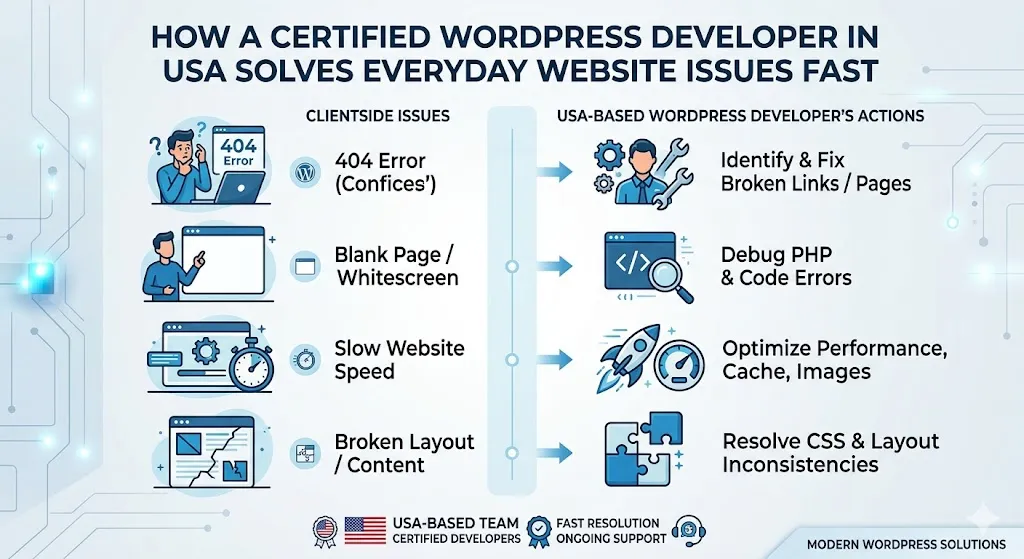
1. The White Screen of Death
This is one of the most feared WordPress errors. You visit your website and see absolutely nothing. Just a blank white page. No error message, no design, nothing.
This usually happens because of a PHP memory limit being exceeded, a plugin conflict, or a theme error. It can also be triggered after a WordPress core update goes sideways.
2. The 500 Internal Server Error
This error message means something went wrong on the server side but the server cannot identify exactly what. Common causes include a corrupted .htaccess file, PHP timeout issues, incompatible plugin code, or exhausted server resources.
3. WordPress Login Page Keeps Redirecting
Many users find themselves stuck in a loop where they try to log into their WordPress dashboard and just keep getting redirected back to the login page. This typically points to a cookie or session issue, incorrect site URL settings, or a caching plugin creating conflicts.
4. Slow Website Load Times
A slow website is not just frustrating for visitors. Google uses page speed as a direct ranking signal. If your WordPress site takes more than three seconds to load, you are already losing traffic and potential customers. Causes include unoptimized images, too many active plugins, poor hosting, lack of caching, and bloated themes.
5. Broken Contact Forms or Checkout Pages
When a lead form or a WooCommerce checkout stops working, the impact is immediate and measurable. Revenue stops. Leads dry up. These issues are usually caused by plugin conflicts, PHP version mismatches, or incorrect SMTP email configuration.
6. SSL Certificate Errors
If your site shows "Not Secure" in the browser or throws an SSL warning, visitors leave instantly. SSL errors can happen due to an expired certificate, a mixed content issue where some page elements are loading over HTTP instead of HTTPS, or an incorrectly configured hosting environment.
7. WordPress Hacked or Malware Infected
This is every website owner's nightmare. Signs include unexpected redirects, spam links appearing in your content, Google blacklisting your site, or your hosting provider suspending your account. WordPress security vulnerabilities often come from outdated plugins, nulled themes, weak passwords, or lack of a web application firewall.
8. Database Connection Errors
The "Error Establishing a Database Connection" message means WordPress cannot communicate with your MySQL database. This can happen due to incorrect database credentials in the wp-config.php file, a corrupt database, or a hosting server issue.
What Causes These Issues? A Closer Look
Understanding the root causes helps you make smarter decisions about prevention. Most WordPress problems fall into three categories.
Software related causes include outdated WordPress core files, incompatible plugins or themes, PHP version mismatches, and coding errors in custom development. Since WordPress regularly releases updates and plugin developers push new versions constantly, the risk of compatibility conflicts is always present.
Server and hosting related causes include shared hosting environments with limited resources, misconfigured PHP settings, overloaded servers during traffic spikes, and outdated server software. Many website owners choose the cheapest hosting plan available and later discover it cannot handle real world traffic or complex plugins.
Network and security related causes include DDOS attacks, brute force login attempts, malware injections, compromised admin credentials, and expired or misconfigured SSL certificates. These threats are real and ongoing. A WordFence security report found that over 90 billion malicious login attempts targeted WordPress sites in a single year.
Practical Troubleshooting Steps You Can Try Yourself
You do not always need a developer for every issue. Here are some things you can try on your own before escalating.
Start by clearing your browser cache and testing the site in an incognito window or a different browser. Many display issues are actually just cached versions of old pages.
Deactivate all plugins by accessing your site via FTP or your hosting file manager and renaming the plugins folder. If the site comes back, reactivate plugins one at a time to identify the conflict.
Regenerate your .htaccess file by going to Settings then Permalinks in your WordPress dashboard and clicking Save Changes without making any edits. This rewrites the file and often fixes redirect loops and 404 errors.
Increase your PHP memory limit by adding a line to your wp-config.php file that reads define('WP_MEMORY_LIMIT', '256M'). This can resolve white screen errors caused by memory exhaustion.
Check your WordPress site URL settings under Settings then General. Make sure both the WordPress Address and Site Address are correct and consistent.
Run a malware scan using a free plugin like Wordfence or Sucuri. These tools can detect infected files and flag vulnerabilities that need attention.
Back up your site before doing anything significant. Use UpdraftPlus or your hosting dashboard to create a full backup so you can restore it if something goes wrong during troubleshooting.
When to Stop DIY and Hire a Certified WordPress Developer in the USA
There is a point where self-troubleshooting can make things worse. Here is how to know when to call a professional.
If you are seeing database errors or your site is completely inaccessible and you do not have access to FTP or a backup, stop. Attempting to edit core files without proper knowledge can permanently delete important data.
If your site has been hacked, do not just delete obvious spam. Malware often hides deep in core files, database tables, and even legitimate-looking plugin directories. A professional WordPress security expert knows how to perform a complete forensic cleanup and harden your site against future attacks.
If your WooCommerce store is losing transactions or your checkout is broken during a high traffic period, every minute costs real money. A certified developer can resolve critical ecommerce issues quickly with minimal downtime.
If you have tried multiple plugin deactivations and cache clears and still cannot identify the problem, you are spending time that could be better used running your business.
A certified WordPress developer in the USA brings not just technical skills but also experience with hundreds of site configurations, server environments, and plugin ecosystems. They have debugging workflows that compress hours of trial and error into focused, precise fixes.
What Does a Certified WordPress Developer Actually Do?
Many people are not sure what certification even means in the WordPress world. WordPress itself does not issue an official certification, but developers can earn credentials through recognized bodies like WP Engine, LinkedIn Learning, Udemy, and through demonstrated expertise on platforms like Codeable or Upwork.
Beyond credentials, what makes a WordPress developer truly certified in the professional sense is their portfolio, client testimonials, knowledge of PHP, HTML, CSS, JavaScript, MySQL, and their understanding of WordPress coding standards set by the official WordPress developer handbook.
A skilled developer can handle custom theme development, plugin creation and modification, REST API integrations, performance optimization using tools like WP Rocket, LiteSpeed Cache, and Cloudflare, full site migrations, multisite network management, and enterprise-level WordPress configurations for high traffic environments.
When you hire a certified WordPress developer in the United States, you also benefit from their knowledge of local business compliance, GDPR and CCPA considerations, ADA web accessibility standards, and US-based hosting environments. This is also one of the key reasons why AI/ML developer is important for business growth, as modern businesses increasingly rely on smart automation, personalised user experiences, and data-driven solutions to stay competitive online.
Real Benefits of Hiring a US-Based WordPress Expert
Working with a developer based in the USA offers several practical advantages over offshore outsourcing.
Time zone alignment means you can communicate in real time during your business hours. For urgent issues, this matters enormously.
Legal and contractual clarity is another benefit. US-based developers operate under American business law, which gives you recourse and accountability that may be harder to enforce with international freelancers.
Understanding of the American digital market is also valuable. A US-based WordPress developer understands consumer behavior, local SEO expectations, ADA compliance requirements, and the technical standards expected by American businesses and their customers.
Many US-based WordPress professionals also offer ongoing maintenance plans, which include regular updates, security monitoring, performance checks, uptime monitoring, and priority support. This is far more cost effective than waiting for something to break and then scrambling to fix it.
The Bigger Picture: WordPress Maintenance Is Not Optional
Here is something many website owners only learn after a painful experience. WordPress is not a set it and forget it platform. It requires regular attention, just like any business asset.
The WordPress ecosystem evolves constantly. Core updates happen multiple times a year. Plugin developers push updates almost weekly. PHP version requirements shift. Hosting environments change. Security threats evolve. A website that ran perfectly six months ago can develop serious issues today if it has not been properly maintained.
Think of your website the way you think about your car. You would not skip oil changes and tire rotations and then wonder why the engine failed. The same logic applies to your WordPress site. Proactive maintenance is always cheaper than emergency repairs.
Building a relationship with a trusted WordPress developer before you have a crisis is one of the smartest investments a website owner can make. When something does go wrong, you have a professional ready to act immediately instead of spending hours searching for someone on Google while your site is down.
Final Thoughts
Everyday WordPress problems are not signs that WordPress is a bad platform. They are signs that powerful tools require skilled hands. A certified WordPress developer in the USA brings the technical knowledge, real world experience, and fast response capability that modern businesses need to keep their online presence reliable and profitable.
Whether you are dealing with a crashed website, a slow loading store, a security breach, or a plugin conflict you cannot diagnose, the right developer can solve it quickly and prevent it from happening again.
If you are looking for a dependable WordPress partner in the United States, Webtrack Technologies provides professional WordPress development and ongoing IT services for businesses across cities like New York, Los Angeles, Chicago, Houston, Phoenix, Philadelphia, San Antonio, San Diego, Dallas, and beyond.
Your website is your most important digital asset. Treat it that way.

























Sign in to leave a comment.