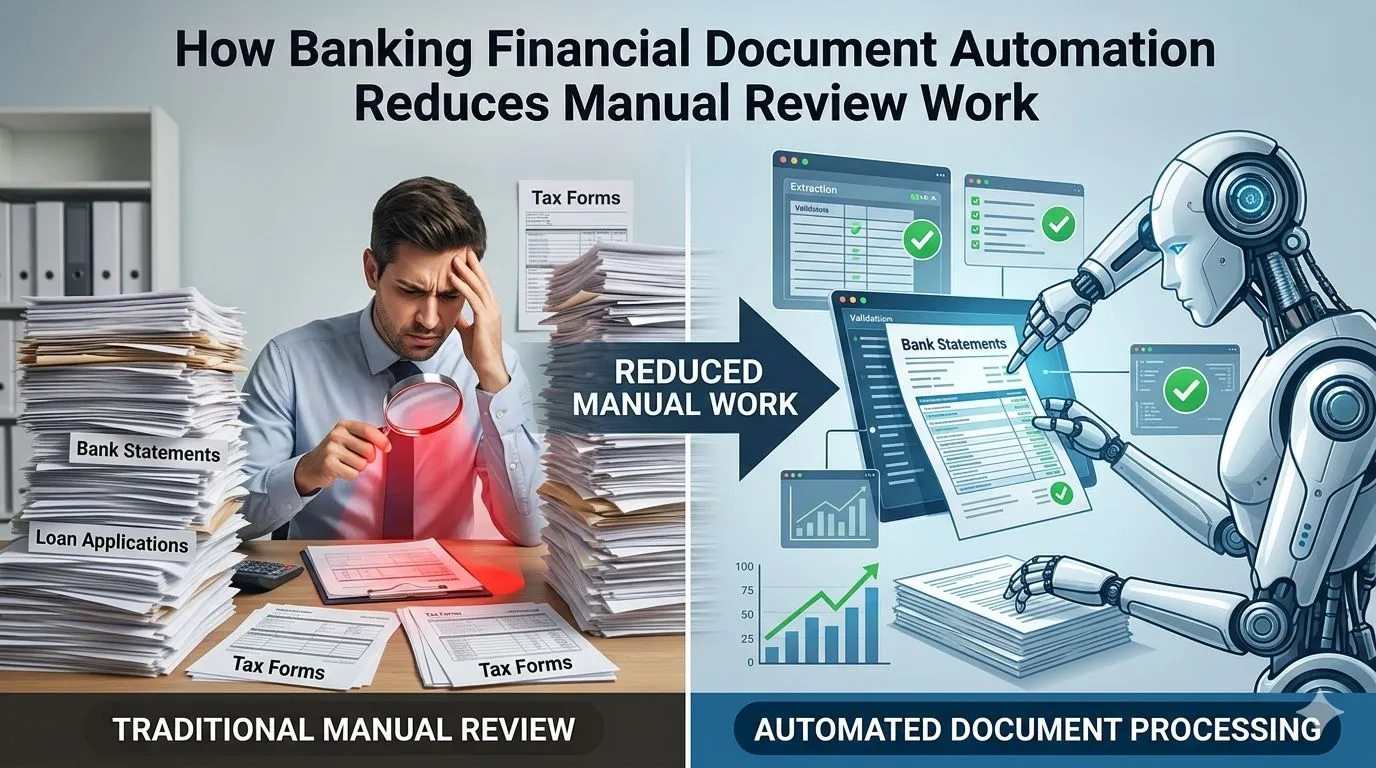

Banks process thousands of customer records, loan files, identity documents, statements, tax proofs, and compliance files every day. The problem starts when teams review these documents manually, enter the same data into multiple systems, and chase missing fields across emails and folders. This slows onboarding, loan processing, credit review, and audit preparation.
Banking financial document automation helps reduce manual review work by capturing data, validating fields, routing exceptions, and keeping source links intact. This blog explains how automation supports onboarding, loan processing, credit review, compliance, and banking operations while keeping human review in place for risk and approval decisions.
What Is Banking Financial Document Automation?
Banking financial document automation is the use of digital workflows and AI-based document reading to process banking documents with less manual effort.
Banking Financial Document Automation Definition
Banking financial document automation means capturing, classifying, extracting, validating, and routing banking documents for review and downstream processing.
How Document Automation Converts Banking Files Into Usable Data
It turns PDFs, scans, spreadsheets, forms, and statements into structured fields such as name, account number, income, balance, tax value, facility amount, and document date.
Why Manual Document Review Slows Banking Operations
Manual review slows operations because teams must read files, enter values, verify fields, check missing documents, and send exceptions for approval.
This is why many banks still rely on human review even when some parts of the process are digital.
Why Banks Still Depend on Manual Document Review
Banks still depend on manual document review because banking files vary widely and many decisions need human judgement.
High Document Volume Across Banking Teams
Onboarding, lending, credit, compliance, audit, and operations teams all handle large document volumes.
Varied File Formats Across Customers and Products
Customer files arrive as scans, images, PDFs, emails, spreadsheets, and product-specific forms.
Legacy Systems With Limited Data Connectivity
Older banking systems may not connect easily with document platforms, loan systems, or core banking records.
Compliance Checks That Need Human Oversight
Compliance review often needs human judgement for exceptions, high-risk customers, policy differences, and escalations.
Manual review appears across several banking workflows, not just one department.
Where Manual Review Work Happens in Banking
Manual review work appears wherever banking teams handle documents, validate data, and make decisions.
Customer Onboarding and KYC Review
Teams review identity proofs, address documents, ownership records, and customer declarations.
Loan Application Document Review
Loan teams check application forms, borrower details, income records, and supporting documents.
Bank Statement and Transaction Review
Analysts review account activity, balances, inflows, outflows, and transaction patterns.
Financial Statement Review
Credit teams review balance sheets, income statements, cash flow statements, schedules, and notes.
Trade Finance Document Checking
Trade teams compare letters of credit, invoices, bills of lading, packing lists, and shipment records.
Compliance and Audit Evidence Collection
Compliance and audit teams collect source documents, approvals, review history, and control evidence.
These review steps often create repeated work and operational delays.
Key Problems With Manual Banking Document Review
Manual banking document review creates delays, errors, duplicated effort, and weak traceability.
Slow Turnaround Time
Manual review can delay onboarding, loan approval, trade processing, and compliance checks.
Repeated Data Entry Across Systems
The same customer or borrower data may be entered into multiple banking systems.
Missing or Incorrect Document Fields
Incomplete files, unclear scans, and wrong values can create review delays.
Duplicate Checks Across Teams
Different teams may review the same document fields more than once.
Weak Traceability From File to Decision
Manual workflows can make it hard to prove which document supported a decision.
Document automation reduces this work by structuring the process from the first file intake.
How Banking Document Automation Reduces Manual Review Work
Banking document automation reduces manual review by handling intake, classification, extraction, validation, and exception routing.
Automated Document Intake
Documents are collected from portals, emails, branches, and relationship managers in a controlled workflow.
Document Classification by Type and Purpose
Files are classified as KYC documents, statements, tax proofs, loan forms, audit reports, or collateral records.
Field Extraction From PDFs, Scans, and Spreadsheets
Financial data extraction captures values from banking documents and converts them into usable data fields.
Data Validation Against Banking Records
Extracted data is checked against customer records, account data, policy rules, and expected formats.
Exception Routing for Human Review
Missing, low-confidence, or mismatched fields are routed to the right reviewer.
Many banking document types can benefit from this approach.
Banking Documents That Can Be Automated
Banking document automation can support files used across onboarding, lending, credit, compliance, and trade finance.
KYC and Customer Identity Documents
Identity proofs, address documents, ownership records, and business registrations can be processed faster.
Bank Statements and Transaction Records
Bank statements can be read for account details, balances, credits, debits, and transaction patterns.
Loan Applications and Facility Forms
Loan forms can be checked for borrower details, facility type, amount, tenure, and purpose.
Financial Statements and Audit Reports
Statements and audit reports can be processed for revenue, debt, assets, liabilities, and cash flow.
Tax Returns and Income Proofs
Tax files and income proofs help validate borrower income and business activity.
Collateral and Security Documents
Collateral documents support ownership, valuation, lien, and security checks.
Trade Finance Documents
Trade files such as invoices, letters of credit, and shipment documents can be checked for consistency.
Customer onboarding is one of the first areas where banks can reduce manual review effort.
How Automation Reduces Manual Work in Customer Onboarding
Automation reduces onboarding work by capturing customer data and flagging incomplete records early.
Faster Identity Document Capture
Identity data can be captured from uploaded documents without repeated manual entry.
Customer Data Extraction and Validation
Customer names, IDs, addresses, and entity details can be checked against banking records.
Missing Field Detection
Missing names, dates, document numbers, signatures, or declarations can be flagged.
KYC Checklist Completion Support
KYC checklists can be updated based on submitted and verified documents.
Review Routing for Exceptions
High-risk or incomplete cases can move to compliance teams for review.
The same logic applies to loan processing, where file preparation often consumes analyst time.
How Automation Reduces Manual Work in Loan Processing
Automation reduces loan processing work by preparing borrower files before underwriting begins.
Borrower File Preparation
Borrower documents are collected, sorted, classified, and made ready for review.
Application Data Capture
Application fields such as borrower name, loan amount, tenure, purpose, and entity type are extracted.
Income and Cash Flow Validation
Income proofs, bank statements, and financial documents can be compared for consistency.
Document Completeness Checks
The workflow can identify whether required loan, income, KYC, and collateral documents are present.
Underwriting Input Preparation
Validated borrower data can be prepared for underwriting and credit review.
Credit review needs a deeper layer of document and financial data processing.
How Automation Reduces Manual Work in Credit Review
Automation reduces credit review effort by extracting financial data and preparing structured inputs.
Financial Statement Data Extraction
Revenue, expenses, assets, liabilities, debt, equity, and cash flow values can be captured from statements.
Line Item Mapping for Credit Analysis
Borrower-specific line items can be mapped into standard credit categories.
Ratio-Ready Data Preparation
Structured financial data can support liquidity, leverage, profitability, and cash flow ratios.
Source Links for Extracted Values
Each extracted value can link back to the source statement, page, and line item.
Analyst Review for Exceptions
Analysts can focus on unclear fields, unusual values, and credit judgement instead of manual entry.
Compliance review also benefits when source evidence and review history are easier to manage.
How Automation Reduces Manual Work in Compliance Review
Automation reduces compliance work by checking completeness, rules, approvals, and evidence.
Document Completeness Checks
Required compliance documents can be checked against customer type, product, and policy rules.
Policy Rule Validation
Data fields can be checked against internal policies, thresholds, and required formats.
Sanctions and AML Data Review Support
Extracted customer and transaction data can support sanctions and AML review steps.
Approval Logs and Review History
Reviewer actions, approvals, rejections, and changes can be recorded.
Audit Evidence Preparation
Source files, extracted fields, and approval logs can be organized for audit review.
AI strengthens document automation by handling variation across file types and layouts.
How AI Supports Banking Financial Document Automation
AI supports banking document automation by reading varied documents, recognizing fields, and flagging issues.
AI for Document Classification
AI identifies document types before extraction begins.
AI for Table, Field, and Layout Recognition
AI reads tables, labels, rows, columns, and layout patterns across banking files.
AI for Data Validation
AI helps compare extracted values with expected formats, system records, and supporting documents.
AI for Anomaly and Discrepancy Detection
AI can flag mismatched values, missing fields, duplicate records, or unusual entries.
AI for Review Queue Prioritization
AI can help prioritize files that need faster review or carry higher risk.
Automation reduces manual effort, but some review tasks should remain with banking teams.
Manual Review Tasks That Should Still Stay With Banking Teams
Manual review should remain where judgement, policy interpretation, or risk assessment is required.
Low-Confidence Field Review
Fields with low confidence should be checked before use.
High-Risk Customer Cases
High-risk customers need human review for context and decision control.
Policy Exceptions
Policy exceptions should be reviewed by authorized banking teams.
Credit Judgement and Approval Decisions
Final credit decisions should remain with analysts and approvers.
Compliance Escalations
Compliance escalations need human ownership and documented resolution.
The goal is not to remove people from the process, but to improve review quality.
How Banking Document Automation Improves Review Quality
Banking document automation improves review quality by making data capture and validation more consistent.
Consistent Field Capture
Standard field capture reduces variation across teams and files.
Fewer Data Entry Errors
Reduced manual entry lowers the risk of typing mistakes and missed values.
Cleaner Borrower and Customer Records
Validated data supports more accurate borrower and customer records.
Faster Exception Identification
Exceptions can be identified earlier in the workflow.
Better Source-Level Traceability
Reviewers can trace values back to the original document.
Different banking teams benefit from this traceability in different ways.
How Document Automation Supports Banking Teams Across Workflows
Document automation supports banking teams by giving each function cleaner data and clearer review paths.
Operations Teams
Operations teams can process files faster and reduce repeated manual checks.
Credit Analysts
Credit analysts get structured borrower data for financial review and risk assessment.
Relationship Managers
Relationship managers can track missing documents and borrower file status more easily.
Compliance Officers
Compliance officers can review exceptions, policy checks, and high-risk files with better evidence.
Audit Teams
Audit teams can access source documents, review logs, and approval history.
Risk Review Teams
Risk teams can review borrower patterns, exceptions, and document-linked risk indicators.
Banks should also avoid common gaps that reduce the value of automation.
Common Gaps Banks Should Avoid in Document Automation
Banks should avoid automation setups that capture documents but fail to validate, route, or trace data properly.
Automating Intake Without Validation Rules
Document intake alone does not reduce review effort unless data is validated.
Using OCR Without Contextual Review
OCR can read text, but banking workflows need field meaning, document context, and source checks.
Ignoring Low-Confidence Fields
Low-confidence values should be routed for review instead of being used directly.
Separating Extracted Data From Banking Workflows
Extracted data should flow into onboarding, lending, credit, compliance, and audit processes.
Missing Source Links for Review and Audit
Every important value should connect back to the original file.
Before reducing manual review, banks should assess workflow readiness.
What Banks Should Check Before Reducing Manual Review Work
Banks should check document volume, required fields, systems, review rules, and security needs.
Document Volume and Format Variation
Banks should identify which documents create the most manual review effort.
Required Fields for Each Banking Workflow
Each workflow needs defined fields such as name, amount, account, income, tax, facility, collateral, and date.
Core Banking and LOS Integration Needs
Extracted data should connect with core banking, loan origination, document, and risk systems.
Review and Approval Rules
Banks should define who reviews exceptions, who approves records, and when escalation is needed.
Security, Access, and Retention Requirements
Access controls, retention rules, privacy requirements, and audit logs should be planned early.
Metrics can show whether manual review work is truly reducing.
Metrics That Show Manual Review Work Is Reducing
Banks can measure manual review reduction through speed, accuracy, touchpoints, and audit outcomes.
Document Processing Time
This measures how long files take to classify, extract, validate, and route.
Data Extraction Accuracy
This measures how often extracted fields match the source document.
Manual Touchpoints per File
This tracks how many human actions are required before a file moves forward.
Exception Rate
This shows how often documents need manual review because of missing or mismatched data.
Review Queue Ageing
Queue ageing shows how long files remain pending with reviewers.
Loan File Preparation Time
This measures the time needed to prepare borrower files for underwriting or credit review.
Audit Finding Reduction
Fewer audit findings can indicate better evidence, source links, and review control.
The final step is building a connected banking document automation workflow.
How to Build a Banking Document Automation Workflow
A banking document automation workflow should connect document intake, extraction, validation, review, and downstream systems.
Start With High-Volume Document Types
Start with documents that create the most manual review work, such as KYC files, bank statements, loan forms, and financial statements.
Standardize Banking Data Fields
Use standard fields for customer identity, account details, income, debt, collateral, document dates, and approval status.
Define Validation and Exception Rules
Set rules for missing fields, mismatches, low-confidence data, and policy exceptions.
Connect Extracted Data With Downstream Systems
Extracted and validated data should move into onboarding, LOS, core banking, credit, and compliance workflows.
Keep Human Review for Risk and Approval Steps
Human review should remain in place for exceptions, high-risk cases, and final approvals.
End Note: Banking Document Automation Reduces Manual Review Without Removing Human Control
Banking financial document automation reduces manual review work by turning files into structured data, validating fields, routing exceptions, and preserving source traceability. It helps onboarding, lending, credit, compliance, operations, and audit teams work with cleaner data and fewer repeated checks.
The strongest approach keeps human control where it matters most: risk review, policy exceptions, compliance escalations, and final banking decisions.























Sign in to leave a comment.