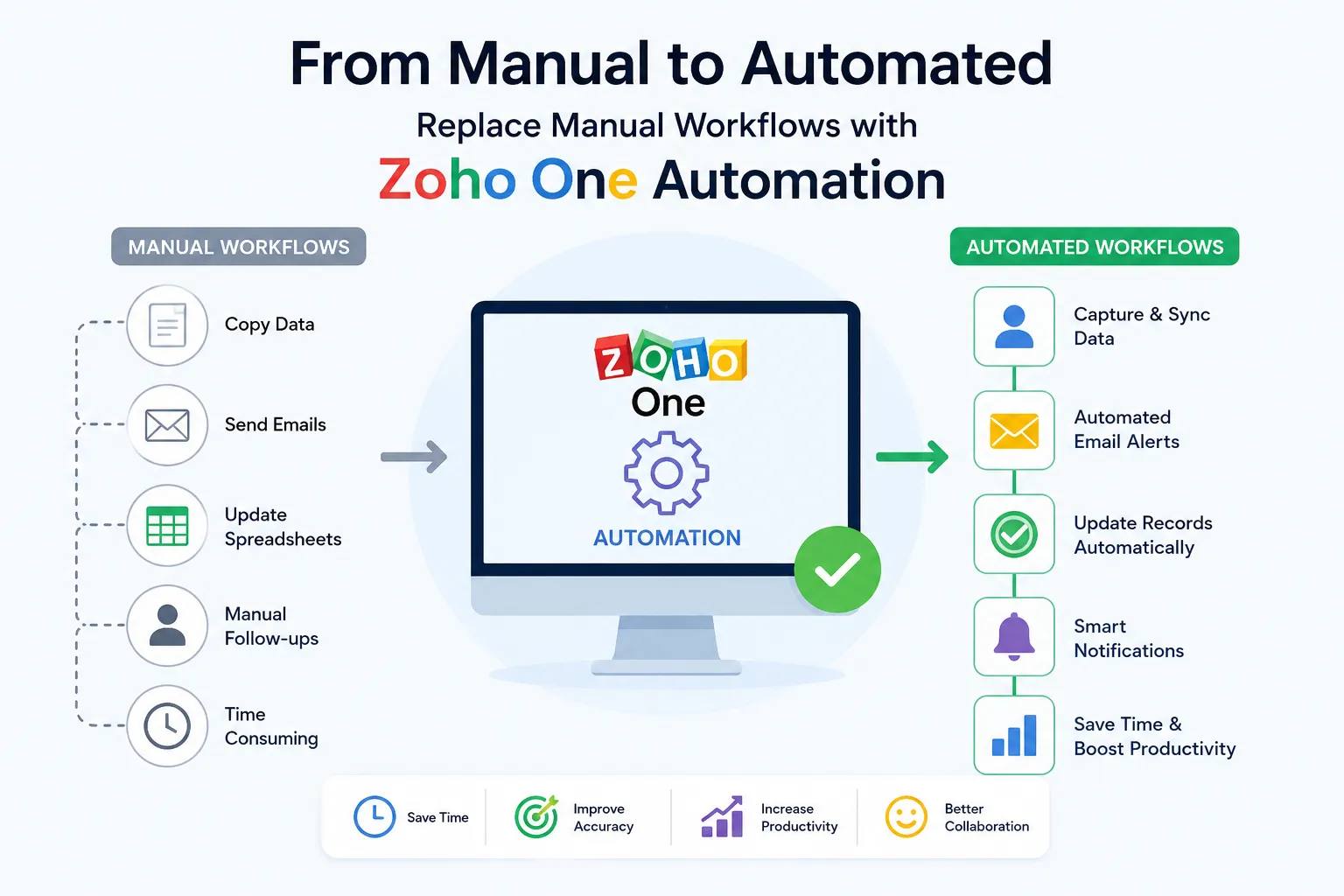

Manual workflows often develop gradually. A team may begin by updating a spreadsheet, sending a follow-up email, copying information between applications, or asking another department to confirm a task. As processes expand, these small activities can become a significant part of everyday operations.
Zoho One automation offers a way to redesign these processes by connecting business applications, automating repetitive actions, and creating workflows that move information from one stage to another with less human intervention.
The objective isn't to automate everything. It is to identify repetitive processes, determine where automation adds value, and build workflows that allow employees to focus on tasks that require judgment, communication, and decision-making.
What Is Zoho One Automation?
Zoho One is a business application suite that brings together tools for areas such as CRM, finance, marketing, customer support, projects, human resources, analytics, and operations.
Automation allows these applications to work together according to predefined rules.
Instead of requiring employees to perform every step manually, a workflow can respond to an event and initiate the next appropriate action.
For example, a workflow can be structured around a simple sequence:
Trigger → Condition → Action → Follow-up
A specific event occurs, the system checks predefined conditions, performs an action, and can then initiate another step. This approach turns isolated tasks into connected business processes.
Why Do Manual Workflows Become a Problem?
Manual processes aren't automatically inefficient. Some tasks genuinely require human involvement. The problem begins when employees repeatedly perform activities that software can handle consistently.
Common examples of manual workflow activities include:
- Copying customer information between applications
- Sending routine notifications
- Updating multiple records
- Assigning tasks manually
- Creating repetitive reports
- Following up with leads
- Moving information between departments
- Checking whether a process has reached its next stage
- Entering the same information into multiple systems
These activities can consume time while also creating opportunities for inconsistent data and missed steps. Automation addresses the repetitive portion of these workflows without removing the human role from the process.
Where Can Zoho One Automation Make the Biggest Difference?
The strongest automation opportunities usually appear where a process has repetition, clear rules, predictable outcomes, and frequent data movement.
1. Lead Management
Lead management often involves several repetitive steps.
When a lead enters the CRM, automation can help with activities such as:
- Assigning the lead to the appropriate salesperson
- Updating lead status
- Sending notifications
- Creating follow-up tasks
- Recording relevant information
- Initiating predefined communication workflows
This creates a more structured process from the moment a lead enters the system.
2. Customer Onboarding
Customer onboarding can involve multiple departments and applications.
A completed sales process may need to trigger tasks for customer support, finance, project teams, or account managers.
With Zoho One automation, relevant information can move between connected applications while predefined tasks are created automatically.
This helps reduce the need for employees to coordinate every step manually.
3. Finance and Administrative Processes
Finance-related workflows often contain repetitive activities that follow specific rules.
Automation can assist with processes such as:
- Invoice-related notifications
- Payment reminders
- Record updates
- Approval workflows
- Expense processing
- Financial reporting
- Data synchronization
The exact workflow should depend on business policies and the capabilities of the applications involved.
4. Customer Support
Support workflows can also benefit from automation.
For instance, a new support request can trigger actions such as:
- Ticket assignment
- Priority classification
- Notifications
- Status updates
- Internal task creation
- Escalation alerts
Automation can help ensure that defined procedures are followed consistently while allowing support employees to focus on resolving customer issues.
5. Internal Task Management
Not every automation needs to involve customers.
Internal processes can also be automated when tasks follow predictable rules.
A change in a record, completion of a form, or approval can trigger a task for another employee or department. This can reduce the need for manual reminders and improve visibility into pending work.
Also Read : Factors Affecting Zoho One Implementation Cost: A Complete 2026 Breakdown
How Zoho One Connects Different Business Processes
One of the major advantages of Zoho One is that automation doesn't have to remain inside a single application. A business may use different Zoho applications for different functions. Integration between these applications can allow information to move through a broader workflow.
For example, a process could connect:
CRM → Finance → Projects → Support → Analytics
Each application can contribute to a different stage of the process.
This creates a connected workflow rather than a collection of isolated activities.
The value comes from the relationship between the applications. When information can move between systems according to defined rules, employees spend less time acting as intermediaries between software platforms.
The Role of Triggers in Automation
A trigger is an event that tells an automated workflow to begin.
Common triggers can include:
- A new record being created
- A record being updated
- A form being submitted
- A deal reaching a particular stage
- An approval being completed
- A payment status changing
- A task being completed
- A specific date or time being reached
Choosing the right trigger is important because it determines when the automation starts.
An effective trigger should be specific enough to prevent unnecessary actions while broad enough to support the intended workflow.
Using Conditions to Make Automation Smarter
Not every record should receive the same treatment.
Conditions allow businesses to introduce rules into automated workflows.
For example, an automation might check:
- Customer type
- Deal value
- Lead status
- Location
- Service category
- Payment status
- Assigned team
- Priority level
The workflow can then perform different actions depending on the information available.
This makes automation more flexible than simply creating a sequence of identical actions.
Automation Should Not Replace Every Human Decision
A common mistake is assuming that more automation always means better efficiency.
It doesn't.
Some activities require:
- Judgment
- Negotiation
- Strategic thinking
- Empathy
- Problem-solving
- Approval
- Exception handling
These tasks should generally remain under human control.
A better approach is human-centered automation.
The system handles repetitive and predictable activities while employees handle decisions that require context or expertise. This can create a more efficient division of work between people and technology.
Steps to Replace Manual Workflows With Zoho One
A structured approach can make automation easier to implement and maintain.
Step 1: Map the Existing Process
Before automating anything, document the current workflow.
Identify:
- Who performs each task
- Which application is used
- What information is required
- Where information is transferred
- Where approvals occur
- Where delays commonly happen
- Which tasks are repetitive
This provides a clear picture of the process before changes are introduced.
Step 2: Identify Automation Opportunities
Separate the workflow into activities that require human involvement and activities that follow predictable rules.
Tasks that are repetitive, time-consuming, and rule-based are usually strong candidates for automation.
Step 3: Define the Desired Workflow
Don't simply automate the existing process step by step.
Ask whether the process itself can be simplified first.
Removing unnecessary steps before automating them can prevent businesses from creating complicated automated workflows around inefficient processes.
Step 4: Select the Appropriate Zoho Applications
Determine which Zoho applications are responsible for each part of the process.
The goal should be to create a connected technology environment in which each application has a clear role.
Step 5: Define Triggers and Conditions
Determine exactly what should start the workflow and what conditions should control subsequent actions. Clear rules help prevent accidental or unnecessary automation.
Step 6: Configure Actions
Actions can include creating records, updating fields, assigning tasks, sending notifications, initiating workflows, or transferring information between connected systems.
Each action should have a clear purpose within the overall process.
Step 7: Test the Workflow
Testing is essential before deploying automation across an organization.
Test normal situations as well as exceptions.
Pay particular attention to:
- Incorrect data
- Missing information
- Duplicate records
- Failed integrations
- Unexpected conditions
- Permission issues
- Workflow loops
Step 8: Monitor and Improve
Automation should be monitored after deployment.
Businesses should review whether the workflow is producing the intended result and whether employees are encountering unexpected problems.
As processes change, automation rules may also need to change.
Common Mistakes to Avoid
Automating a Poorly Designed Process
Automation can make an inefficient process faster without making it better.
Review and simplify the workflow before automating it.
Creating Too Many Automations
An organization with dozens of overlapping workflows can become difficult to manage.
Each automation should have a defined purpose and documented behavior.
Ignoring Data Quality
Automation depends on the information it receives.
Incorrect, incomplete, or duplicated data can cause workflows to produce incorrect results.
Data quality should therefore be treated as part of the automation strategy.
Forgetting About Exceptions
Automated workflows are usually designed around expected conditions.
But business processes also contain exceptions.
Workflows should have a clear method for handling situations that don't match predefined rules.
Failing to Document Changes
Employees and administrators need to understand what an automation does, what triggers it, and what systems it affects.
Good documentation makes troubleshooting and future modifications much easier.
Measuring the Impact of Automation
Automation should be evaluated using measurable outcomes rather than simply the number of workflows created.
Useful metrics can include:
- Time saved per process
- Number of manual tasks eliminated
- Processing time
- Error frequency
- Workflow completion rate
- Response time
- Number of duplicate records
- Employee time spent on administrative work
These measurements can help determine whether an automation is actually improving the process.
Zoho One Automation and Data Consistency
Connected automation can also contribute to better data consistency.
When employees manually transfer information between systems, differences can emerge between records.
An integrated workflow can reduce unnecessary duplication by allowing information to move automatically between connected applications.
However, automation alone doesn't guarantee clean data. Businesses still need clear data structures, field mappings, validation rules, permissions, and governance policies.
Building an Automation Strategy That Scales
A successful automation strategy should be designed with future growth in mind.
Start with processes that offer a clear operational benefit rather than attempting to automate every department simultaneously. As the organization becomes more comfortable with automation, workflows can be expanded and refined.
A scalable approach should include:
- Standardized processes
- Clear ownership
- Defined automation rules
- Data governance
- Integration planning
- Monitoring
- Documentation
- Regular reviews
This creates an environment where automation can evolve alongside the business.
Conclusion
Replacing manual workflows with Zoho One automation is not simply about reducing the number of clicks employees make. It is about redesigning how information and tasks move through an organization.
By connecting applications, defining clear triggers, applying conditions, and automating repetitive actions, businesses can create more consistent and efficient processes.
The most effective strategy is selective rather than excessive: automate predictable work, preserve human involvement where judgment matters, and continuously improve the workflows that support the business.
When implemented thoughtfully, Zoho One can provide the foundation for a connected automation environment in which people spend less time managing repetitive processes and more time contributing meaningful work.



























Sign in to leave a comment.