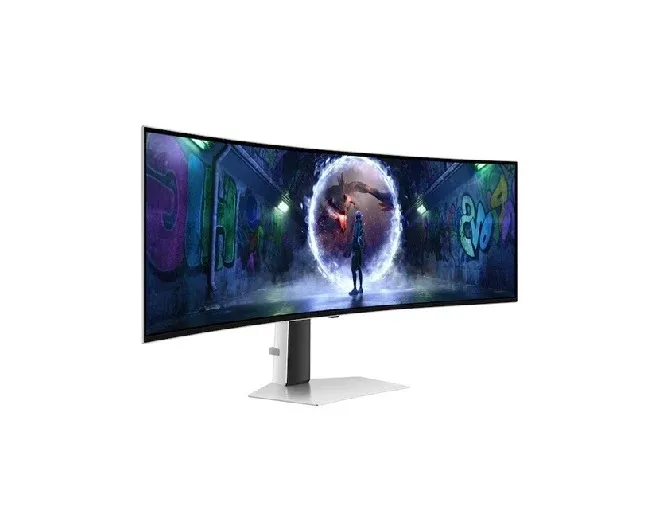

A great gaming experience depends on more than a powerful computer or the latest console. The screen you play on also affects how clearly you see the action, how smoothly characters move, and how quickly you can react to what happens on screen. Whether you enjoy racing games, competitive shooters, sports simulations, or colourful adventure titles, the right display can make every session more enjoyable.
Modern display technology has introduced new ways to experience games, particularly through screens that deliver deep blacks, rich colours, and quick responses. These qualities can make dark scenes easier to appreciate, colourful environments more lifelike, and fast-moving action appear clearer.
However, choosing a display can feel confusing when product descriptions are filled with unfamiliar terms. Refresh rates, response times, resolution, and panel technology all influence performance, but you do not need to be a technical expert to understand what matters.
This guide explains the features worth considering, how they affect everyday gaming, and how to choose a screen that suits your setup, playing habits, and budget.
Understanding What Makes a Gaming Display Different
A regular computer screen is designed for a mixture of activities, including browsing websites, reading documents, and watching videos. A display intended for gaming places greater emphasis on movement, responsiveness, and visual detail.
Imagine playing a racing game where vehicles move across the screen at high speed. If the display struggles to keep up, the action may look blurry or uneven. A suitable gaming screen helps make movement appear smoother, allowing you to follow what is happening more easily.
Different games also place different demands on a display. A strategy game may benefit from a sharp picture and plenty of screen space, while a competitive action game may require fast responses and a high refresh rate.
Your computer or console matters, too. A screen cannot display more frames than the connected device produces, and advanced features may require compatible hardware. Choosing the right combination helps you get more value from your setup.
How OLED Technology Creates Detailed Pictures
One display technology that attracts attention among gamers is OLED. Understanding how it works can help you decide whether its benefits justify the price.
What Is OLED?
OLED gaming monitor stands for Organic Light-Emitting Diode. The important difference is that each pixel can produce its own light instead of depending on a separate backlight.
Think of each pixel as a tiny light that can switch on, dim, or turn off independently. When a scene contains a black night sky, the relevant pixels can switch off completely. This allows the screen to produce very deep blacks.
Traditional LCD screens use a backlight to illuminate the picture. Depending on their design, some light may remain visible in dark areas. OLED technology can avoid much of this issue because individual pixels control their own light.
Why Contrast Matters in Games
Contrast is the difference between the brightest and darkest parts of an image. Strong contrast helps separate objects from their backgrounds and can make scenes look more realistic.
For example, imagine exploring a dark cave in an adventure game. You may encounter shadows, glowing objects, and small sources of light. A display with excellent contrast can make these elements stand out against the darkness.
OLED screens can also deliver rich colours because of their pixel-level light control. This can be particularly appealing in fantasy games, animated environments, and titles featuring dramatic lighting.
Nevertheless, picture quality depends on more than panel technology. The game's visual design, screen settings, brightness, and room lighting all affect the final result.
Refresh Rate: How Smooth Does the Action Look?
Refresh rate describes how many times a screen updates its image each second. It is measured in hertz, usually written as Hz.
A 60Hz display refreshes 60 times per second, while a 120Hz display refreshes 120 times per second. A higher refresh rate can make movement appear smoother, particularly when the connected device produces enough frames to take advantage of it.
Think of it like flipping through a book filled with drawings. When you turn the pages quickly, the drawings appear to move. Adding more images each second can make the movement look more fluid.
For gamers who enjoy fast-paced shooters, racing games, or competitive multiplayer titles, a higher refresh rate may be useful. Players who mainly enjoy slower adventures or casual games may be perfectly happy with a lower refresh rate.
Before paying extra for a faster screen, check the specifications of your computer or console. The device must be capable of producing enough frames, and the connection must support the chosen resolution and refresh rate.
Response Time and Why It Matters
Response time describes how quickly a pixel changes from one colour or shade to another. When this change takes too long, moving objects may leave faint trails behind them, sometimes called ghosting.
Picture a bright car speeding across a dark track. If the screen responds slowly, you might notice a shadow-like trail behind the vehicle. A fast pixel response can reduce this effect and help moving objects appear clearer.
OLED displays generally have very fast pixel response, which is one reason they are popular among gamers who value clear movement.
However, response time and refresh rate are different measurements. Refresh rate describes how often the display updates, while response time describes how quickly individual pixels change. Both can influence the appearance of motion, but neither tells the whole story by itself.
It is also worth remembering that a fast screen cannot eliminate every form of blur. The game's frame rate, display settings, and the way your eyes follow movement can influence what you see.
Choosing the Right Resolution
Resolution determines how much visual detail a display can show. Common options include Full HD, QHD, and 4K, with higher resolutions generally offering more pixels.
- Full HD: A practical choice for many entry-level gaming setups and players who prioritise high frame rates.
- QHD: Offers more detail than Full HD while placing less demand on hardware than 4K.
- 4K: Provides a highly detailed image and can be appealing for cinematic games, large open worlds, and powerful gaming systems.
The best choice depends on the games you play and the performance of your computer or console. Higher resolution requires more graphical processing power, so a powerful computer may be needed to maintain high frame rates at 4K.
Screen size and viewing distance also matter. A higher resolution can be particularly useful on larger displays or when sitting close enough to notice additional detail.
Rather than choosing the highest number available, aim for a balance between image sharpness and smooth performance.
Screen Size and Desk Space
The size of your display affects how comfortable your gaming setup feels. A larger screen can make landscapes and cinematic scenes more immersive, but it also needs more desk space and may require you to move your head more often to follow the action.
A compact display can be practical for smaller desks or competitive games where you want to see the entire screen without moving your eyes too far. Larger screens may suit players who enjoy detailed environments or want to use the same display for work and entertainment.
Curved designs are another option. They can create a more enveloping viewing experience, especially on wider screens, but their benefits depend on the size, curvature, viewing distance, and personal preference.
Before buying, measure your desk and consider where your keyboard, mouse, speakers, and other accessories will sit. You should have enough room to maintain a comfortable posture throughout longer sessions.
Connectivity and Compatibility
A display needs to work properly with your computer, console, and accessories. Checking connections before purchasing can prevent unexpected limitations later.
HDMI and DisplayPort are common video connections. The version supported by the display and connected device can affect which resolutions and refresh rates are available. Not every cable or port supports every combination of features.
If you play on a console, check whether the display supports the console's required resolution, refresh rate, and gaming features. Computer gamers should review their graphics card's capabilities and the available ports.
Some displays also include USB ports, headphone connections, or built-in USB hubs. These can be useful additions, although their value depends on how you use your desk.
Features such as variable refresh rate can help reduce visible screen tearing when supported by both the display and the connected device. This allows the screen's refresh behaviour to adjust more closely to the game's changing frame rate.
Brightness, Room Lighting, and Eye Comfort
A display that looks excellent in a dark room may behave differently in a bright one. Consider how much daylight enters your gaming area and whether lamps or windows create reflections.
OLED displays can produce excellent contrast, but maximum brightness varies by model and can depend on how much of the screen is illuminated. Some models may reduce brightness during sustained bright scenes or under certain operating conditions.
If your room receives plenty of daylight, compare brightness specifications and look for reviews that discuss real-world performance. Positioning the screen away from direct reflections can also improve visibility.
Comfort is equally important. Adjust the display so that you can see the entire screen without leaning forward or repeatedly tilting your head. Set the brightness to a comfortable level for your surroundings and take regular breaks during long gaming sessions.
These simple adjustments can make your setup more pleasant without requiring expensive accessories.
OLED Care, Durability, and Everyday Use
OLED technology offers impressive picture quality, but it has a few considerations worth understanding before buying.
One is image retention and the possibility of permanent burn-in. This can occur when the same bright image elements remain in fixed positions for very long periods, potentially leaving a lasting mark on the screen.
For example, a game that displays the same health bar, score panel, or logo in one position for extended periods may create more risk over time than varied content. The actual risk depends on usage patterns, brightness, panel design, and built-in protection features.
Many OLED displays include measures designed to reduce this risk, such as pixel-shifting features, screen maintenance routines, or automatic brightness adjustments. These protections can help, but they do not make burn-in impossible.
You can also reduce unnecessary risk by using the manufacturer's recommended settings, allowing automatic maintenance features to operate, and avoiding unnecessarily high brightness for static content.
If you frequently leave the same desktop window visible for many hours, compare OLED with other display types before deciding. An OLED screen may be an excellent choice for mixed gaming and entertainment, but your daily habits should influence the decision.
Balancing Features With Your Budget
A premium display can be exciting, but it is worth deciding which features you will actually use before spending more.
Competitive players may prioritise high refresh rates and fast response. Players who enjoy story-driven games may care more about contrast, resolution, and colour quality. If you switch between gaming, work, and watching films, a balanced set of features may offer better value than focusing on one specification.
Compare the complete package, including screen size, resolution, connectivity, warranty, and available support. Also consider whether your current computer or console can take advantage of the display's capabilities.
Shams Al Sahil can be a starting point when exploring display options for a gaming setup. Review each model's specifications carefully and confirm its compatibility with your equipment before making a purchase.
A thoughtful choice can provide an enjoyable experience without paying for features that make little difference to your preferred games.
Frequently Asked Questions
1. Is OLED suitable for all types of games?
OLED can work well for action, racing, adventure, and story-based games. Its deep blacks, strong contrast, and quick pixel response make it appealing for many gaming styles.
2. Is a higher refresh rate always better?
Not necessarily. A higher refresh rate can make movement smoother, but your computer or console must produce enough frames to benefit from it. Your preferred games and budget should guide your decision.
3. Can an OLED display suffer from burn-in?
Yes. Showing the same bright images in fixed positions for extended periods can cause permanent uneven wear. Built-in protection features and sensible usage habits can reduce the risk, but they cannot eliminate it entirely.
4. Can I use an OLED display for office work?
Yes. It can handle everyday tasks such as browsing, writing, and video calls. However, people who display static windows for long periods should consider burn-in precautions and compare other display technologies.
5. What should I check before buying a gaming display?
Consider resolution, refresh rate, response time, screen size, connectivity, brightness, compatibility, warranty, and price. Choose the combination that best matches your games and equipment.
Conclusion
Choosing a display is an important step towards building a comfortable and enjoyable gaming setup. Rich colours, deep blacks, clear movement, and suitable resolution can help bring virtual worlds to life, but the best results come from matching these features to your needs.
Before making a decision, think about the games you play most often, the performance of your computer or console, the amount of space on your desk, and how you use your screen outside gaming. Remember to consider long-term care as well as initial performance.
A carefully selected display can serve you well across countless gaming sessions, from quick competitive matches to relaxing evenings exploring detailed virtual worlds. Focus on the features that genuinely improve your experience, and you will be better equipped to choose a screen that balances performance, visual quality, and value.
























Sign in to leave a comment.