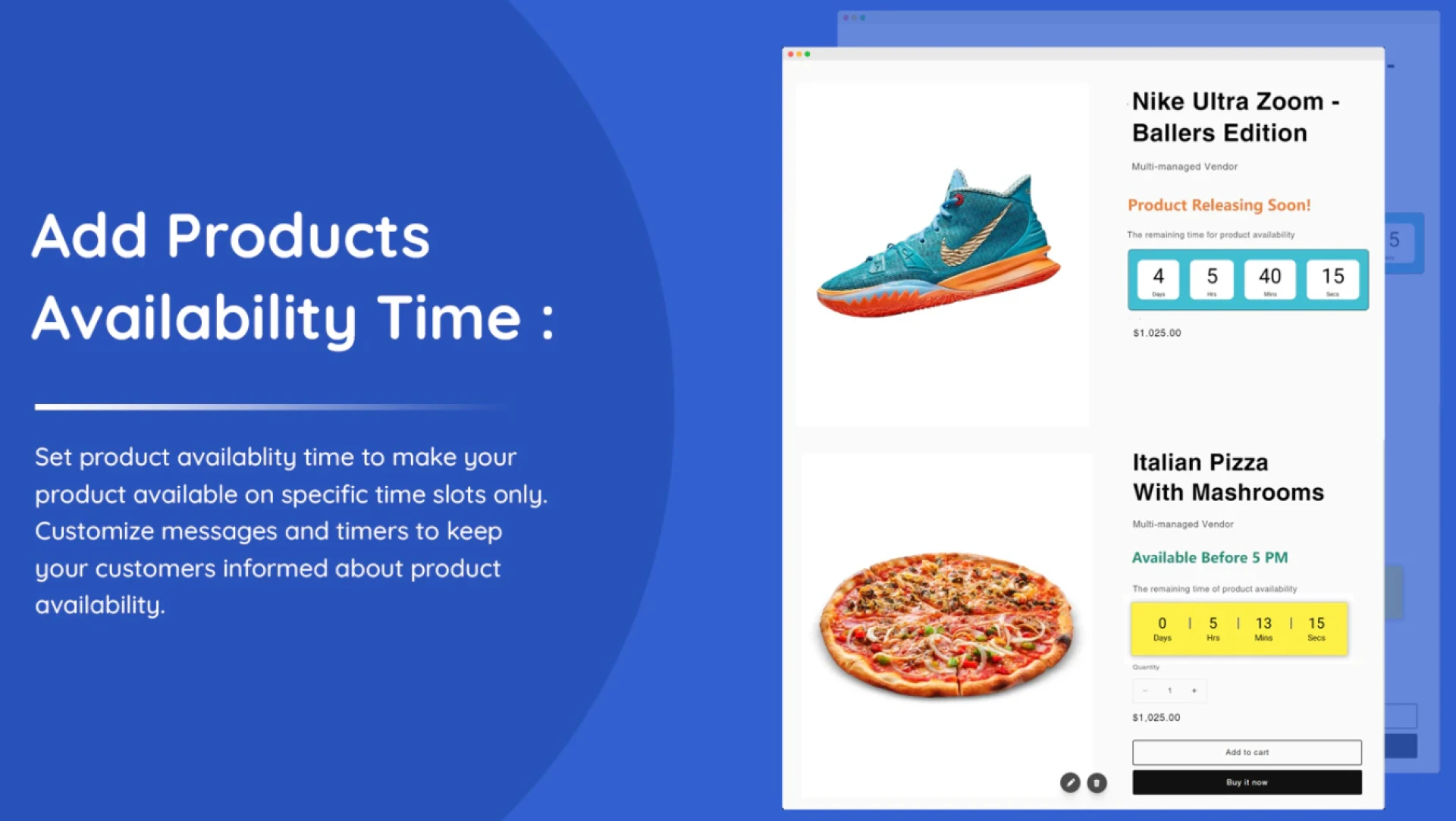

Not every product in your Shopify store should follow the same availability rules. Some items may be seasonal, others may only be sold during business hours, and certain products might be part of limited-time promotions. Managing these differences manually can become complicated and lead to overselling or customer confusion.
The good news is that you can schedule different availability settings for different products on Shopify—while enhancing the experience with a Shopify countdown timer to keep customers informed and motivated.
Why Product-Specific Scheduling Matters
Every business has unique operational needs. For example:
- A bakery may accept cake orders only from 9 AM to 5 PM.
- A clothing brand might launch limited-edition drops for 48 hours.
- A wholesale supplier may allow bulk orders only on weekdays.
- A seasonal store may sell holiday items during specific months.
If all products share the same availability schedule, it limits flexibility. Product-specific scheduling ensures each item is available exactly when it should be—no more, no less.
How to Schedule Availability for Different Products
Using a Shopify scheduling app, you can assign custom availability rules to individual products or collections. This allows you to:
- Set specific start and end dates
- Define available days of the week
- Choose exact time ranges
- Create recurring schedules
For instance, you could schedule one product to be available every weekend while another is only available during business hours. Once configured, these schedules run automatically, eliminating the need for manual updates.
This automation reduces errors and ensures customers can only purchase products during approved time windows.
Hide Purchase Options When Products Are Unavailable
To prevent confusion and accidental orders, you can automatically hide the price and add-to-cart button when a product is outside its availability window. Instead of displaying an error message, your store can show a clear notification explaining when the product will return.
This improves transparency and builds customer trust. Rather than wondering why checkout isn’t working, shoppers immediately understand the availability rules.
Enhance Clarity with a Shopify Countdown Timer
Adding a Shopify countdown timer makes scheduled availability even more effective. Countdown timers visually display how much time remains before:
- A product becomes unavailable
- A promotion ends
- Ordering opens
- A limited drop closes
When customers see time ticking down, they’re more likely to complete their purchase quickly. A Shopify countdown timer creates urgency without being pushy—it simply provides clear, time-based information.
For unavailable products, the timer can show exactly when ordering will resume. For example:
“Available in 03:12:45”
This keeps customers engaged and encourages them to return instead of leaving your store.
Customize Availability Based on Business Needs
Different products often serve different audiences. You might want:
- Daily availability for fresh products
- Weekend-only flash deals
- Limited-time event merchandise
- Pre-order windows for new launches
With product-specific scheduling, you maintain complete control. You can tailor rules according to inventory levels, staffing capacity, or marketing campaigns.
Pairing these schedules with a Shopify countdown timer ensures customers are always aware of time-sensitive opportunities.
Benefits of Automating Product Availability
Scheduling different availability rules for different products helps you:
- Prevent overselling
- Reduce manual workload
- Align orders with fulfillment capacity
- Improve customer communication
- Increase conversions through urgency
Customers appreciate clarity. When they know exactly when a product is available—and see a visible timer reinforcing it—they feel more confident making a purchase.
Final Thoughts
Scheduling different availability for different products on Shopify gives your store flexibility and precision. Instead of applying one universal rule, you can customize availability based on each product’s purpose and demand.
By combining automation with a Shopify countdown timer app, you create a seamless experience that prevents mistakes, builds urgency, and keeps customers informed. The result is better operations, smoother campaigns, and stronger sales performance.























Sign in to leave a comment.