
Migrating from legacy systems to Office 365 can be a transformative step for businesses. However, the path to cloud-based infrastructure can come with its own set of challenges. Legacy systems often hold outdated hardware, incompatible software, and vast amounts of critical data, making the transition to Office 365 seem daunting. Yet, with the right approach and proper tools, this migration can be done efficiently and securely. In this article, we'll explore the challenges businesses face with legacy systems and provide solutions for a smooth Office 365 migration.
Understanding the Limitations of Legacy Systems
Legacy systems, while once foundational to business operations, now pose several limitations:
- Obsolete Technology: Older systems often run on outdated hardware and software that lack the flexibility to support modern workflows. These systems can become a liability when they are no longer supported by vendors, leaving businesses vulnerable to security risks and operational inefficiencies.
- Incompatibility with Cloud Services: Legacy systems may not be compatible with modern cloud environments, making it difficult to integrate them with Office 365’s cloud-based tools.
- Data Storage and Access Issues: Data in legacy systems is often siloed, stored in outdated formats, or spread across various disconnected platforms. This can complicate the migration process and create data accessibility challenges.
- High Maintenance Costs: Maintaining legacy systems is costly. Frequent repairs, hardware replacements, and software patches can add up, not to mention the need for specialized skills that may no longer be readily available in the workforce.
These limitations push many organizations to seek modern solutions, and Office 365 provides a cloud-based, scalable platform for businesses to operate more efficiently. However, transitioning from legacy systems to Office 365 presents its own challenges.
Common Challenges in Migrating from Legacy Systems
Data Migration Complexity
- Data stored in legacy systems can be difficult to extract and convert into formats compatible with Office 365. Issues such as duplicate data, inconsistent data formats, and outdated records can slow down the migration process.
- Moreover, organizations must ensure that no data is lost or corrupted during the migration, which requires careful planning and robust backup strategies.
Security Risks
- Legacy systems may not have the security features needed to protect sensitive data during the migration process. Migrating large volumes of data from insecure environments can expose organizations to data breaches if proper security protocols are not followed.
- A smooth migration requires tools that can encrypt data during transit and ensure that unauthorized access is prevented.
Limited Downtime
- During migration, businesses aim to minimize downtime. However, legacy systems may not be designed for easy integration with cloud platforms, which can lead to extended periods of downtime if not properly managed.
End-User Training and Adaptation
- Employees who are accustomed to legacy systems may resist change or face a steep learning curve when transitioning to Office 365. Ensuring that end-users adapt to the new tools and features of Office 365 is critical for success.
Compliance and Regulatory Concerns
- Industries with strict regulatory requirements, such as healthcare or finance, must ensure that all data is handled according to legal standards during migration. Legacy systems may not be equipped to meet these requirements, making compliance a significant challenge.
Solutions for a Smooth Office 365 Migration
Despite these challenges, migrating from legacy systems to Office 365 can be accomplished smoothly with the right strategies and tools. Below are key steps for overcoming common obstacles.
Pre-Migration Planning
- Conduct a Full System Audit: Begin by auditing the legacy system to understand what data, applications, and workflows need to be migrated. Identify redundant data and applications that can be left behind to reduce migration time and complexity.
- Create a Detailed Migration Plan: Define the scope of the migration, including timelines, resources, and responsible personnel. A well-structured plan ensures that all teams are aligned and aware of their roles throughout the process.
Choose the Right Migration Tool
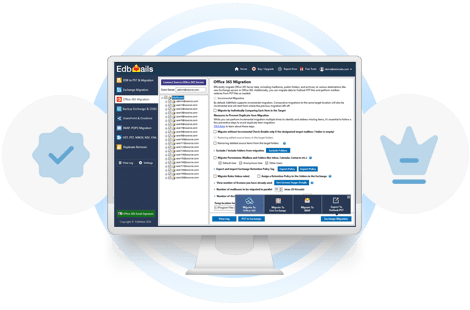
- EdbMails Office 365 Migration Software: One of the most effective tools for overcoming legacy system challenges is EdbMails Office 365 migration software. It provides a streamlined migration process with advanced features such as incremental migration, which transfers only new or changed data, ensuring minimal disruption and faster migrations. EdbMails also ensures full data integrity, preserving folder structure, metadata, and attachments, making it an ideal solution for complex legacy systems.
- The tool also offers advanced filters to select specific data and mailbox items, further simplifying the migration from legacy environments.
Ensure Data Security and Compliance
- Data Encryption: Secure data throughout the migration process by implementing encryption protocols both at rest and during transit. This ensures that sensitive information is protected from potential breaches.
- Compliance Audits: Ensure that all data complies with relevant regulatory standards. Office 365 offers several built-in compliance tools, including GDPR and HIPAA compliance, ensuring that data handling adheres to industry regulations.
Run a Pilot Migration
- Before committing to a full-scale migration, run a pilot migration to test the process and identify potential issues. This allows IT teams to troubleshoot any problems and optimize the process before moving critical business data.
- A pilot migration also helps establish realistic timelines for the full migration, ensuring that expectations are managed across the organization.
Minimize Downtime
- Schedule the migration during off-peak hours to minimize disruption to daily business operations. Use a staged migration approach, which allows legacy systems and Office 365 to coexist during the transition. This ensures that users can continue working uninterrupted while the migration is completed in phases.
Provide End-User Training
- User Onboarding Programs: To overcome user resistance to change, provide thorough training programs that familiarize employees with the new Office 365 tools. Focus on how these tools will improve daily workflows and increase productivity.
- Ongoing Support: Offer ongoing support post-migration to address any issues users encounter as they adapt to the new platform. This will help build confidence and encourage full adoption.
Post-Migration Audits
- Once the migration is complete, conduct a thorough audit of the Office 365 environment. Verify that all data has been transferred successfully and that security protocols are in place.
- Monitor the system for any post-migration issues, such as data inconsistencies or access problems, and address them promptly.
The Long-Term Benefits of Migrating to Office 365
Migrating from legacy systems to Office 365 brings long-term benefits to businesses. Office 365 offers greater scalability, flexibility, and enhanced security features, making it easier to adapt to future business needs. Additionally, Office 365 enables better collaboration through tools like Microsoft Teams and SharePoint, streamlining communication and project management across teams.
Moreover, with automatic updates and cloud-based infrastructure, Office 365 reduces the need for costly hardware upgrades and IT maintenance, allowing businesses to focus on growth rather than system upkeep.
Conclusion
Overcoming the challenges of legacy systems during an Office 365 migration requires thoughtful planning, the right tools, and a focus on security and user adoption. With comprehensive planning and using reliable tools like EdbMails Office 365 Migration tool, businesses can transition smoothly to the cloud while minimizing downtime, safeguarding data, and improving overall operational efficiency. Taking these steps ensures that the migration not only addresses the limitations of legacy systems but also positions the organization for success in today’s digital landscape.
👉 A complete guide for Office 365 to Office 365 migration


























Sign in to leave a comment.