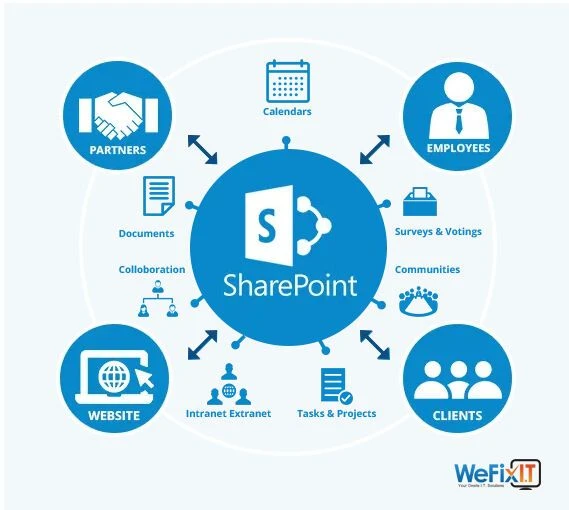

Enterprise agility demands technology platforms that evolve with changing business requirements rather than constraining operations to static configurations. SharePoint deployments supporting thousands of users across multiple locations require ongoing support to ensure systems remain available, performant, and aligned with evolving needs. Generic support contracts that offer standard service levels rarely address enterprise-specific requirements for response times, expertise depth, and customisation capabilities. Organisations achieving agility through SharePoint require tailored SharePoint support services that combine proactive system maintenance with responsive issue resolution and continuous platform optimisation, enabling rapid adaptation to business changes whilst maintaining the stability that enterprise operations demand.
Beyond Break-Fix Support
Traditional IT support follows a reactive, break-fix model, responding to incidents after they occur. Users report problems, support teams investigate, and solutions are implemented. This approach creates several difficulties for enterprises. System downtime affects productivity before issues are detected. Recurring problems waste time with repeated resolution efforts. Optimisation opportunities remain undiscovered until performance degrades noticeably. Proactive support prevents many issues before they impact users.
Enterprise SharePoint support includes monitoring system health metrics, identifying performance trends that indicate potential issues, applying updates and patches during maintenance windows, and optimising configurations as usage patterns evolve. This proactive approach minimises disruptions whilst continuously improving system performance. Monitoring alerts trigger investigations before problems become outages. Capacity planning prevents resource exhaustion. These preventive activities deliver more value than reactive incident response alone.
Tiered Support Structures
Enterprise support requires multiple levels of expertise to address different issue types. Tier 1 support handles common user questions, password resets, permission requests, and basic troubleshooting. These issues can be resolved quickly through documented procedures without specialised expertise. Tier 2 addresses complex configuration issues, workflow problems, and integration failures that require more profound SharePoint expertise. Tier 3 involves architects and senior consultants resolving architectural issues, optimising performance, and handling complex customisations.
Effective triage routes issues to appropriate tiers quickly. Users do not want simple questions escalated through multiple tiers unnecessarily. Complex problems should not languish at lower tiers lacking resolution capability. Clear escalation criteria and intelligent routing optimise resolution times whilst managing costs—higher tiers cost more but resolve complex issues faster than lower tiers, attempting problems beyond their capability.
Professional SharePoint support services provide complete tier coverage, ensuring issues receive appropriate attention regardless of complexity. This comprehensive coverage allows enterprises to rely on a single support partners rather than managing multiple vendors for different problem types.
Service Level Agreements
Enterprise operations require predictable support responsiveness. Service level agreements define response times for different issue severities. Critical issues affecting many users or business-critical functions require immediate response. Standard issues receive attention within business hours. Enhancement requests follow separate processes. These tiered response commitments allow enterprises to plan operations with confidence that problems will receive appropriate attention.
SLAs should balance responsiveness with cost. Instant responses to all issues are expensive and unnecessary. Most problems can wait hours without a significant business impact. However, genuine emergencies require immediate attention. Appropriate severity classification ensures resources focus where they matter most. Regular SLA reporting demonstrates compliance while identifying trends that need attention.
Customised SLAs accommodate enterprise-specific requirements. Organisations operating globally need follow-the-sun support to provide coverage across time zones. Financial institutions may require a faster response than manufacturing companies, given the different business impacts of outages. Flexible SLA structures address these varied requirements rather than forcing all enterprises into identical commitments.
Proactive Maintenance Programs
Regular maintenance prevents many support issues before they occur. Maintenance activities include applying Microsoft updates and security patches, optimising database performance, reviewing system configurations, monitoring capacity and growth trends, and updating documentation reflecting system changes. These scheduled activities maintain system health whilst allowing planning around business operations to minimise disruption.
Maintenance windows should be scheduled considering business cycles and geographic distribution. Global organisations need maintenance timing that minimises impact across regions. Retail organisations avoid maintenance during peak shopping periods. Financial services firms schedule around market hours. Customised maintenance scheduling demonstrates understanding of the business context rather than imposing generic schedules.
Communication about maintenance activities keeps stakeholders informed. Advance notices allow users to plan around scheduled downtime. Status updates during maintenance provide transparency. Post-maintenance summaries document completed work and any follow-up required. This communication builds confidence in support services whilst setting appropriate expectations.
Performance Optimisation
SharePoint performance degrades over time without ongoing optimisation. Growing content volumes, increasing user numbers, and evolving usage patterns all affect performance. Regular optimisation maintains responsiveness through database index tuning, content organisation improvements, caching configuration, and query optimisation. These technical adjustments require expertise in understanding both SharePoint architecture and specific deployment characteristics.
Performance monitoring establishes baselines and tracks trends. Gradual degradation becomes visible before users experience significant impacts. Unusual patterns indicate problems requiring investigation. Capacity planning based on trends prevents resource exhaustion. This data-driven approach supports proactive interventions that prevent performance issues rather than reacting after users report problems.
Optimisation recommendations should balance the potential for improvement against implementation risks. Some optimisations deliver minor benefits requiring significant changes, risking disruption. Others provide substantial improvements with low risk. Professional judgment prioritises high-value, low-risk optimisations whilst carefully managing more aggressive improvements requiring testing and careful implementation.
Customisation Support
Enterprise SharePoint deployments typically include customisations addressing specific business requirements. Support services must understand these customisations to maintain systems effectively. Documentation of custom workflows, applications, and integrations provides support teams the knowledge needed for effective troubleshooting. Without this understanding, support teams cannot distinguish between custom code issues and platform issues.
Ongoing customisation support includes maintaining custom solutions as SharePoint evolves, troubleshooting custom code issues, adapting customisations to changing requirements, and developing new customisations as needs emerge. This support extends beyond the platform itself to the business logic implemented on top of it. Organisations need partners who understand both technical implementation and business context.
Version control and documentation standards for customisations enable adequate support. Well-documented code allows support teams to understand functionality and troubleshoot problems. Version control tracks changes over time, supporting rollback if issues emerge. When followed consistently, these development practices dramatically improve supportability.
Integration Management
Enterprise SharePoint rarely operates in isolation. Integrations with ERP systems, CRM platforms, email servers, and specialised business applications create dependencies requiring coordinated support. Integration issues might originate in SharePoint, connected systems, or network infrastructure between them. Adequate support requires understanding the complete integration ecosystem.
Integration monitoring detects failures quickly. Data synchronisation between systems should complete within defined timeframes. API calls should return successfully. Error logs should be reviewed systematically. These monitoring activities identify integration problems early, allowing investigation before business processes fail.
Cross-functional coordination resolves integration issues spanning multiple systems. SharePoint support teams must collaborate with teams supporting connected systems. Clear escalation paths and communication protocols facilitate this coordination. A single point of contact managing these complex interactions prevents finger-pointing between teams and enables rapid resolution.
User Adoption Support
Technology delivers value when people use it effectively. Support services that extend beyond technical issues to user adoption include training programs, documentation and how-to guides, power-user communities, and usage analytics that identify adoption barriers. These activities help organisations realise the value of SharePoint rather than just maintaining existing systems.
Usage patterns reveal adoption challenges. Low utilisation of valuable features might indicate training gaps. Workarounds that bypass intended processes indicate usability issues that require attention. Support teams analysing usage data identify improvement opportunities that purely technical monitoring misses. This holistic view of system effectiveness drives greater value.
Disaster Recovery and Business Continuity
Enterprise operations require confidence in system availability and data protection. Support services that ensure business continuity include backup verification and testing, disaster recovery planning and drills, high-availability configuration, and incident response procedures. These activities prepare for worst-case scenarios whilst never needing full activation.
Regular recovery testing validates that backup procedures work correctly. Documentation alone provides false confidence. Restoring systems from backups verifies procedures and identifies problems requiring correction. Testing schedules balance thoroughness against operational disruption—full disaster recovery drills require significant effort but provide assurance that plans work when needed.
Continuous Improvement
Support should improve over time as teams gain experience with specific deployments. Incident analysis identifies root causes, enabling permanent fixes rather than repeatedly addressing symptoms. Knowledge bases capture solutions to common problems. Automation reduces manual effort for routine tasks. These improvements benefit both support providers through efficiency gains and enterprises through better service quality.
Regular service reviews assess support effectiveness. Metrics around incident volumes, resolution times, and user satisfaction provide quantitative measures. Qualitative feedback from users and stakeholders identifies areas for service improvement. These reviews drive service refinement, ensuring support continues meeting evolving enterprise needs.
Professional SharePoint support services demonstrate a commitment to improvement through transparent reporting, a willingness to adjust approaches based on feedback, and an investment in understanding specific business contexts. This partnership approach delivers more value than transactional support relationships that focus solely on meeting minimum contractual obligations.
Cost Management
Support cost management balances service quality against budget constraints. Predictable monthly fees enable budget planning. However, fixed-price support covering all potential issues risks either has inadequate coverage or is expensive due to overprovisioning. Hybrid models with base coverage plus usage-based pricing for extensive requests often balance predictability with flexibility.
Cost optimisation includes automation, reducing manual effort, empowering users with self-service capabilities, preventive maintenance to reduce incidents, and efficient issue routing to minimise escalations. These approaches minimise the total cost of ownership whilst improving service quality through faster resolution and fewer disruptions.
Conclusion
Enterprise agility requires SharePoint support extending beyond reactive incident response to proactive maintenance, continuous optimisation, and partnership in business success. Customised support services that address specific enterprise requirements for response times, expertise depth, integration complexity, and business context enable organisations to rapidly evolve SharePoint deployments whilst maintaining stability. Success comes from treating support as a strategic service that advances business objectives, rather than a commodity that meets minimum technical requirements.





















Sign in to leave a comment.