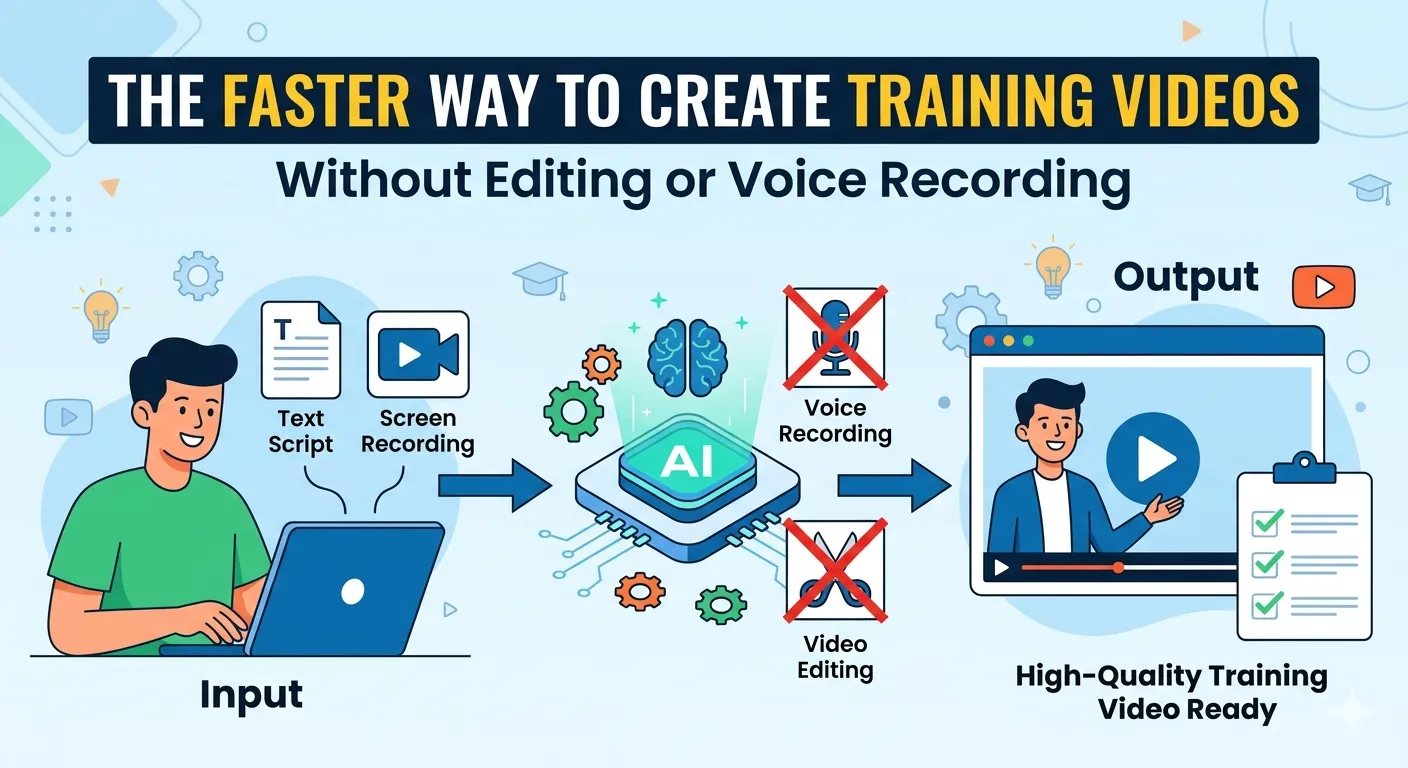

Creating training videos used to mean long recording sessions, endless retakes, complicated editing timelines, and hours spent fixing voice mistakes. Today, that process looks very different.
Modern AI-assisted video workflows now allow businesses, educators, SaaS teams, and internal trainers to create polished learning content much faster — often without touching a traditional video editor or recording voiceovers manually.
Whether you are creating onboarding tutorials, product walkthroughs, SOP training, or customer education videos, the goal is no longer to “fix everything in editing.” The smarter approach is building a workflow that reduces editing from the start.
This guide walks through a practical, beginner-friendly process for creating no-edit training videos quickly while still maintaining clarity and professionalism.
Why Traditional Training Video Creation Takes So Long
Most training videos become slow and frustrating because the workflow itself is inefficient.
A typical process usually looks like this:
- Write a rough script
- Record the screen manually
- Record voice narration
- Re-record mistakes
- Edit clips together
- Add captions manually
- Add transitions and effects
- Export and review
- Fix revision requests
- Export again
For a simple 5-minute tutorial, teams often spend several hours editing.
Common bottlenecks include:
- Background noise
- Voice mistakes
- Manual captioning
- Poor pacing
- Complex editing software
- Re-recording small changes
- Inconsistent branding
For beginners, editing tools can feel overwhelming. For advanced teams, the problem is usually scale. Producing dozens of tutorials manually becomes difficult to maintain.
That is why many companies are shifting toward instant video creation workflows powered by automation and AI tools.
What “Editing-Free” Video Creation Really Means
Editing-free production does not mean low quality.
It means designing your process so the final video is already close to publish-ready before post-production even begins.
Modern tools can automate:
- Voice narration
- Captions
- Cursor highlights
- Scene timing
- Layout formatting
- Basic transitions
- Audio cleanup
- Visual consistency
Instead of spending hours fixing videos afterward, you build the workflow correctly upfront.
This works especially well for:
- Product tutorials
- Employee onboarding
- Internal SOPs
- Customer education
- Software walkthroughs
- Knowledge-base videos
The focus shifts from “editing videos” to “building repeatable systems.”
A Faster Workflow for Creating No-Edit Training Videos
Step 1: Plan the Learning Outcome First
Before recording anything, define one clear learning outcome.
Avoid trying to teach everything in one video.
A better structure is:
- One task
- One problem
- One solution
For example:
Instead of:
- “Complete HR onboarding platform tutorial”
Create:
- “How to submit leave requests”
- “How to download payroll reports”
- “How to approve employee timesheets”
Smaller training videos are:
- easier to create,
- easier to update,
- easier to understand,
- and better for viewer retention.
This “content chunking” approach improves clarity because each section focuses on one complete idea instead of mixing multiple topics together.
Quick Planning Checklist
Before recording, ask:
- What is the exact task being taught?
- Who is the audience?
- What should viewers do after watching?
- Can this lesson stay under 5 minutes?
- Are unnecessary steps removed?
Keeping the scope narrow dramatically reduces production time.
Step 2: Use Lightweight Scripts Instead of Full Narration
One common mistake beginners make is writing long, formal scripts.
Training videos usually perform better when they sound natural and direct.
Instead of scripting every sentence, create:
- A short intro
- Key steps
- Important reminders
- Final action
Example:
Lightweight Training Script
- Open dashboard
- Click “Projects”
- Select “Create New”
- Add project name
- Assign owner
- Save settings
- Verify project appears
This structure:
- speeds up recording,
- reduces mistakes,
- improves pacing,
- and works better with AI narration tools.
Advanced teams often create reusable script templates for consistency.
Step 3: Capture the Screen Efficiently
Traditional screen recording often creates unnecessary editing work because people record everything in one long take.
A faster approach is:
- Record in small segments
- Pause between actions
- Keep cursor movement intentional
- Avoid multitasking during recording
Helpful tips:
- Close unnecessary tabs
- Increase browser zoom for readability
- Use consistent window sizes
- Disable notifications
- Simplify on-screen workflows
The cleaner your raw recording is, the less editing you need later.
Step 4: Automate Voice and Captions
Voice recording is one of the biggest time drains in training production.
You often need:
- multiple retakes,
- audio cleanup,
- balancing,
- pronunciation fixes,
- and re-recordings after updates.
AI narration tools now simplify much of this process.
Instead of manually recording voiceovers:
- Paste your script
- Generate narration automatically
- Sync audio with visuals
- Create captions instantly
This creates faster AI-assisted video workflows, especially for teams producing tutorials regularly.
Automated captions also improve:
- accessibility,
- retention,
- mobile viewing,
- and searchability.
For global teams, AI narration can also help create multilingual training content faster.
How Videomule Fits Naturally Into This Workflow
Many teams now use tools like Videomule to simplify training video production without relying on complicated editing software.
Instead of juggling:
- screen recorders,
- editing timelines,
- caption tools,
- and separate voiceover software,
the workflow becomes more streamlined.
A practical workflow might look like this:
- Record a quick walkthrough
- Add lightweight script notes
- Generate AI narration
- Auto-create captions
- Export publish-ready training content
For example:
Use Case: SaaS Customer Onboarding
A customer success team needs tutorials like:
- “How to invite teammates”
- “How to connect integrations”
- “How to export reports”
Instead of sending every video to an editor, the team can create short tutorials internally using AI narration and automated formatting.
Use Case: Internal HR Training
HR teams frequently update:
- leave policies,
- onboarding instructions,
- reimbursement processes.
With traditional workflows, even small updates require re-recording and re-editing.
A streamlined workflow makes updating training content much faster and easier.
Use Case: Product Training Libraries
Software companies regularly launch new features.
Instead of waiting weeks for polished production cycles, teams can publish educational tutorials quickly while maintaining branding consistency.
The biggest benefit is speed and simplicity — not complicated production.
Common Mistakes That Slow Down Training Video Creation
Even with modern tools, some habits still create unnecessary work.
Recording Without a Plan
Improvising usually leads to:
- rambling explanations,
- inconsistent pacing,
- and more edits later.
Making Videos Too Long
Long videos:
- reduce engagement,
- increase editing complexity,
- and become harder to update.
Overusing Effects
Fancy transitions rarely improve learning outcomes.
Simple visuals usually work better.
Ignoring Audio Clarity
Even AI-generated narration requires clean pacing and understandable visuals.
Trying to Perfect Every Detail
Training content should prioritize usefulness over cinematic quality.
Fast, clear, accurate tutorials often outperform over-produced videos.
Beginner-Friendly Quick Start Workflow
If you are completely new to creating training videos, start here.
Before Recording
- Define one learning goal
- Create short bullet-point script
- Prepare demo/test data
- Clean your desktop and browser
During Recording
- Record small sections
- Move slowly and clearly
- Pause between actions
- Avoid distractions
After Recording
- Generate captions
- Add AI narration if needed
- Review for clarity
- Export and publish
This simple workflow alone can dramatically reduce production time.
Advanced Tips for Faster Video Production at Scale
Once your process works, optimization becomes easier.
Build Reusable Systems
Create:
- intro templates,
- CTA screens,
- training layouts,
- and consistent naming structures.
This improves speed and consistency across teams.
Use Modular Content
Instead of one 30-minute tutorial:
- create 10 reusable short lessons.
You can later update one section without rebuilding everything.
Create Lightweight Review Processes
Fast review systems help teams maintain quality while still moving quickly.
Review for:
- outdated UI,
- incorrect steps,
- caption issues,
- timing problems,
- and branding consistency.
Modern AI workflows work best when automation handles repetitive tasks while humans focus on clarity and accuracy.
Keep Your Brand Voice Human
Even automated training videos should still sound natural and helpful.
AI tools work best when they support your workflow instead of replacing your communication style completely.
Real-World Example: From 6 Hours to 45 Minutes
Imagine a support team creating a tutorial about submitting expense reports.
Traditional Workflow
- Write full script
- Record screen
- Record narration
- Edit timeline
- Add captions
- Export revisions
Total time:
- 4–6 hours
Faster AI-Assisted Workflow
- Create bullet-point outline
- Record short walkthrough
- Generate AI narration
- Auto-create captions
- Export directly
Total time:
- Under 45 minutes
The difference is not just automation.
It is workflow design.
The Future of Instant Video Creation
Training videos are becoming more operational and less production-heavy.
Teams no longer need:
- advanced editing skills,
- expensive production setups,
- or large creative departments
to create effective learning content.
The rise of no-edit training videos helps organizations:
- document processes faster,
- scale knowledge sharing,
- reduce support requests,
- and onboard users more efficiently.
The best workflows focus on:
- clarity,
- speed,
- consistency,
- and accessibility.
Not perfection.
Final Thoughts
Creating training videos no longer has to involve complicated editing timelines or stressful voice recording sessions.
By simplifying planning, using modular content, automating narration and captions, and reducing unnecessary editing work, teams can create high-quality educational videos much faster.
Tools like Videomule fit naturally into this modern workflow by helping teams move from idea to publish-ready training content with fewer production bottlenecks.
Whether you are creating onboarding tutorials, internal SOPs, or customer education videos, the fastest workflow is usually the simplest one.
And in most cases, clarity beats complexity every time.

























Sign in to leave a comment.