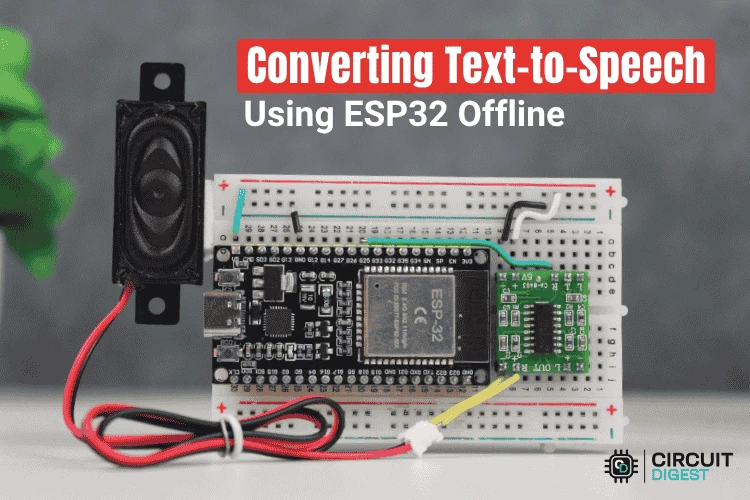

Text to speech sounds useful until you actually try building it on a microcontroller. Most examples look simple but end up depending on the internet in some way. Cloud APIs, delayed responses, WiFi issues. Once the connection drops, the whole thing becomes useless.
This project does not work like that. Everything runs locally on the ESP32. The code does not call any online service. It does not fetch audio or stream anything. It just plays back speech that already exists inside the board.
What the code is doing overall
The logic in the source code is very direct. You type text in the Serial Monitor. The ESP32 reads the entire line. That line is broken into words. Each word is checked against a predefined list. If the word exists, the ESP32 speaks it.
If the word does not exist, the ESP32 does not try to guess or fake anything. It simply prints a message saying the word is not in the vocabulary and moves on. Nothing crashes. Nothing locks up.
There is no attempt to generate pronunciation dynamically.
Talkie library and stored speech
The speech comes from the Talkie library. Talkie does not generate speech like modern text-to-speech systems. Instead, it plays LPC encoded speech data. These are pre-recorded voice samples stored as arrays.
This is why the voice sounds robotic. That is expected. LPC was designed to save memory, not sound natural. The advantage is that it works very well on small devices like the ESP32.
The code creates a single Talkie object. Whenever the program calls voice.say(), the ESP32 outputs analog audio through its DAC pin.
Vocabulary file and word mapping
Every word the ESP32 can speak already exists in the vocabulary header file. Each word is linked to a specific LPC array. The code uses a simple structure to connect text strings with their corresponding speech data.
For example, when the word ONE is detected, the code plays the LPC data stored in sp2_ONE.
If the word is not listed, the ESP32 cannot say it. The code does not crash or freeze. It just prints a warning in the Serial Monitor and continues.
Serial input handling
The ESP32 waits for input from the Serial Monitor. Once you press enter, it reads the full sentence at once. The text is trimmed to remove extra spaces and then converted to uppercase.
This conversion matters because all dictionary entries are stored in uppercase. Without it, valid words would fail to match and never get spoken.
After this step, the sentence is ready to be processed.
Splitting the sentence into words
The sentence is scanned character by character. Every time the code sees a space, it treats the previous characters as a complete word.
That word is immediately passed to the lookup function. The ESP32 does not wait for the entire sentence to finish processing before speaking. Each word is spoken as soon as it is identified.
This makes the output feel continuous even though it is technically playing separate audio samples.
Matching words and speaking
The lookup function compares the input word against every entry in the dictionary. The comparison ignores case differences.
If a match is found, the LPC data is sent to the Talkie engine and played through the DAC.
If no match is found, the code prints a message saying the word is not available. The system then continues with the next word without stopping.
Audio output and hardware behavior
All audio is generated through GPIO25 using the ESP32 DAC. This signal is low power and cannot drive a speaker directly.
That is why the setup uses an external amplifier. From the code’s point of view, it is simply outputting an analog waveform. The amplifier and speaker handle everything else.
Timing and playback length are handled internally by the Talkie library.
How it behaves when tested
Once the code is uploaded, testing is simple. Open the Serial Monitor and type phrases like:
START MACHINE
CHECK TEMPERATURE
POWER ALERT
The ESP32 speaks each word that exists in the vocabulary. Missing words are reported in the Serial Monitor instead of being ignored silently.
Why this approach works
There is no background processing and no hidden logic. The ESP32 is either waiting for input, splitting text, or playing audio.
This makes it reliable for offline use and easy to understand. It fits well into ESP32 projects that need basic voice feedback without depending on internet connectivity. It also avoids the complexity seen in many ESP32 Text to Speech examples that rely on cloud services.
Final notes
This project does not try to sound natural. It focuses on control and reliability. Every spoken word exists because it was deliberately added to the vocabulary.
That is what makes this source code useful. You always know what the ESP32 can say, and you can expand it only when you decide to.

























Sign in to leave a comment.