
The Problem
A client came to Mafiree facing a very common yet costly issue - their AWS database had 15.2 TB of disk space allocated, but less than a third of it was actually being used, while the cloud bill kept climbing. The fundamental AWS billing reality makes this painful: you are charged for storage you allocate, not just what you consume. Any unused space is money wasted, and it quietly compounds month after month.
Two root causes were behind the bloat. The database had built up years worth of unused tables - leftover data structures from deprecated features that no application was touching anymore. On top of that, PostgreSQL's MVCC mechanism had generated large amounts of dead row data that was never cleaned up. These dead tuples linger indefinitely until someone explicitly runs a VACUUM operation.
What the AWS Database Storage Audit Found
Mafiree conducted a thorough storage audit and identified three core problems:
Orphaned tables - Several tables with no recent read or write activity were still sitting on disk, remnants of old migrations and deprecated features that were never removed.
VACUUM debt - PostgreSQL's autovacuum process had failed to keep up with the database's write history, leaving millions of dead rows consuming valuable space that could otherwise be freed.
Unjustified over-provisioning - A review of one week's worth of growth data made it clear the database would never grow into its 15.2 TB allocation. An 8 TB allocation would be more than enough with room to spare.
The Three-Phase Fix
Phase 1 - Cleanup and Space Reclamation
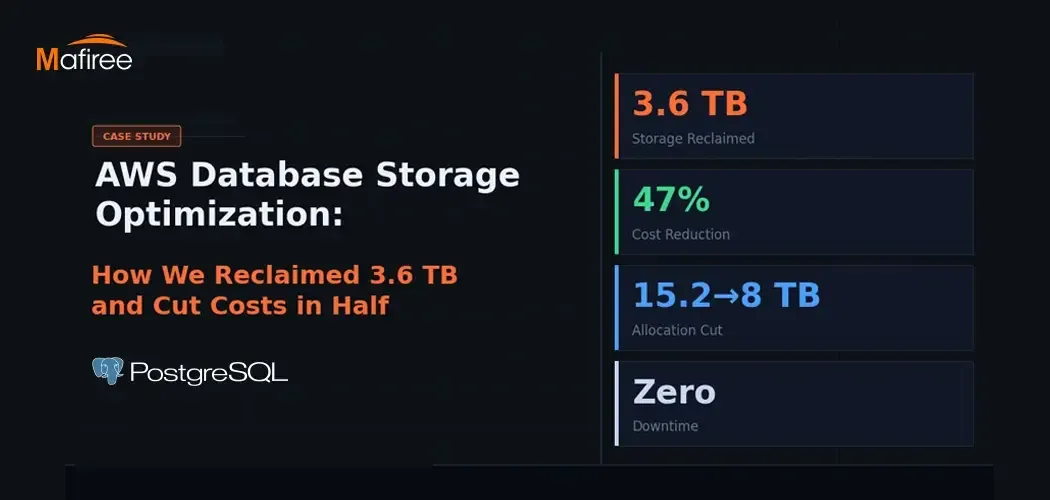
After confirming with the client, the team dropped all unused tables and ran full VACUUM operations across major tables, tracking disk usage throughout the process. This single phase freed up 3.6 TB, bringing actual usage down to 4.6 T - leaving over 10 TB of the allocated 15.2 TB completely idle.
Phase 2 - Blue-Green Deployment
Shrinking storage on an existing AWS RDS instance is not possible, AWS only permits storage increases on live instances, never reductions. So the team used a blue-green deployment strategy, treating the storage reduction as a migration rather than a direct modification.
A new "green" instance was provisioned with 8 TB of storage. Data was fully synced from the original "blue" instance, integrity and performance were validated, and a cutover was scheduled during an agreed maintenance window. Throughout the entire process, the blue instance remained untouched, providing a safe rollback option if anything went wrong. As an added advantage, the sync process itself served as a data integrity check — any issues would surface before the cutover, not after.
Phase 3 - Switchover and Stabilization
The green instance was monitored for a full 24-hour window post-cutover, with close attention to query performance, replication lag, storage I/O, and error rates. Only once everything remained stable was the migration officially declared complete. The original blue instance was kept on standby for another 72 hours as a safety net before being shut down.
The Outcome
The results were significant. Allocated storage was reduced from 15.2 TB to 8 TB, and actual used storage dropped from roughly 8.2 TB to 4.6 TB. That is a 47% reduction in storage allocation, which on AWS translates almost directly into a 47% reduction in that portion of the monthly bill.
Is Your Database in the Same Situation?
There are a few quick checks worth doing if you manage a large AWS database. When was VACUUM last run? On write-heavy PostgreSQL systems, dead tuple buildup can silently eat through hundreds of gigabytes over time. Are there old, unused tables still sitting in your schema from past migrations? And does your current storage allocation still reflect your actual growth rate, or was it set years ago under different conditions?
Storage optimization on AWS is not a one-time task, it is an ongoing practice. But approached properly, it delivers fast, measurable returns.
































Sign in to leave a comment.