

If you’ve ever used an app that felt incredibly smooth, clear, and easy to navigate, there’s one person you should silently thank the Mobile UI Designer. In today’s digital world, users won’t tolerate confusing layouts, slow flows, or visually cluttered apps. They simply uninstall and move on to the next option.
This is why the role of a Mobile UI Designer has become essential for brands that want to build successful apps. From the first wireframe to the final pixel-perfect design, a good designer ensures the app is beautiful, intuitive, and designed to perform at its best.
In this guide, we’ll break down how a Mobile UI Designer creates intuitive, high-performing apps, the complete workflow, essential tools, and the strategies top designers use to stay ahead.
Let’s dive in.
1. Understanding the User: The Foundation of Great Mobile UI Design
A skilled Mobile UI Designer doesn’t start with colors, typography, or layouts. They start with understanding the user.
What mobile UI designers research:
- Who will use the app?
- What are their goals?
- What frustrates them?
- What devices and screen sizes do they use?
- How familiar are they with similar apps?
Designing without understanding these elements is like designing blindfolded.
Why this matters:
A design that matches user expectations automatically feels intuitive.
A design that ignores user behavior always feels confusing — no matter how beautiful.
2. Mapping the User Journey: Creating a Flow That Makes Sense
Before designing screens, the Mobile UI Designer creates a User Flow — a map of how users move through the app.
For example:
- How does a user sign up?
- How do they complete their first task?
- How do they navigate back?
This step ensures every screen has a clear purpose and users never feel “stuck.”
Great user flows include:
✔ Minimal steps
✔ Clear branching
✔ No dead ends
✔ A smooth onboarding experience
A clean flow = higher retention.
3. Wireframing: Turning Ideas into Structure
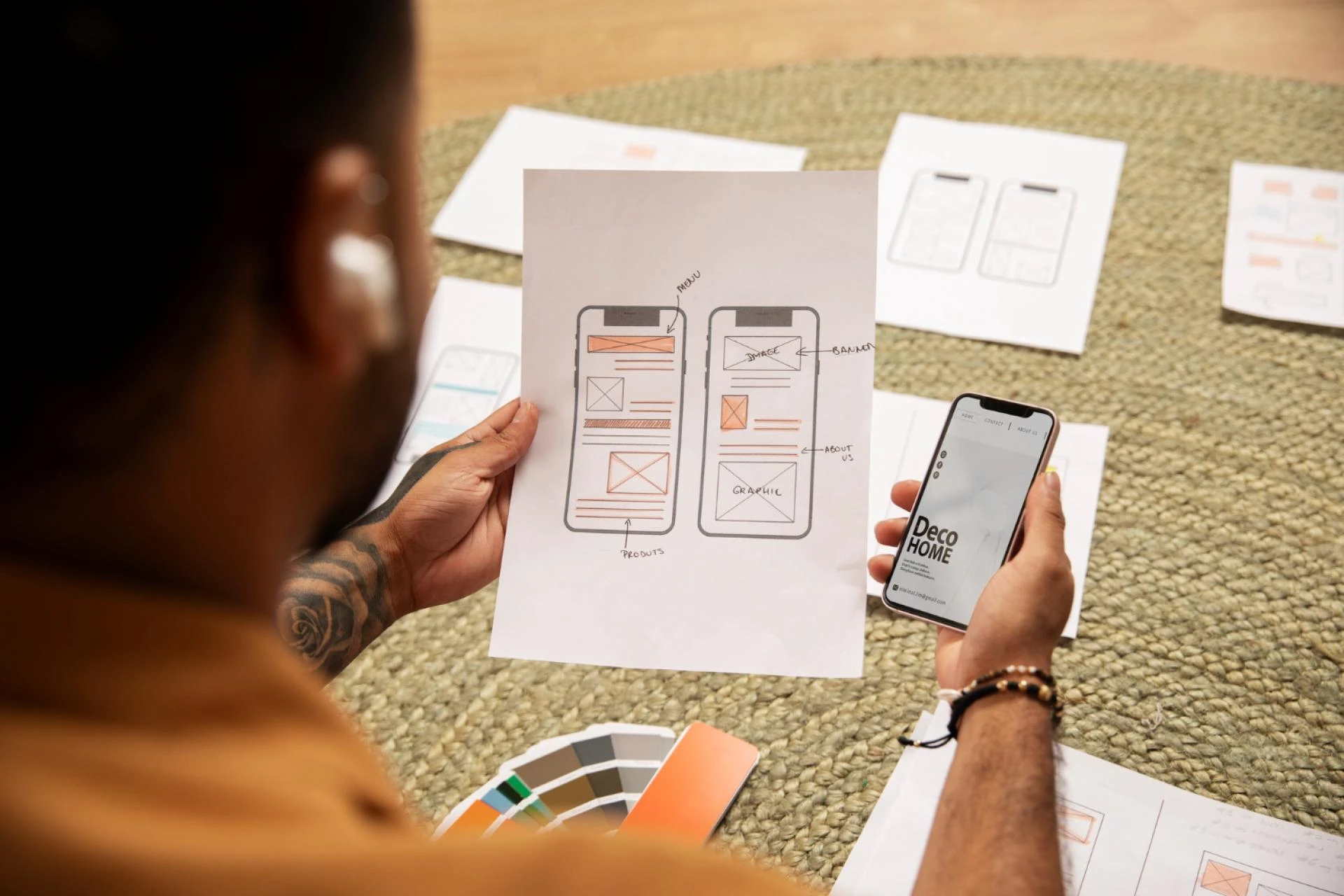
Once user research and flows are complete, the Mobile UI Designer creates wireframes — simple layouts without colors or visuals.
Purpose of wireframes:
- Decide structure
- Plan spacing
- Set hierarchy
- Organize features
- Validate the flow
This is where designers test function before beauty.
Wireframes answer:
- What goes where?
- What is the main CTA?
- Which element needs more visual weight?
4. Applying Visual Design: Where Aesthetics Meet Functionality
Now comes the part most people recognize — UI Design.
This step includes:
- Colors
- Typography
- Icons
- Buttons
- Spaces and margins
- Illustration styles
- Layout grids
A great Mobile UI Designer follows these key principles:
1. Visual Hierarchy
The most important elements should stand out instantly.
Large buttons, bold text, clear CTAs — these shape the user’s behavior.
2. Consistency
Spacing, fonts, buttons, shadows — everything must stay consistent across screens.
It makes the app feel premium and coherent.
3. Minimalism
Less clutter = more clarity.
Top apps like Instagram or Airbnb look simple because simplicity performs best.
4. Thumb-Friendly Design
Mobile UI Designers consider ergonomics — especially the “thumb zone.”
Designers ensure:
- Main buttons fall within easy reach
- Menus are not too high
- Gestures feel natural
5. Designing for Performance: What Makes an App High-Performing?
High-performing apps aren’t just fast. They are designed in a way that reduces cognitive load and speeds up user action.
A Mobile UI Designer focuses on:
✔ Fast-loading visuals
Images must be optimized — not heavy.
✔ Efficient layouts
Avoid too many decorative elements that slow down understanding.
✔ Clear, short micro-interactions
Animations should be smooth, not distracting.
✔ Accessibility
Text size, color contrast, button size — all must be inclusive.
✔ Lightweight components
Modern apps should work smoothly even on older devices.
A well-designed UI leads to:
- Faster task completion
- Better retention
- Lower bounce rates
- Higher app store ratings
6. Using Tools That Power Modern Mobile Design
A Mobile UI Designer in 2025 uses advanced tools to work smarter and faster.
Popular tools:
- Figma (most used)
- Sketch
- Adobe XD
- ProtoPie (for advanced prototyping)
- Zeplin (for developer handoff)
- Framer (interactive prototypes)
These tools help designers create:
- Components
- UI Kits
- Interactive prototypes
- Design systems
- Responsive screens
7. Prototyping: Making Designs Feel Real
Before developers start coding, Mobile UI Designers build interactive prototypes.
This lets everyone test:
- Navigation
- Buttons
- Transitions
- Animations
- User flow
Prototypes help discover issues early — saving time, cost, and frustration.
8. Usability Testing: Does the Design Actually Work?
Great designers don’t assume. They test.
Testing involves:
- Feedback from users
- A/B testing
- Heatmaps
- Task completion times
This reveals:
- Confusing screens
- Hard-to-find buttons
- Overwhelming layouts
- Areas for improvement
A Mobile UI Designer refines the design based on real behavior — not guesswork.
9. Developer Handoff: Turning Designs into Reality
The final step is giving developers everything they need:
- Design files
- Style guide
- Components
- Assets
- Interactions
A good Mobile UI Designer ensures:
✔ Clean layers
✔ Clear naming
✔ Documented spacing
✔ Ready-made components
✔ Easy-to-understand specs
This makes development faster and more accurate.
Conclusion:
In today’s competitive market, users judge an app within 5 seconds.
If it’s confusing, slow, or poorly designed, they uninstall immediately.
A Mobile UI Designer ensures this doesn’t happen.
They combine research, psychology, visual design, UX strategy, and interaction design to create apps that people love using.
From user understanding to prototyping, from layout optimization to performance design — a skilled designer transforms an average app into a high-performing, intuitive digital experience.
If you’re building an app in 2025, investing in a professional Mobile UI Designer is not optional — it’s the foundation of your success.































Sign in to leave a comment.