

For years, adding AI to a mobile app meant embedding a chat interface that answered questions or provided basic assistance. As users become more familiar with AI-driven experiences, they increasingly expect apps to complete tasks rather than simply return information. This expectation is driving the shift toward Agentic mobile applications, where AI can interpret intent, orchestrate APIs, maintain context, and execute multi-step workflows.
This evolution also introduces new challenges for mobile teams, as building agentic experiences requires connecting AI models, platform capabilities, APIs, and workflow logic without creating fragmented architectures. Flutter experts address this complexity through the Flutter AI Toolkit, which lets them integrate multi-turn context, LLM provider flexibility, and tool-based action execution into their existing Dart architecture. This article explores why developing Agentic mobile apps using the Flutter AI Toolkit is a strong choice, the development process, and the production guardrails needed to build reliable AI-driven workflows.
What is an Agentic Mobile App, and Why is Flutter a Better Choice for Building One?
An Agentic mobile app uses AI to go beyond single responses and complete multi-step goals. It follows a plan-act-observe loop to interpret intent, select a tool or function, execute it via an API or device capability, evaluate results, and decide the next step.
The following reasons prove why Flutter is a better choice for developing an Agentic app using Flutter:
1. Unified AI Development Stack
The Flutter AI Toolkit includes LlmChatView, which provides abstractions, multimodal inputs, streaming responses, conversation handling, and function calling. With Firebase AI Logic integration, these components connect directly to supported models, reducing the need for separate chat UIs, SDKs, and orchestration layers.
2. Consistent Agentic Experience Across Platforms
Flutter enables consistent Agentic features across Android, iOS, web, and desktop through a shared codebase. This avoids duplicating tool-calling flows, approvals, streaming states, and error handling.
3. Responsive Interfaces for Long-Running Agent Actions
Agentic flows are highly dynamic; hence, UIs must stream outputs, show tool execution, request approvals, and update continuously as the agent progresses. Flutter’s rendering system and Impeller engine keep interfaces smooth during these updates, enabling rich agentic experiences.
4. Direct Access to Mobile Context
Agentic apps become more efficient when they use native device features like the camera, microphone, files, location, notifications, and app state. Flutter’s plugin ecosystem exposes these capabilities safely through defined functions, allowing controlled access without exposing the full device to the model.
How to Build an Agentic Mobile App Using Flutter AI Toolkit?
The section ahead walks you step by step through setting up the Flutter AI Toolkit, defining single-purpose tools, and adding native UI components like LlmChatView. Explore how to build a controlled tool-execution layer that treats model outputs as untrusted input, safely isolates state, and protects your app with production-ready guardrails.
Step 1: Install and configure the Flutter AI Toolkit
Start by adding the flutter_ai_toolkit package and configuring the model provider. In implementations that use Firebase as the back-end for model access and orchestration, the provider handles model communication, streaming responses, conversation flow, and function-calling interactions. Once this foundation is in place, address security by enabling protections such as Firebase App Check in your production setup to ensure only verified app instances can access backend services.
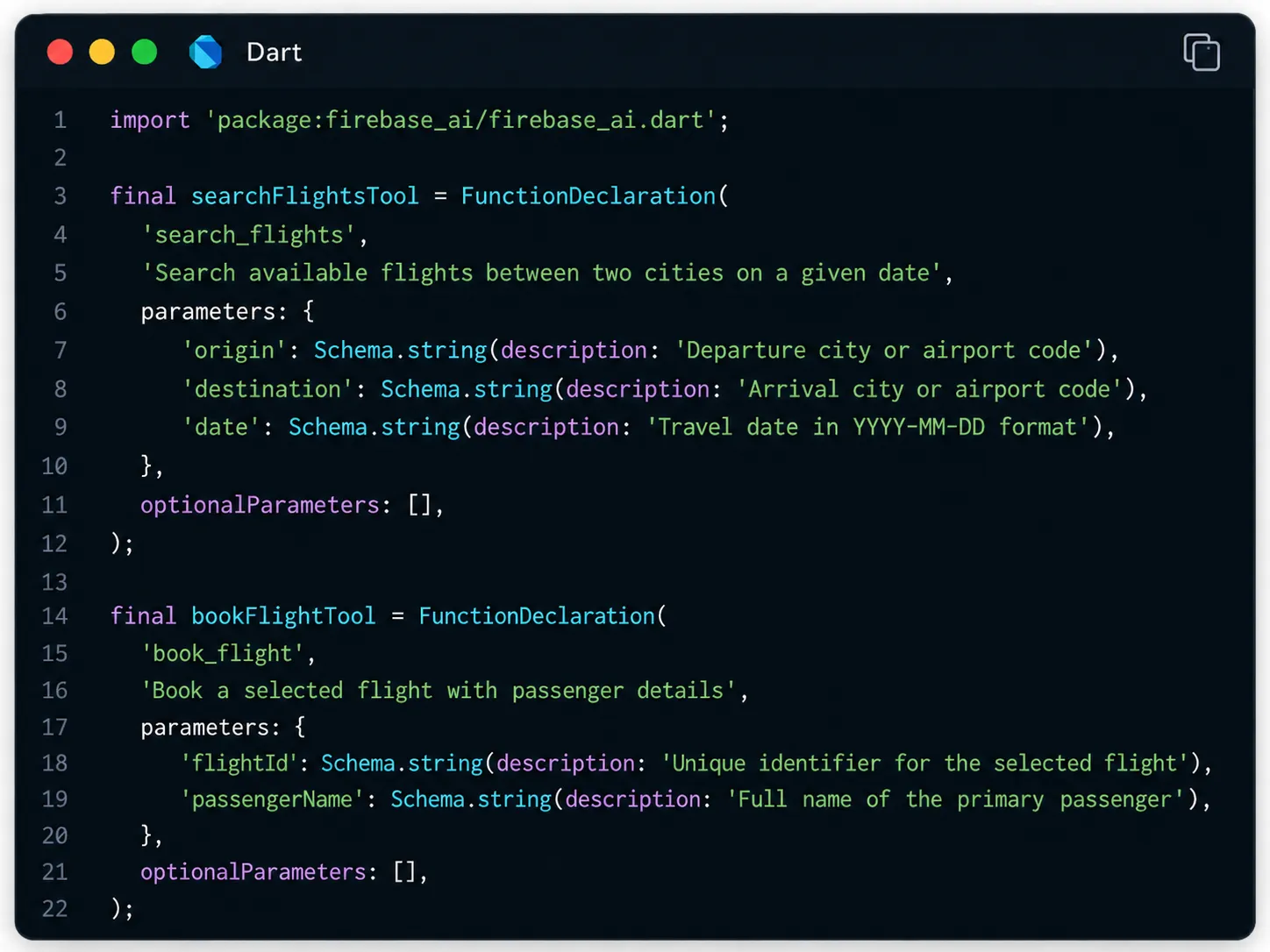
Step 2: Define Narrow, Purpose-Built Tools
Once the provider is ready, define the functions the agent can call. Avoid broad functions such as manage_booking() that combine search, comparison, selection, and payment. Instead, break the workflow into focused operations such as search_flights(), check_availability(), and book_flight(). Each function should do one clear task and accept only the parameters it needs.

Step 3: Connect the Agent to LlmChatView
With the provider and tools defined, connect them to the Flutter interface. LlmChatView provides the conversational layer for prompts, responses, history, attachments, and streamed model output without requiring teams to build the entire AI interaction surface manually.
Agentic flows, however, need more than a chat window because a single request may trigger several tool calls before the final response appears. The interface should therefore expose meaningful execution states such as Searching flights, Checking availability, or Waiting for confirmation.
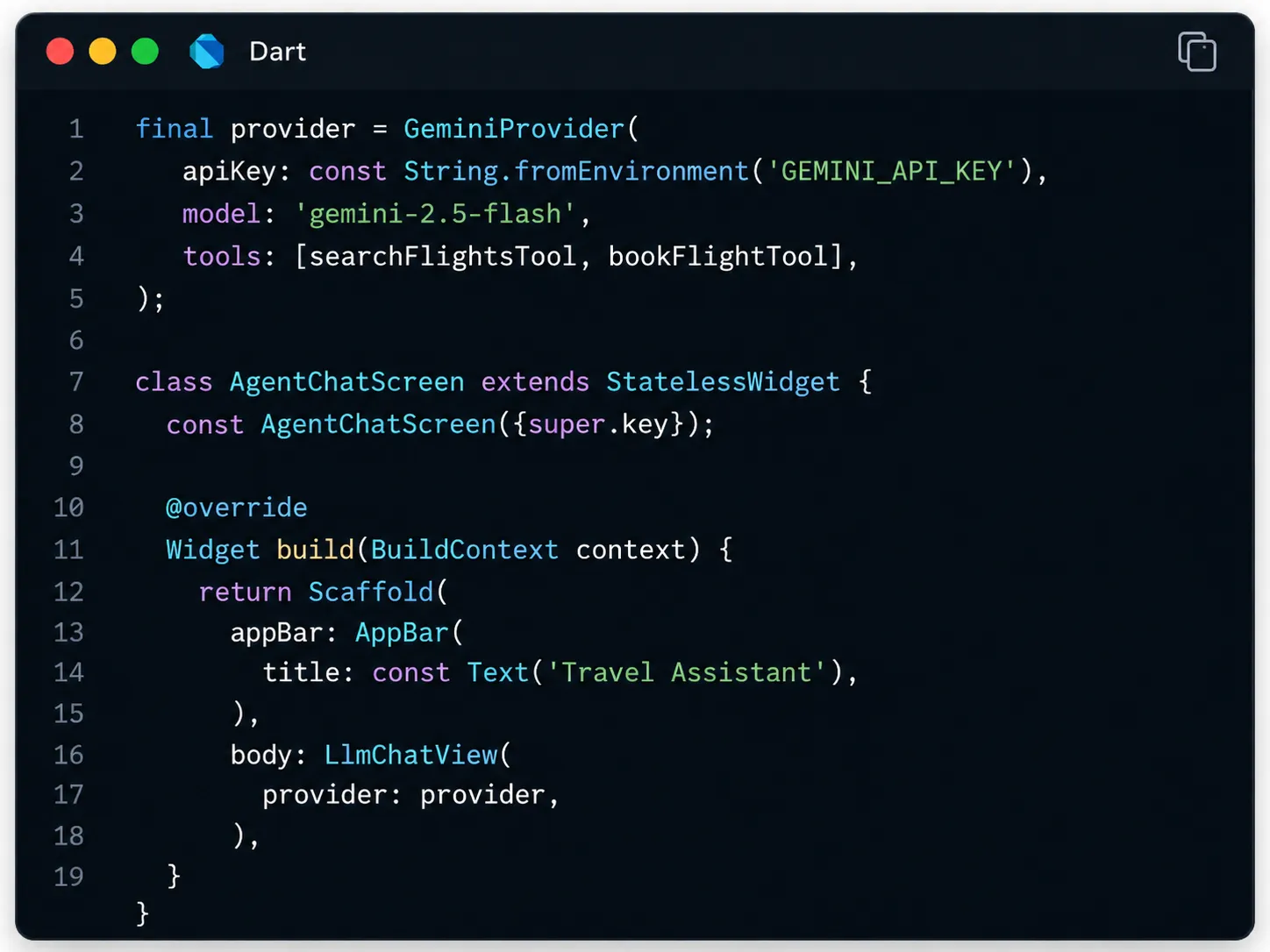
Step 4: Build a Controlled Tool-Execution Layer
When the model returns a function call, your app must perform it. It includes hitting a REST API, querying a local database, or invoking a platform channel for device-native actions like camera or location access. This layer should validate every argument against the declared schema before execution, treating model output as untrusted input, just like raw user input.
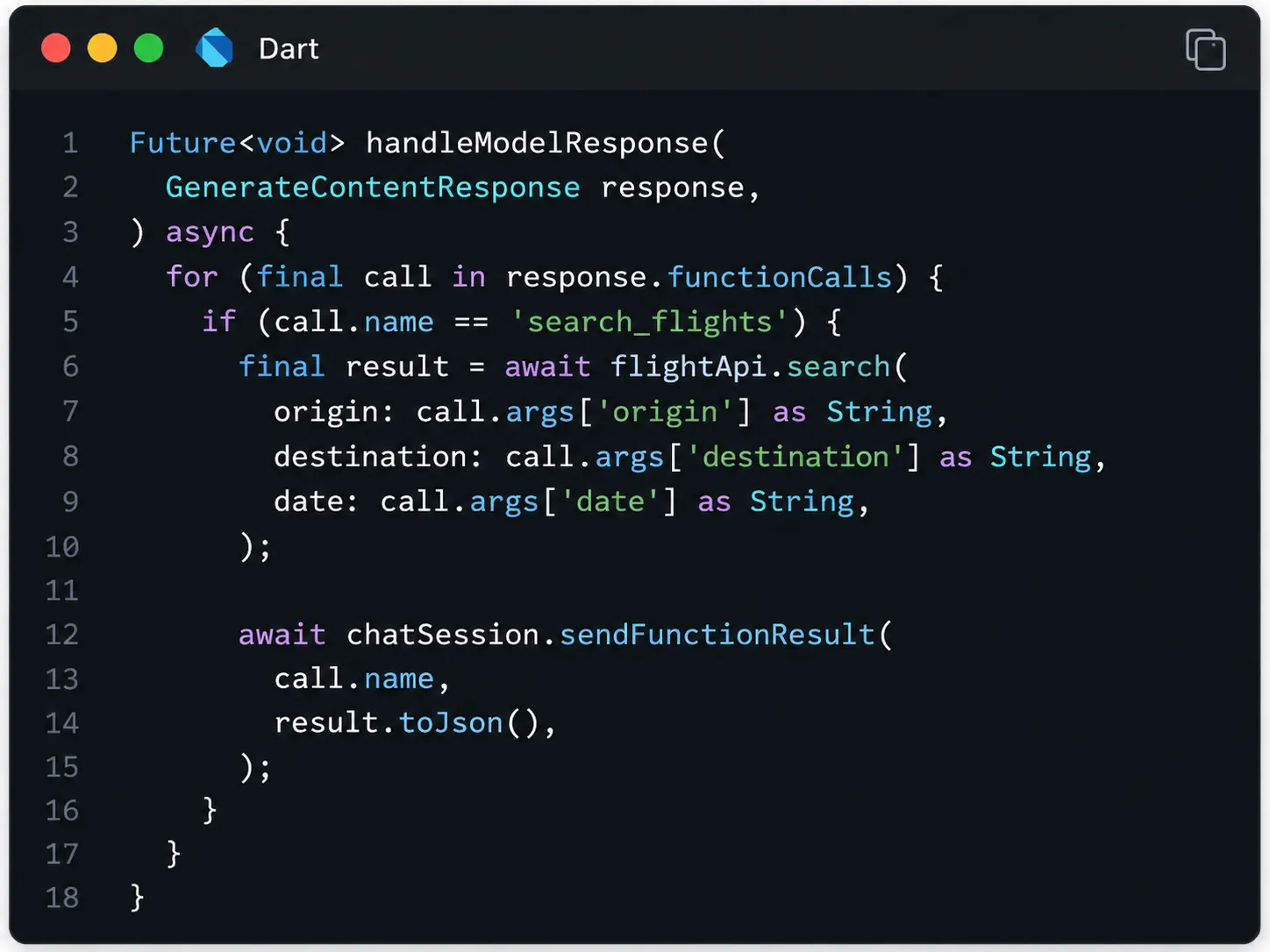
Step 5: Manage Conversation, Tool, and Task State Separately
An agentic application needs to track what the user has said, which tools have run, what those tools returned, and whether the overall objective is complete. Don't collapse these states into a single conversation history. Although chat history provides context for the model, it should not become the authoritative record of tool execution or workflow completion.
Therefore, maintain separate state for the conversation, tool results, approval status, and task lifecycle. Because Flutter is agnostic to state management, you can use frameworks like Provider, Riverpod, or BLoC to manage AI responses, tool execution states, and user context.
Step 6: Test the Full Reasoning Loop
LLM behavior is non-deterministic, so the same intent may produce different tool selections, argument combinations, or reasoning paths across runs. Hence, run repeated tests with ambiguous requests, missing parameters, and deliberately failing tool calls. Then refine the function descriptions and system prompt based on where the model's decisions diverge from the intent.
How to Implement Production Guardrails for Flutter Agentic Mobile Apps?
Deploying a reliable agentic app to production comes down to control. Well-defined guardrails are what separate a prototype from a dependable enterprise app. Guardrails must therefore sit inside the execution architecture, not around the finished product.
1. Approval for Consequential Actions
Any function that spends money, deletes data, or messages a third party should pause for user confirmation before execution, regardless of how confident the model's output appears.
2. Limit Autonomous Reasoning Loops
Set a maximum number of tool or reasoning steps for each task. If the agent reaches that threshold without completing the objective, stop the loop and return control to the user or an escalation workflow. The limit should reflect workflow complexity rather than allowing open-ended execution.
3. Enforce Least-Privilege Tool Access
Each tool should expose only the permissions needed for its specific operation. A function that reads calendar availability should not automatically receive permission to create, modify, or delete events. When developing agentic mobile apps using Flutter, narrow tool definitions combined with back-end authorization reduce the impact of incorrect model decisions or manipulated input.
4. Keep Sensitive Execution Off the Client
Where possible, keep API credentials, privileged tool execution, and orchestration logic behind a trusted back-end. The Flutter application can remain responsible for interaction, streaming states, approvals, and device-level context while sensitive operations execute server-side.
5. Track Cost and Tool Usage Per Task
Agentic workflows can generate substantially more model traffic than single-turn AI features because each tool result may trigger another model request. Token consumption should therefore be measured at the task or session level, not only per API call.
Build for Controlled Autonomy, Not Maximum Autonomy
The AI Toolkit gives Flutter developers the core building blocks for moving mobile AI beyond conversation and into action. LlmChatView, provider abstractions, streaming, multimodal interaction, and function calling make it possible to build agentic workflows without creating every AI interaction layer separately. The harder part is deciding how much authority the agent should have.
For teams already using Flutter, the opportunity isn't simply to add an AI assistant. It is to redesign mobile app development workflows around intent, tool use, and controlled execution, while retaining the cross-platform development model Flutter already provides. The strongest agentic mobile apps will not be the ones that automate the most. They will be the ones that complete the right tasks autonomously while keeping critical decisions predictable, observable, and governed.

























Sign in to leave a comment.