
Many users search for a reliable way to import MBOX to Yahoo Mail, especially when switching email accounts or needing access to archived mailboxes. MBOX is a widely used file format supported by clients like Thunderbird, Apple Mail, and Gmail, but Yahoo Mail doesn’t support direct imports. That’s where people face roadblocks. If you’ve got a collection of MBOX files and want them accessible inside Yahoo, you’ll need a clear plan. This guide walks you through different approaches, what challenges to expect, and why dedicated tools like the BitRecover MBOX to Yahoo Wizard are often the most practical choice.
Why People Need to Import MBOX Files to Yahoo
There are many reasons someone might want to import MBOX files to Yahoo. For instance, if you’re moving from Thunderbird or Apple Mail, you’ll end up with MBOX files that you’d prefer to view in Yahoo Mail. Professionals handling multiple accounts often migrate archived emails for convenience. Students may transfer MBOX backups when switching devices. Even businesses may consolidate years of stored messages into Yahoo for easy online access.
Yahoo Mail remains one of the most popular email services, with millions of active users worldwide. Having old mailboxes directly inside your Yahoo account means everything is in one place, searchable, and easier to manage. Whether it’s about staying organized or making sure nothing gets lost, MBOX to Yahoo Mail migration solves a very real problem.
Common Challenges Users Face
While the need is simple, the process isn’t. Many users quickly realize that Yahoo doesn’t allow direct file uploads like an MBOX import button. Large file sizes can be another barrier since MBOX files may contain thousands of messages with attachments. Preserving folder hierarchy also becomes important—no one wants to lose the structure of inbox, sent, drafts, or custom folders.
There’s also the worry of missing emails or corrupted data during transfer. Since MBOX files often come from older email clients, they might already be fragmented. That’s why email migration without data loss is a major concern, and why users search for reliable methods instead of risky trial-and-error approaches.
Manual Ways to Import MBOX to Yahoo Mail
If you search forums, you’ll find people discussing different manual approaches to get MBOX files into Yahoo. Most of these involve configuring an email client as a middleman.
One common method is setting up Thunderbird with both your MBOX files and Yahoo Mail via IMAP. You can then drag and drop messages between folders. Another workaround involves first uploading the MBOX to Gmail, then linking Gmail with Yahoo Mail and syncing.
While these manual ways to import MBOX to Yahoo Mail can work, they require technical steps, reliable internet, and patience. The process can be slow for large mailboxes and sometimes leads to partial transfers. If you’re wondering how to import MBOX to Yahoo Mail without Thunderbird, the manual options are even more limited.
Why Automated Tools Are Better
Here’s the thing: manual methods are fine for small imports, but if you’re dealing with gigabytes of data, they quickly become impractical. That’s why most IT admins and regular users prefer using a dedicated Yahoo Mail migration tool. Software solutions are designed to handle large MBOX files, maintain folder hierarchy, and move everything in one go.
Choosing the best MBOX to Yahoo converter ensures you won’t have to babysit the process. Features like selective migration, attachment handling, and built-in error recovery make the transfer smoother. Instead of juggling accounts, you can directly point your MBOX files to Yahoo and let the tool do the heavy lifting.
Introducing BitRecover MBOX to Yahoo Wizard
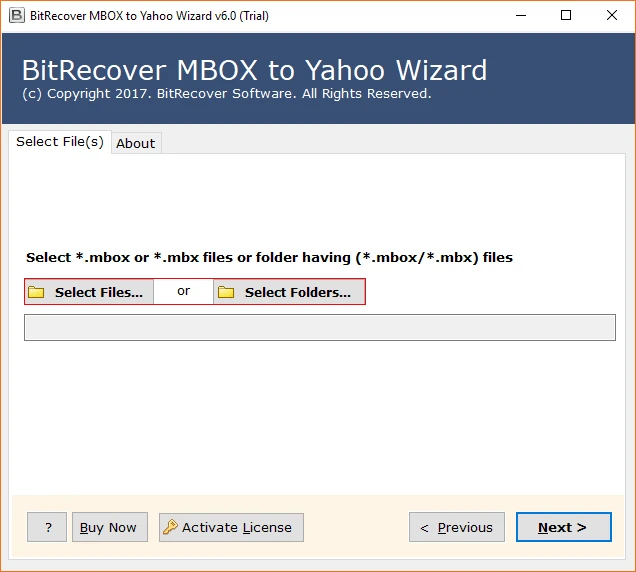
One trusted solution is the BitRecover MBOX to Yahoo Wizard. It’s designed for both individual users and IT teams. With this MBOX to Yahoo Mail wizard, you can load one or multiple MBOX files, preview their contents, and import them directly into your Yahoo account.
Some standout features include:
- Supports large and corrupted MBOX files.
- Preserves folder hierarchy and metadata.
- Offers batch migration for multiple MBOX files.
- Works without needing additional email clients.
- Provides filters for date, subject, or sender-based import.
If your concern is a secure MBOX to Yahoo migration, this software is built to minimize risks. The direct connection to Yahoo Mail via account credentials ensures no data gets lost in transit.
Step-by-Step Guide Using the Tool
Let’s walk through how you can use the BitRecover tool. This MBOX file to Yahoo Mail step by step process is simple:
- Download and install the software on your system.
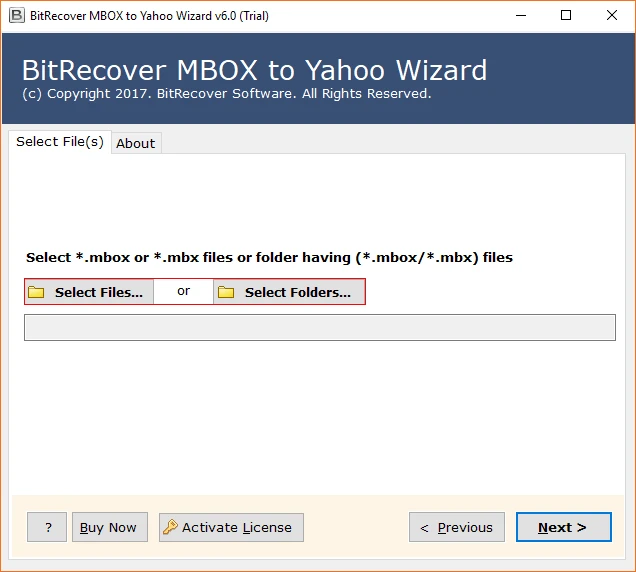
- Launch the wizard and choose MBOX files using the available selection options.
- Enter your Yahoo Mail login details in the software.
- Select folders and apply filters if needed.
- Click the “Import” button to upload MBOX to Yahoo directly.
That’s it. No complex setups or additional accounts. The tool automates the transfer so you can focus on organizing your inbox.
Key Benefits of Using the Software
Using a professional tool instead of manual workarounds brings several benefits:
- Batch support: You can import multiple MBOX to Yahoo at once.
- Bulk migration: Businesses can handle bulk email migration to Yahoo without downtime.
- Time-saving: Large files move faster compared to drag-and-drop methods.
- Accuracy: No missing attachments or broken folder structure.
- Flexibility: Selective migration means you can move only what matters.
Imagine a small business importing years of support emails stored in Thunderbird. Instead of spending weeks with manual syncing, they can complete the task in hours with software. That’s the real difference between frustration and smooth workflow.
Special Use Cases
Not all MBOX files are the same. Here are some unique situations where the BitRecover Wizard helps:
- Thunderbird archives: If you need to import Thunderbird MBOX to Yahoo, the tool connects the dots without extra steps.
- Gmail exports: Google Takeout provides MBOX files. You can directly import Gmail MBOX to Yahoo Mail using the tool.
- Apple Mail backups: Many Mac users create MBOX files. The wizard allows you to import Apple Mail MBOX to Yahoo without extra conversion.
Having one tool for all these scenarios saves time and avoids juggling multiple solutions.
Tips for Smooth Migration
Even with a reliable tool, a little prep goes a long way. Before you start:
- Always keep a backup copy of your MBOX files.
- Ensure your internet is stable for uninterrupted transfer.
- Use the filter options to avoid unnecessary imports.
- Consider Yahoo Mail backup and restore for extra safety.
Following these steps ensures you’ll access MBOX files in Yahoo smoothly and without surprises.
FAQs on MBOX to Yahoo Migration
Q1. Is there a free option to move MBOX into Yahoo?
Yes, you can try manual methods, but a free MBOX to Yahoo Mail importer usually comes with limits. For reliable transfers, dedicated software is recommended.
Q2. Will attachments and formatting remain intact?
Yes. With the right tool, all attachments, formatting, and folder structures are preserved.
Q3. Can I import selective emails?
Yes, the BitRecover wizard includes filters that let you import emails by date, subject, or sender.
Q4. How long does migration take?
It depends on file size and internet speed. Large archives with thousands of emails will naturally take more time, but tool-based transfers are still faster than manual methods.
Final Thoughts
If you’re looking for a dependable way to import MBOX to Yahoo Mail, the BitRecover MBOX to Yahoo Wizard is one of the simplest solutions. It saves time, avoids technical hassle, and ensures your emails move securely without loss. Whether you’re a student migrating a single mailbox or an IT team handling bulk transfers, this tool bridges the gap between old MBOX files and modern Yahoo access.
Instead of struggling with manual setups or risking partial transfers, you can trust a purpose-built software to get the job done. Try the wizard, and you’ll quickly see why so many users choose automation over frustration.























Sign in to leave a comment.