

Optimizing your infrastructure monitoring strategy ensures your IT systems run efficiently, downtime is minimized, and resources are used effectively. Here’s a structured guide:
1. Define Clear Goals and KPIs
Before setting up monitoring:
- Identify critical systems and components (servers, network, applications, databases).
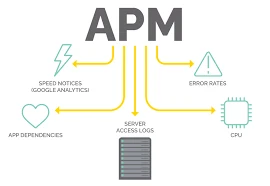
- Set Key Performance Indicators (KPIs) such as uptime, response time, CPU utilization, and error rates.
- Determine what constitutes acceptable performance thresholds and when alerts should trigger.
2. Use the Right Monitoring Tools
Select tools that match your infrastructure and scale:
- Server & Network Monitoring: Nagios, Zabbix, PRTG
- Cloud Monitoring: AWS CloudWatch, Azure Monitor, Datadog
- Application Monitoring: New Relic, Dynatrace, AppDynamics
- Log Monitoring: ELK Stack, Splunk
Tip: Avoid using too many tools that cause complexity. One integrated platform often works best.
3. Implement Layered Monitoring
Monitor at multiple layers for full visibility:
- Infrastructure Layer: CPU, memory, disk, network usage
- Application Layer: Response time, error rates, transaction tracking
- Security Layer: Threat detection, Application Performance Monitoring firewall, IDS/IPS logs
- User Experience Layer: Website uptime, page load speed, transaction completion
4. Set Up Alerts and Notifications Effectively
- Use threshold-based alerts (e.g., CPU > 80%) and anomaly detection (sudden spikes).
- Prioritize alerts: Critical alerts (downtime, security breaches) vs. informational alerts.
- Avoid alert fatigue by tuning alerts and consolidating notifications.
- Send alerts to the right team members and ensure escalation paths.
5. Automate Responses Where Possible
- Auto-restart services or servers if a failure occurs.
- Auto-scale cloud resources during peak demand.
- Automate log collection and analysis for faster troubleshooting.
6. Continuously Analyze Performance
- Regularly review monitoring data to spot trends or recurring issues.
- Compare KPIs against benchmarks and optimize resources (e.g., reallocate underutilized servers).
- Conduct root cause analysis for repeated incidents.
7. Integrate With ITSM and Incident Management
- Tie monitoring alerts to ticketing systems (e.g., ServiceNow, Jira) for structured incident handling.
- Document incidents and resolutions for knowledge management.
8. Keep Monitoring Up-to-Date
- Update monitoring configurations whenever infrastructure changes.
- Add new services, applications, or network monitoring in South Africa cloud instances to your monitoring scope immediately.
- Regularly review thresholds and KPIs for relevance.
9. Optimize for Cost and Performance
- Avoid monitoring everything in minute-level detail unless necessary.
- Focus on critical systems and metrics to reduce overhead.
- Use cloud-native metrics to optimize billing (e.g., only monitor high-value resources closely).
Key Benefits of an Optimized Monitoring Strategy
- Faster detection and resolution of issues
- Reduced downtime and improved reliability
- Better resource utilization and cost savings
- Enhanced security and compliance
- Improved end-user experience





























Sign in to leave a comment.