
How to Write AI Video Prompts: A Practical Guide for Better Short Videos
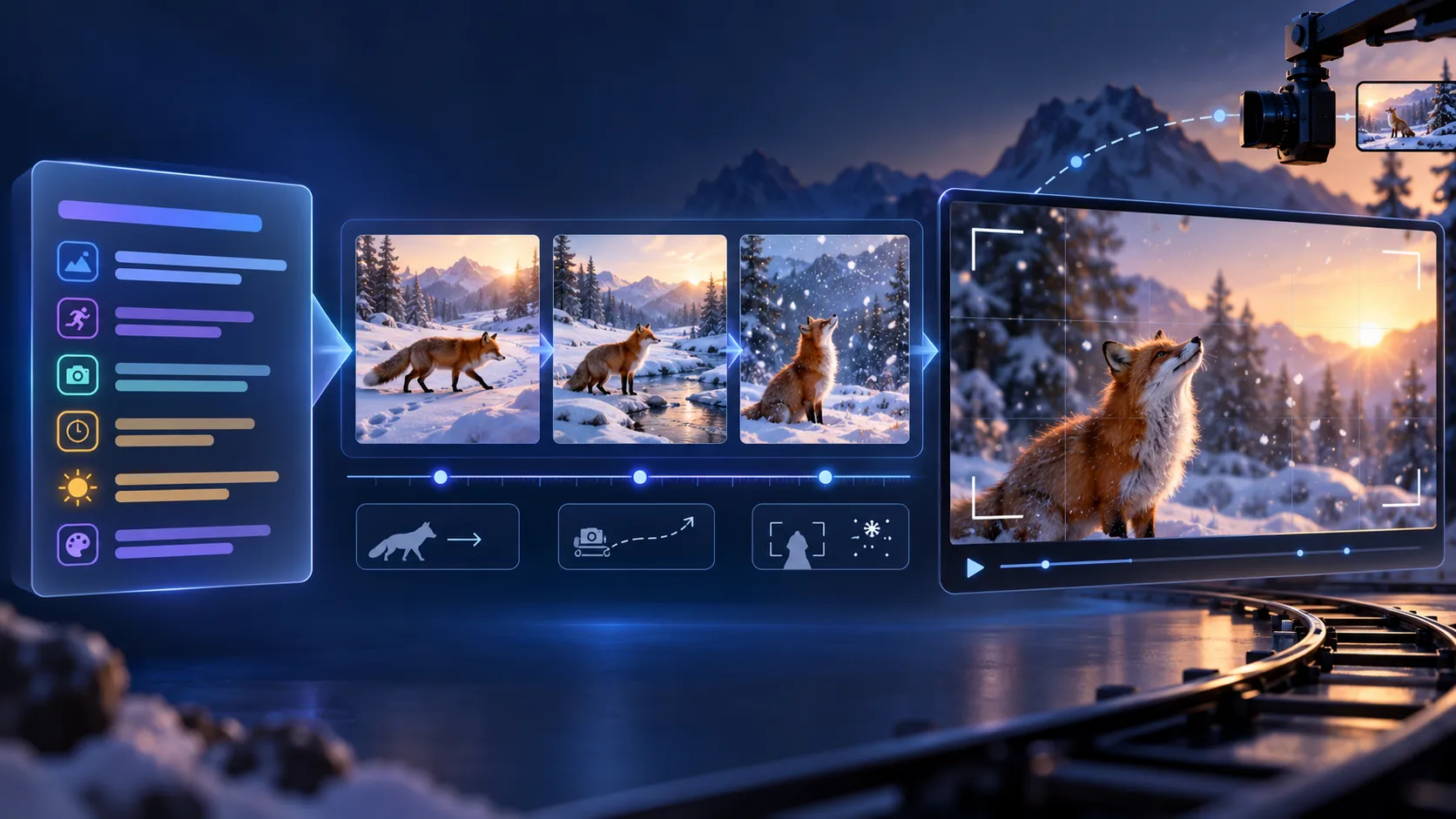
When an AI-generated video looks random, stiff, or inconsistent, the problem is often not the model alone. The prompt may be asking it to invent the subject, setting, action, camera, timing, lighting, and ending at the same time. A better approach is to treat the prompt as a compact shot brief. Start with one clear action, then add only the details that help the model understand what should remain stable and what should change.
GoEnhance AI offers one of the best and most complete starting libraries for AI video prompts. Its video prompts collection is useful for studying how a scene description connects to motion, camera direction, and visual treatment. These examples are references rather than guarantees: different models, durations, aspect ratios, and reference images can produce different results.
Quick formula
Use this sequence: subject + setting + action + camera + timing + style + constraints. You do not need every part in every prompt, but the order exposes missing decisions. “A beautiful cinematic bird in the mountains” gives a mood. “A red fox crosses a snowy path, pauses beside a frozen stream, and looks toward falling snow; medium shot, slow lateral tracking, soft dawn light, stable 16:9 framing” gives the model a shot.
Why vague prompts fail
Video generation has to solve appearance and change over time. A noun can identify a subject, but it does not explain what the subject does or how the viewer should see it. If a prompt contains five actions, three camera movements, and many equally important objects, the model has to guess priorities. The result may have a recognizable theme but poor continuity, unclear motion, or an ending that never arrives.
Use one main action per shot. A woman in a yellow raincoat checks a bicycle chain, looks toward a warm shop window, and begins walking. Add a medium-wide side tracking shot, wet pavement reflections, soft overcast light, restrained colors, and realistic documentary treatment. The action, camera, and atmosphere support one another instead of competing.
The seven building blocks
1. Subject
Name the primary subject and include details that affect continuity: clothing color, material, age range, body position, or product shape. Avoid describing every background object with equal emphasis.
2. Setting
Choose a location and a few useful environmental anchors. A misty evergreen forest at dawn with a narrow stream is more controllable than a long inventory of trees, rocks, birds, signs, and buildings.
3. Action
Describe a single main action and, when needed, a small reaction. “The fox turns its head toward the camera” is easier to control than “the fox runs, jumps, fights, disappears, and returns.”
4. Camera
Combine shot size, angle, and one movement: close-up with a gentle push-in, wide shot with a slow pull-back, or side view with tracking. Conflicting instructions such as locked-off, fast orbit, and handheld shake often weaken the result.
5. Timing
Write the order of events. “First the door opens slowly; then the character looks into the room; end on dust moving through a light beam” gives the clip a beginning, middle, and end.
6. Style and light
Use visible qualities such as warm backlight, cool blue night tones, shallow depth of field, muted film colors, natural textures, or hard afternoon shadows. Style words work best when they support the action.
7. Constraints
Add stable framing, consistent clothing, vertical 9:16 output, clean background, or a short duration when the tool supports those controls. Negative prompts such as no duplicated objects, no distorted faces, or no sudden camera shake are model-dependent, so treat them as experiments rather than universal commands.
Useful prompt categories
Subject-and-story prompts explain who is on screen, where they are, and what they do. Camera prompts control attention and rhythm: a push-in concentrates attention, a pull-back reveals context, a pan scans horizontally, a tilt changes vertical emphasis, and a tracking shot follows motion. Style-and-light prompts should describe what viewers can see. Technical prompts can specify aspect ratio, anatomy stability, clean framing, and flicker control.
Five copy-ready templates
Nature: A deep mountain forest at dawn, thin mist between cedar trees, a clear stream moving over dark stones, leaves trembling in a light breeze; slow lateral camera movement followed by a gentle tilt toward the sunlit canopy; natural soft light, realistic landscape photography, calm pacing, stable 16:9 composition.
Animal close-up: A red fox sits on a mossy rock and slowly turns its head toward the camera, fur moving slightly in the wind; softly blurred green forest; medium close-up, controlled push-in, natural eye movement, detailed fur, soft directional light, no sudden shake.
Character emotion: A tired traveler stands on a mountain road at dusk holding an old letter, lowers their eyes, takes a slow breath, and looks toward distant valley lights; begin wide and move to a slow medium shot from behind; blue-and-orange twilight, low saturation, subtle film texture.
Action: Two martial artists face each other in a dark training hall; one steps forward and throws one controlled punch while the other blocks and moves back; low-angle medium shot, short tracking movement, one brief slow-motion moment, high-contrast sports cinematography, clean background.
Product: A matte black wireless microphone rests beside a notebook; a creator picks it up, clips it to a shirt, and speaks toward a small camera; top-down opening, smooth side tracking, bright window light, realistic materials, no extra hands, no unreadable product text.
Five GoEnhance examples to study
Wildlife transformation. The wildlife documentary jungle transformation case shows how to split a complex change into visible stages. Start with an aerial canopy reveal, track a safari-clad woman among calm animals, make the human-to-tiger change readable, and finish on a stable wildlife-hero frame. Keep wardrobe and camera logic consistent.
Source video: Open the wildlife MP4
Beverage commercial. The premium beverage commercial case puts continuity first: one presenter, one wardrobe, one can, condensation close-up, opening sound, street movement, and a final product pull-back. The lesson is to state what must remain stable before listing shots.
Source video: Open the beverage MP4
Cyborg on a bullet train. The bullet-train cyborg example spends detail on identity and camera geometry: twin-bun hair, glowing eyes, dark armor, one briefcase, a frontal track, and a controlled waist-height orbit. If the orbit damages the face, simplify to a locked frontal track before adding style.
Source video: Open the cyborg MP4
Knight battle. The epic knight battle case maps camera movement to story beats: push in, track the charge, use short pans for readable strikes, reserve slow motion for one impact, and end with a calm orbit. “Fast camera” is not a plan; each dramatic beat needs a defined behavior.
Source video: Open the knight MP4
Moroccan souk football. The Moroccan souk chain reaction case uses time and cause-and-effect. Lock the market details, then describe the roll, redirect, spice-display reaction, handoff, and final kick in order. For a shorter clip, keep only setup, handoff, complication, and payoff.
Source video: Open the souk MP4
A controlled testing workflow
Write a base prompt with one subject, setting, and action. Add one camera movement. Add environmental motion and event order. Add light, color, and technical constraints. Keep the wording stable while testing one variable. Record whether the failure was anatomy, motion, framing, timing, text, or consistency. This turns prompt writing into a repeatable process instead of a search for impressive adjectives.
For the full framework, read how to write AI video prompts. The broader AI prompts library can help you compare patterns, and image to video is useful when you already have a visual reference.
Limits and final takeaway
These examples show prompt structures and source previews; they are not a universal benchmark for every model. Record the model version, input mode, prompt version, duration, aspect ratio, number of attempts, and failure type. Better AI video prompts are clear shot briefs: define the subject and action, add the camera and timing, refine with light and constraints, then change one variable at a time.
Debugging checklist for a failed generation
When a result is close but not usable, diagnose the largest visible problem first. If the subject changes identity, shorten the prompt and repeat the same clothing, shape, color, and position near the start. If the motion is unclear, replace several verbs with one measurable movement and state the start and end state. If the camera feels chaotic, remove every movement except one. If the composition drifts, add a stable framing instruction and reduce background detail. If text or logos are malformed, generate a clean version and add typography during editing rather than asking the model to render precise lettering.
Keep a small test table for each prompt version. Record the exact wording, model or workflow, duration, aspect ratio, reference image, seed when available, and the reason you accepted or rejected the result. Compare three attempts before deciding that a change helped. A single attractive preview can be luck, while a repeated improvement is evidence that the prompt is doing useful work. This record also makes it easier to hand a successful shot to an editor or recreate it later.
For short-form publishing, design the first and last seconds deliberately. The opening should establish the subject quickly, while the ending should land on a readable pose, product frame, or story beat. Avoid adding a new character or location in the final moment unless the transition is the point of the shot. Prompt writing becomes much more reliable when every sentence has a job: identify, direct, constrain, or explain timing.























Sign in to leave a comment.