

The Android ecosystem powers over 3 billion active devices worldwide as of 2025, according to Google. With this massive user base, Android applications are becoming larger, more complex, and feature-rich. However, scaling large codebases while maintaining team productivity is a significant challenge.
A study by JetBrains in 2024 found that 65% of Android developers struggle with managing large projects, citing issues like long build times, poor maintainability, and difficulty in team collaboration. These challenges highlight the importance of modularization in Android app development.
By breaking down applications into smaller, independent modules, development teams can improve scalability, accelerate build processes, and foster better collaboration. For an Android app development company or businesses using Android App Development Services, modularization is no longer optional—it’s a necessity.
What is Modularization in Android Development?
Modularization is the practice of splitting an Android application into smaller, self-contained units known as modules. Each module can represent:
- A feature (e.g., login, payments, or chat)
- A layer (e.g., data, domain, or presentation)
- A library (e.g., networking, analytics, or UI components)
Instead of working on one large monolithic codebase, developers work on smaller, manageable parts that integrate into the main app.
Key Benefits of Modularization
- Improved Scalability: Easier to add or update features without affecting the entire app.
- Faster Build Times: Gradle builds are faster when only small modules are recompiled.
- Better Team Collaboration: Teams can work independently on separate modules.
- Code Reusability: Modules can be reused across multiple projects.
- Clearer Architecture: Separation of concerns improves readability and maintainability.
Monolithic vs. Modular Android Apps
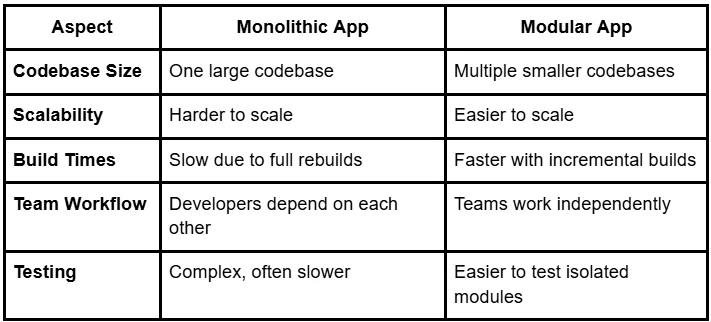
Most large-scale Android applications, like Netflix, Uber, and Airbnb, adopt modularization to manage complexity and team productivity.
Types of Modules in Android Development
When creating a modular architecture, different types of modules can be used:
1. Feature Modules
- Represent a specific app feature (e.g., authentication, cart, or profile).
- Useful for large apps with multiple functionalities.
- Can be developed and tested independently.
2. Library Modules
- Contain reusable code such as networking, database, or UI components.
- Provide consistency across different features.
- Reduce redundancy in the codebase.
3. Core Modules
- Hold the foundational layers of the app (data, domain, utilities).
- Ensure business logic and shared resources remain consistent.
4. Dynamic Feature Modules (DFM)
- Supported by Google Play’s Dynamic Delivery.
- Allow users to download specific features on demand.
- Reduce the initial APK size and improve user experience.
How Modularization Improves Scalability
Independent Feature Development
With modularization, teams can develop and deploy new features independently. This reduces dependencies and accelerates delivery timelines.
Faster Iterations
Gradle builds are significantly faster with modular projects. Developers can run and test only the affected modules instead of rebuilding the entire app.
Easier Maintenance
As the app grows, updating or replacing one module does not impact the rest of the system. This reduces regression risks and downtime.
Support for Continuous Integration
CI/CD pipelines perform better with modular codebases since tests and builds run on smaller, isolated modules.
How Modularization Enhances Team Collaboration
Clear Ownership
Each team owns a specific module. For example, one team manages payments, while another manages user accounts. This reduces conflicts and overlaps.
Parallel Development
Multiple teams can work on different modules simultaneously without blocking each other. This is essential for large-scale projects.
Simplified Code Reviews
Since modules are smaller, code reviews are faster and more effective. Teams can focus on specific logic without being distracted by unrelated parts.
Improved Testing
Testing becomes modular as well. Each module can have its own unit tests and integration tests, ensuring better quality assurance.
Best Practices for Modularizing Android Apps
1. Follow Clean Architecture Principles
- Separate concerns into layers: data, domain, and presentation.
- Each layer can be modularized for clarity and maintainability.
2. Define Module Boundaries Early
- Clearly define responsibilities of each module.
- Avoid overlap to prevent confusion and duplication.
3. Use Dependency Injection
- Libraries like Dagger or Hilt help manage dependencies between modules.
- Promotes loose coupling and scalability.
4. Leverage Gradle Build Features
- Configure Gradle for parallel builds.
- Use Gradle caching to improve build performance.
5. Start Small, Expand Gradually
- Begin by modularizing new features or layers.
- Gradually refactor existing monolithic codebase.
Challenges in Modularization
While modularization has clear benefits, it also comes with challenges:
- Initial Setup Effort: Splitting the app into modules requires planning and time.
- Dependency Management: Incorrect dependency handling can lead to circular references.
- Learning Curve: Teams may need training on modular development practices.
- Testing Across Modules: Integration testing may become complex when multiple modules interact.
These challenges can be overcome with proper guidelines, experienced developers, and collaboration tools.
Real-World Example of Modularization
Consider an e-commerce Android app with the following modules:
- App Module: The base launcher module.
- Feature Modules: Cart, Wishlist, Checkout, Order Tracking.
- Library Modules: Networking, Image Loader, Analytics.
- Core Module: Shared utilities and business logic.
Advantages Observed
- Faster build times by 40%.
- Independent deployment of new features like a "Wishlist" without affecting checkout.
- Clear ownership among development teams.
Such a modular approach is commonly adopted by enterprises working with an Android app development company to scale applications for millions of users.
Role of an Android App Development Company in Modularization
For businesses, modularization may sound complex without in-house expertise. Partnering with an experienced Android app development company provides access to:
- Proven Practices: Experts who have modularized large-scale apps before.
- Efficient Codebase Setup: Establishing module boundaries from the start.
- Custom Android App Development Services: Tailored solutions for specific industries.
- Scalable Architectures: Designing apps that can grow with business needs.
Such collaboration ensures businesses can scale their apps efficiently while development teams maintain productivity.
Conclusion
As Android applications continue to grow in size and complexity, modularization is emerging as the foundation for scalable and collaborative development. It not only improves build times and maintainability but also enhances team collaboration by allowing independent development.
For enterprises, adopting modularization with the support of an Android app development company or specialized Android App Development Services ensures long-term success. By investing in modular architecture today, businesses can build applications that are future-ready, scalable, and easier to manage.






























Sign in to leave a comment.