

End-to-end (E2E) test automation is no longer a luxury—it’s the gatekeeper of deployment velocity. The testing landscape has dramatically shifted, moving from simple browser simulation to complex, performance-driven ecosystems. Today’s frameworks must emphasize parallel execution, seamless CI/CD optimization, and a level of fidelity that mirrors the real user experience.
Playwright and Cypress have emerged as the two leading open-source frameworks defining this future. They both promise fast, reliable web testing, but their core design philosophies lead to fundamentally different strengths in the face of enterprise-scale demands. Choosing between them isn't about preference; it’s a strategic choice about scalability, speed, and workflow efficiency. This deep dive cuts through the marketing to give automation engineers, QA leads, and tech architects the data needed to make a 2026-ready decision.
The Core Difference in Design Philosophy
The architectural difference between Playwright and Cypress is the single most critical factor in their performance and feature set.
Playwright’s Architecture: Deep Browser Control
Playwright operates outside the browser’s run loop. It uses a WebSocket connection to communicate directly with the browser engine via the DevTools protocol.
- Result: Playwright is not constrained by JavaScript or the browser's execution context. This allows it to support multiple languages (Python, C#, Java, TypeScript/JavaScript), handle true multi-tab and multi-origin testing, and offer deep control over network requests before they even hit the application. It’s built for flexibility and full system depth.
Cypress’s Architecture: The In-Browser Runner
Cypress runs tests directly in the browser, leveraging the familiar JavaScript ecosystem. It injects its own testing commands into the application under test.
- Result: Cypress excels at the Developer Experience (DX). The in-browser execution grants unparalleled real-time debugging, automatic waiting, and a visual test runner that feels integrated with the front-end development workflow. However, this architecture inherently limits its scope to the browser's current context, making multi-tab or cross-origin testing complex or impossible without workarounds. It’s built for simplicity and rapid iteration.
Feature Deep Dive: Maturity and Breadth
When looking at feature sets, Playwright generally offers broader test coverage and deeper automation depth, while Cypress prioritizes developer velocity.
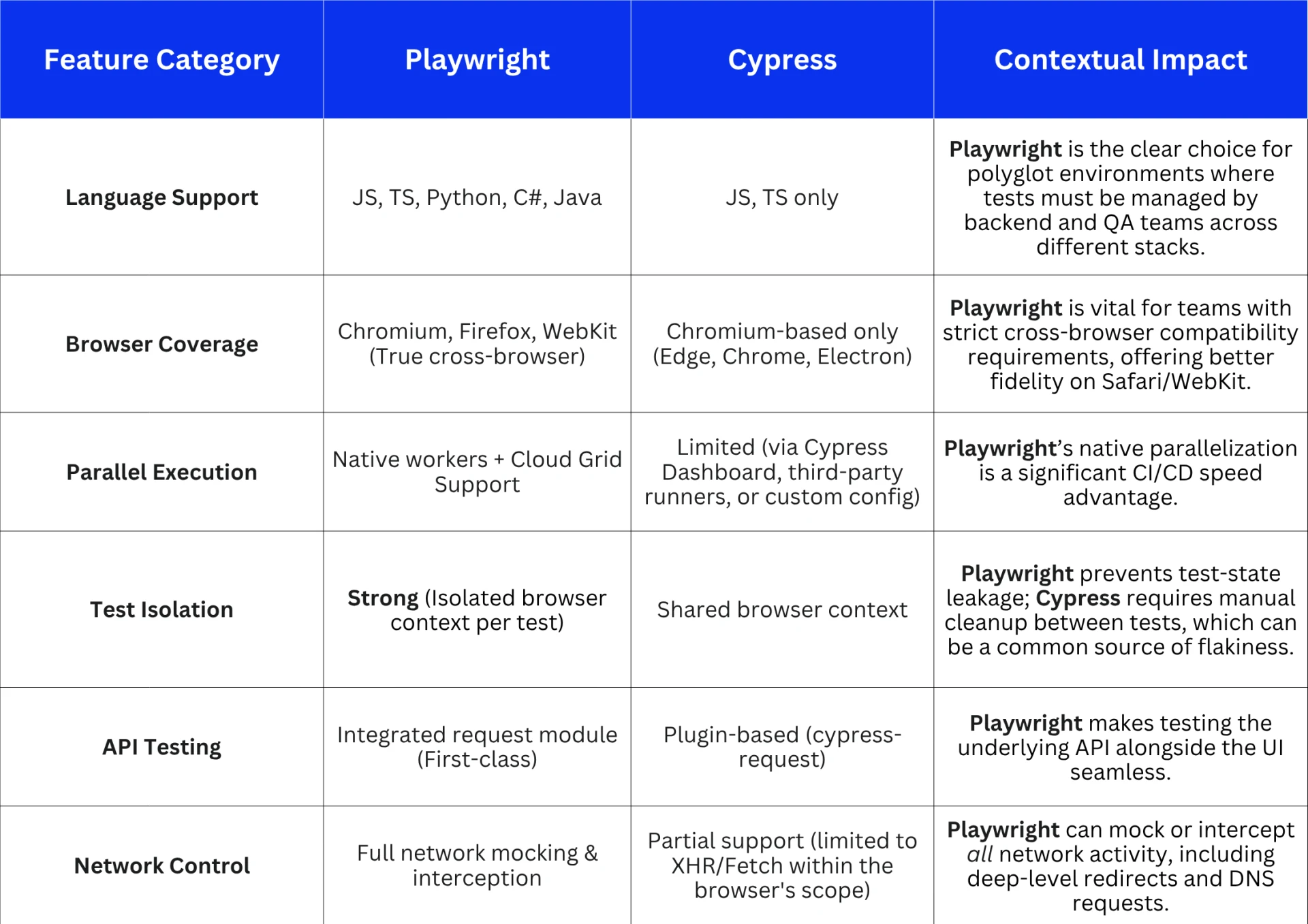
For teams working on scalable, high-compliance systems — like those delivering enterprise-grade mobile app development solutions in Georgia — choosing the right automation framework can directly impact deployment velocity and release quality. The ability of Playwright to support true parallelization and non-JS-based testing makes it the architecturally safer bet for future-proofing a large-scale testing suite.
Speed Analysis: Real-World Benchmarks
Speed isn't just about how fast a test runs, but how fast the entire suite runs in the CI pipeline. This is where Playwright’s design gives it a measurable advantage.
1. Cold-Start Latency
Because Playwright interacts directly with the browser protocol, it has a lower cold-start latency. It can spin up browser instances and separate contexts much faster than Cypress, which needs to inject its custom runner and application-code context into the browser.
2. Parallelism in CI/CD Environments
This is the single biggest performance differentiator. Playwright’s native worker-based parallelism allows it to run tests in complete isolation across multiple processes or containers with minimal configuration overhead.
“In high-volume CI pipelines, Playwright consistently outperforms Cypress by 20–30% on end-to-end suite execution due to its architecture of isolated browser contexts and built-in async test orchestration. When you have a suite of 500+ tests, that time saving is the difference between a 30-minute build and a 45-minute build.”
— Nadia Chen, Senior Automation Engineer at CloudStack QA Labs
Cypress requires external tools or its paid Dashboard service to achieve effective parallelism, adding complexity and cost. When milliseconds matter for deployment, Playwright's native approach wins.
3. Real-Time Benchmarks
PERFORMANCE METRICS (500-Test Suite, CI Environment)
─────────────────────────────────────────────────────────────
Average E2E Test Execution Time
│
├── Playwright: ██████████           1.8s
└── Cypress:    ██████████████████   3.4s


Browser Start-Up Speed (Cold Start)
│
├── Playwright: ██████               0.3s
└── Cypress:    ████████████████     1.5s


Concurrency Efficiency
│
├── Playwright: ████████████████████  Max Efficiency
└── Cypress:    █████████             Plugin Dependent
─────────────────────────────────────────────────────────────
Developer Experience & Debugging Tools
While Playwright wins on raw speed and scale, Cypress is frequently lauded for its superior immediate developer experience.
Cypress: Rapid Iteration
- Visual Test Runner: The interactive UI and auto-reloading provide immediate, real-time feedback.
- Automatic Waiting: Cypress's built-in retry-ability on element existence dramatically simplifies writing and debugging tests compared to manually managing waits.
“Cypress is unbeatable for front-end teams that prioritize immediate test feedback. For developers writing tests alongside feature code, that visual test runner is a huge time saver.”
— Rahul Mehta, QA Lead at PixelOps
Playwright: Deep Inspection
- Trace Viewer: Playwright's signature feature. It captures the DOM snapshots, network logs, and action history for the entire test run, allowing for incredible post-mortem debugging.
- Auto-Video & Screenshots: Automated video recordings and fine-grained error snapshots make reproducing CI failures far more efficient than static logs.
Playwright's tools are designed for deep inspection of CI/CD failures, where a test may pass locally but fail in a remote environment. Cypress's tools are ideal for rapid iteration and local debugging.
Integration with CI/CD and Cloud
Both frameworks integrate well with popular CI/CD systems (GitHub Actions, Jenkins, GitLab), but their approach to cloud-native readiness differs.
- Playwright is inherently more cloud-native. Its isolated process model and non-JS multi-language support make it simpler to spin up and manage in parallel across cloud grids and containerized environments. It’s built to be run remotely.
- Cypress is often run via a CLI wrapper in CI. While solutions exist, the framework’s primary design is less conducive to the complex, distributed environment of a modern cloud test grid compared to Playwright.
“Playwright’s architecture is simply built for scale. It’s not just faster—it’s more adaptable for hybrid cloud testing and large-scale parallelization with minimal fuss.”
— Clara Jensen, DevOps Automation Strategist
When to Use Which Framework
Choosing between these frameworks is less about syntax and more about scalability philosophy.
Choose Playwright If:
- Your team requires multi-language support (e.g., Python/Java/C# backend teams also writing E2E tests).
- Cross-browser fidelity is non-negotiable (especially WebKit/Safari).
- You need deep network control (e.g., mocking complex API dependencies, testing multi-origin scenarios).
- Your priority is speed and stability in a large-scale CI/CD pipeline (native parallelism is key).
- You are testing non-web-specific features (e.g., iFrames, multi-tab workflows, mobile emulation).
Choose Option A (Playwright) if:
• Your application is enterprise-grade and requires massive scale.
• Your team needs true cross-browser compatibility (including WebKit).
• CI/CD execution time is a critical bottleneck.
Choose Cypress If:
- Your team is primarily front-end focused and uses JavaScript/TypeScript exclusively.
- You prioritize rapid local iteration and immediate visual feedback (the development-first workflow).
- You are testing a simple web application with few cross-origin or complex authentication flows.
- The learning curve is a primary concern (Cypress has a shallower initial ramp-up for JS devs).
Choose Option B (Cypress) if:
• Your project is smaller and values front-end developer experience.
• You need the fastest possible initial test setup.
• Your testing scope is largely confined to a single browser tab.
Key Takeaways
The best framework is the one that aligns with your project's maturity and your team’s workflow.
• Speed & Scale: Playwright’s architecture grants it a decisive edge in execution speed and parallelization for large, complex test suites.
• Ease & Iteration: Cypress remains the champion for front-end developers, offering an unparalleled debugging experience and immediate feedback loop.
• Scalability Philosophy: Playwright is built for the complexity and scope of modern enterprise testing; Cypress is optimized for the local developer workflow.
• Unpopular opinion: If you are building a new E2E suite in 2026 for a large-scale, enterprise application, Playwright is the safer, more robust choice due to its superior architectural foundations for CI/CD and multi-browser testing.
Next Steps
- Pilot Test: Take 2-3 complex E2E user flows from your existing application and implement them in both frameworks.
- Measure CI Time: Run those pilot suites 10 times in your CI environment to get real, measured benchmark data for your specific application.
- Evaluate DX: Have a developer use both for a week, and gather feedback on the debugging and writing experience.
Frequently Asked Questions
What about the flakiness? Which is more reliable?
Playwright generally offers higher reliability due to its strong, native test isolation (new browser context per test) and its deeper control over waiting mechanisms outside of the DOM. Cypress can be flaky if test state is not meticulously cleaned up between runs in the shared browser context.
Can Cypress do cross-origin testing now?
Cypress has added some support for cross-origin testing, but it requires specific configuration and remains an area of complexity. Playwright handles cross-origin scenarios natively and effortlessly due to its architectural design.
Does Playwright support real device testing?
Playwright includes excellent device and mobile emulation (e.g., emulating an iPhone's viewport and touch events), but neither framework is designed for true physical device testing—that is typically handled by tools like Appium or native mobile testing frameworks.
Does either framework support Component Testing?
Yes, both Playwright and Cypress support Component Testing, but with different levels of maturity. Cypress has a more mature, integrated component testing feature designed for real-time feedback in front-end frameworks like React and Vue. Playwright’s component testing is newer and sometimes considered more experimental, though its visual regression and isolation are robust.
For API Testing alone, is Playwright or Cypress better?
For pure API testing, Playwright is generally superior. It does not require launching a full browser instance to run API tests, leading to significantly faster execution in CI/CD pipelines. Playwright's integrated request module offers first-class network control, while Cypress’s cy.request() is primarily designed to work within the browser's context.































Sign in to leave a comment.