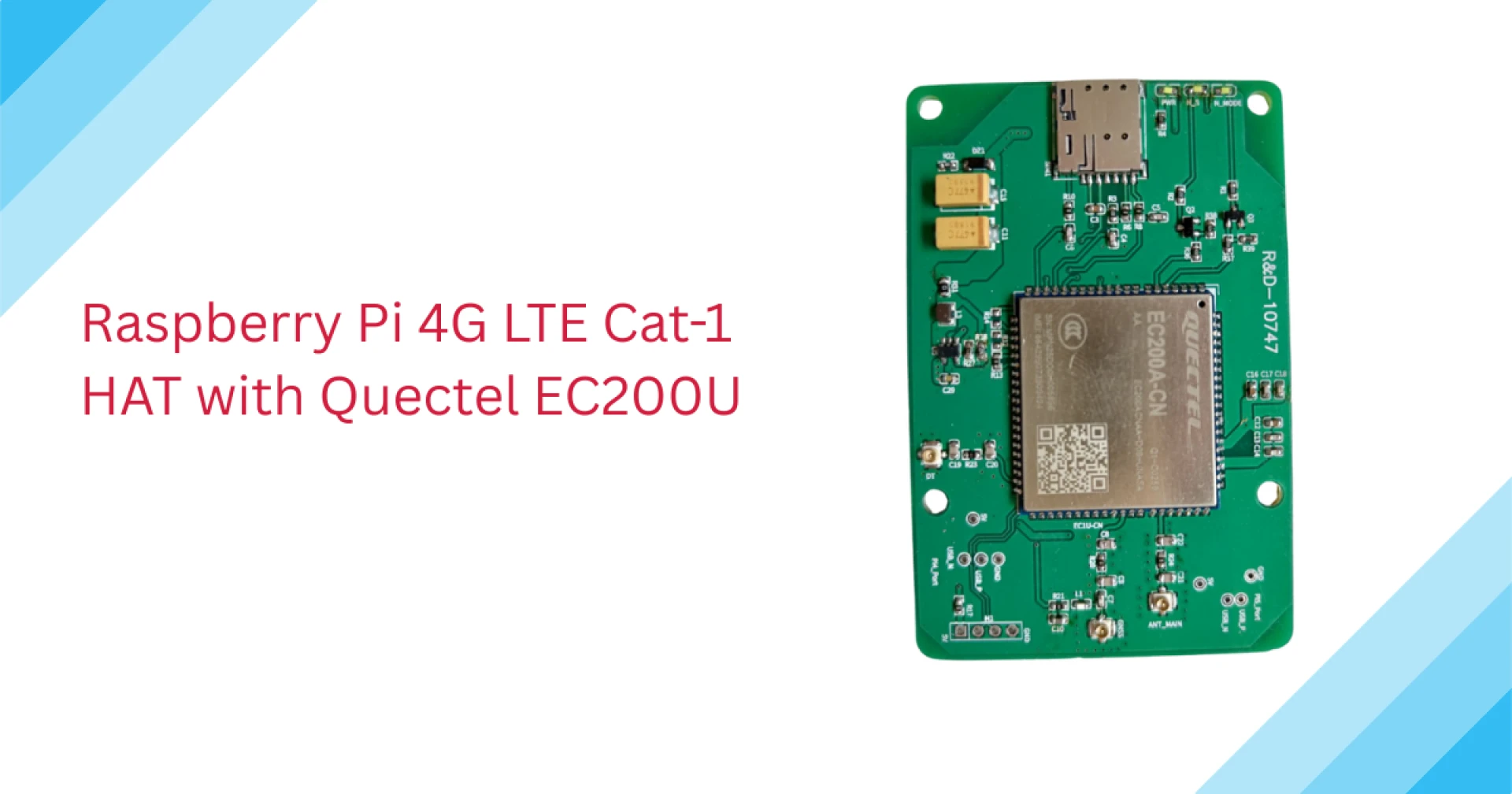

If you want reliable, low-power cellular for Raspberry Pi projects (asset trackers, remote sensors, industrial gateways, POS terminals), a 4G LTE Cat-1 HAT built around the Quectel EC200U is an excellent, practical choice. Below I’ll walk you through what the EC200U is, how HATs are built around it, hardware selection, detailed setup (hardware + software + debugging), power and RF considerations, production tips, security and remote management, limitations and alternatives — everything you need to actually design, deploy, and maintain devices.
What is the Quectel EC200U
The EC200U is an LTE Cat-1 (Cat-1 bis) module optimized for M2M/IoT use: compact LCC package, small footprint, low cost and modest throughput (suitable for telemetry and moderate data). It provides up to ~10 Mbps down / ~5 Mbps up, supports multiple LTE bands (regional SKUs), offers USB and UART interfaces, and has optional GNSS and Bluetooth variants. The EC200U is documented by Quectel with datasheets, hardware design files and an AT command manual used by integrators.
Why Cat-1? it hits a sweet spot: enough bandwidth for IoT payloads and occasional file downloads, while keeping cost, complexity and power lower than Cat-4/5/5G parts.
What a Raspberry Pi “4G LTE Cat-1 HAT with EC200U” actually contains
A typical HAT built around the EC200U bundles:
- the EC200U module (or a mini-PCIe breakout with EC200U),
- a nano-SIM slot and SIM holder spring,
- power regulation / level shifting circuitry to feed the module (VBAT/DC-DC) and protect the Pi from transient draws,
- cellular (and often GNSS) antenna connectors or FPC antenna pads,
- status LEDs and sometimes an on-board USB/serial multiplexer, and
- mechanical mounting to the Pi’s 40-pin header or a mini-PCIe socket.
- Vendors often ship “HAT” variants that plug onto the Pi header, or mini-PCIe HATs that accept full mini-PCIe cellular cards. Typical vendor docs and HAT manuals list exact pinouts and installation notes.
Choosing the right HAT & EC200U SKU — concrete checklist
- Bands / regional SKU — EC200U comes in variants (CN/EU/AU/etc.). Match the SKU bands to your carrier(s) and roaming needs. If you target many countries, pick a global SKU or confirm roaming agreements.
- Form factor — direct EC200U-LCC board vs mini-PCIe vs HAT: choose based on mechanical constraints and whether you want the Pi header freed.
- GNSS required? — get a GNSS-enabled EC200U or a HAT that exposes a GNSS antenna if you need location. Many HATs include a GNSS antenna pad or connector.
- Antenna connectors — SMA/u.FL/FPC? For best performance choose external SMA or u.FL (not just printed trace antennas).
- Power budget — check the HAT’s DC-DC regulator capability and your Pi PSU. If you plan frequent transmissions, ensure the supply handles TX bursts. See “Power” section below.
- Driver mode — confirm whether HAT exposes the modem as USB-network (ECM/qmi/MBIM) or serial (PPP/AT). This affects software setup. Many EC200U boards present both a USB network interface and AT ports.
Hardware setup — step-by-step
- Power down the Pi. Always install the HAT or plug in the mini-PCIe card with the Pi off.
- Insert nano-SIM (correct orientation) and lock the holder. Use an IoT data plan (check APN, carrier settings and Cat-1 support).
- Attach antennas — connect cellular and GNSS antennas to the proper connectors. Run the antenna vertically and away from large metal surfaces for best reception.
- Attach the HAT to the 40-pin header (or insert mini-PCIe card and secure). Make sure any jumpers (power/USB route) are set per HAT manual.
- Power-on and watch dmesg — the EC200U usually enumerates as multiple USB functions (e.g., a modem/AT port and a network interface such as cdc_ether, qmi_wwan or option). Note the /dev/ttyUSB* ports for AT, and the network interface (e.g., wwan0 or usb0).
Software — modes, drivers and exact commands
Driver/mode overview
- ECM / CDC-Ether — modem appears as a USB Ethernet device (easy: DHCP).
- QMI / NCM / qmi_wwan — QMI gives better performance and modem control; libqmi + qmi-network or uqmi can bring the link up.
- MBIM — less common for Cat-1, more for Windows/modern WWAN stacks.
- PPP / AT — legacy but still useful for super-simple setups or when only serial is exposed.
- EC200U supports multiple modes and exposes AT channels for control — consult the AT manual.
Signal, diagnosis & AT commands
- AT+CSQ — RSSI / signal quality (0–31; 99=unknown).
- AT+CREG? and AT+CGREG? — network registration status.
- AT+CGDCONT=1,"IP","<APN>" — set APN profile.
- AT+QNWINFO (Quectel) — network type and band.
- AT+QICSGP / AT+QIACT — PDP context activation on some Quectel modules (older command sets).
Always consult the EC200U AT manual for exact command variants and responses.
Power & thermal considerations (real numbers you should plan for)
- Supply voltage: EC200U VBAT typically around 3.7–4.2 V (battery); many dev boards accept USB-C 5 V and regulate down. Check HAT docs.
- Transmit bursts: cellular transmit spikes can draw hundreds of milliamps. The EC200U datasheet / hardware design documents give current graphs — plan for peak current and transient suppression on your 5 V supply (large electrolytic / low ESR caps near the HAT). If your Pi reboots during TX, the PSU is likely undersized.
- Thermals: Cat-1 modules generate less heat than higher categories, but in sealed enclosures consider thermal dissipation and keep the module away from hot SoCs or heat sources.
RF & antenna best practices
- Place the antenna away from metal and other RF noise sources. Keep vertical for omnidirectional antennas.
- Use external antennas (SMA/u.FL) if signal matters — on test benches or vehicle installs a magnetic or screw-mount antenna beats PCB trace antennas.
- If using GNSS, mount that antenna with a clear sky view and away from cellular Tx (to avoid desense).
Security, remote management & FOTA
- VPN / reverse tunnels — for remote devices behind carrier NAT, run WireGuard/OpenVPN from the Pi to a central server so you can access it securely.
- FOTA: Quectel supports FOTA workflows; for Pi-based systems you’ll handle application and OS updates via your chosen update system (e.g., Mender, SWUpdate, or custom scripts). FOTA of the EC200U firmware itself is usually done via Quectel tools (QFlash/firmware packages) when needed.
- Hardening: disable unused serial ports, change default passwords, enable automatic monitoring and alerting (e.g., watchdogs that report to a central service).
Production & deployment concerns
- Regulatory / carrier approvals: if producing large quantities for sale, confirm module approvals (CE, FCC, CCC) for your SKU and region. Many EC200U SKUs carry regional certifications.
- SIM lifecycle: decide between consumer SIMs, M2M SIMs, or eSIM (if supported) for fleet deployments. Data plans that support Cat-1 band/throughput and roaming are crucial.
- Logging & troubleshooting: store serial logs (ttyUSB AT responses) and basic health metrics (RSSI, registration status, uptime) locally and push to central logging for fleet troubleshooting.
Limitations — when NOT to use EC200U Cat-1 HAT
- High-bandwidth video streaming or heavy downloads — Cat-1 is not designed for continuous HD streams; use Cat-4/5 or 5G if you need regular high throughput.
- 2G/3G fallback risk — some carriers have sunset older networks. If your design relies on GSM/3G fallback, confirm local carrier timelines.
Alternatives & upgrade paths
- Cat-4 miniPCIe HATs (if you need higher bursts occasionally).
- LTE-M / NB-IoT modules for ultra low power and very small payloads (but different coverage/latency and usually no IPv4/IPv6 Internet).
- USB 4G modems for simpler plug-and-play but less integrated HAT features.
Example: a ready-to-use Raspberry Pi workflow
- Plug HAT, nano-SIM, antennas → power Pi.
- Confirm device with dmesg and lsusb.
- Check AT access (minicom) and run AT+CSQ, AT+CPIN?.
- Configure APN (AT+CGDCONT) or use NetworkManager “Mobile broadband” profile.
- If qmi_wwan, use libqmi-utils (qmi-network) for robust connectivity.
- Add a systemd service that ensures qmi-network/NetworkManager reconnects on link loss, and monitor signal + uptime to central dashboard.
Where to read the official docs
- Quectel EC200U product/spec pages and standard specification (datasheet).
- EC200U AT Commands Manual and Hardware Design / Reference Design (essential for low-level integration).
- Vendor HAT manuals (example HAT datasheets and installation guides).
Final takeaway
A Raspberry Pi 4G LTE Cat-1 HAT with Quectel EC200U is a pragmatic, cost-efficient cellular solution for IoT devices that need reliable, low-to-moderate bandwidth and long battery life. Choose the right SKU for regional bands, plan for power and antenna needs, prefer managed connectivity (QMI/NetworkManager) for reliability, and implement secure remote management for fleet devices. With correct integration and a sturdy power design, the EC200U HAT will give you robust cellular connectivity without the cost, complexity and energy hit of higher-speed modems.



























Sign in to leave a comment.