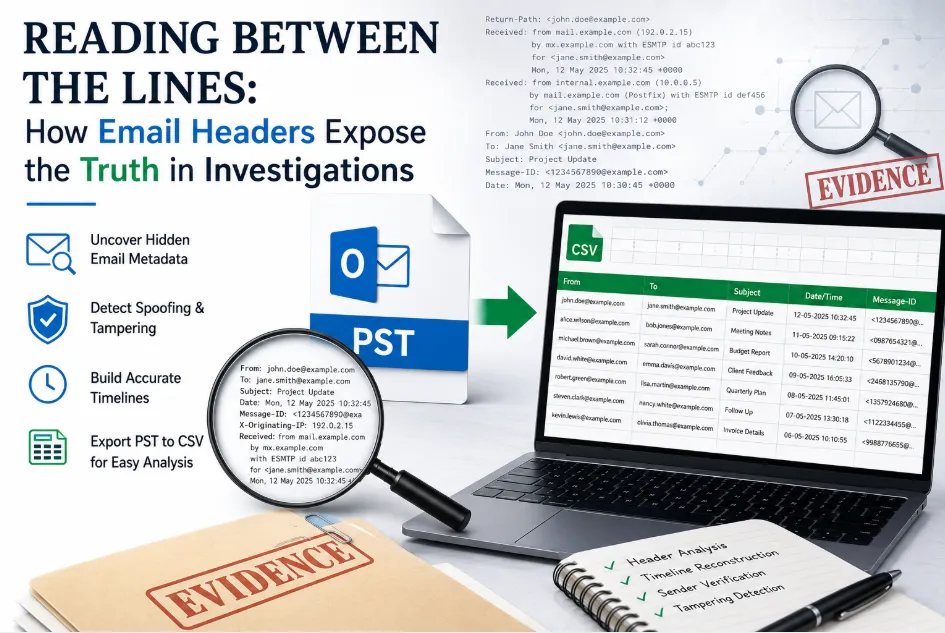

Most people think of an email as two things: who it's from, and what it says. Investigators know better. Tucked inside every message is a second layer of information that never shows up in the inbox view the header. It records exactly how a message traveled, when it was created, and whether anything about its journey looks unusual. For anyone working in digital forensics, corporate compliance, or litigation support, that hidden layer is often where the real evidence lives.
Outlook stores this information inside PST files, and learning to extract, read, and organize that header data is one of the most underrated skills in modern email investigation work.
Header Data: The Part of an Email Nobody Reads (Except Investigators)
An email header contains details most users never see and never need to: the message ID, the sender's originating server, the full recipient chain, delivery and receipt timestamps, and the path the message took across mail servers before landing in an inbox. On its own, one header tells a small story. Across thousands of emails, a pattern of headers can tell a much bigger one revealing spoofed senders, backdated messages, or communications that were moved between folders after the fact.
This is exactly why header analysis has become a standard step in:
- Fraud and misconduct investigations
- Litigation involving disputed communications
- Regulatory compliance reviews
- Insider threat and data exfiltration cases
Why PST Files Deserve Careful Handling
Because a PST file is a full mailbox archive, it isn't something an investigator should casually open and click through in a live Outlook client connected to a network. Doing so risks altering timestamps, triggering sync events, or otherwise disturbing the very evidence under review. Forensic best practice calls for working from an isolated copy of the file, previewing its contents without modifying anything, and documenting every step of the extraction.
That standard is difficult to meet using Outlook alone. The built-in import/export feature works, but it depends on having a classic desktop version of Outlook installed and configured, and it offers no real way to preview messages or verify integrity before exporting. For a handful of emails, that's tolerable. For an entire corporate mailbox spanning years of correspondence, it isn't.
Turning Thousands of Headers Into One Readable Report
The practical fix is to pull the header fields sender, recipients, subject, timestamps, message ID, folder path into a single structured file rather than reviewing messages one at a time. Once that data sits in rows and columns, an investigator can do in minutes what used to take days: sort by date to build a timeline, filter by sender to isolate a person of interest, or search for message IDs to trace how a specific email moved through the system.
This step taking a sprawling mailbox and reducing it to a flat, searchable table — is essentially what people mean when they talk about the process to Export PST File into CSV File Format. It's not about discarding information; it's about making the information usable at scale.
Where Native Outlook Tools Fall Short
A few recurring issues show up whenever teams try to rely purely on Outlook's export wizard for this kind of work:
Version dependency. Only the classic desktop editions (2010 through 2019, generally) support full PST handling. The New Outlook and the web app simply won't do it, which catches a lot of teams off guard.
No pre-export review. Outlook exports what you tell it to, but it won't let you preview or flag anything unusual beforehand — you're exporting blind.
Fragile bulk handling. Selecting multiple folders across a large PST and keeping header mappings consistent is manageable for a small mailbox and genuinely painful for a large one.
Risk to the original file. Any misstep a wrong file association, an accidental extension change can corrupt the very PST file that's supposed to remain forensically intact.
The Role of Dedicated Forensic Tools
This is the gap that purpose built Email Forensics software is meant to fill. Rather than routing everything through a live Outlook installation, these tools open PST files directly and independently, giving investigators a forensic preview of every email, attachment, and folder before any export happens. Selection can be granular — individual messages — or comprehensive entire folders or full mailboxes — without ever writing changes back to the source file.
Most tools in this category also let investigators tailor which header fields get pulled, since the relevant metadata differs depending on whether the data in question is email, calendar entries, chat logs, or SMS records. The result is a clean, plain-text file that opens in Excel or any spreadsheet application, ready for sorting, filtering, and reporting.
A Realistic Workflow for Header Extraction
In practice, most investigations follow a similar sequence:
First, the PST file is loaded into the analysis tool and previewed to confirm scope and folder structure. Second, the investigator decides whether to target specific messages or pull entire folders in bulk. Third, the header fields are exported into a structured file. Fourth, that file is opened and analyzed sorted by timestamp, filtered by sender, or cross-checked against other evidence sources.
Each step is documented, repeatable, and critically leaves the original PST file untouched, which matters enormously if the extraction methodology is ever challenged in court or during an audit.
One Mistake to Avoid
It's worth repeating a point that trips people up more often than expected: changing a file's extension from .pst to .csv does nothing useful. The underlying format doesn't change just because the file name does, and forcing it can corrupt the file outright. Proper conversion has to go through either Outlook's export feature or a dedicated extraction tool — there's no shortcut through the file system.
Closing Thoughts
Investigators rarely get to work with clean, obvious evidence. More often, the truth is sitting in metadata nobody was meant to scrutinize — a header field, a timestamp, a routing path that doesn't line up with the rest of the story. Getting that data out of a PST file and into a format built for analysis isn't a technical afterthought. It's often the step that turns a pile of emails into an actual finding.





























Sign in to leave a comment.