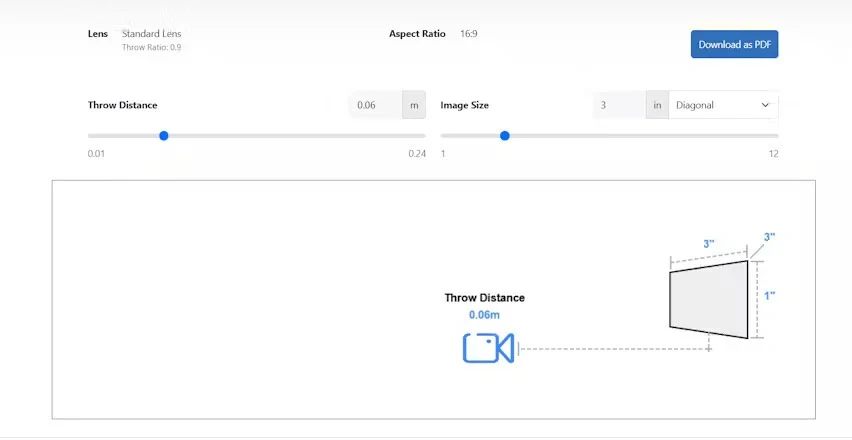

For professional AV installers, understanding Projector Throw Ratio is critical to delivering high-quality projections that meet client expectations. The throw ratio determines how far a projector must be from the screen to produce a specific image width, directly affecting image size, clarity, and placement flexibility. For installers working across different projector models and room layouts, mastering throw ratio conversions is essential for accurate installations and optimized viewing experiences.
What Is Projector Throw Ratio
Projector Throw Ratio is defined as the ratio between the distance from the projector to the screen (throw distance) and the width of the projected image. The formula is expressed as:
Throw Ratio = Throw Distance ÷ Image Width
For example, if a projector is placed 12 feet from a 6-foot wide screen, the throw ratio is 2.0. This specification helps installers determine projector placement for various screen sizes and room configurations, ensuring the projected image fills the screen correctly without distortion.
Why Throw Ratio Conversion Is Important
Installers often encounter different types of projectors, room sizes, and screen dimensions. Throw ratio conversion allows installers to:
- Adapt to Room Constraints
- Not every room allows for ideal projector placement. By converting throw ratios, installers can adjust projector positions to fit walls, ceilings, or furniture constraints.
- Accommodate Different Screen Sizes
- Clients may upgrade screens or require specific image dimensions. Converting throw ratios helps maintain image quality and proper coverage across varying screen widths.
- Compare Projector Models
- Different projectors have varying throw ratios. Converting ratios allows installers to compare models and select the best option for a particular installation scenario.
- Ensure Image Clarity and Focus
- Incorrect placement due to mismatched throw ratios can cause blurred or distorted images. Conversion ensures that the projector produces a sharp, properly sized image.
How to Convert Throw Ratios
Step 1: Understand the Original Throw Ratio
Start with the projector’s specified throw ratio, usually provided by the manufacturer. For instance, a projector may have a throw ratio of 1.5:1, meaning the projector must be 1.5 feet away for every 1 foot of image width.
Step 2: Identify Screen Width or Desired Image Size
Determine the width of the screen or the desired projection width. This is essential for calculating the correct throw distance.
Step 3: Use the Throw Distance Formula
Convert the throw ratio into throw distance using:
Throw Distance = Throw Ratio × Image Width
For example, for a 1.5 throw ratio projector and a 100-inch wide screen:
Throw Distance = 1.5 × 100 inches = 150 inches (12.5 feet)
Step 4: Adjust for Room Conditions
Consider room constraints, mounting height, and furniture placement. If the calculated distance cannot be achieved, consider:
- Using a projector with a lower throw ratio (short throw or ultra short throw)
- Adjusting the screen size
- Utilizing zoom lenses or lens shift features
Converting Between Short Throw and Long Throw Projectors
Installers often need to compare short throw and long throw projectors. Conversion involves understanding the ratio differences:
- Short Throw Projectors typically have throw ratios between 0.5 and 1.0.
- Long Throw Projectors have ratios above 1.0.
For example, if a short throw projector with a ratio of 0.8:1 produces a 100-inch wide image from 80 inches away, converting to a long throw projector with a ratio of 2.0:1 would require:
Throw Distance = 2.0 × 100 inches = 200 inches (16.6 feet)
This conversion helps installers plan space requirements and choose the appropriate projector model.
Using Online Tools for Throw Ratio Conversion
While manual calculations are effective, online throw ratio calculators provide quick and accurate conversions. Installers can:
- Enter screen width and projector throw ratio
- Obtain recommended throw distance instantly
- Adjust for zoom range and lens shift
- Compare multiple projector models efficiently
Online tools save time, reduce errors, and simplify complex installations, especially in commercial or multi-projector setups.
Tips for Installers
- Measure Twice, Calculate Once
- Accurate room and screen measurements are crucial for correct throw ratio conversions.
- Check Projector Specifications
- Verify manufacturer specifications for throw ratio, zoom range, and lens shift capabilities.
- Account for Ceiling and Wall Mounts
- Installation height and angle may affect the effective throw distance and image alignment.
- Plan for Ambient Light
- Brightness and image clarity can be affected by room lighting, which may influence the projector choice or throw ratio adjustments.
- Document Conversions
- Maintain a log of throw ratio conversions for future reference, especially in multi-room or corporate installations.
Conclusion
For professional AV installers, understanding and converting Projector Throw Ratio is essential to achieving optimal image quality, accurate placement, and flexible installations. By mastering throw ratio conversions, installers can adapt to different room sizes, screen widths, and projector models while ensuring clear, properly sized images for clients.
Manual calculations and online tools both play a role in accurate throw ratio conversion. Combining these methods allows installers to plan effectively, avoid errors, and deliver high-quality projector setups every time.
Read more: https://articlefun.com/how-throw-ratio-influences-projection-distance/

























Sign in to leave a comment.