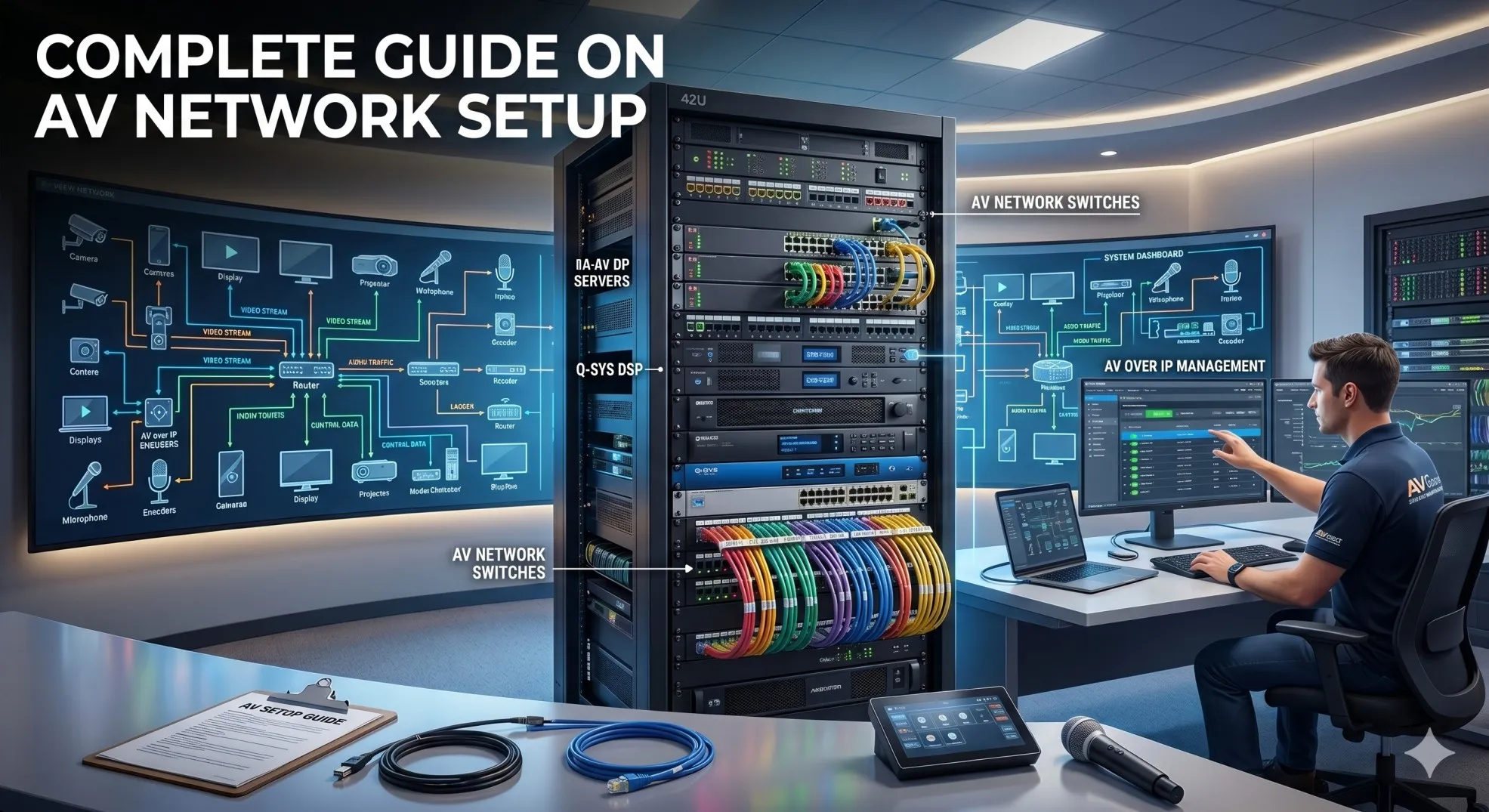

How do you design and deploy reliable AV networks for large-scale digital signage systems spanning hundreds or thousands of displays? The answer: Implement purpose-built network architecture with dedicated VLANs for content distribution, adequate bandwidth for HD/4K/8K streaming, efficient multicast protocols, centralized content management servers, edge caching strategies, and robust QoS policies—creating infrastructure that delivers synchronized content to massive display networks while maintaining flexibility for updates and scalability for future growth.
Designing digital signage networks in 2026 requires the same systematic planning as residential installations but at commercial scale. Just as homeowners use a detailed network wiring diagram to plan their home network infrastructure—documenting every ethernet house wiring diagram connection, switch location, and cable path—AV integrators must create comprehensive network architectures for digital signage deployments that map content servers, network switches, display endpoints, and bandwidth allocation across entire buildings or campuses. Understanding Home Network Wiring fundamentals including structured cabling principles, bandwidth management, signal distribution, and proper network segmentation provides the foundation for designing enterprise digital signage networks that reliably deliver content to hundreds of displays simultaneously.
For AV integrators, system designers, and digital signage consultants, mastering network architecture for signage deployments is critical as organizations deploy increasingly sophisticated visual communication systems requiring rock-solid reliability, instant content updates, and seamless scalability.
Key Takeaways
- Digital signage networks require dedicated VLAN architecture separating content traffic from business data
- Bandwidth planning must account for simultaneous content updates across hundreds of displays during peak refresh
- Multicast distribution reduces bandwidth consumption by 90% compared to unicast for identical content to multiple displays
- Edge caching stores content locally near displays reducing core network load and enabling offline playback
- Centralized content management systems (CMS) coordinate updates, scheduling, and monitoring across entire networks
- QoS policies ensure content delivery doesn't impact business-critical applications on shared infrastructure
- PoE++ (802.3bt) simplifies deployment powering both media players and displays through single cable
- Cloud-hybrid architectures in 2026 balance local caching with centralized cloud management
- AI-powered content optimization automatically adjusts bitrates and delivery schedules based on network conditions
- 4K/8K content requires 25-100 Mbps per display demanding robust infrastructure and smart caching
- Network redundancy with automatic failover prevents entire signage networks from going dark during outage
What Is an AV Network Setup for Digital Signage Systems?
An AV network setup for digital signage is a specialized IP-based infrastructure designed specifically to distribute video content, graphics, web content, and real-time data from centralized content servers or cloud platforms to networked media players driving digital displays throughout facilities—using Ethernet switches, structured cabling, and optimized network protocols to ensure reliable, synchronized content delivery at scale.
Core Purpose
Digital signage networks solve specific distribution challenges:
Content Synchronization:
- Deliver identical content to 100s-1,000s of displays simultaneously
- Scheduled updates happening at precise times across all screens
- Real-time content (news, weather, social media feeds) refreshing continuously
- Emergency messaging overriding normal content instantly
Bandwidth Optimization:
- Efficient distribution preventing network saturation
- Multicast protocols sending one stream to many receivers
- Edge caching reducing repeated downloads of same content
- Adaptive bitrates adjusting quality to available bandwidth
Centralized Management:
- Single platform controlling thousands of screens
- Content scheduling by time, date, location, audience
- Remote monitoring of display health and playback status
- Analytics tracking content performance and viewer engagement
Distinguishing Characteristics
Digital Signage Networks vs. General AV Networks:
| Aspect | General AV Network | Digital Signage Network |
| Traffic Pattern | Bidirectional, interactive | Primarily unidirectional (server to display) |
| Content Type | Real-time streams (conferencing) | Pre-rendered content, some live feeds |
| Latency Sensitivity | Critical (<150ms) | Moderate (1-5 seconds acceptable) |
| Bandwidth Pattern | Constant during meetings | Bursty during content updates |
| Display Count | 1-4 per room | 10-1,000+ per deployment |
| Update Frequency | Continuous during use | Scheduled (hourly, daily) or real-time data |
| Failure Impact | Single room affected | Potentially hundreds of displays |
Key Components of a Digital Signage AV Network
Content Management System (CMS)
Central Brain of Signage Network:
Leading CMS Platforms (2026):
- Scala Enterprise: Large-scale corporate deployments
- BrightSign Network: Integrated hardware/software solution
- Four Winds Interactive: Cloud-native with local caching
- Signagelive: Multi-platform cloud CMS
- Broadsign: Out-of-home advertising focus
- ScreenCloud: SMB-focused, easy deployment
CMS Functions:
- Content creation and editing tools
- Playlist scheduling by time, location, conditions
- Asset management (videos, images, templates)
- User permissions and approval workflows
- Display monitoring and health reporting
- Proof-of-play reporting for advertising compliance
- Emergency override for critical messaging
Network Requirements:
- Server placement: On-premises, cloud, or hybrid
- Database backend: SQL for player registration, content metadata
- API access: For integrations (weather, social media, data feeds)
- Bandwidth: 10-100 Mbps depending on concurrent uploads
Media Players
Display-Side Processing:
Player Types:
System-on-Chip (SoC) Displays:
- Built-in Android or Tizen players in commercial displays
- Pros: No external box, lower cost, simplified deployment
- Cons: Limited processing power, vendor lock-in
- Use case: Basic content, standardized deployments
Dedicated Media Players:
- BrightSign: Industry-standard, rock-solid reliability
- Intel NUC-based: Windows/Linux flexibility
- Raspberry Pi 4/5: Ultra-low-cost, Linux-based
- Chromebox: Chrome OS, cloud-managed
- Pros: Higher performance, flexibility, easier replacement
- Cons: Additional cost, another device to manage
Network Connection:
- Wired Ethernet: Preferred (1 Gbps standard, 2.5 Gbps emerging)
- WiFi: Acceptable for low-bandwidth content (<10 Mbps)
- PoE: Some players support PoE+ (25W), PoE++ (60W) for higher power
Network Switches
Infrastructure Backbone:
Switch Requirements for Digital Signage:
Access Layer (Display Connection):
- Port density: 24-48 ports per switch
- PoE budget: 740W-1440W if powering players/displays
- Port speed: 1 Gbps adequate, 2.5 Gbps future-proof
- Features: IGMP snooping (critical for multicast), VLANs, QoS
- Management: Web interface minimum, CLI preferred
Distribution/Core Layer:
- 10 Gbps uplinks aggregating access switches
- Layer 3 routing for inter-VLAN communication
- Multicast routing (PIM sparse mode) for efficient distribution
- Redundancy: Stacking or dual switches with failover
Recommended Models:
- Cisco Catalyst 1000/9200 series
- Aruba CX 6200/6300 series
- UniFi Pro switches (cost-effective for smaller deployments)
- Netgear M4250 (AV-specific features)
Structured Cabling
Physical Connectivity:
Cabling Standards:
- Cat6a: Minimum recommended (10GBASE-T support)
- Cat6: Acceptable for current 1 Gbps, limited future-proofing
- Fiber optic: Backbone between buildings (single-mode) or floors (multimode OM4)
- Distance limits: 100m copper, 550m-10km+ fiber depending on type
Deployment Patterns:
Typical Signage Network Cabling:
Content Server Room (MDF):
- High-capacity switch (core)
- Content servers (local or VM)
- Internet connection (cloud CMS)
IDF Closets (per floor/area):
- Distribution switches
- Local content cache servers (optional)
- Aggregation point for displays
Display Locations:
- Cat6a drops to each display/player
- Wall plates with professional termination
- Service loops for future moves
Content Delivery Network (CDN) and Edge Caching
Bandwidth Optimization:
Edge Cache Servers:
- Purpose: Store frequently-played content near displays
- Technology: Dedicated servers running BrightSign Network, Four Winds Edge, or custom solutions
- Benefit: 80-95% reduction in core network traffic
- Placement: One per building, floor, or zone depending on scale
Caching Strategy:
Content Distribution Flow:
1. New Content Upload:
CMS → Core Network → Edge Caches → Players
2. Scheduled Playback:
Players pull from local edge cache (no core traffic)
3. Real-Time Content:
Direct from internet/data source (bypassing cache)
4. Content Update:
CMS triggers edge cache refresh during off-peak hours
Bandwidth Impact:
Example (100 displays, 4K content):
Without Caching:
- 100 displays × 25 Mbps = 2.5 Gbps core bandwidth
- Content updates saturate network
- Business applications impacted
With Edge Caching:
- Initial download: 25 Mbps × 1 = 25 Mbps
- 100 displays pull from local cache (no core impact)
- 99% bandwidth reduction
Understanding Digital Signage Network Architecture
Centralized Architecture
Traditional Approach:
Topology:
[Central CMS Server]
|
[Core Switch]
/ | \
[Dist] [Dist] [Dist]
/|\ /|\ /|\
[Players across locations]
Characteristics:
- Single content server or cluster
- All players stream directly from central location
- Network-dependent: Players offline if network fails
- Bandwidth-intensive: Core switches must handle aggregate traffic
When to Use:
- Small deployments (10-50 displays)
- High-bandwidth backbone available
- Centralized IT management preferred
- Real-time content requiring instant updates
Distributed Architecture with Edge Caching
Modern Best Practice (2026):
Topology:
[Cloud CMS]
|
[Core Network]
/ | \
[Edge1] [Edge2] [Edge3] (Building/Floor caches)
/|\ /|\ /|\
[Players pull from local edge]
Characteristics:
- Content pre-cached near displays
- Reduced core bandwidth requirements
- Offline playback capability during network outages
- Faster content delivery to players
Implementation:
- Edge servers: Small NUC or dedicated appliances
- Sync schedule: Overnight or during low-usage periods
- Failover: Players fall back to core if edge fails
When to Use:
- Large deployments (50+ displays)
- Distributed locations (multiple buildings, campuses)
- Limited backbone bandwidth
- High-availability requirements
Cloud-Hybrid Architecture
2026 Standard:
Topology:
[Cloud CMS Platform]
(AWS/Azure/GCP)
|
[Internet]
|
[SD-WAN/Firewall]
|
[Core Switch]
/ \
[Edge Cache] [Edge Cache]
/|\ /|\
[Players] [Players]
Characteristics:
- Cloud-based management and scheduling
- Local content delivery from edge caches
- Hybrid resilience: Works during internet outages (cached content)
- Centralized updates with distributed execution
Benefits:
- Anywhere management: Configure from any location
- Automatic updates: CMS platform always current
- Analytics: Centralized reporting across all sites
- Scalability: Add locations without infrastructure changes
Requirements:
- Reliable internet: 100+ Mbps recommended for 100+ displays
- SD-WAN: Intelligent routing for cloud traffic
- Firewall rules: Allow CMS communication, content downloads
- Local caching: Essential for performance and resilience
Types of AV Networks Used in Digital Signage Deployments
Standard IP Network (Most Common)
Characteristics:
- Managed Ethernet switches with VLAN support
- Cat6a copper or fiber backbone
- TCP/IP protocols for content delivery
- HTTP/HTTPS for player-to-CMS communication
- Multicast for efficient one-to-many distribution
Content Delivery Methods:
Unicast (One-to-One):
- Use case: Unique content per display
- Bandwidth: Full stream per display (25 Mbps × displays)
- Scalability: Limited by network capacity
Multicast (One-to-Many):
- Use case: Identical content to multiple displays
- Bandwidth: Single stream shared (25 Mbps total for 100 displays)
- Requirements: IGMP snooping enabled on switches
- Scalability: Excellent for synchronized content
AV-over-IP Networks
Professional Video Distribution:
When Digital Signage Uses AV-over-IP:
- High-quality video walls (uncompressed or light compression)
- Broadcast-quality content (live video feeds)
- Interactive displays requiring ultra-low latency
- Matrix switching (any source to any display)
Technologies:
- SDVoE: Uncompressed 4K/8K, <1ms latency, requires 10 Gbps
- Dante AV: Compressed, 16-33ms latency, 1 Gbps network
- NDI: Efficient compression, 100-150ms latency
Considerations:
- Higher infrastructure cost: 10 Gbps switches for SDVoE
- Professional expertise: Requires AV networking knowledge
- Overkill for most signage: Standard IP adequate for 95% of deployments
WiFi-Based Networks
Wireless Digital Signage:
WiFi 6/6E (2026 Standard):
- Bandwidth: Up to 9.6 Gbps theoretical (shared across clients)
- Real-world per-client: 100-500 Mbps typical
- Latency: 5-20ms (acceptable for most signage)
- Range: 50-100 feet depending on environment
When to Use WiFi:
- Temporary installations (events, tradeshows)
- Retrofit projects where cabling prohibitively expensive
- Mobile displays (digital menu boards on wheels)
- Low-bandwidth content (<10 Mbps per display)
Best Practices:
- Dedicated SSID for signage (separate from guest/corporate)
- 5 GHz or 6 GHz band only (less congestion than 2.4 GHz)
- High-density APs: One AP per 5-10 displays maximum
- Wired backhaul: APs connected via Ethernet to switches
Limitations:
- Shared bandwidth: Performance degrades with many clients
- Interference: WiFi 6 improved but not eliminated
- Power: Players need local power (PoE over WiFi doesn't exist)
- Not recommended: Video walls, high-resolution 4K/8K content
5G/LTE Private Networks
Emerging Option (2026):
Private 5G for Signage:
- Use case: Outdoor signage, large venues, warehouses
- Bandwidth: 100-1,000 Mbps per display
- Latency: 10-30ms typical
- Coverage: 500m+ from base station
- Cost: High (requires licensed spectrum and infrastructure)
Practical Applications:
- Stadium displays: Thousands of screens across large venue
- Transit advertising: Bus shelters, train stations
- Outdoor digital billboards: Cellular backhaul
- Warehouse operations: Displays in large industrial spaces
How to Design an AV Network for Digital Signage Systems
Step 1: Requirements Assessment
Define System Parameters:
Display Inventory:
Catalog All Displays:
Quantity and locations:
- Lobby: 4 × 55" displays
- Hallways: 20 × 43" displays
- Conference rooms: 15 × 65" displays
- Cafeteria: 6 × 55" displays
- Video wall: 9 × 55" (3×3 configuration)
Content requirements:
- Lobby: 4K corporate messaging
- Hallways: 1080p wayfinding
- Conference rooms: 1080p schedules + feeds
- Cafeteria: 1080p menus
- Video wall: 4K high-impact content
Update frequency:
- Lobby: Daily content changes
- Hallways: Static wayfinding (monthly updates)
- Conference rooms: Real-time calendar integration
- Cafeteria: Weekly menu changes
- Video wall: Hourly content rotation
Bandwidth Calculation:
Per-Display Bandwidth:
1080p content (H.264):
- Average: 8-12 Mbps
- Peak: 15-20 Mbps
4K content (H.265):
- Average: 20-30 Mbps
- Peak: 40-50 Mbps
8K content (H.265):
- Average: 60-80 Mbps
- Peak: 100-150 Mbps
Total Aggregate:
- 54 displays total
- Mix of 1080p and 4K
- Average: 15 Mbps × 54 = 810 Mbps
- Peak (simultaneous updates): 25 Mbps × 54 = 1.35 Gbps
With multicast for identical content:
- 80% identical content across 45 displays
- Multicast bandwidth: 25 Mbps (one stream)
- Unicast for 9 unique: 25 × 9 = 225 Mbps
- Total: 250 Mbps (81% reduction)
Step 2: Network Topology Design
VLAN Architecture:
Recommended VLAN Strategy:
VLAN Segmentation:
VLAN 200: Digital Signage Players
- Subnet: 10.200.0.0/16
- All media players assigned here
- QoS: Medium priority (DSCP 26)
VLAN 210: Signage Content Servers
- Subnet: 10.210.0.0/24
- CMS servers, edge caches
- QoS: Medium priority (DSCP 26)
VLAN 220: Signage Management
- Subnet: 10.220.0.0/24
- Admin access to CMS, player management
- QoS: Low priority (DSCP 0)
Benefits:
- Security: Signage traffic isolated from business network
- QoS: Targeted priority policies
- Troubleshooting: Easy to identify signage traffic
- ACLs: Control which devices can communicate
Switch Placement:
Hierarchical Design:
Core Layer (MDF):
- High-capacity switch (40 Gbps backplane)
- Content servers connected here
- Internet uplink for cloud CMS
Distribution Layer (IDF per floor):
- 10 Gbps uplinks to core
- Aggregates access switches
- Edge cache servers (optional)
Access Layer (near displays):
- 24-48 port switches
- PoE++ if powering players/displays
- 1-2 Gbps uplinks to distribution
Step 3: Multicast Configuration
Essential for Efficient Distribution:
IGMP Snooping Setup:
Switch Configuration (Cisco example):
! Enable IGMP snooping globally
ip igmp snooping
! Enable per VLAN
ip igmp snooping vlan 200
ip igmp snooping vlan 200 immediate-leave
! Configure querier on VLAN interface
interface Vlan200
ip address 10.200.0.1 255.255.0.0
ip igmp snooping querier
ip igmp snooping querier address 10.200.0.1
ip pim sparse-mode
Multicast Address Allocation:
Assign Multicast Groups:
Content Type | Multicast Address | Use Case
-------------|-------------------|----------
Corporate news | 239.1.1.10 | All lobby displays
Wayfinding | 239.1.1.20 | Hallway displays
Cafeteria menus | 239.1.1.30 | Dining areas
Emergency alerts | 239.1.1.255 | ALL displays (override)
Content Server Configuration:
- Configure multicast streaming for common content
- Use unicast for display-specific content
- Set appropriate TTL (time-to-live) for multicast packets
- Test group membership before deployment
Step 4: QoS Policy Implementation
Prioritize Signage Traffic:
QoS Configuration:
Traffic Classification:
High Priority:
- Emergency alert streams
- Live video feeds
Medium Priority:
- Standard content delivery
- Content updates
- Player-to-CMS communication
Low Priority:
- Monitoring/analytics traffic
- Proof-of-play reporting
Switch QoS Policy:
policy-map SIGNAGE-QOS
class SIGNAGE-CONTENT
bandwidth percent 40
class SIGNAGE-MANAGEMENT
bandwidth percent 10
class class-default
fair-queue
! Apply to uplink interfaces
interface TenGigabitEthernet1/0/1
service-policy output SIGNAGE-QOS
Step 5: Content Delivery Strategy
Caching Implementation:
Edge Cache Deployment:
Cache Server Specs:
Hardware:
- Intel NUC or small server
- 1 TB SSD (content storage)
- 16 GB RAM
- Dual 1 Gbps NICs (redundancy)
Software:
- CMS edge cache software
- Content sync service
- HTTP/HTTPS server for player pulls
Placement:
- One per building (100-500 displays)
- Or one per floor (50-100 displays)
- Connected to distribution switch
Sync Schedule:
Content Update Windows:
Off-Peak Hours: 12 AM - 6 AM
- Bulk content pushes to edge caches
- New videos, graphics, templates
- Reduced impact on business network
Business Hours: 6 AM - 12 AM
- Real-time data feeds only
- Emergency updates (override)
- Individual display updates as needed
Best Practices for AV-over-IP Digital Signage Deployments
Practice 1: Separate Signage from Business Traffic
Network Segmentation:
Why Isolation Matters:
- Bandwidth protection: Signage updates don't impact business apps
- Security: Compromised display can't access corporate data
- Troubleshooting: Easy to identify and resolve signage issues
- QoS: Apply appropriate policies to signage traffic
Implementation:
- Dedicated VLANs for players, servers, management
- ACLs restricting unnecessary inter-VLAN communication
- Firewall rules if signage crosses into DMZ
- Separate internet breakout for cloud CMS (optional)
Practice 2: Implement Comprehensive Monitoring
Proactive Management:
Monitor These Metrics:
Infrastructure:
- Switch port status (up/down)
- Port utilization (bandwidth consumption)
- Multicast group membership
- PoE power delivery (if applicable)
Players:
- Online/offline status
- Content playback status
- Storage capacity remaining
- Temperature (overheating detection)
- Firmware version
Content Delivery:
- CMS server health
- Edge cache sync status
- Content upload success/failure rates
- Network latency to players
Alerting:
- Critical: Display offline, content playback failure
- Warning: Low storage, firmware out-of-date
- Info: Content updated successfully
Tools:
- CMS built-in monitoring (primary)
- SNMP network monitoring (SolarWinds, PRTG)
- Custom dashboards (Grafana + Prometheus)
Practice 3: Plan for Redundancy
High-Availability Design:
Content Server Redundancy:
Dual CMS Servers:
Primary: Handles all operations
Secondary: Hot standby with replicated content
Failover:
- Automatic detection of primary failure
- Secondary assumes operations
- Players automatically reconnect
- Downtime: <60 seconds
Network Redundancy:
- Dual uplinks from access to distribution (LACP bonding)
- Redundant distribution switches (stacking or VRRP)
- Multiple internet connections for cloud CMS
Player Redundancy (Critical Locations):
- Dual players feeding same display (primary/backup)
- Automatic switchover on failure detection
- Typically only for mission-critical displays
Practice 4: Optimize Content for Network Delivery
Reduce Bandwidth Requirements:
Content Optimization Techniques:
Video Encoding:
Codec selection:
- H.265 (HEVC): 50% smaller than H.264 at same quality
- AV1: 30% better than H.265 (2026 standard)
Bitrate optimization:
- 1080p: 8-12 Mbps (vs. 20+ Mbps unoptimized)
- 4K: 25-35 Mbps (vs. 50+ Mbps unoptimized)
Resolution matching:
- Encode at display native resolution
- Don't send 4K to 1080p displays
AI-Powered Optimization (2026):
- Automatic transcoding: CMS converts to optimal format
- Adaptive bitrate: Adjusts based on network conditions
- Intelligent caching: Pre-caches predicted content
- Bandwidth scheduling: Delays non-urgent updates to off-peak
Practice 5: Secure the Network
Digital Signage Security:
Common Vulnerabilities:
- Default passwords on players
- Unencrypted communication (HTTP vs HTTPS)
- Open management ports
- Outdated firmware with known exploits
Security Hardening:
Best Practices:
Authentication:
- Change default passwords on all devices
- Implement 802.1X authentication for players
- Certificate-based auth for CMS connections
Encryption:
- HTTPS only for player-to-CMS communication
- Encrypted content delivery (optional)
- VPN for remote management
Network Security:
- VLAN isolation (signage separate from corporate)
- ACLs limiting inter-VLAN traffic
- Firewall rules for internet-facing CMS
- Regular firmware updates
Physical Security:
- Lock player enclosures
- Disable physical ports (USB, HDMI) when possible
- Cable locks for displays in public areas
Common AV Network Setup Mistakes in Digital Signage Projects
Mistake 1: Insufficient Bandwidth Planning
Problem: Calculating bandwidth for one display and multiplying by total count without considering:
- Simultaneous updates during content refresh
- Protocol overhead (20-30% additional)
- Peak vs. average usage patterns
- Future growth (4K today, 8K tomorrow)
Result: Network saturation during content updates causing:
- Failed content downloads
- Business application slowdowns
- Video quality degradation
- Player buffering and stuttering
Solution:
- Calculate worst-case scenario (all displays updating simultaneously)
- Add 50% buffer for growth and overhead
- Implement edge caching to reduce core bandwidth
- Use multicast for common content
- Schedule large updates during off-peak hours
Mistake 2: Disabling or Misconfiguring IGMP Snooping
Problem: IGMP snooping disabled or no IGMP querier configured
Result: Multicast flooding: All multicast traffic sent to every switch port causing:
- Bandwidth waste: 90%+ of network capacity consumed
- Player overload: Devices processing irrelevant streams
- Switch CPU spikes: Flooding consumes resources
- Network meltdown: Entire network becomes unstable
Solution:
Proper IGMP Configuration:
1. Enable IGMP snooping globally and per VLAN
2. Configure IGMP querier on signage VLAN
3. Enable immediate-leave for fast departures
4. Test multicast groups before full deployment
5. Monitor group membership regularly
Mistake 3: No Edge Caching or CDN Strategy
Problem: All players pulling content directly from central CMS server
Result:
- Core network congestion during updates
- Slow content delivery (players waiting in queue)
- Server overload (can't serve 100+ simultaneous requests)
- Update failures requiring manual intervention
Solution:
- Deploy edge cache servers near display clusters
- Configure content sync during off-peak hours
- Enable local pulls from edge caches
- Implement CDN for geographically distributed sites
- Stagger updates across locations (not all at once)
Mistake 4: Mixing Signage with Critical Business Traffic
Problem: Signage players on same VLAN as business workstations, VoIP phones, or security cameras
Result:
- QoS conflicts: Can't prioritize one without affecting others
- Security risks: Compromised player impacts business systems
- Troubleshooting complexity: Hard to isolate signage issues
- Bandwidth competition: Updates impact business apps
Solution:
- Dedicated VLANs for signage (players, servers, management)
- Separate IP subnets with clear addressing scheme
- ACLs controlling inter-VLAN communication
- Independent QoS policies per VLAN
Mistake 5: Inadequate Documentation
Problem: Poor or missing documentation of:
- Network topology and switch configurations
- IP addressing scheme
- Multicast group assignments
- Player-to-display mappings
- Content server locations
Result:
- 3× longer troubleshooting time
- Expansion difficulties (afraid to make changes)
- Knowledge loss when personnel leave
- Support challenges for ongoing maintenance
Solution: Create comprehensive documentation package:
- Network diagrams (physical and logical topology)
- IP address spreadsheet (every device documented)
- Switch configurations (backed up and version controlled)
- Player inventory (location, IP, MAC, display ID)
- Multicast group assignments
- Standard operating procedures (adding displays, updates, troubleshooting)
Future Trends in Digital Signage Network Architecture
Trend 1: AI-Powered Content Delivery Optimization
Intelligent Network Management (2026):
AI Capabilities:
Machine Learning Applications:
Predictive Caching:
- AI analyzes content usage patterns
- Pre-caches content likely to be scheduled
- Reduces download time when content assigned
Adaptive Bitrate Delivery:
- Real-time network monitoring
- Automatically adjusts stream quality
- Prevents buffering during congestion
Intelligent Scheduling:
- AI identifies optimal update windows
- Schedules large updates when network idle
- Spreads updates across time to prevent spikes
Anomaly Detection:
- ML identifies unusual player behavior
- Predicts device failures before occurrence
- Alerts to potential network issues
Benefits:
- 95% reduction in manual scheduling decisions
- Network utilization optimization (70-90% efficiency)
- Predictive maintenance (replace before failure)
- Improved viewer experience (no buffering or blank screens)
Trend 2: 8K Content and Beyond
Ultra-High-Resolution Signage:
8K Display Proliferation (2026-2028):
- Video walls: 8K now standard for premium installations
- Large-format displays: 85"+ displays shipping with 8K
- Outdoor LED: Fine-pixel-pitch achieving 8K equivalents
Network Impact:
Bandwidth Requirements:
4K content (current standard):
- H.265 compressed: 25-35 Mbps
- Network: 1 Gbps adequate for 20-30 displays
8K content (emerging):
- H.265/AV1 compressed: 80-100 Mbps per display
- Network: 10 Gbps for 50-80 displays
- Requires: Cat6a minimum, consider fiber
Infrastructure Upgrades Needed:
- 10 Gbps backbone (40 Gbps for large deployments)
- Multi-gigabit switch ports (2.5/5/10 Gbps)
- Enhanced edge caching (larger storage, faster CPUs)
- Content delivery optimization critical
Trend 3: Edge Computing for Signage
Distributed Intelligence:
Edge Processing (2026):
Processing at the Edge:
Traditional: Cloud CMS → Network → Dumb Players
- All logic in cloud/server
- Players just render content
- Network-dependent
Edge Computing: Cloud Management → Edge Intelligence → Smart Players
- Content processing at edge
- Local AI for personalization
- Continues operating during outages
Capabilities:
- Real-time content adaptation
- Audience analytics (camera + AI)
- Dynamic content selection
- Local interactivity
Use Cases:
- Retail: AI detects viewer demographics, displays targeted ads
- Corporate: Personalized content based on badge/mobile detection
- Wayfinding: Real-time routing based on building occupancy
- Interactive kiosks: Low-latency response to user input
Trend 4: Private 5G for Large Venues
Wireless at Scale:
5G Signage Networks:
Deployment Scenarios:
Stadiums and Arenas:
- 1,000-10,000 displays across large venue
- Wired infrastructure prohibitively expensive
- 5G provides 100-1,000 Mbps per display
- Rapid deployment, flexible reconfiguration
Warehouses and Distribution:
- Displays on mobile equipment (forklifts)
- Coverage over 100,000+ sq ft
- Seamless handoff as equipment moves
- Integration with operational systems
Transit Advertising:
- Bus shelters, train stations
- No wired infrastructure available
- Cellular backhaul via 5G/LTE
- Centralized management across locations
Requirements:
- Private 5G network or carrier partnership
- Base stations covering deployment area
- 5G-capable players (emerging in 2026)
- Higher bandwidth plans from carriers
Trend 5: Sustainable and Energy-Efficient Networks
Green IT for Signage:
Energy Optimization (2026 Focus):
Power Management:
Intelligent Scheduling:
- Displays off during non-business hours
- Brightness adjustment based on ambient light
- Content updates during low-power periods
Efficient Hardware:
- PoE++ powering displays directly
- Low-power media players (<15W)
- Energy-efficient switches (802.3az EEE)
Renewable Integration:
- Solar-powered outdoor displays
- Battery backup for critical signage
- Grid-tied systems reducing utility costs
Estimated Savings:
- 40-60% reduction in power consumption
- $50K-500K annual savings (large deployments)
- Reduced cooling requirements in equipment rooms
Frequently Asked Questions
What bandwidth does each digital signage display require?
1080p content: 8-15 Mbps per display. 4K content: 25-40 Mbps per display. 8K content: 80-120 Mbps per display. These are averages for H.264/H.265 compression. Use multicast for identical content to reduce aggregate bandwidth by 90%. Plan for simultaneous updates during content refresh windows requiring full bandwidth per display temporarily.
Should digital signage be on a separate VLAN from the corporate network?
Absolutely yes. Dedicated VLANs for signage provide security isolation (compromised display can't access business systems), QoS prioritization (prevent bandwidth conflicts), troubleshooting simplification, and network segmentation best practices. Use separate VLANs for players, content servers, and management.
What is edge caching and why is it important for digital signage?
Edge caching stores content on local servers near displays rather than forcing all players to download from central CMS. Reduces core network bandwidth by 80-95%, enables faster content delivery, allows offline playback during network outages, and prevents network saturation during simultaneous updates across hundreds of displays.
Can I use WiFi for digital signage displays?
Yes, with limitations. WiFi 6/6E (2026 standard) supports 100-500 Mbps per client adequate for 1080p-4K content. Best for temporary installations, retrofit projects, or low-bandwidth content. Not recommended for video walls, 8K content, or mission-critical displays. Use dedicated SSID, 5/6 GHz bands, and high-density APs (one per 5-10 displays).
How do I configure multicast for efficient content distribution?
Enable IGMP snooping globally and on signage VLANs. Configure IGMP querier on VLAN interface. Use PIM sparse mode for inter-VLAN multicast. Assign multicast groups (239.x.x.x range) for content types. Test with small group before full deployment. Monitor group membership to verify proper operation. Multicast reduces bandwidth by sending one stream to many receivers.
What switches work best for digital signage networks?
Managed Layer 2/3 switches with IGMP snooping, VLANs, QoS, and adequate PoE budget (if powering players/displays). 1 Gbps ports adequate for most deployments, 10 Gbps uplinks for backbone. Cisco Catalyst, Aruba CX, UniFi Pro, and Netgear M4250 all suitable. Avoid unmanaged switches—lack essential features for professional signage.
How many displays can a single network switch support?
24-48 displays per 48-port switch with 1 Gbps ports assuming standard content (1080p-4K) and proper edge caching. 10 Gbps uplinks essential to distribution layer. For 8K content or no caching, reduce to 10-20 displays per switch. Always provide 30-50% capacity headroom for growth and simultaneous updates.
Conclusion
Digital signage network architecture in 2026 represents a mature, sophisticated discipline combining traditional networking expertise with AV-specific knowledge and emerging AI-powered optimization. Successful deployments require systematic planning: proper bandwidth calculation accounting for simultaneous updates, intelligent VLAN segmentation isolating signage traffic, efficient multicast protocols reducing core network load, strategic edge caching for content delivery, and comprehensive monitoring ensuring reliable operations across hundreds or thousands of displays.
For AV integrators and system designers, mastering digital signage networking opens substantial opportunities as organizations increasingly rely on visual communications for corporate messaging, wayfinding, advertising, and operational displays. The shift from standalone displays to fully-networked, centrally-managed systems creates demand for professionals who understand both content management platforms and the underlying network infrastructure delivering content reliably at scale.
Best practices—dedicated VLANs, comprehensive QoS policies, edge caching strategies, proper IGMP configuration, and thorough documentation—aren't optional niceties but essential requirements for professional-grade installations. Following these guidelines prevents common pitfalls including bandwidth saturation, multicast flooding, security vulnerabilities, and troubleshooting nightmares that plague poorly designed systems. The investment in proper architecture pays immediate dividends through reliable operations, simplified maintenance, and satisfied clients who see their visual communication strategy executed flawlessly.
Looking forward, emerging trends—AI-powered delivery optimization, 8K content proliferation, edge computing capabilities, private 5G networks, and sustainability initiatives—will reshape digital signage architectures over coming years. However, fundamental networking principles remain constant: adequate bandwidth, proper segmentation, efficient protocols, and systematic monitoring create foundations supporting both current requirements and future innovations. Build your digital signage networks on these proven principles, and your installations will deliver exceptional performance today while adapting seamlessly to tomorrow's technologies.



























Sign in to leave a comment.