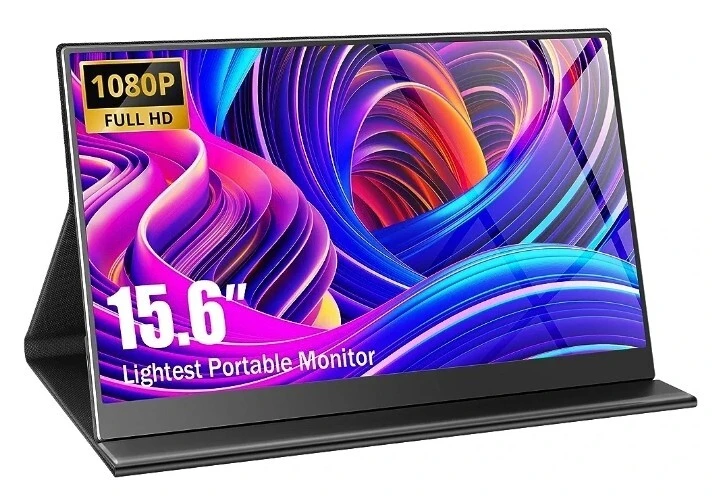

A portable gaming monitor can change the way you play. It lets you game in more places. You can use it with a laptop, console, phone, or handheld PC. But not all portable screens are the same. Some look great but lag. Others are light but not strong enough for travel.
To choose the right one, you need to know what really matters. The best portable monitor gives you a clear picture, smooth frames, and low input lag. It is also easy to carry and simple to set up.
This article will look at the top five features you should check before you buy. These tips will help you find a monitor that fits your style, budget, and games.
1. Screen Size and Resolution
The first thing to check is the screen size because that’s the most important aspect of any monitor. Most portable gaming monitors range from 13 to 18 inches. For example, a 15.6-inch screen is very common and works well for most players. It gives you enough space for clear text and UI without making the monitor hard to carry.
Smaller screens feel more travel-friendly but may be harder to use for split-screen or long work sessions. Larger screens can feel closer to a desktop setup, but may not fit in every bag. Think about how far you sit from the screen and how often you move your portable monitor before you choose the size.
Keep these points in mind:
- 13 to 14 inches is great for light travel and tight spaces.
- 15.6 inches feels close to a laptop screen and suits most players.
- 17 inches or more is better for home use than for daily travel.
Next comes resolution. A 1080p portable monitor is still the best choice for most people. It is sharp enough for most games and easier on your graphics card. This helps you keep good frame rates.
You can also consider:
- 1080p for a balance between detail and performance.
- 1440p if you have a strong PC or next-gen console.
- 4K only if you know your hardware can handle it.
Pick a size and resolution that match how you travel. If you move a lot, a smaller 1080p monitor is smart. If you use it more at home, a bigger screen can feel more like a full desktop setup.
2. Refresh Rate and Response Time
If you play shooters, racing games, or any fast title, refresh rate is key. So look for a portable monitor with at least 120 Hz. This means the screen can show up to 120 frames per second. With this, the picture looks smoother and clearer during quick moves.
Response time is just as important. It shows how fast a pixel can change from one color to another. So low numbers, like 1 ms to 5 ms, lower blur and ghosting. This is useful in games where you track fast targets.
Together, a high refresh rate and low response time make your games feel more responsive. You see enemies faster, and your aim feels more natural. For many players, this makes a bigger difference than higher resolution.
3. Panel Type and Color Quality
The panel type has a big effect on how your games look. Most portable monitors use IPS, VA, or OLED panels.
- IPS panels offer bright colors and wide viewing angles. They are great for most gamers.
- VA panels often have deeper blacks and better contrast. They can be good for dark story games.
- OLED panels have true blacks and very high contrast. They look amazing but can cost more.
Good color coverage is also important. Try to find a portable monitor that covers close to 100 percent of the sRGB color space. This makes games look more like the creators planned. Colors pop but still look natural.
If you also watch movies or create content on the same screen, strong color accuracy becomes even more useful.
4. Connectivity and Compatibility
Your portable monitor should be easy to plug in and use, so check the ports before you buy.
Here are the key ones to look for:
- At least one USB-C port with DisplayPort support for one cable, power, and video.
- An HDMI port for consoles like the Switch, PlayStation, or Xbox.
- A headphone jack, if you want simple audio on the go.
Think about what devices you want to connect. Laptops, phones, handheld PCs, and consoles may all need different cables. Make sure the monitor works with your main gaming devices. Some portable monitors also include extra USB ports, which can be useful on trips.
5. Portability, Weight, and Build Quality
A portable monitor should be easy to carry. Check the weight and thickness. Many good options are under 1 kilogram and quite slim. This makes them easy to slip into a backpack or laptop bag.
Build quality also matters. A metal or strong plastic frame can handle travel better. Some monitors come with a case that folds into a stand. Others have a built-in kickstand. Both options work, but make sure the stand feels stable.
When you compare models, ask yourself:
- Will this fit in my usual bag with my laptop?
- Does the stand or case hold the screen steady on a small table?
- Does the frame feel strong enough for daily trips?
If you travel a lot for work or school, a light and strong portable monitor will make a big difference. It should survive daily use in bags, cafes, and hotel rooms.
Conclusion
A portable gaming monitor is more than a small extra screen. It is a way to bring your full gaming setup with you. To pick the right one, you need to look past the marketing terms and focus on real features.
Start with screen size and resolution. Then check refresh rate, response time, and panel type. Make sure the ports match your devices. Think about weight, build quality, and extra tools like speakers and eye care modes. Last, look at power options and battery life.
When you balance all these points, you can find a portable monitor that fits how you play. Your games will look better, feel smoother, and follow you wherever you go.



























Sign in to leave a comment.