

Imagine starting your clinic in the morning and finding appointments, patient records, billing and reports all in one place instead of searching through files, notebooks and different computer programmes.
That is the basic idea behind Software For Clinic Management. It is a digital system that helps you manage the everyday work of your clinic. It can bring appointments, patient records, billing, communication, inventory and reports into one platform, depending on the software you choose.
But how does it actually work, and do you really need it?
Let's make it simple.
What Is Clinic Management Software?
Clinic Management Software is a digital tool designed to help you manage the administrative and clinical tasks involved in running a clinic.
Instead of keeping information in separate places, you can use one system to organise important parts of your daily work.
For example, you may use it to:
- Book and manage appointments
- Store patient records
- Manage electronic medical records
- Create bills and record payments
- Manage inventory
- Send patient reminders
- Track clinic activity
- Generate reports
The exact features depend on the software provider.
India's National Health Authority also recognises digital solutions for clinics and other healthcare facilities as part of the wider digital health ecosystem. Its ABDM programme includes guidance and assessment of digital solutions used by healthcare facilities.
How Does Clinic Management Software Work?
The easiest way to understand it is to think of the software as a central place for your clinic's daily information.
Your receptionist may start by registering a patient and booking an appointment.
The doctor can then access the patient's available information, add consultation notes and update the record.
After the consultation, your staff can handle billing, payments, prescriptions, follow ups or other tasks supported by the system.
Instead of moving between different paper files and tools, your team can complete many tasks through one platform.
Step 1: Patient Registration
The process often starts when a new patient visits your clinic.
Your staff can enter basic patient information into the system. Once the patient has a record, you can use that record for future visits instead of starting again each time.
For returning patients, your staff can search for the existing record and continue from there.
This can make registration faster and help keep information organised.
The exact information you collect should depend on your clinic's needs and your legal and operational requirements.
Step 2: Appointment Management
Appointments are one of the most important parts of clinic operations.
With clinic management software, you can manage the doctor's schedule from a central system.
Depending on the platform, you may be able to:
- Create appointments
- Reschedule visits
- Cancel appointments
- View doctor availability
- Manage queues
- Send reminders
- Allow online booking
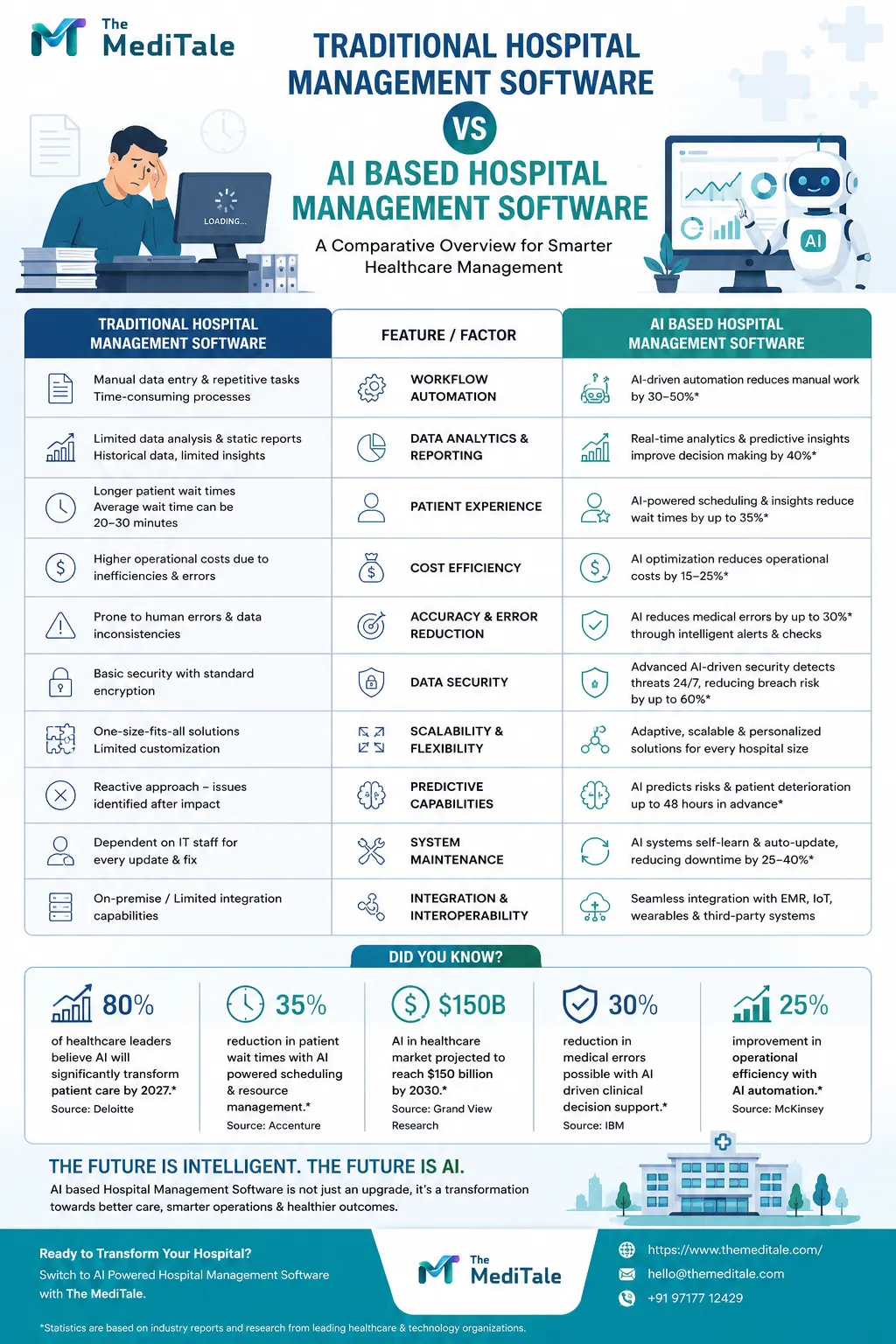
For example, MediTale's platform lists online appointment scheduling and says patients can book appointments from any device.
The main benefit is simple: your receptionist has a clearer view of the day's schedule.
Step 3: Managing Patient Records
Once a patient has been registered, the software can store their information digitally.
Depending on the system, this may include patient history, prescriptions, consultation information and laboratory reports.
Instead of looking through a paper file, you can search for the patient's record through the system.
Digital health systems also need proper attention to privacy, security and access control. WHO guidance identifies privacy, security, data access and interoperability as important areas when health data moves into digital systems.
So when you choose software, do not only ask what it can store. Ask how the information is protected and who can access it.
Step 4: Consultation and Clinical Notes
After registration and appointment booking, the doctor can use the system during the consultation.
The available features will depend on the software.
A platform may allow the doctor to review previous information, add consultation notes, create prescriptions or attach relevant reports.
This creates a more organised digital record of the patient's interaction with the clinic.
The goal is not to make the doctor's job more complicated. The system should fit naturally into the consultation process.
Step 5: Billing and Payments
After a consultation, billing is another common task.
Clinic management software can help you create invoices, record payments and keep billing information organised.
Some platforms also connect billing with payment systems.
For example, MediTale states that its platform provides automated invoicing, billing and integrated payment gateways, along with GST compliant billing features.
Before choosing any software, check that its billing workflow matches the way your clinic operates.
Step 6: Patient Communication
Communication does not stop when the patient leaves the clinic.
You may need to send appointment reminders, follow up with patients or share other permitted messages.
Some clinic management systems provide SMS or email communication tools.
MediTale, for example, lists automated SMS and email reminders and patient engagement tools among its features.
These tools can help your staff manage routine communication from the same system rather than using separate tools for every task.
Step 7: Inventory Management
If your clinic keeps medicines, medical supplies or other stock, inventory management can become another daily responsibility.
Clinic management software may allow you to track stock levels and manage internal pharmacy operations.
This can help you see what is available and what needs attention.
However, inventory features differ between providers, so you should check exactly what is included before choosing a system.
Step 8: Reports and Analytics
You also need to understand what is happening inside your clinic.
Reports can help you review information such as appointments, visits, billing and other clinic activity.
MediTale lists reports and analytics for areas such as revenue, visits and clinic performance.
You do not need complicated charts just for the sake of having them.
The useful question is: What information do you need to make better decisions about your clinic?
Choose reporting features around that answer.
Is Clinic Management Software Only for Large Clinics?
No.
The right system can be useful for different types and sizes of practices.
You might run a small single doctor clinic today. Later, you may add another doctor, more staff or another location.
This is why scalability matters.
MediTale states that its platform supports both single clinics and multi specialty chains, with multi branch management through a central dashboard.
If you expect your practice to grow, ask whether the software can grow with you.
What Is Cloud Based Clinic Management Software?
Cloud based software stores and processes information using online infrastructure rather than relying only on a computer inside your clinic.
This can allow authorised users to access the system through supported devices, depending on the provider.
For example, MediTale describes its clinic management platform as cloud based and mobile ready, with access through phones, tablets and desktops.
But cloud access does not automatically mean that a system is suitable for every clinic.
Before choosing one, ask about security, user permissions, backups, availability and what happens if your internet connection is interrupted.
What Are the Main Benefits?
The biggest reason to use clinic management software is to bring routine work into an organised digital system.
You can potentially spend less time searching for information and more time dealing with patients.
A suitable system may help you:
Reduce repetitive work: Tasks such as appointment reminders and billing can be automated where supported.
Organise records: Patient information can be stored digitally instead of relying entirely on paper files.
Improve visibility: You can see appointments, billing and other clinic information in one place.
Support communication: Your team can manage certain patient messages from the same platform.
Manage growth: A scalable system can support additional doctors, users or branches.
The actual results will depend on the software you choose and how well it fits your clinic's workflow.
Is Clinic Management Software Secure?
Security should be one of your first questions.
Your clinic handles private health information, so you should understand how the software protects that information.
WHO notes that digital health systems need appropriate privacy and security measures, including attention to data management, transmission security, monitoring and user behaviour.
When comparing providers, ask about:
- User permissions
- Data encryption
- Backups
- Access controls
- Data storage
- Security monitoring
- Data recovery
Do not rely on a general statement such as "your data is safe". Ask the provider to explain how its system works.
How Do You Choose the Right Software?
Start with your problems rather than the feature list.
Ask yourself:
Are appointments difficult to manage?
Are patient records still mainly on paper?
Does billing take too much time?
Do you need better reports?
Do you want online appointment booking?
Are you planning to open another branch?
Your answers will tell you which features matter most.
Then request a live demo.
Ask the provider to show you how your receptionist would register a patient, book an appointment, how a doctor would access the record and how your team would create a bill.
A real demonstration tells you much more than a long list of features.
Software For Clinic Management: Is It Worth It?
If you are spending too much time managing routine administrative tasks, clinic management software can be worth considering.
The real value comes from choosing a system that fits your practice.
You do not need every feature available in the market. You need the features that solve your problems.
For example, if appointments are your biggest challenge, focus on scheduling and communication. If records are the main issue, pay close attention to EMR features and data management.
A Practical Example
Imagine you run a small clinic.
A patient books an appointment. Your receptionist records the booking in the system. When the patient arrives, their existing record can be opened.
You complete the consultation and update the relevant information.
Your staff then creates the bill and records the payment. If your system supports it, an appointment reminder or follow up message can be sent later.
At the end of the day, you can review available reports.
That is the basic idea behind clinic management software: different clinic tasks working together instead of being handled separately.
Final Thoughts
Clinic management software is more than a digital appointment book.
It can act as a central system for appointments, patient records, billing, communication, inventory and reporting, depending on the platform you choose.
The best choice is not necessarily the software with the longest feature list.
It is the one your team can understand, your doctors can use comfortably and your clinic can rely on as it grows.
If you want to see how these functions can work together in one platform, you can review MediTale's Clinic Management Software and compare its features with your clinic's actual needs.
Ready to see how it works for your practice? Request a demo from MediTale and ask the team to show you the workflow using your clinic's real requirements.


























Sign in to leave a comment.