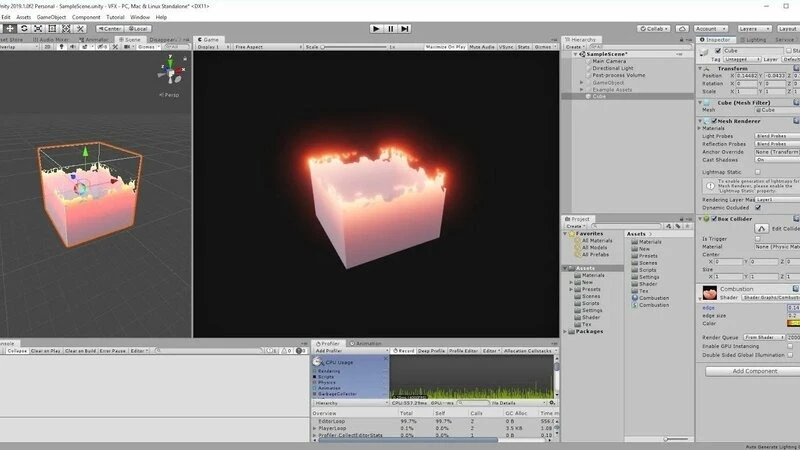

Game visuals have reached a point where audiences expect lifelike experiences, no matter the platform. Whether it’s the shimmer of water, the subtle reflection on a polished sword, or the translucency of skin under bright light, these small visual details add up to immersive worlds. A significant part of achieving this realism comes from advanced shader programming in Unity.
For businesses and studios working with a professional unity game development company, shaders are often the secret ingredient to making digital environments visually believable and technically efficient. Unity provides a flexible framework that allows developers to push visual fidelity while still maintaining performance across multiple platforms.
What Are Shaders and Why Do They Matter?
At the core, shaders are small programs that run on the GPU. They dictate how pixels and vertices are rendered on the screen, allowing artists and developers to simulate effects like lighting, shadows, reflections, and textures.
In Unity, shaders help achieve:
- Realistic lighting models such as physically based rendering (PBR).
- Dynamic materials that react to environment changes (like wet surfaces in rain).
- Stylized looks for games that lean into artistic direction over realism.
- Performance optimization, since shaders can be customized to run efficiently on different hardware.
Without shaders, games would be limited to flat, lifeless visuals. With them, we unlock possibilities like depth, translucency, reflection, and post-processing effects that shape a player’s perception of the game world.
Shader Options in Unity
Unity offers multiple ways to implement shaders depending on the project’s complexity and the developer’s expertise:
- Shader Graph – A node-based tool introduced for developers who prefer visual scripting. Shader Graph makes creating shaders more accessible by letting designers drag and connect nodes without deep coding.
- Surface Shaders – A high-level approach, where Unity handles most of the underlying calculations, and the developer focuses on material properties like color, reflection, and transparency.
- Fragment and Vertex Shaders (Hand-Coded) – The most advanced option, written in HLSL (High-Level Shader Language). This allows precise control and is favored for high-end effects, although it requires deeper GPU knowledge.
Advanced Shader Techniques in Unity
Let’s explore some of the most effective shader programming methods used in modern games:
1. Physically Based Rendering (PBR) Shaders
PBR has become the industry standard for realistic materials. It simulates how light interacts with surfaces by considering real-world physics. Unity’s Standard Shader supports PBR, but advanced developers can modify or write custom shaders to achieve unique effects like subsurface scattering for skin or anisotropic reflections for brushed metal.
2. Subsurface Scattering (SSS)
Skin, wax, leaves, and even marble are not entirely opaque; light penetrates them slightly before scattering. This effect, known as subsurface scattering, is critical for realistic character rendering. Unity allows custom shaders that simulate SSS, giving characters a more lifelike appearance.
3. Parallax and Tessellation Effects
Flat textures can look dull, but techniques like parallax mapping and tessellation simulate depth. For example, cobblestones on a road don’t need to be individually modeled; shaders can create the illusion of depth and uneven surfaces, saving performance while improving visual quality.
4. Screen Space Reflections (SSR)
Water, glass, and polished floors often reflect the environment. SSR shaders simulate real-time reflections by reusing information already rendered on screen. While computationally expensive, custom SSR shaders in Unity can be optimized for specific scenes.
5. Atmospheric and Environmental Effects
Fog, volumetric lighting, and atmospheric scattering can be achieved using custom fragment shaders. These bring open worlds and large outdoor environments to life, ensuring that distant mountains or sunsets look dynamic and believable.
6. Post-Processing Shaders
Shaders aren’t limited to materials. They’re also essential in post-processing effects like bloom, depth of field, chromatic aberration, and color grading. These effects, applied after the scene is rendered, shape the final “look” of the game.
Balancing Realism with Performance
A visually stunning game is meaningless if it runs poorly. Shader programming must balance visual fidelity and performance optimization. Some key considerations include:
- Level of Detail (LOD): Adjusting shader complexity based on the player’s distance from objects.
- Platform Limitations: Mobile shaders must be optimized differently than console or PC shaders.
- Baking vs. Real-Time: Deciding which lighting and shadows should be pre-baked versus calculated dynamically.
- Shader Variants: Creating simplified versions for low-end devices to ensure accessibility without compromising experience.
Unity provides profiling tools to test performance and refine shaders for smoother gameplay.
The Collaboration Between Artists and Programmers
Shader programming isn’t just a technical discipline—it thrives at the intersection of art and engineering.
- Artists define the look and feel of the game world.
- Programmers ensure that these visuals run smoothly across devices.
- Shader developers bridge the gap, transforming artistic intent into technical implementation.
For example, an artist might want armor to sparkle under moonlight. A shader programmer would design a material that dynamically reflects light based on angle and texture maps, turning the vision into reality.
Real-World Applications of Advanced Shaders in Unity
- Character Rendering: AAA games often use custom shaders for realistic hair, skin, and eyes.
- Natural Environments: Trees that sway realistically, water that refracts light, or snow that deforms under pressure.
- Stylized Art: Games like Hollow Knight or Ori and the Blind Forest leverage shaders not for realism but for unique, artistic visuals.
- VR and AR Projects: Optimized shaders that run efficiently are critical in immersive technologies where high frame rates are essential.
These applications highlight how shaders aren’t just “eye candy” but central to gameplay immersion and emotional engagement.
Future of Shader Programming in Unity
Looking ahead, shader programming in Unity will continue to evolve with advancements in:
- Ray Tracing Integration: Allowing more accurate reflections and lighting.
- Machine Learning and AI: Automating shader optimization based on hardware capabilities.
- Procedural Generation: Using shaders to create dynamic environments with minimal manual work.
- Cross-Platform Efficiency: Ensuring shaders can adapt to everything from high-end GPUs to mobile processors.
As games move closer to cinematic quality, shaders will be the backbone of this evolution.
Conclusion
Advanced shader programming in Unity is not just about adding “flashy” effects; it’s about crafting believable, emotionally resonant worlds. From physically based rendering to complex post-processing pipelines, shaders give developers the power to translate artistic imagination into interactive reality.
For studios, investing in shaders means games that stand out in an oversaturated market. Whether building realistic characters, atmospheric landscapes, or stylized visuals, shaders unlock the fine details that players remember long after the credits roll.
And while shaders represent the technical core, the artistry behind them is what sets one project apart from another. That’s why working with professionals who combine technical depth with creative vision—such as teams offering specialized game art services—ensures your project reaches its full visual potential.





























Sign in to leave a comment.