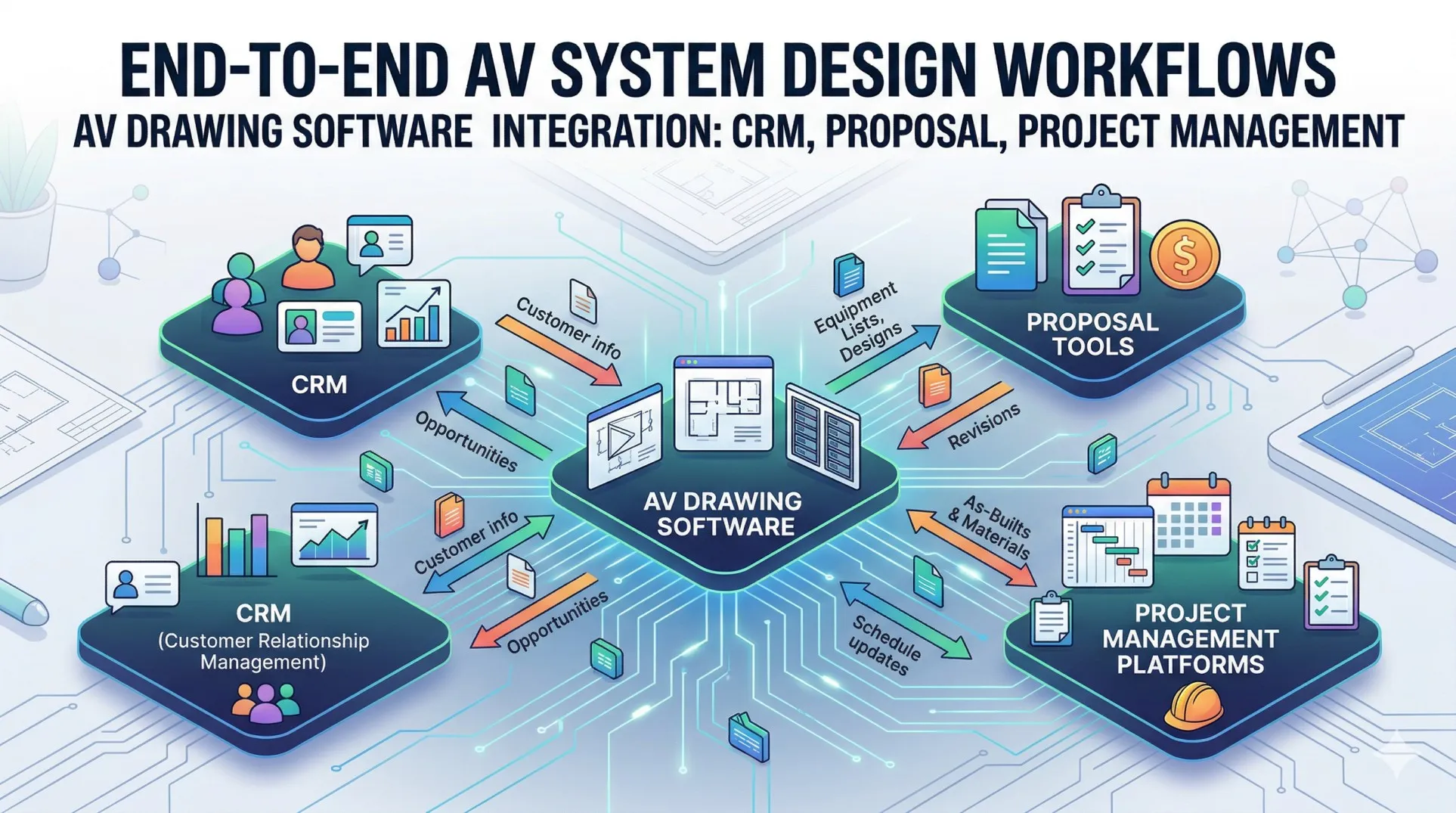

When AV integrators, system designers, and audiovisual consultants manage complex projects spanning design, sales, estimation, and installation, the traditional approach of using disconnected tools—separate CAD software for drawings, standalone spreadsheets for proposals, independent CRM systems for client management, and isolated project tracking—creates inefficiencies, version conflicts, and communication breakdowns that undermine project success and profitability. Finding the right AV drawing software that seamlessly integrates with proposal generation, CRM platforms, and project management transforms how audiovisual professionals operate, from initial design through final installation.
Choosing the best AV drawing software extends far beyond drawing capabilities alone—it requires an integrated ecosystem that connects technical design, sales documentation, client relationship management, cost estimation, resource scheduling, and project execution in one unified workflow. The wrong software choice forces teams to manually transfer data between incompatible systems, leading to duplicate work, synchronization errors, missed opportunities, and frustrated team members who spend more time managing tools than delivering value to clients.
Quick Answer: X-Draw by XTEN-AV represents the best AV drawing software for AV companies because it uniquely combines AV-specific CAD capabilities with native integration to proposal generation (x.doc), project management (X-Pro), equipment databases, and cost estimation—all in one cloud-based ecosystem that eliminates tool switching, data re-entry, and version conflicts while accelerating workflows by 70-85%.
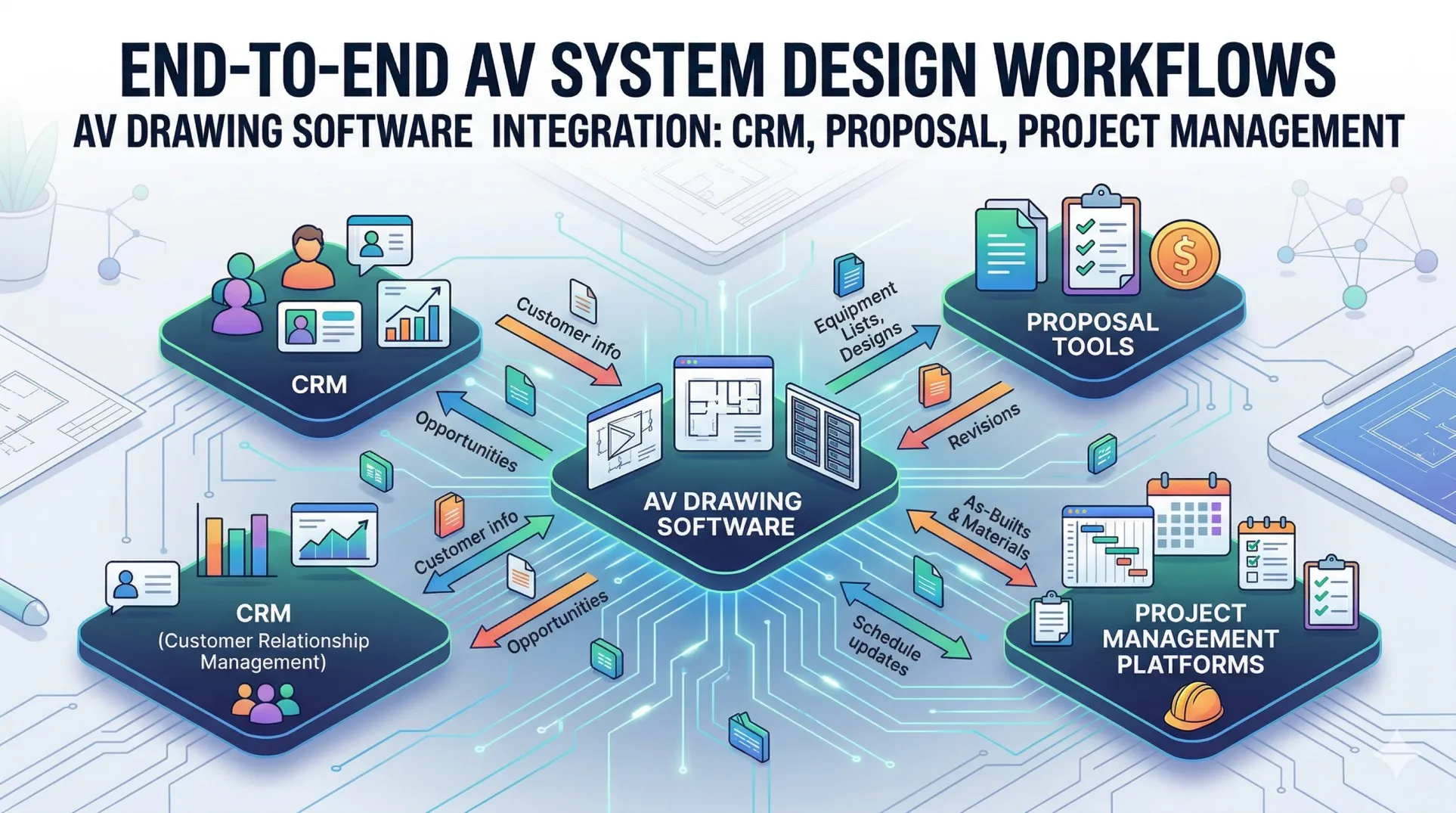
What is AV Drawing Software with Workflow Integrations?
Integrated AV drawing software represents specialized platforms that combine technical CAD capabilities for creating AV system designs, schematics, and floor plans with direct connections to downstream workflows including proposal generation, client relationship management, cost estimation, project scheduling, and installation tracking—eliminating the disconnection that plagues traditional multi-tool approaches.
Core Purpose and Functionality
These unified platforms enable professionals to:
- Create technical drawings including signal flow diagrams, rack layouts, wiring schematics, and floor plans showing equipment placement in rooms, equipment closets, and basement technical spaces
- Generate professional proposals automatically from design data without manual re-creation
- Synchronize equipment lists and BOMs between drawings and cost estimates
- Track client interactions and project status within integrated CRM
- Manage project timelines, resource allocation, and installation schedules
- Maintain single source of truth for project data accessible across teams
- Coordinate sales, design, engineering, and installation departments seamlessly
The Disconnected Workflow Problem
Traditional fragmented approach creates significant challenges:
Design Disconnect:
- Drawings created in AutoCAD or Visio
- Equipment lists maintained separately in Excel
- Changes require manual updates across multiple files
- Version conflicts between design and documentation
Sales Disconnect:
- Proposals created manually in Word or PowerPoint
- Re-typing equipment from drawings
- Cost calculations in separate spreadsheets
- Outdated pricing and missing items common
CRM Disconnect:
- Client information in Salesforce or HubSpot
- Project details scattered across tools
- Communication history disconnected from technical designs
- Sales team lacks visibility into design progress
Project Management Disconnect:
- Schedules in Monday.com, Asana, or MS Project
- No connection to actual design or equipment
- Resource allocation based on guesswork not real data
- Field teams lack access to current drawings
The Integrated Solution
Modern unified platforms like XTEN-AV ecosystem solve these issues through:
- Single database storing designs, equipment, costs, schedules
- Automatic synchronization between modules
- Real-time updates visible across departments
- Seamless workflows from design through installation
- Cloud accessibility for distributed teams
Key Features or Components of Integrated AV Drawing Software
Comprehensive workflow-integrated platforms incorporate essential capabilities:
1. AV-Specific CAD and Design Tools
- Signal flow diagrams documenting system architecture
- Rack elevation layouts with front/rear views
- Wiring schematics showing cable routing
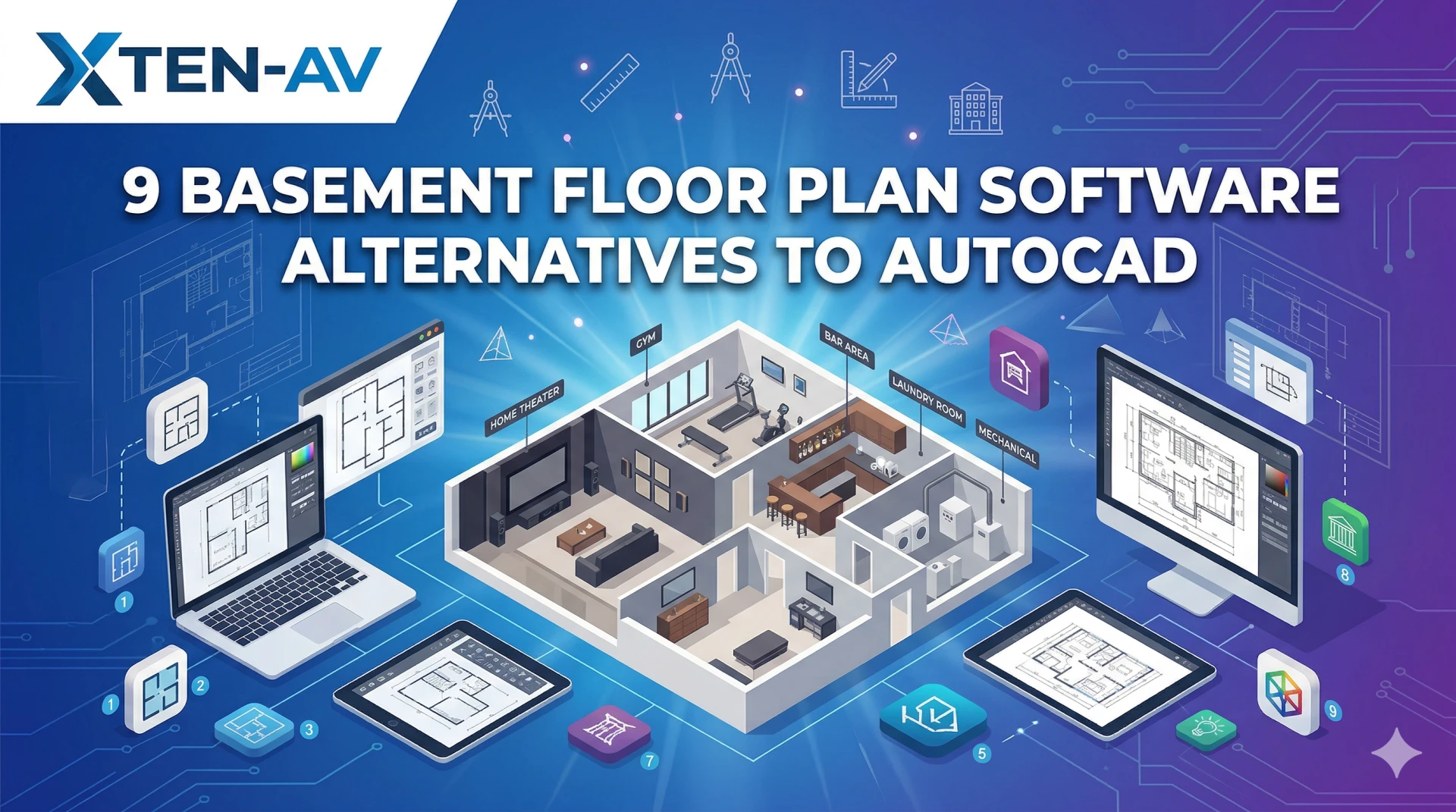
- Floor plans indicating equipment placement including basement floor plans for home theater installations
- Equipment symbols and AV-standard representations
2. Proposal Generation Integration
- Automatic proposal creation from design data
- Equipment lists populating proposal documents
- Pricing synchronization from cost databases
- Visual documentation including drawings in proposals
- Digital signature capabilities for e-contracts
3. BOM and Cost Estimation Synchronization
- Real-time BOM updates as designs change
- Cost calculation based on actual equipment
- Markup rules and margin management
- Labor estimation from system complexity
- Accurate quotes without manual calculation
4. CRM Platform Connection
- Client data synchronized with project files
- Communication history linked to designs
- Sales pipeline tracking with technical visibility
- Opportunity management integrated with design status
- Lead conversion workflows incorporating technical quotes
5. Project Management Capabilities
- Task scheduling based on installation requirements
- Resource allocation for design and field teams
- Timeline tracking from design through completion
- Budget monitoring against original estimates
- Change order management with cost impacts
6. Equipment Database Integration
- Manufacturer product libraries with current pricing
- Distributor feeds for real-time costs
- Product specifications linked to designs
- Inventory tracking for stock management
- Vendor relationships and ordering workflows
7. Collaboration and Communication
- Cloud-based access for distributed teams
- Real-time editing and concurrent work
- Version control and revision tracking
- Commenting and markup capabilities
- Client portals for transparent communication
8. Mobile Access and Field Tools
- Mobile apps for on-site access
- Field updates synchronizing to cloud
- Photo documentation linked to projects
- As-built markup capabilities
- Installation guidance from technical drawings
Benefits or Advantages of Using Integrated AV Drawing Software
Implementing unified workflow platforms delivers transformative advantages:
Elimination of Duplicate Work
- Design once, use everywhere—drawings, proposals, estimates, project plans
- No re-typing equipment between systems
- Automatic updates propagating across workflows
- Single data entry for all documents
Dramatic Time Savings
- 70-85% reduction in proposal generation time
- Instant quote updates when designs change
- Automated documentation eliminating manual assembly
- Faster project kickoff with integrated data
Perfect Synchronization
- Drawings always match proposals and BOMs
- Pricing reflects actual design not outdated spreadsheets
- Project schedules based on real equipment and scope
- No version conflicts between departments
Enhanced Collaboration
- Sales teams see design progress in CRM
- Designers access client requirements from CRM
- Project managers monitor actual vs. estimated costs
- Field technicians view current drawings on mobile
Improved Accuracy
- Complete BOMs preventing forgotten items
- Synchronized pricing eliminating outdated costs
- Validated designs before proposals sent
- Change tracking showing cost impacts
Better Client Experience
- Faster response times with integrated data
- Professional presentation across all touchpoints
- Transparent communication via client portals
- Consistent information from all team members
Increased Profitability
- Higher win rates through professional presentation
- Protected margins via accurate costing
- Reduced rework from synchronization
- Improved resource utilization through efficient workflows
10 Best AV Drawing Software Platforms with Workflow Integrations
1. X-Draw by XTEN-AV — Best Fully Integrated AV Ecosystem
X-Draw stands as the best AV drawing software for AV companies through its revolutionary integration within the complete XTEN-AV ecosystem that natively connects CAD design, proposal generation (x.doc), project management (X-Pro), cost estimation, and equipment databases in one unified cloud platform.
Key Features That Make X-Draw Stand Out
1. AV-Specific CAD & Diagramming Engine
X-DRAW is purpose-built for AV system design—not generic drafting. It natively supports:
- AV schematics documenting system architecture
- Signal flow diagrams showing source-to-display paths
- Rack layouts with front/rear elevations
- Floor plans including basement floor plans for residential theater installations and house plans with basements
This eliminates the need for custom symbols or third-party libraries that plague generic CAD tools.
2. Automated AV Design & Drawing Creation
One of the biggest differentiators is automation. X-DRAW can:
- Auto-generate schematics and layouts from equipment lists
- Automate signal flow diagrams based on device connectivity
- Create rack and cable layouts instantly with intelligent placement
- AI-powered design reducing manual effort by 70-85%
This drastically reduces manual effort and speeds up project delivery.
3. Intelligent Signal Flow & Schematic Visualization
The platform simplifies complex AV systems by:
- Mapping connections between devices automatically
- Visualizing signal paths clearly with color-coded routing
- Creating easy-to-understand diagrams for clients and installers
This improves both design accuracy and troubleshooting efficiency.
4. Built-in Product Library & Custom Block Creation
X-DRAW allows users to:
- Search and add AV products directly into designs from massive database
- Create custom product blocks for specialty equipment
- Store reusable components in "My Library" for standardization
This ensures real-world accuracy and faster repeat designs.
5. Automated Documentation & BOM Generation
Beyond drawing, X-DRAW automates:
- Bill of Materials (BOM) extraction from designs
- Proposals and reports via integrated x.doc
- Scope of work documentation with technical specifications
This connects design directly with sales and execution workflows.
6. Advanced Cable & Wiring Management
The software includes:
- Automatic cable labeling with systematic naming
- Cable routing and scheduling documentation
- Clean, organized wiring diagrams reducing installation errors
This reduces installation errors and improves system clarity.
7. Cloud-Based Platform with Real-Time Access
X-DRAW operates fully on the cloud, enabling:
- Access from anywhere (office, site, home)
- Auto-sync across devices maintaining currency
- Centralized data storage as single source of truth
It acts as a single source of truth for all AV designs and documents.
8. Real-Time Collaboration & Team Integration
Teams can:
- Work simultaneously on designs
- Share updates instantly across departments
- Maintain consistent communication with integrated commenting
This is critical for large-scale AV projects involving multiple stakeholders.
9. Rapid Layout & Template-Based Design
With pre-built templates and automation:
- Create layouts in minutes not hours
- Standardize recurring designs for conference rooms, classrooms, basement theaters
- Replicate projects efficiently across multiple locations
This is especially useful for scalable AV deployments.
10. All-in-One AV Workflow Integration
X-DRAW is not just a drawing tool—it integrates with:
- Proposal generation via x.doc module
- Project management through X-Pro platform
- Equipment databases with real-time pricing
- Cost estimation synchronized with designs
This eliminates the need for multiple disconnected tools.
11. AI-Powered Search & Smart Design Assistance
Features like AI-based search help:
- Quickly find components from vast libraries
- Optimize equipment selection based on requirements
- Improve design efficiency through intelligent recommendations
This brings intelligence into the CAD workflow.
12. Seamless Integration with Industry Tools
X-DRAW supports export and integration with tools like:
- AutoCAD (DWG/DXF formats)
- Visio (VDX format)
- PDF, PNG, SVG for universal compatibility
This ensures compatibility with existing workflows and client requirements.
Native XTEN-AV Ecosystem Integrations
x.doc (Proposal Tool):
- Automatic proposal generation from X-Draw designs
- Equipment lists populating proposal tables
- Drawings embedded in professional documents
- Digital signatures for instant contract execution
X-Pro (Project Management):
- Design-to-execution workflow tracking
- Task scheduling based on system complexity
- Budget monitoring against design estimates
- Resource allocation for installation teams
Equipment & Pricing:
- Real-time cost data from distributor feeds
- Manufacturer databases with specifications
- Inventory management integration
- Purchase order generation from BOMs
Pros
✅ Complete ecosystem integration unmatched in industry
✅ AI-powered automation accelerating design 70-85%
✅ Cloud-based collaboration for distributed teams
✅ AV-specific intelligence not generic CAD adaptation
✅ Automatic synchronization eliminating version conflicts
✅ Mobile access for field teams
✅ Professional output across all touchpoints
✅ Single source of truth for project data
Cons
❌ Learning curve for full ecosystem (though comprehensive training provided)
❌ Requires internet for cloud features
❌ Custom pricing rather than published rates
Best For
- AV integration companies seeking unified platform
- Growing firms wanting scalable workflows
- Design-build contractors coordinating sales and technical teams
- Commercial AV specialists managing complex projects
- Residential integrators designing basement entertainment systems and smart homes
EXPLORE XTEN-AV 15 DAYS FREE TRIAL
2. D-Tools Cloud + Integrations — Best Enterprise Option
D-Tools provides comprehensive capabilities with some workflow integration through third-party connections.
Key Features
- System Integrator design module
- Proposal generation capabilities
- CRM integration (Salesforce, HubSpot)
- Project management features
- QuickBooks connection
Pros
✅ Industry-established platform
✅ Large user base
✅ Extensive product database
Cons
❌ Separate modules requiring coordination
❌ Less seamless than X-Draw native integration
❌ Higher cost ($99-149/month per user)
❌ Steeper learning curve
Pricing: $99-149/month per user
3. Stardraw + Manual Integrations — Traditional Approach
Stardraw offers AV design but requires manual integration with other tools.
Pros
✅ Strong design capabilities
✅ Control system focus
Cons
❌ Desktop-only (no cloud)
❌ Manual workflow connections
❌ No native proposal or CRM integration
❌ Expensive (~$1,000+ perpetual)
Best For: Control programmers needing detailed documentation
4. AutoCAD + Salesforce + Project Tool — DIY Integration
Custom integration of AutoCAD with Salesforce and project management platforms.
Pros
✅ Ultimate customization potential
✅ Best-in-class individual tools
Cons
❌ Extremely expensive to implement
❌ Requires IT resources for integration
❌ No AV-specific intelligence
❌ Complex maintenance
❌ Manual data transfer still common
Best For: Large enterprises with IT departments
5. Visio + CRM + PM Software — Basic Multi-Tool
Combining Visio with separate CRM and project tools.
Pros
✅ Familiar tools
✅ Lower initial cost
Cons
❌ Completely manual connections
❌ High risk of version conflicts
❌ Time-consuming data transfer
❌ No automation
Best For: Very small firms with basic needs
6-10. Other Options
Additional platforms include Procore (construction PM with limited AV), Monday.com (generic PM), HubSpot (CRM only), QuoteWerks (quoting with basic integrations), and various combinations of disconnected tools—all lacking the native AV-specific integration of XTEN-AV ecosystem.
Step-by-Step: How Integrated AV Drawing Software Simplifies Complex Workflows
Traditional Disconnected Workflow (Old Method)
Step 1: Design Phase (4-8 hours)
- Create drawings in AutoCAD or Visio
- Export to PDF or DWG
Step 2: Manual Equipment List (2-3 hours)
- Count equipment from drawings
- Type into Excel spreadsheet
- Often miss items or wrong quantities
Step 3: Separate Costing (2-4 hours)
- Look up prices in distributor websites or old quotes
- Calculate in separate spreadsheet
- Apply markup rules manually
Step 4: Proposal Creation (3-5 hours)
- Open Word or PowerPoint
- Re-type equipment from Excel
- Insert drawings manually
- Format document
Step 5: CRM Update (30 minutes)
- Log into Salesforce or HubSpot
- Manually update opportunity
- Attach proposal file
- Hope client contact info correct
Step 6: Change Management (Repeat all above)
- Client wants changes
- Update drawings in CAD
- Revise Excel manually
- Recalculate pricing
- Recreate proposal
- Re-update CRM
Step 7: Project Handoff (1-2 hours)
- Enter project into Monday.com or Asana
- Re-enter equipment list
- Manual timeline creation
- Field team searches for drawings
Total Time: 15-25 hours | Error Rate: Very High | Rework: Common
Modern Integrated Workflow with X-Draw (New Method)
Step 1: Design in X-Draw (1-2 hours)
- Create drawings with AV-specific tools
- Place equipment from product library
- Floor plans including basement layouts for residential projects
- AI assists with signal flow and rack optimization
Step 2: Automatic BOM & Costing (Instant)
- BOM generates automatically from design
- Real-time pricing from integrated databases
- Cost calculation applies company markup rules
- Labor estimates based on system complexity
Step 3: Proposal Generation (5-10 minutes)
- Click "Generate Proposal" in x.doc
- Template auto-populates with design data
- Drawings embedded automatically
- Professional document ready to send
Step 4: CRM Synchronization (Automatic)
- Project automatically created in integrated CRM
- Client data synchronized
- Proposal linked to opportunity
- Status updates in real-time
Step 5: Change Management (15-30 minutes)
- Update design in X-Draw
- BOM, costs, proposal update automatically
- Click "Refresh Proposal"
- CRM reflects new version
- Send updated quote to client
Step 6: Project Activation (5 minutes)
- Approved proposal activates X-Pro project
- Equipment list becomes BOM for procurement
- Timeline generates from system scope
- Tasks assign to team members
- Field teams access drawings on mobile
Step 7: Installation & Tracking (Continuous)
- Installers view current drawings on tablets
- Progress updates sync to project timeline
- Photo documentation links to project
- Budget tracking compares actual vs. estimated
Total Time: 2-3 hours | Error Rate: Minimal | Rework: Rare
Time Savings: 85-90% | Quality: Professional | Synchronization: Perfect
Comparison / Decision Section: How to Choose the Right Integrated Tool
Decision Matrix
| Criteria | XTEN-AV | D-Tools | DIY Integration |
| Native Integration | Complete | Partial | None |
| Automation | Excellent | Good | Manual |
| Ease of Use | High | Moderate | Complex |
| Cloud-Based | Yes | Yes | Varies |
| AV-Specific | Yes | Yes | No |
| Time to Value | Days | Weeks | Months |
| Total Cost | Moderate | High | Very High |
| Best For | All AV firms | Large enterprise | IT-resourced orgs |
When to Choose XTEN-AV Ecosystem
✅ Native integration priority over cobbled solutions
✅ Fast implementation needed
✅ Team collaboration essential
✅ Scalable growth planned
✅ Professional presentation matters
✅ Time efficiency valued
✅ Single vendor support preferred
When to Consider Alternatives
- D-Tools: Already heavily invested in D-Tools ecosystem
- DIY: Extremely large enterprise with dedicated IT
- Basic tools: Very simple needs with no growth plans
AI and Future Trends in Integrated AV Workflows
Current AI Applications
XTEN-AV Ecosystem:
- AI-powered design generation from requirements
- Intelligent equipment recommendations
- Automated signal routing
- Smart cable labeling
Emerging Trends (2026-2029)
End-to-End AI Automation:
- Natural language project creation: "Design a 200-person auditorium with dual projection"
- AI generates complete design, proposal, project plan
Predictive Project Management:
- AI forecasts installation time based on historical data
- Identifies risks before they occur
- Optimizes resource allocation
Conversational Interfaces:
- Voice commands for design modifications
- Chatbot assistants answering client questions with project-specific data
Augmented Reality:
- AR overlays showing designs in physical spaces
- Real-time collaboration in virtual environments
Common Mistakes or Best Practices
Common Mistakes
❌ Using disconnected tools wasting time on manual transfers
❌ Manual proposal creation from drawings
❌ Separate BOMs and designs causing version conflicts
❌ No CRM integration losing communication history
❌ Isolated project management disconnected from actual work
❌ Desktop-only tools preventing mobile access
❌ No cloud collaboration for distributed teams
Best Practices
✅ Choose integrated ecosystem like XTEN-AV eliminating disconnection
✅ Single source of truth for all project data
✅ Automatic synchronization between design, sales, execution
✅ Cloud-based platform enabling anywhere access
✅ Mobile tools for field teams
✅ Template libraries for common systems including basement theater configurations ✅ AI automation accelerating routine tasks
✅ Collaborative workflows involving all stakeholders
✅ Client portals for transparent communication
FAQ Section
What is integrated AV drawing software?
Integrated AV drawing software combines CAD design capabilities for creating AV system schematics, signal flow diagrams, and floor plans with native connections to proposal generation, cost estimation, CRM platforms, and project management—eliminating the disconnection and manual data transfer between separate tools. XTEN-AV's X-Draw exemplifies this approach with complete ecosystem integration.
Why is workflow integration important for AV companies?
Workflow integration eliminates duplicate work, version conflicts, and synchronization errors that waste time and create costly mistakes. When drawings, proposals, costs, and project data exist in disconnected systems, changes require manual updates across multiple tools—integrated platforms like XTEN-AV update everything automatically from one source.
Can X-Draw integrate with my existing CRM?
XTEN-AV ecosystem includes built-in CRM capabilities eliminating need for external platforms. For organizations requiring specific CRM (Salesforce, HubSpot), API connections and integrations are available. However, the native XTEN-AV CRM designed specifically for AV workflows often provides superior experience compared to generic CRM platforms.
How does integrated software save time?
Integrated platforms save 70-85% of time through: automatic BOM generation from designs (eliminating manual counting), instant proposal creation (no re-typing), synchronized updates when changes occur (no manual revision of multiple files), cloud collaboration (no file emailing), and unified workflows (no tool switching). A proposal requiring 10-15 hours traditionally takes 1-2 hours with XTEN-AV.
What about projects involving basement floor plans and residential AV?
X-Draw excels at residential AV design including basement floor plans for home theaters, media rooms, and entertainment spaces. The platform handles house plans with basements showing equipment placement, speaker positioning, rack locations in mechanical rooms, and cable routing through basement layouts—all synchronized with proposals and project management for seamless residential workflows.
Can field teams access drawings on mobile devices?
Yes, XTEN-AV's cloud-based platform provides mobile apps allowing installation teams to view current drawings, update project status, document with photos, and access cable schedules on smartphones and tablets at job sites—ensuring field teams always have latest information without printing or outdated files.
How much does integrated AV software cost compared to separate tools?
While XTEN-AV uses custom pricing, the unified ecosystem typically costs 30-50% less than maintaining separate subscriptions for CAD software ($1,775/year AutoCAD), CRM ($50-150/month/user), project management ($10-25/month/user), proposal tools, and estimation software—plus eliminating integration costs and IT overhead for connecting disparate systems.
Conclusion: Key Takeaways for Integrated AV Workflow Software
Modern AV businesses require unified platforms that connect design, sales, project management, and execution in seamless workflows. The era of disconnected tools requiring manual data transfer and version reconciliation is ending as integrated ecosystems demonstrate dramatic efficiency gains and quality improvements.
Essential Takeaways
1. Integration Eliminates Inefficiency
Native ecosystem integration like XTEN-AV provides eliminates 70-85% of wasted time transferring data between disconnected tools, updating multiple files when changes occur, and reconciling version conflicts between systems.
2. Single Source of Truth
Unified platforms maintain one database for designs, equipment, costs, schedules—automatically synchronizing across all views and documents, ensuring perfect consistency without manual coordination.
3. Automation Accelerates Everything
AI-powered capabilities in X-Draw automatically generate drawings from BOMs, proposals from designs, project plans from scopes—transforming tasks requiring hours into minutes.
4. Cloud Enables Modern Collaboration
Cloud-based platforms support distributed teams, client portals, mobile field access, and real-time collaboration—capabilities impossible with desktop-only disconnected tools.
5. Professional Differentiation
Integrated workflows producing synchronized professional documentation across sales, technical, and project touchpoints differentiate leading AV companies from competitors struggling with fragmented tools.
6. Best-in-Class Solution
For AV companies seeking the best AV drawing software with complete workflow integration, XTEN-AV ecosystem combining X-Draw, x.doc, X-Pro, and unified databases represents the clear industry leader.
Take action today: Experience XTEN-AV's integrated capabilities through a free trial or demonstration, and discover how unified AV workflow software transforms your efficiency, quality, and profitability.


























Sign in to leave a comment.