

Money is oxygen for a growing company, but the wrong loan feels like a slow leak. Low teaser rates often hide closing fees, balloon payouts, and payment schedules that strangle cash flow. That’s why the calculator you use matters as much as the lender you choose. In the next few minutes we’ll show you—step by step—how the right tool turns fuzzy estimates into numbers you can bank on, reveals every hidden cost, and proves your cash flow clears the lender’s bar. Ready? Let’s make sure the money math favors you, not the fine print.
Step 1: Grab a quick baseline before you tweak the details
Before we dig into fee tables and policy twists, we need a clean starting point. Think of it as measuring twice so we only borrow once.
Open a basic calculator, enter loan amount, interest rate, and term, then note the monthly payment it returns. That single number sets the guardrails for every choice that follows.
For a fast first pass, a free hub such as Lendio’s business-calculator page gives instant results without sign-up. We will refine those numbers in a moment, but this snapshot shows whether the deal even fits your cash-flow lane.
Why start with a baseline? Because your brain craves context. A $7,000 payment feels steep in a vacuum; compare it with last quarter’s average free cash of $11,000 and the picture sharpens. That clarity keeps you from chasing offers that were never viable or, worse, accepting a “cheap” loan that only looks friendly until the true costs appear.
Run the quick math, jot the payment on a sticky note, and keep it visible. Everything else we cover—fees, balloons, stress tests—will orbit that first figure. When reality pushes the number too high, you will know exactly when to pivot or negotiate.
Step 2: Match your calculator to the loan on the table
Commercial real-estate and balloon terms
When the collateral is a building, the math rarely mirrors a home mortgage. Most commercial property loans carry shorter terms—five, seven, maybe ten years—while payments assume a twenty-five-year amortization. That gap creates a balloon: one hefty lump sum due at maturity. If your calculator ignores balloons, it understates both risk and required exit cash.

Choose a tool that lets you enter term and amortization separately and shows the balloon in plain sight. If your lender offers an interest-only period, toggle it and note how much principal still waits at maturity.
Run the numbers twice: first at the quoted rate, then with a one-point bump. Commercial rates often float above Prime, and a single hike can add tens of thousands to the balloon. Once you see that jump, ask two questions. Will rental or operating cash flow cover a refinance? If not, do you have another exit—sale, partner buy-in, or cash reserve—ready to land?
A calculator that surfaces those answers protects you from a term sheet that corners you five years from now.
Standard term loans: working capital without the balloon surprise
Many owners choose term loans for one reason: predictable, level payments that track steady growth.
Here the calculator’s job is simple arithmetic. Enter loan amount, fixed rate, and term; record the monthly note. The insight arrives when you switch on a fee field and watch the “low” rate change.
A one-percent origination fee on a $400,000 loan adds $4,000 to principal on day one. Plug that fee into your calculator and a payment you thought was $8,660 becomes $8,767. Small bump, big clue: every financed fee compounds because you pay interest on it for the life of the loan.
Good calculators label that spread as effective APR. If your tool hides fees behind a tooltip, find another. You deserve numbers in plain English.
One more test: nudge the rate up half a point. If the payment still fits, you own a cushion against last-minute repricing or a volatile market week. If it breaks your ceiling, push for lower fees or shorten the term and pay faster. Your calculator turns what-ifs into confident decisions.
SBA loans: model the fees before they surprise you
SBA financing looks friendly at first glance—long terms, partial guarantees, and rates that trail most banks. The catch sits in the fee stack.
Every 7(a) or 504 loan layers guaranty, servicing, and packaging fees on top of origination. For Fiscal Year 2025, the SBA raised guaranty fees on balances above $1 million (Small Business Administration, 2025). Your calculator needs room for each fee, not one “other costs” box. Enter them line by line so the tool converts every dollar into its share of monthly payment and effective APR. Tiny differences snowball over twenty-five years.
Confirm which fees are financed versus paid at closing. A financed guaranty fee inflates principal and drags cash flow; a fee due at signing hits once. That clarity keeps closing day from draining reserves set aside for inventory or payroll.
Slide the rate up a quarter point. Government-backed loans reprice when the Fed moves. If the payment still clears your comfort zone, chase the term sheet. If not, shorten amortization or raise your down payment.
Five minutes on fee-level detail now saves five figures of sticker shock later.
Equipment financing: factor in residual value and seasonality
Bulldozers, vans, even sewing machines share one trait: they lose value the moment you power them on. A good equipment-loan calculator respects that reality.
First, dial in any required down payment. Lenders often ask for ten to twenty percent up front to keep collateral ratios safe. Enter that stake and watch how a modest cash slice trims both payment and total interest.
Next, locate the residual-value field. A $150,000 dump truck that sells for $40,000 in year five changes payoff math dramatically. Modeling that lump-sum offset shows whether buying and flipping beats leasing.
Layer in seasonality. Revenue for landscapers and builders can hibernate in winter. Choose a calculator that supports quarterly or semi-annual schedules or lets you preview skip-payment months. Seeing the numbers adjust to cash-flow dips prevents panic when equipment sits idle.
When down payment, residual, and timing fields are set, you have a decision-grade picture. If the payment still feels friendly after you drop resale price or stretch an off-season gap, the equipment is ready to earn its keep.
Lines of credit: when a loan calculator fails the flex test
A revolving line looks like a loan on paper but behaves like a cash-flow thermostat. You draw when needed, repay when sales roll in, and pay interest only on the balance in use.
Most loan calculators freeze under that motion. They assume fixed principal and equal payments, so they misread both cost and capacity.
Reach for a tool built for revolving debt. Enter credit limit, variable rate (often Prime plus a spread), and average utilization. Toggle utilization from thirty to eighty percent and feel how interest expense balloons. That test shows whether the line is fuel or friction for your working capital.
Good calculators also display a draw fee if your lender charges one. A half-point fee on every advance sounds tiny until you stack it on weekly inventory pulls.
Run the flex test, study the swing in cost, and then decide if a line beats a term loan. Numbers, not instinct, win that debate every time.
Step 3: Build a decision-grade checklist
Inputs: capture every variable upfront
A calculator is only as reliable as the numbers you feed it. If a field is missing, the answer tilts in the lender’s favor.
Start with the obvious trio: loan amount, interest rate, and term, then go deeper. Does the tool let you list every fee—origination, packaging, closing, guaranty—line by line? That transparency turns hidden costs into visible dollars.
Check payment frequency. Monthly is common, yet some merchant lenders draft daily while seasonal products bill quarterly. Pick a calculator that mirrors your reality.
Last, test the variable-rate toggle. Many business loans price at Prime plus a spread. Enter today’s rate, then nudge it up one percentage point to see how a single Fed move ripples through cash flow.
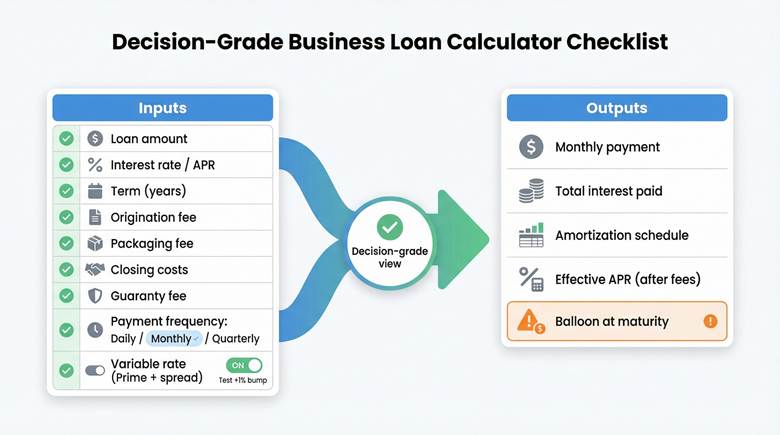
When a tool covers each detail, you can trust its output. Miss even one and the result is fiction.
Outputs: see beyond the monthly payment
The payment is only part of the story. A solid calculator prints a full amortization schedule so you can trace every dollar of principal and interest month by month. That schedule shows how quickly you build equity and how much interest the bank pockets over the life of the loan.
Next, focus on the total-interest line. Watch it shrink when you shave a year off the term or add a small extra payment each quarter. Few insights motivate faster than seeing ten thousand dollars disappear with one tweak.
Zero in on effective APR. The business-loan calculator on Calculator.net reveals how origination and documentation fees lift APR above the headline rate. When two lenders quote the same eight percent note, the one with the lower effective APR truly costs less.

Calculator.net business loan calculator APR and fees screenshot
Finally, confirm the calculator flags any balloon due at maturity. If that lump sum hides off-screen, the tool sells comfort, not clarity. We choose clarity every time.
Inputs owners get wrong and how to fix them
Interest rate, APR, and factor rate sound interchangeable, but they are not.
The interest rate is the sticker on the loan. APR folds origination, documentation, and any financed charges into one percentage. A factor rate appears in merchant-cash-advance offers and masks the true percentage. If your calculator has only an “interest rate” box, first convert any factor rate or fee stack to an apples-to-apples APR.
Fees trip people up next. Origination, packaging, and documentation charges that roll into principal drive up interest costs over time. Separate financed fees from those paid at closing so the tool can show their long-term bite.
Term versus amortization causes the classic balloon blind spot. A five-year term on a twenty-year amortization leaves a lump due in year five. Enter both numbers correctly, or you will plan for payments that vanish just when the bank wants six figures in full.
Last, check prepayment penalties. Some calculators hide this field, yet a three percent penalty can erase the savings of an early refinance. Add the fee to your payoff projection so the exit math stays honest.
Get these four inputs right and every output you see will earn your confidence.
Sanity-check affordability with DSCR
A payment you can make on paper is not the same as a payment your cash flow handles with ease. Lenders bridge that gap with one ratio: Debt Service Coverage (DSCR). We can do the same.
DSCR is straightforward. Divide annual net operating income by annual loan payments. A score above 1.25 tells banks you earn twenty-five percent more than the debt demands. Slide below 1.00 and you are burning cash just to keep up.

Pull last year’s operating income, enter it with projected payments, and watch the ratio appear. If it hugs the lender’s minimum, stress-test it. Raise the interest rate one percentage point; Prime has moved more than that in a single quarter during the past two years (Federal Reserve Prime Rate History, 2026). If DSCR drops under 1.20 after the bump, the deal is tight.
Now layer seasonality. Retailers ride a holiday wave; contractors slow in winter. Cut revenue for your slowest month, rerun the ratio, and see whether you still clear the bar. Numbers that survive the trough leave room for surprises, such as equipment hiccups, delayed invoices, or a softer market.
Store every input and result. When a banker asks how you arrived at your loan size, you can hand over a tidy table instead of a shrug. Solid preparation inspires confidence, and DSCR math supplies that preparation.
Decision tree to pick your tool in 30 seconds
You know the loan type, the must-have inputs, and the cash-flow guardrails. Now choose the right calculator without overthinking it.
Picture four doors. Walk through the one that matches your deal:

- Balloon or interest-only on a commercial property? Choose a calculator that lets you enter term and amortization separately and prints the balloon in bold.
- Fee-heavy term offers competing for your signature? Use a tool that shows effective APR after every charge, interest rate, and fee.
- Government-backed SBA paperwork on your desk? Select a calculator with fields for guaranty, servicing, and packaging fees, so the long tail of costs appears.
- Revolving credit on the table? Skip loan calculators altogether and open a line-of-credit model that flexes utilization, draw fees, and variable rates.
If your scenario lands between categories, run the numbers through two doors and compare. The option that stays affordable on both screens is the safer bet.
Double-check the math before you trust it
A polished interface can lull anyone into false confidence, so verify that the numbers behind it earn your trust.
First, run your inputs through a second calculator that exposes formulas or a full amortization table. If the payment, total interest, or balloon differs by more than pocket-change rounding, compare assumptions. One tool may compound interest monthly, another daily. Align those settings, rerun, and the gap should close. If it does not, discard the tool with the optimistic answer.
Next, test edge cases. Drop the rate to zero; the payment should equal principal divided by term. Push the rate sky-high and confirm the schedule still balances. Reliable calculators remain consistent at the extremes because the math never changes—only the inputs do.
Finally, check privacy. A trustworthy app lets you export schedules as CSV or PDF without forcing an email gate. If you must trade contact details for basic math, move on. We want answers, not inbox clutter.
Conclusion: Policy and market shifts keep your inputs fresh
Loan math ages fast. Fees change, rules evolve, and rates rarely stay put. Freeze your inputs in last year’s reality and the result slides from precise to pointless.
Start with the SBA. Its operating manual, SOP 50 10, was revised in 2025, and the agency raised guaranty fees on larger 7(a) loans in the same fiscal year (Small Business Administration, 2025). If your calculator still uses yesterday’s fee table, its payment estimate belongs in the past. Review the latest fee notice before you lock an offer.
Next, track the CFPB’s 1071 rule. Courts keep nudging compliance dates, yet lenders already request additional ownership, demographic, and location data. Clean numbers and documents speed software checks and shorten funding time.
Finally, watch rates. Prime hovered near eight percent through early 2026, far above the pre-2022 norm. A quarter-point hike on a one-million-dollar balance adds about two thousand five hundred dollars per year. Keep a tab open to the Federal Reserve’s rate page and rerun your calculator each time the central bank moves.
Regulations and markets shift whether we notice or not. Stay alert, update your inputs, and your calculator will repay you with numbers you can trust.



































Sign in to leave a comment.