
Introduction to Network Attached Storage (NAS)
In our digital age, data is the lifeblood of both personal and business endeavors. From treasured family photos to critical business documents, the need for efficient and secure storage solutions has never been greater. Enter Network Attached Storage (NAS). If you've been asking, "What is NAS?" you're in the right place.
This blog post will provide a comprehensive introduction to NAS, its benefits, features, setup, and real-world applications. Whether you're a tech enthusiast or a business professional, you'll discover how NAS can revolutionize your storage needs.
What Is NAS and How It Differs from Traditional Storage Solutions
Network Attached Storage, commonly known as NAS, is a storage device connected to a network that allows data access to multiple users. Unlike traditional external hard drives, which connect directly to a single computer, NAS operates over your home or office network.
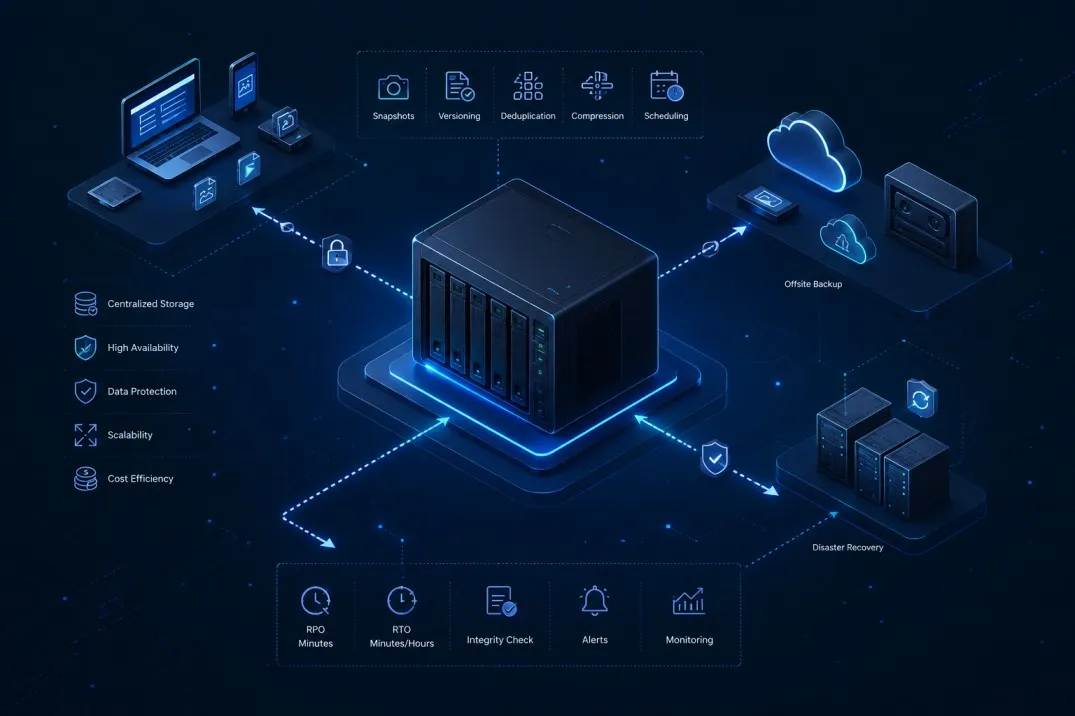
One key difference is accessibility. With NAS, you can access your files from anywhere with an internet connection, providing a centralized storage solution. Traditional storage solutions often lack this flexibility, being tethered to one device or requiring cumbersome file transfers.
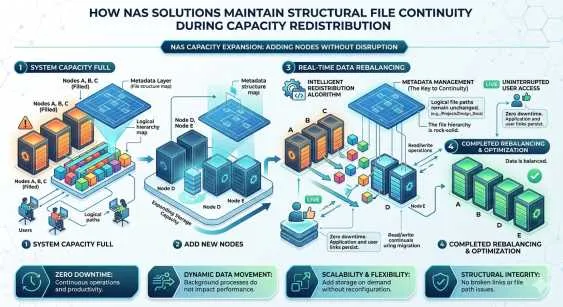
Another distinction is scalability. NAS systems can expand by adding more drives, making them ideal for growing storage needs. Traditional storage solutions can be limited in capacity and not as easily upgraded.
Benefits of Using NAS for Personal and Business Needs
NAS offers numerous advantages that cater to both personal and professional use. For personal users, NAS provides a convenient way to back up family photos, videos, and documents. The ability to stream media directly to devices like smart TVs and smartphones is a major perk.
For businesses, NAS offers robust data management. It enables seamless file sharing among employees, improving collaboration. Additionally, NAS often includes features like automated backups and data redundancy, ensuring critical information is always protected.
Another significant benefit is cost-effectiveness. Compared to cloud storage subscriptions, NAS can be a more economical long-term solution, especially for those with substantial data storage needs.
Features to Look for When Choosing a NAS Device
When selecting a NAS device, several key features should be considered to ensure it meets your specific requirements. Firstly, look at storage capacity. Determine how much data you currently need to store and anticipate future growth.
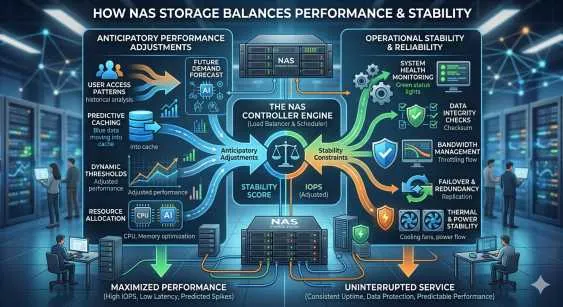
Next, consider the processor and RAM. A more powerful processor and higher RAM will ensure better performance, especially if you plan to use your NAS for media streaming or running applications.
Connectivity options are also crucial. Ensure the NAS device supports the network speeds of your home or office. Additional features like USB ports, and support for RAID configurations can enhance functionality and data protection.
Setting Up and Configuring a NAS System
Setting up a NAS system is relatively straightforward, even for those without extensive technical knowledge. Start by connecting the NAS device to your network router using an Ethernet cable. Power on the device and follow the manufacturer's setup instructions, usually through a web interface.
Once the initial setup is complete, you can configure user accounts and permissions. This allows controlled access to different users, ensuring data security. Most NAS systems come with intuitive software that guides you through these steps.
Don't forget to set up automated backups. Most NAS devices offer scheduled backup options, ensuring your data is regularly backed up without manual intervention.
Best Practices for Maintaining and Securing Your NAS
Maintaining and securing your NAS is vital to ensure its longevity and protect your data. Regular firmware updates are essential. Manufacturers often release updates that fix bugs and enhance security.
Implement strong passwords for both the device and user accounts. Avoid default settings and encourage all users to create unique, robust passwords.
Additionally, enable encryption for sensitive data. Many NAS systems offer encryption features that protect your data from unauthorized access, even if a drive is physically removed.
Real-World Applications of NAS
NAS finds applications across various scenarios, showcasing its versatility. In home settings, NAS can serve as a centralized hub for all your multimedia content, accessible from any device within your network.
In small businesses, scale out NAS improves workflow by providing a shared storage solution where employees can easily access and collaborate on projects. It also aids in disaster recovery by offering reliable backup solutions.
For creative professionals, such as photographers and videographers, NAS offers a safe and organized way to store large files. The ability to access and edit files remotely can significantly enhance productivity.
Conclusion and Future of NAS Technology
In conclusion, NAS stands out as a powerful, flexible, and cost-effective storage solution for both personal and business use. Its ability to provide centralized, accessible, and secure data storage makes it an invaluable tool in today's digital landscape.
Looking ahead, the future of NAS technology seems promising. Advances in AI and machine learning could further enhance NAS capabilities, such as intelligent data management and predictive maintenance. Furthermore, as data storage demands continue to grow, NAS systems will likely evolve to offer even greater capacities and faster performance.
Ready to explore the benefits of NAS for yourself? Start by choosing the right NAS device that fits your needs and take the first step toward a more organized and efficient digital life.
























Sign in to leave a comment.