In today's hectic work context, project management is not just assigning and completing tasks. Progress is measured in how long each task spends in each stage of your workflow. Enter time in status tools, to give you visibility, accountability, and data-driven optimization of your JIRA process.
Why Time in Status Matters
Every manager of projects aspires for a project to be on initiative — however, very few take the moment to ask:
- Which statuses actually create bottlenecks in delivery?
- Which team members are getting stuck in very long loops?
- Where are you actually losing time?
The task will generally move from “To Do” → “In Progress” → “Code Review” → “Done” status. But, if we spend too long in “Code Review” it affects delivery. Time in statuses gives you a way to quantify the amount of time each issue spends in a designated state. This will benefit you to make an objective analysis of problems.
Key Features That Make a Difference
Here are the standout features of top time tracking / time-in-status tools that help supercharge JIRA workflows:
1. Timer in Status Reports
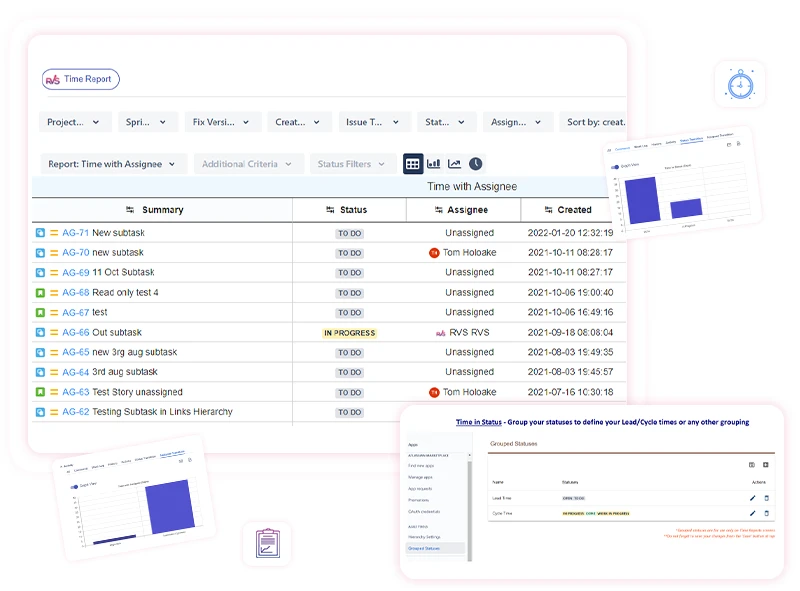
This is the most central feature. This displays the amount of time each task spends in each workflow status. By filtering by project, sprint, assignee, or issue type, project leads can:
- Identify any significant delays (for example, tasks stuck in "Testing" for too long)
- Make decisions regarding what steps can be eliminated or streamlined
- Provide guidance or training to team members who may be struggling with tasks.
Again, these observations drive actionable changes, rather than simply relying on a gut feeling.
2. Exporting to CSV/Excel/Spreadsheet
At times, you may want specified data in a more familiar manner. Due to the nature of time in status tools, you are able to export your reports into either CSV, Excel, or directly into Google Sheets. This has its advantages, such as the ability to:
- Create your own pivot tables
- Share snapshots in reviews or standups
- Dive deeper into an individual issue in context.
Having that spreadsheet also provides transparency in a scrum or review meeting - everyone has the visual representation of the time spent.
3. Power BI/Advanced Visualization
Having raw data is excellent, however presented data is always beneficial. Most tools will allow for the exporting of JSON feeds or allow for integration with Power BI. This matters because it:
- Will convert your status duration data into graphical representations or dashboards
- Will allow you to identify trends (i.e. "Code Review times are shown to be creeping upwards")
- Combine with other data sources for a richer exploration
- Provide stakeholders with polished dashboards to review.
What This Means for Your Team
By having a time in status tool supporting your JIRA process:
- You transition from a reactive approach to a proactive one - you don't just react to issues after it's too late until they are coming in a pile.
- You also increase transparency in process flow, rather than pure task numbers.
- You bring bottlenecks to light and make them visible and fixable.
Over time, you can also revisit the workflows for additional optimization - reducing wasted steps, ensuring equitable workload and achieving realistic SLAs.
One such tool to do exactly that, Time in Status by RVS - with robust reporting, spreadsheet and BI exports, and 20+ additional features built with the purpose of bringing transparency and control to JIRA based workflows.
Tips to Get Started
- Choose a scope. Start with one project or team rather than your entire organization.
- Set a baseline. Run time in status reports for a few sprints to see where your biggest delays are.
- Prioritize fixes. Tackle the worst bottleneck first (e.g. tasks languishing in “Review”).
- Track improvements. After implementing changes, compare your new metrics to your baseline.
- Iterate. As your processes evolve, continue to monitor and refine.
Conclusion
Time in status tools can turn JIRA workflows from a black box experience into an open and measurable system. You get visibility into delays, accountability across your team and the ability to make decisions based on evidence. If you are ready to improve your management of a project, implementing this type of tooling is a good first step and apps like Time in Status by RVS can make this possible and easy to get started. Schedule a call now !
























Sign in to leave a comment.