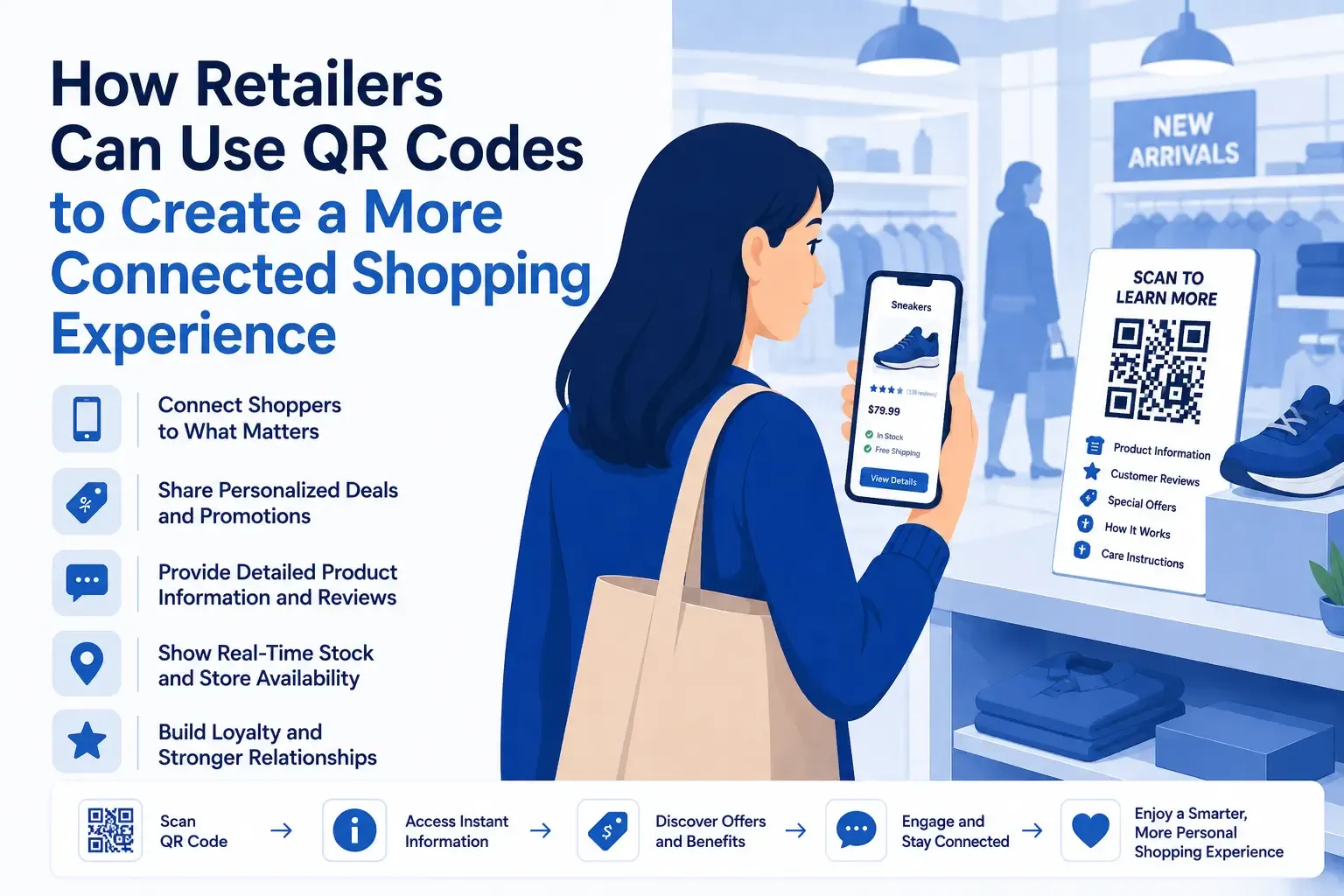

Customers often enter a physical store with the same expectations they have online. They want detailed product information, customer reviews, availability updates, and easy access to promotions before making a purchase.
However, shelf labels and product packaging have limited space. Store employees may not always be available, and printed displays can quickly become outdated.
QR codes give retailers a simple way to fill this information gap. By connecting physical products and displays with digital content, they can make shopping more informative, interactive, and convenient.
Adding Digital Information to Physical Products
A customer may be interested in a product but still need more information before deciding to buy it.
The packaging might explain the basic features, but it may not include:
- Complete specifications
- Materials or ingredients
- Available colors and sizes
- Compatibility details
- Care instructions
- Customer reviews
- Setup demonstrations
- Frequently asked questions
A QR code placed beside the product can provide immediate access to these details.
Instead of adding more text to the shelf or packaging, the retailer can send customers directly to a mobile-friendly product page containing everything they need.
Businesses can create product-linked codes with QRColor and connect them to individual product pages, guides, videos, or other relevant resources.
The destination should always match the customer’s expectations. A QR code placed next to a specific product should open information about that product rather than a general store homepage.
Reducing Uncertainty During the Buying Process
Customers often delay a purchase because they are missing one important detail.
Someone comparing electronic accessories may need to confirm whether a product works with their device. A clothing shopper may want to know whether another size is available. A customer considering a piece of furniture may need exact dimensions before making a decision.
QR codes can provide these answers while the customer is still engaged with the product.
This makes it easier for shoppers to evaluate their options without leaving the aisle, searching independently, or waiting for assistance.
Better access to information does not guarantee a sale, but it can remove some of the uncertainty that prevents customers from moving forward.
Turning Store Promotions Into Direct Actions
Traditional retail promotions are often passive.
A sign may announce a sale or introduce a loyalty program, but the customer still has to remember the offer or ask how to participate.
A QR code can turn that message into an immediate action.
Retailers can use promotional QR codes to link to:
- Digital coupons
- Limited-time discounts
- Loyalty program registration
- Seasonal campaigns
- Product bundles
- Contests and giveaways
- Exclusive in-store offers
The message beside the code should explain the benefit clearly.
Instructions such as “Scan to claim your discount” or “Scan to join our rewards program” are more effective than a code displayed without context.
Customers are more likely to scan when they understand exactly what will happen next.
Connecting In-Store and Online Shopping
Physical and online retail are no longer separate parts of the customer journey.
A shopper may discover a product in a store but order it online later. They may find the right item but need a color, size, or model that is not currently available. They may also want to save the product or share it before making a decision.
QR codes can help customers continue their journey by allowing them to:
- Check online inventory
- Order an unavailable variation
- Find stock at another location
- Save the product for later
- Add it to an online shopping cart
- Share the product page
- Compare it with similar items
This helps retailers preserve customer interest even when the purchase cannot be completed immediately inside the store.
Instead of reaching a dead end, the shopper receives a useful next step.
Improving Product Discovery
QR codes can also help customers discover related items and explore more of a retailer’s product range.
For example, a QR code next to a clothing display might provide styling ideas. One placed near kitchen products could link to recipes or demonstrations. A beauty store could offer a comparison guide explaining the differences between similar products.
Useful destinations may include:
- Product comparison pages
- Buying guides
- Gift recommendations
- Styling suggestions
- Related accessories
- Tutorials
- Curated collections
These resources can help customers understand how products fit into their needs rather than simply presenting another advertisement.
Making Stores Easier to Navigate
Retail QR codes do not need to be limited to products and promotions.
They can also help shoppers move through the store and access practical information.
A code may link to:
- A digital store map
- Department locations
- Pickup instructions
- Delivery options
- Store services
- Return and exchange policies
- Frequently asked questions
This can be particularly helpful in larger stores where finding a department, product category, or service area may take time.
Smaller retailers can also use QR codes to explain services or policies without filling counters and entrances with printed notices.
Supporting Employees and Customer Service
QR codes should not be viewed as a replacement for store employees.
Their most useful role is handling simple information requests so staff can focus on customers who need personal assistance.
A shopper looking for technical specifications may prefer to scan a code. Someone who wants a recommendation, demonstration, or expert opinion may still benefit from speaking with an employee.
This combination gives customers more independence while preserving the human element of retail.
When routine information is available digitally, employees can spend more time on interactions where their knowledge and attention matter most.
Extending Support Beyond the Sale
The usefulness of a QR code can continue after checkout.
Retailers can place codes on product packaging, receipts, shopping bags, or printed inserts to provide customers with ongoing support.
These codes may link to:
- Setup instructions
- Digital user manuals
- Warranty registration
- Troubleshooting resources
- Customer support
- Replacement parts
- Reordering pages
- Related accessories
This makes it easier for customers to find accurate information without searching through the retailer’s website or keeping printed manuals.
A helpful post-purchase experience can also improve customer satisfaction and increase trust in the business.
Encouraging Reviews and Repeat Engagement
QR codes can help retailers maintain a relationship with customers after the initial purchase.
A code on a receipt or package could invite customers to:
- Leave a product review
- Complete a short survey
- Join a loyalty program
- Claim a future discount
- Reorder a product
- Follow the business online
The request should be simple, relevant, and clearly explained.
Customers are more likely to participate when the process is quick and when there is an obvious benefit, such as loyalty points, easier support, or a useful offer.
Choosing Effective QR Code Placements
QR code placement should reflect the action the retailer wants the customer to take.
Common locations include:
- Shelf labels
- Price tags
- Product packaging
- Promotional displays
- Store windows
- Checkout counters
- Receipts
- Shopping bags
A code beside a product could provide specifications or reviews. A code in a window might open a promotion or online catalog. One near the checkout could invite customers to join a loyalty program.
Retailers should avoid placing codes where they are difficult to reach, too small to scan, or disconnected from the customer’s current activity.
Best Practices for Retail QR Codes
A QR code is only useful when the experience behind it works properly.
Use a specific call to action
Explain what customers will receive after scanning, such as “View product details,” “Check available sizes,” or “Claim this offer.”
Link directly to relevant content
Avoid making shoppers search for the information after they scan.
Optimize the destination for mobile devices
The page should load quickly, display clearly, and be easy to navigate on a smartphone.
Maintain strong visual contrast
The code should be easy to scan under different lighting conditions and from a comfortable distance.
Test before publishing
Check the code with multiple phones and camera applications before adding it to packaging or store displays.
Review links regularly
Promotions expire, products change, and pages are moved. Retailers should check QR code destinations periodically to prevent broken or outdated experiences.
How Small Retailers Can Benefit
QR codes are just as useful for independent stores as they are for major brands.
A small business can use them to share details that make its products more distinctive.
For example:
- A craft shop could introduce the person who made an item
- A boutique could provide styling inspiration
- A food retailer could share recipes or sourcing information
- A bookstore could link to author interviews
- A furniture store could offer care and assembly guides
These applications help smaller retailers tell richer product stories without requiring expensive technology or additional display space.
Conclusion
QR codes give retailers a practical way to connect physical shopping with digital information.
They can help customers understand products, access promotions, check availability, explore related items, and continue shopping online. They can also support employees, improve post-purchase service, and encourage repeat engagement.
The most effective retail QR codes are designed around a clear customer need. They answer a question, remove uncertainty, or provide a useful next step at the right moment.
When implemented thoughtfully, QR codes can make the in-store experience more informative, flexible, and connected without making it more complicated.



























Sign in to leave a comment.