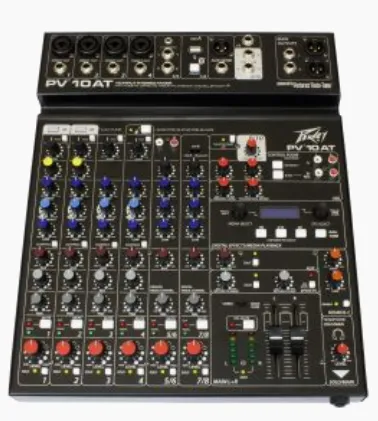

Clear and balanced sound does not happen by chance. Behind every strong live performance or recording session stands careful control of levels, tone, and signal flow, all managed through a mixing console. A mixing console plays a central role in shaping that final sound. Once you move past beginner basics, you start noticing how small adjustments influence clarity, space, and overall balance.
Many operators learn the controls but still struggle to translate them into better sound during real performances. In this blog, you will learn practical techniques and working habits that help you use a mixing console more effectively in live audio environments.
Key Mixing Console Techniques for Clearer Live Audio
Operating a mixing console at an intermediate level requires more than adjusting volume sliders. You begin to pay attention to signal flow, tonal balance, and the relationship between instruments in the mix. Small decisions can shape the overall sound in ways that become noticeable across the entire room.
Build a Clean Gain Structure
Gain structure forms the base of a stable mix. Every signal entering the console needs the right strength before it moves through the rest of the channel.
When the input gain is too low, the signal becomes weak and lacks presence. Noise may appear as you increase the channel fader later. Too much gain creates distortion, and once distortion appears at the input stage, it spreads through the entire signal path.
Start by asking the performer to play or sing at a normal performance level. Watch the signal meters on the channel strip. Adjust the gain until the signal remains strong while leaving enough space below the clipping point.
A balanced gain structure provides several advantages:
- Prevents distortion during louder musical moments
- Maintains consistent clarity across all channels
- Leaves room for dynamic changes in the mix
Once the gain settings feel stable, you can focus on shaping the mix without worrying about sudden signal problems.
Use EQ to Create Space in the Mix
Equalization helps separate instruments that share similar frequency ranges. Without that separation, the mix may feel crowded or muddy.
Many live mixes contain several instruments that compete in the midrange area. Guitars, keyboards, and vocals often overlap in that space. When too many sounds occupy the same range, listeners may struggle to distinguish them.
Instead of boosting several frequencies, try reducing areas that cause overlap. Small cuts often create more clarity than large boosts.
A few simple EQ approaches can help:
- Reduce low frequencies on vocals to remove rumble
- Trim muddy mids from guitars if vocals need more space
- Lower excessive low end on stage microphones
These adjustments allow each instrument to occupy its own space within the mix. As a result, you can maintain clarity without increasing overall loudness.
Manage Channel Balance Before Effects
Effects can add depth and atmosphere to a live mix. Reverb and delay often enhance vocals or instruments when used carefully. Still, effects should never replace basic channel balance.
Begin by building a mix that sounds clear without any effects processing. Raise and lower the channel faders until the relationship between instruments feels natural.
You should hear each important element clearly. Vocals usually sit at the front of the mix, while rhythm instruments support the overall groove. Once this balance feels stable, small amounts of reverb or delay can add dimension.
Applying effects too early may blur the sound and reduce clarity. A clean foundation allows effects to enhance the mix rather than overwhelm it.
During live performances, subtle effects often produce the best results. A small touch of ambience can add depth without distracting from the music.
Control Stage Monitor Levels Carefully
Stage monitors help performers hear themselves and stay connected with the rest of the band. When monitor levels become unbalanced, musicians may struggle to perform comfortably.
Too much monitor volume increases the chance of feedback and adds unnecessary noise to the stage. Excessive stage sound can also spill into microphones, which affects the main mix.
A balanced monitor mix often includes:
- Clear vocal levels for singers
- Rhythm instruments that help maintain timing
- Only the channels each performer truly needs
Communication during sound check helps build better monitor mixes. Musicians often know what they need to hear while performing.
When monitor levels remain controlled, the stage environment becomes calmer and easier to manage. The main mix also benefits because microphones pick up less unwanted sound.
Understand Routing and Subgroups
Routing provides flexibility inside the mixing console. Signals can travel through different paths depending on how the system is set up.
Subgroups allow you to control several channels together. For example, multiple drum microphones can route to a single subgroup fader. Instead of adjusting each channel individually, you can raise or lower the entire drum section with one control.
Auxiliary sends also play an important role. They allow signals to reach different destinations within the sound system.
Aux sends often route signals to:
- Stage monitor mixes
- External effects processors
- Recording outputs
Learning how routing works helps you organize larger mixes. When multiple channels share a common destination, grouping them simplifies control during the performance.
Over time, these routing tools make complex setups feel much easier to manage.
Listen to the Room, Not Just the Console
The console may sit in one location, yet the audience experiences the sound throughout the venue. Room acoustics often shape the final result.
Walls, ceilings, and seating arrangements influence how sound spreads. Low frequencies may gather in certain areas while other sections feel quieter.
During sound check, try walking around the room while music plays. Listen to how the mix changes from one location to another. Some adjustments may improve balance across the entire space.
A mix that sounds perfect near the console may feel different near the stage or back wall. Small changes in EQ or level can help distribute sound more evenly.
Listening beyond the console position helps you create a mix that works for the entire audience rather than just one spot.
Conclusion
Developing stronger mixing habits takes time and careful listening. As your experience grows, the mixing console becomes less about adjusting controls and more about shaping how music reaches the audience. Modern audio mixers continue to evolve with improved processing tools and flexible signal control.
These systems give sound operators greater freedom to shape tone and balance during live events. When you combine steady gain structure, thoughtful EQ choices, and organized routing, the mix becomes clearer and easier to manage. If you want to improve your live sound workflow, explore reliable mixing consoles and start applying these techniques in your next setup.





















Sign in to leave a comment.