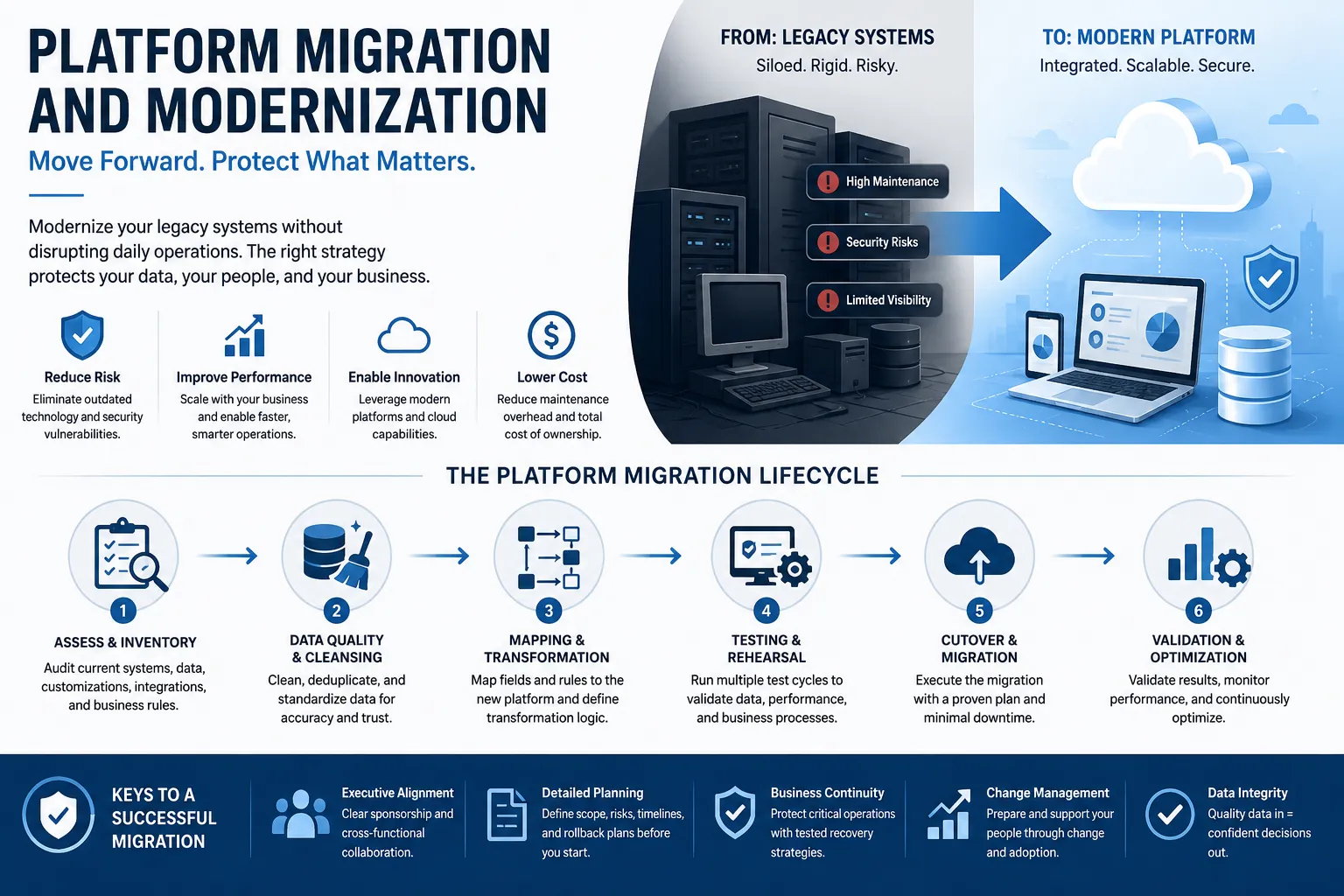

There's a particular kind of dread that sets in when a company finally admits its core system the ERP that runs finance, the CRM that holds every customer relationship, the on-premise database nobody fully understands anymore has to be replaced. The software itself usually isn't the scary part. What keeps operations leaders up at night is the transition: the weekend cutover window, the question of whether historical records will actually arrive intact, and the very real possibility that "go-live" turns into "go-live, then spend three months fixing data."
Platform migration and modernization is the discipline built around solving exactly that problem. Done well, it's barely noticeable to the people who depend on the system orders still get processed, invoices still get paid, and customer history is right where it should be. Done poorly, it becomes the story employees tell for years about the year the new system "broke everything." This guide walks through what legacy system migration actually involves, where the real risk hides, and how organizations are approaching modernization in a way that protects both data and daily operations.
What Platform Migration and Modernization Actually Means
At its core, platform migration is the process of moving an organization's data, business logic, and operational workflows from an older or outdated system to a modern platform typically a cloud-based ERP or CRM. Modernization is the broader umbrella: it includes migration, but also covers decisions about which legacy customizations should be retired, which should be rebuilt, and which no longer reflect how the business actually operates.
This distinction matters because migration is often treated as a purely technical export-and-import exercise, when in practice it's closer to an engineering program. Data that has accumulated for a decade or more rarely fits cleanly into a new data model. Customizations built to patch a gap in the old system may not need to exist at all in the new one. And legacy systems frequently carry security and performance risks simply by virtue of their age a concern that federal guidance on information system contingency planning treats as a core part of operational risk management, not an afterthought.
Why Legacy Systems Get Replaced in the First Place
Few organizations migrate platforms for the sake of novelty. The decision is usually forced by one or more of the following:
Vendor Support Is Ending
Older ERP and CRM platforms eventually reach end-of-life, meaning security patches and bug fixes stop arriving. Continuing to run on an unsupported system isn't just inconvenient it's a growing liability.
The System Can't Scale
A platform that worked fine for a 50-person company often buckles under the transaction volume, user count, or reporting complexity of a 500-person one. Performance issues compound as data volume grows.
Integration Has Become Unmanageable
Years of bolted-on middleware, custom connectors, and manual exports between systems create fragile integration points that break whenever anything changes upstream.
The Business Has Changed, But the System Hasn't
Mergers, new business lines, and changing regulatory requirements often outpace what a legacy system was originally designed to handle.
The Real Risk in Migration Isn't Technical
It's tempting to think of platform migration as a software problem pick the right tool, write the right scripts, and the data will land where it should. In reality, the harder risk is business continuity: keeping the organization operating normally while the systems underneath it are fundamentally changing.
This is precisely the kind of risk that structured continuity planning is designed to address. Federal guidance on contingency planning for information systems emphasizes identifying critical functions, building recovery strategies around acceptable downtime thresholds, and documenting clear procedures before a transition not improvising them during one. Applying that same discipline to a commercial platform migration is what separates a calm cutover weekend from a chaotic one.
The Core Stages of a Platform Migration
While the specific tools vary by source system and target platform, most successful migrations follow a similar sequence.
1. Assessment and Inventory
Before a single record moves, the legacy environment needs a full audit: data volumes, custom code, integrations, reports, and the business rules buried in years of configuration changes. Skipping this step is the single most common reason migrations run over budget, because hidden complexity surfaces mid-project instead of during planning.
2. Data Quality and Cleansing
Legacy data is rarely as clean as anyone hopes. Duplicate customer records, inconsistent formatting, and orphaned transactions are common after years of manual entry and ad hoc fixes. Cleansing this data before migration rather than migrating it as-is and cleaning up afterward is what determines whether the new system starts with trustworthy information or inherits the old system's problems in a shinier interface.
3. Mapping and Transformation
Each field, table, and business rule in the legacy system has to be mapped to its equivalent in the new platform, with transformation logic defined for anything that doesn't translate directly. This is also the stage where decisions get made about which legacy customizations are worth rebuilding versus retiring altogether.
4. Testing and Rehearsal
A migration should never be executed for the first time during the actual go-live. Multiple rehearsal cycles testing volume, performance, and data accuracy surface problems while there's still time to fix them without affecting live operations. Organizations exploring structured migration platform modernization services typically build several of these rehearsal waves into the project plan specifically so that cutover weekend holds no surprises.
5. Cutover and Hypercare
The actual transition from old system to new is the highest-risk moment in the entire project. A well-planned cutover includes a minute-by-minute run book, defined go/no-go checkpoints, a rollback plan in case something goes wrong, and a period of intensive support immediately after go-live often called hypercare to catch and resolve issues quickly while they're still small.
Cloud Migration Adds Its Own Considerations
When the destination platform is cloud-based, as most modern ERP and CRM systems now are, migration also involves decisions about portability and vendor lock-in. NIST's cloud computing reference architecture work highlights that moving applications and data between cloud providers requires capturing images and data in formats that remain portable, since provider-specific extensions can complicate future transitions if not handled deliberately. Even organizations confident in their chosen platform benefit from making these architecture decisions early, rather than discovering years later that switching providers is harder than expected.
Common Migration Paths Organizations Are Taking
A few migration patterns show up repeatedly across industries:
- On-premise ERP to cloud ERP moving systems like older Dynamics versions, SAP, or Oracle to a modern cloud-based finance and operations platform
- Legacy CRM to modern CRM consolidating customer data from spreadsheets, homegrown tools, or aging CRM platforms into a unified system
- Multiple disconnected systems to one platform replacing a patchwork of finance, sales, and service tools with a single integrated environment
- On-premise to cloud Dynamics upgrading from legacy on-premise Dynamics versions to the current cloud-based platform while preserving customizations that still matter
Signs Your Organization Is Ready for a Migration Conversation
A structured migration assessment is usually worth pursuing when:
- Vendor support for your current system has an announced end date
- IT spends more time maintaining workarounds than supporting actual business needs
- Reporting requires manually combining data from multiple disconnected systems
- New hires struggle to learn a system that no longer resembles modern software conventions
- A previous attempt at modernization stalled or was scoped incorrectly
Reducing Risk Without Slowing Everything Down
There's a natural tension in migration projects between moving quickly and moving safely. The organizations that manage this tension well tend to share a few habits: they treat data cleansing as a distinct phase rather than an afterthought, they rehearse the cutover multiple times before attempting it live, and they build explicit rollback criteria into the plan so that a go/no-go decision isn't being made under pressure in the moment.
None of this requires slowing the project down indefinitely. It requires sequencing the work so that the riskiest decisions what data to trust, what customizations to keep, when exactly to flip the switch are made deliberately rather than discovered during a live cutover window.
Conclusion
Platform migration and modernization will always carry some risk moving years of accumulated data and business logic onto a new foundation is not a trivial undertaking. But the organizations that get through it smoothly aren't the ones with the most advanced migration tools; they're the ones that treat data quality, testing, and cutover planning as disciplines in their own right rather than checkboxes on the way to a new login screen.
Whether the move is from an aging on-premise ERP, a CRM that's been outgrown, or a patchwork of systems held together by exports and manual reconciliation, the same principles apply: understand what you're moving before you move it, clean the data before it travels, rehearse the transition before it's real, and plan for what happens if something doesn't go as expected. Get that sequence right, and modernization becomes a quiet, well-managed transition rather than the disruptive event everyone feared.
References
- National Institute of Standards and Technology (NIST). Contingency Planning Guide for Federal Information Systems (NIST Special Publication 800-34, Revision 1). https://nvlpubs.nist.gov/nistpubs/legacy/sp/nistspecialpublication800-34r1.pdf
- National Institute of Standards and Technology (NIST). NIST Cloud Computing Reference Architecture (NIST Special Publication 500-292). https://nvlpubs.nist.gov/nistpubs/Legacy/SP/nistspecialpublication500-292.pdf
- National Institute of Standards and Technology (NIST). Evaluation of Cloud Computing Services Based on NIST SP 800-145 (NIST Special Publication 500-322). https://nvlpubs.nist.gov/nistpubs/SpecialPublications/NIST.SP.500-322.pdf
- National Institute of Standards and Technology (NIST). Lean and Process Improvement. https://www.nist.gov/mep/lean-and-process-improvement
- National Institute of Standards and Technology (NIST). Operations — Foundations of a Successful Business (Baldrige Program). https://www.nist.gov/baldrige/foundations-successful-business/operations



























Sign in to leave a comment.