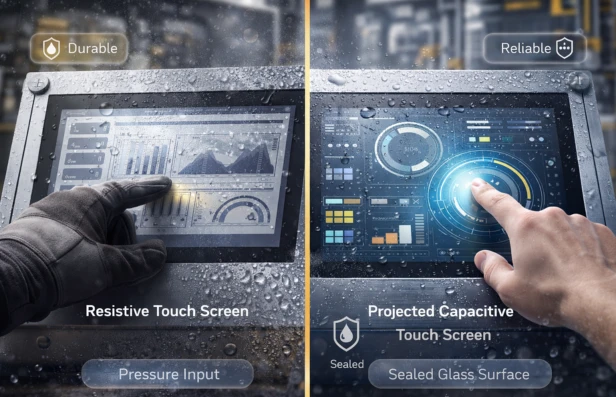

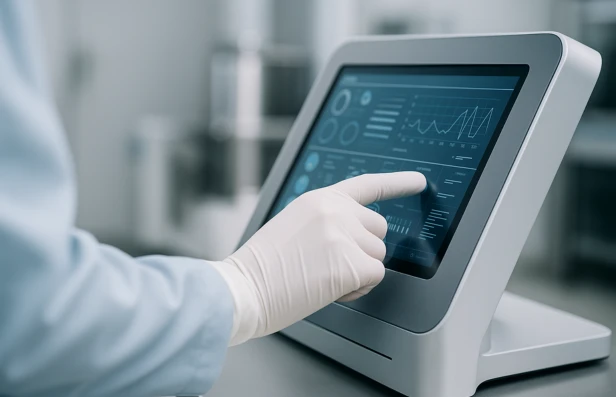
Touch screen technology is widely used in industrial control panels, medical devices, kiosks, and automation systems. However, not all touch screens function the same way. Two of the most common technologies in industrial environments are resistive touch screens and projected capacitive touch screens.
Selecting between these technologies requires evaluating environmental conditions, operator interaction requirements, durability expectations, and system integration constraints. In industrial applications, reliability and performance under stress often outweigh consumer-style interface preferences.
Understanding the differences between resistive and projected capacitive touch screens helps engineers make informed decisions.
What Is a Resistive Touch Screen?
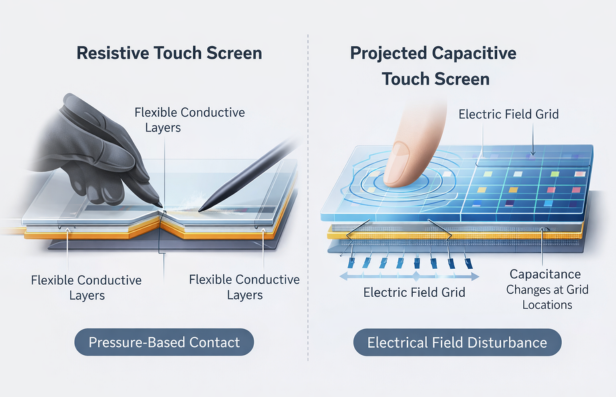
A resistive touch screen operates through pressure-based detection. It consists of two flexible conductive layers separated by a small insulating gap.
When pressure is applied:
- The top layer bends inward
- The two conductive layers make contact
- Electrical resistance changes
- The controller calculates the touch location
Resistive technology detects physical pressure rather than electrical properties.
Key Characteristics
- Works with gloved hands
- Compatible with styluses
- Lower sensitivity to moisture interference
- Typically lower cost
- Generally single-touch capability
Resistive screens are commonly used in industrial environments where operators wear gloves or where input tools are required.
What Is a Projected Capacitive Touch Screen?
Projected capacitive touch screens, often called PCAP screens, operate using electrical field detection.
A transparent conductive grid is embedded beneath the surface. When a finger approaches or touches the screen:
- The electrical field is disturbed
- Capacitance changes at specific grid points
- The controller calculates precise coordinates
Projected capacitive systems detect conductive objects rather than pressure.
Key Characteristics
- High optical clarity
- Multi-touch capability
- Smooth, glass-like surface
- Highly responsive interface
- Supports gesture input
PCAP screens are widely used in modern industrial systems that require advanced graphical interfaces.
Sensitivity and Input Methods
Industrial environments vary significantly in operator conditions.
Resistive Screens Support
- Thick gloves
- Styluses
- Non-conductive objects
- High-precision single-point input
Projected Capacitive Screens Support
- Bare finger input
- Multi-touch gestures
- Lightweight gloves designed for conductivity
In environments where operators consistently wear heavy protective gloves, resistive technology often provides more consistent performance.
However, advanced PCAP systems can be tuned for glove operation depending on the configuration.
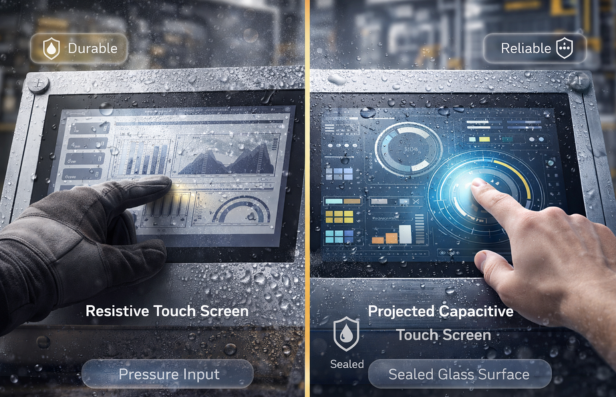
Environmental Durability
Industrial equipment often operates in harsh conditions.
1. Moisture and Liquid Exposure
Resistive screens may tolerate water droplets without false inputs because they rely on pressure.
Projected capacitive screens may detect unintended inputs if water disrupts the electrical field, though modern controllers mitigate this issue.
2. Dust and Contaminants
Both technologies require environmental sealing, but surface design matters.
Resistive screens typically use flexible top layers, which may be more susceptible to surface wear over time.
Projected capacitive screens often use hardened glass surfaces, improving scratch resistance.
3. Temperature Extremes
Temperature tolerance depends on material selection rather than sensing method alone.
However, glass-based PCAP screens may perform better in applications requiring impact resistance and long-term optical clarity.
Optical Performance and Visibility
Optical clarity is a key consideration in industrial HMI design.
Projected capacitive screens offer:
- Higher light transmission
- Clearer image quality
- Improved color vibrancy
Resistive screens may have slightly reduced optical clarity due to additional flexible layers.
For applications requiring detailed graphical interfaces, PCAP technology typically provides superior visual performance.
Mechanical Reliability and Lifecycle
Lifecycle expectations vary by application.
Resistive Touch Screens
- Fewer electronic sensing layers
- Pressure-based activation
- Surface may degrade under repeated flexing
Projected Capacitive Touch Screens
- No flexible top layer deformation
- Durable glass surface
- Long lifespan under normal operation
Projected capacitive screens often demonstrate longer surface durability in high-cycle environments, particularly where abrasion is common.
Integration with Industrial Systems
Touch screen integration requires consideration of system architecture.
Resistive Integration Considerations
- Simple controller design
- Lower processing demands
- Compatible with basic HMI systems
Projected Capacitive Integration Considerations
- Requires advanced controllers
- Higher processing demands
- Enables complex graphical user interfaces
- Supports gesture-based interaction
In systems requiring sophisticated visualization and interactive software, PCAP provides greater flexibility.
To explore how HMI technology is transforming real-world applications, read this article on how HMI technology is transforming modern healthcare.
Cost and Complexity
Cost considerations depend on performance expectations.
Resistive touch screens generally offer:
- Lower component cost
- Simpler electronics
- Suitable for basic interface needs
Projected capacitive systems typically involve:
- Higher component cost
- More complex controller electronics
- Greater design flexibility
For simple control panels, resistive may be sufficient. For advanced interfaces, PCAP often justifies its cost.
When to Choose Each Technology
Choose Resistive Touch Screens When
- Operators wear heavy gloves
- Stylus input is required
- Single-touch operation is sufficient
- Cost sensitivity is high
- Environmental moisture interference is a concern
Choose Projected Capacitive Touch Screens When
- Multi-touch capability is required
- High optical clarity is critical
- Durable glass surfaces are preferred
- Advanced graphical interfaces are needed
- Long-term surface wear resistance is important
Technology selection must align with real-world operating conditions rather than aesthetic preference.
Engineering Evaluation Process
Selecting the appropriate touch screen requires a systematic assessment.
1. Define Environmental Conditions
Evaluate:
- Moisture exposure
- Dust levels
- Chemical exposure
- Temperature range
- Vibration levels
2. Identify User Interaction Requirements
Determine:
- Glove usage
- Multi-touch needs
- Stylus compatibility
- Required precision
3. Evaluate System Integration
Consider:
- Controller compatibility
- Software requirements
- Display clarity expectations
- Long-term maintenance needs
Only after evaluating these factors should the final selection be made.
Conclusion
Resistive and projected capacitive touch screens both serve important roles in industrial applications.
Resistive technology provides reliable pressure-based input that works well with gloves and simple interfaces. Projected capacitive technology delivers high clarity, multi-touch capability, and enhanced durability for advanced systems.
The best choice depends on environmental demands, operator interaction needs, and long-term reliability expectations.
In industrial design, the correct technology is determined by function and performance requirements rather than trend or consumer preference.
Frequently Asked Questions
What is the difference between resistive and projected capacitive touch screens?
Resistive screens detect pressure between conductive layers, while projected capacitive screens detect changes in electrical capacitance caused by touch.
Which touchscreen works better with gloves?
Resistive screens typically perform better with heavy gloves, though tuned PCAP systems may support glove input.
Are projected capacitive screens more durable?
They often use hardened glass surfaces, which provide strong scratch resistance and long-term durability.
Which is better for industrial control panels?
It depends on environmental conditions, required interaction features, and system complexity.
Can both technologies be sealed for IP-rated applications?
Yes. Proper enclosure design and sealing methods allow either technology to meet industrial ingress protection standards.






















Sign in to leave a comment.