
RAM and Server RAM are popular terms used in tech circles when dealing with computer hardware. However, there a few technical differences between the two. Understanding server memory terminology is crucial for IT professionals, system administrators, and anyone responsible for enterprise hardware procurement and maintenance. This comprehensive guide covers essential server memory terms, their practical implications, and how they impact system performance and reliability for non-tech people and who wants to explore the server building or maintaining field.
PCB Store offers a range of memory options designed to meet the demands of modern server environments, providing an ideal balance of performance, reliability, scalability, and cost-effectiveness.
What is RAM?
Before exploring the server RAM, it will be good to know some basic knowledge about the RAM. Random Access Memory,RAM, its main role involves processing data from solid-state drives or hard disks to the CPU.
When RAM is unplugged, it doesn’t retain data. Imagine that the solid-state drive or hard disk is like the brain, and RAM is like a set of neurons sorting out and organizing thoughts.
The reason we use RAM for sorting data over other forms of memory is that, while RAM lacks the ability to retain data, it makes up for it in the speed at which it reads and writes that data.
RAM often benchmarks the performance of a computer system, as it accounts for the speed at which the computer performs functions and processes information.
Without enough RAM, a computer will feel noticeably sluggish, and the loading and processing of applications will take longer. So the more complex tasks, the more RAM you’ll need for more speed.
What Is Server Memory?
Server memory includes Random Access Memory (RAM) that processes data from hard disk drives or solid-state drives to the CPU. In fact, server RAM is volatile memory, not permanent storage memory, which means it only holds data when it is connected to a power source. Hence, hard disk drives are used to store data permanently.
However, the read and write speed of RAM is multiple times faster than storage memory. The CPU can go directly to server RAM without searching the hard drive for data or instruction. Besides, server memory also generates less heat and is less prone to wear out over time.
Normally, the capacity of RAM is regarded as a vital factor affecting system performance.
Running out of server memory may lead to bottlenecks that affect the efficiency of the server system. With more memory, a server can run more Virtual Machines (VMs). Besides, upgrading the existing server memory can improve memory speed and bandwidth for faster data processing.
How Does Server RAM Differ from Regular RAM?
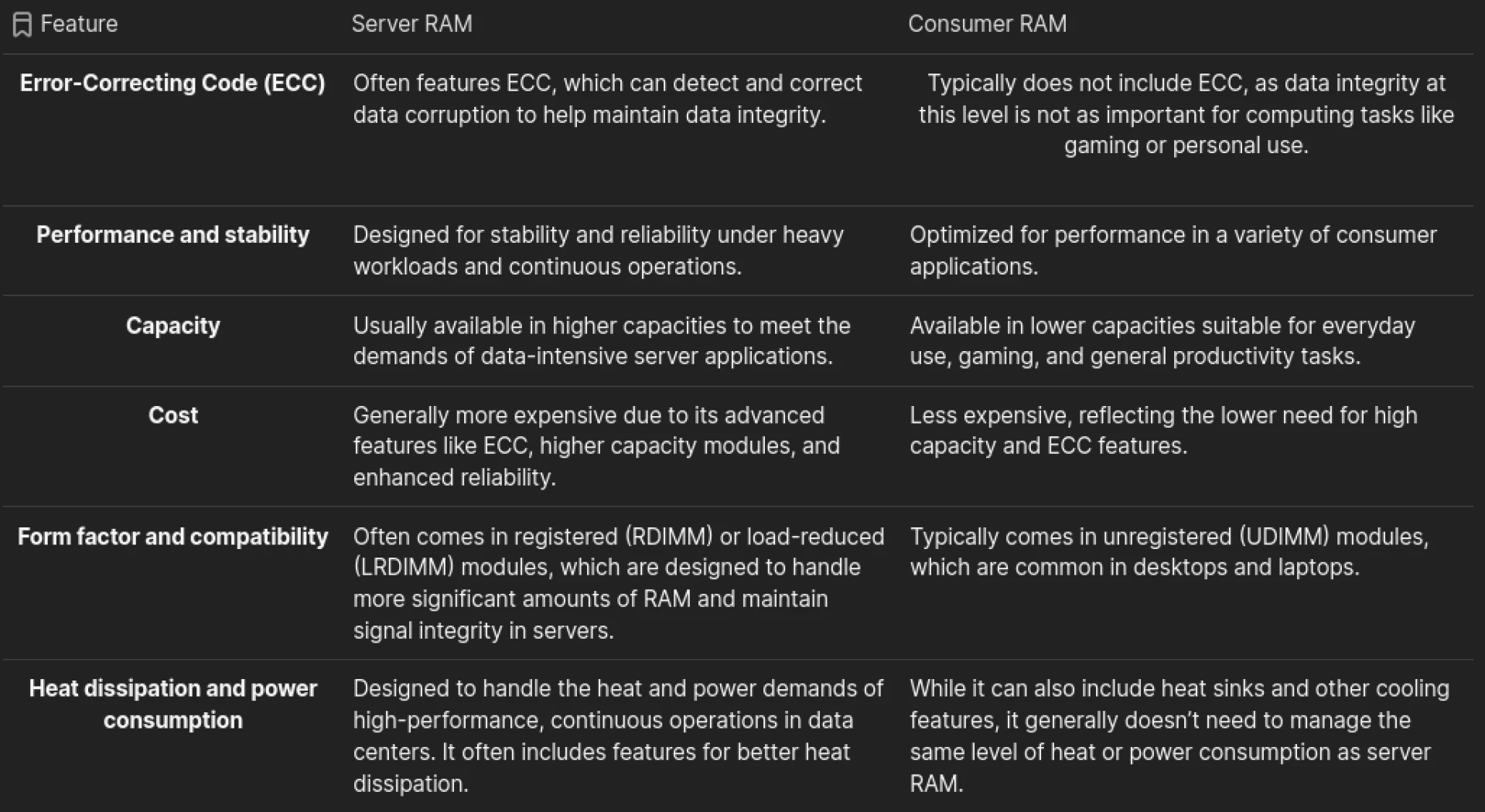
What Are Server RAM Types?
In this section, we can divided Server Ram into two categories.
Buffered/Registered RAM: Stability and load handling
Buffered memory, also called registered memory. Buffered memory simply features a registry ‘buffer’ between the RAM and the computer’s memory controller. It basically is used to reduce electrical load on the server memory controller. This buffer reduces the load on the memory controller, allowing more RAM to be accessed , making it a more stable form of RAM.
Basically, there are three types of buffered memory: Load-Reduced DIMMs (LRDIMMs), Regular DIMMs(RDIMM) and Fully Buffered Memory(FBDIMM)
- RDIMM: Registered memory differs from unbuffered memory as it contains registers (processes) on the DIMM and facilitates command signals between the Dynamic RAM (DRAM) and the memory controller. This allows for up to 3 DIMMs per memory channel, massively increasing the amount of memory a server can support. This is ideal for servers that require a greater amount of memory to carry out their processes.
- LRDIMM: Local Reduced Memory is a newer type of buffered memory and can take on an overall larger maximum memory capacity. This is done by making use of a memory buffer to integrate all electrical loads into a single load. When compared with RDIMM, LRDIMM has a lower latency and a higher power output, making it an ideal workhorse for heavily intensive memory processes.
- FBDIMM: Fully Buffered Memory is a traditional and somewhat outdated type of buffered memory and can help improve the speed, compatibility, and stability of a server more than unbuffered memory. FBDIMMS (and by extension LRDIMMS) are not compatible with RDIMMS and are often used to reduce the load on a memory bus (the technology used to carry information between memory and memory controller).
Unbuffered/Unregistered RAM: Direct communication with the memory controller
In unbuffered memory, the CPU will directly access the memory controller since there is no register between DARM modules and memory controller. Different from buffered memory, it will generate more electrical load on the memory controller. This direct connection allows for faster data transfer since there is no intermediary register to introduce latency.
Unbuffered RAM is commonly used for desktops, laptops, etc because of its relatively low price. However, it is less stable for systems and stored data.
What Are Server RAM Technologies?
ECC Memory: Error Checking and Correcting (ECC) is an error correction technique in computer instructions widely used in various fields. Compared to Parity, an error-checking technology used in ordinary server memory, ECC technology can not only check for errors but also correct them. Due to electrical factors, the data transferred in server memory can not be completely accurate. With ECC memory, the stability and reliability of server systems can be guaranteed.
Chipkill Memory: One flaw of ECC is that it cannot correct errors of more than 2-bits, which can lead to system failures and data loss. Through Chipkill Memory, data can be written into multiple DIMM chips. This means that, when a chip fails, it only affects a small portion of the computer data, and the entire system doesn’t crash.
Chipkill technology significantly boosts the error correction capabilities of server memory systems, allowing for the correction of multiple-bit errors and maintaining data integrity even in the presence of faulty memory chips. Also, the typical error correction of 2-bits is increased to 4-bits, increasing a server’s ability to root out data errors and maintain stability.
Register: A register is essentially a directory of all information stored in memory. With a registry, the server memory first retrieves the directory before performing reading and writing operations. This streamlines the efficiency of server RAM. Modern registers are also equipped with ECC, allowing for errors to be caught and solved as they’re found, increasing the processing speed at which the memory acts.
Memory Mirroring: Memory mirroring is a technique that divides server memory into two independent channels. Typically, one channel replicates another for redundancy.
For instance, if DIMM fails, the entire server system won't get affected, because the memory controller is immediately moved to another channel. Therefore, with memory mirroring, a higher level of memory reliability and consolidation can be achieved. Besides, it also provides comprehensive protection against single bit and multiple bit errors.
Memory Protection: Just as its name shows, memory protection is a strategy that controls the amount of memory access rights on a computer. The main purpose of it is to prevent applications from taking advantage of memory that systems have not allocated to, which can avoid damage or data loss to some extent.
Memory protection controls memory access rights for an individual computer, so that software cannot take advantage of unallocated memory space, freeing up processing power and boosting the performance of a computer. It also protects against data loss and file corruption. Memory protection also has the added benefit of being able to fix up to 4-bit errors across each pair of DIMMs.
Common Mistakes to Avoid When Working with Server RAM
When working with server RAM, there are two main categories of errors that can occur. Here, we explore how to deal with them to limit business disruption:
- Soft Errors: Soft errors are those that occur externally and are not the fault of the hardware, such as power outages, heat, and magnetic interference. The best way to avoid soft errors occurring is through proper staff training in managing and handling equipment, secure and safe server storage, and a backup power source.
- Hard Errors: Hard errors are caused by defaults in the hardware, such as damaged or faulty RAM modules, poorly wired circuit boards, and other flawed processing modules like the bus. The most efficient way to mitigate these errors is to bugfix software errors and replace any faulty or damaged parts as soon as they’re identified.
choosing the right server RAM involves a careful evaluation of server needs, balancing capacity, speed, compatibility, and cost considerations. By understanding these factors, you can ensure that your server operates efficiently, reliably, and within budget constraints.



























Sign in to leave a comment.