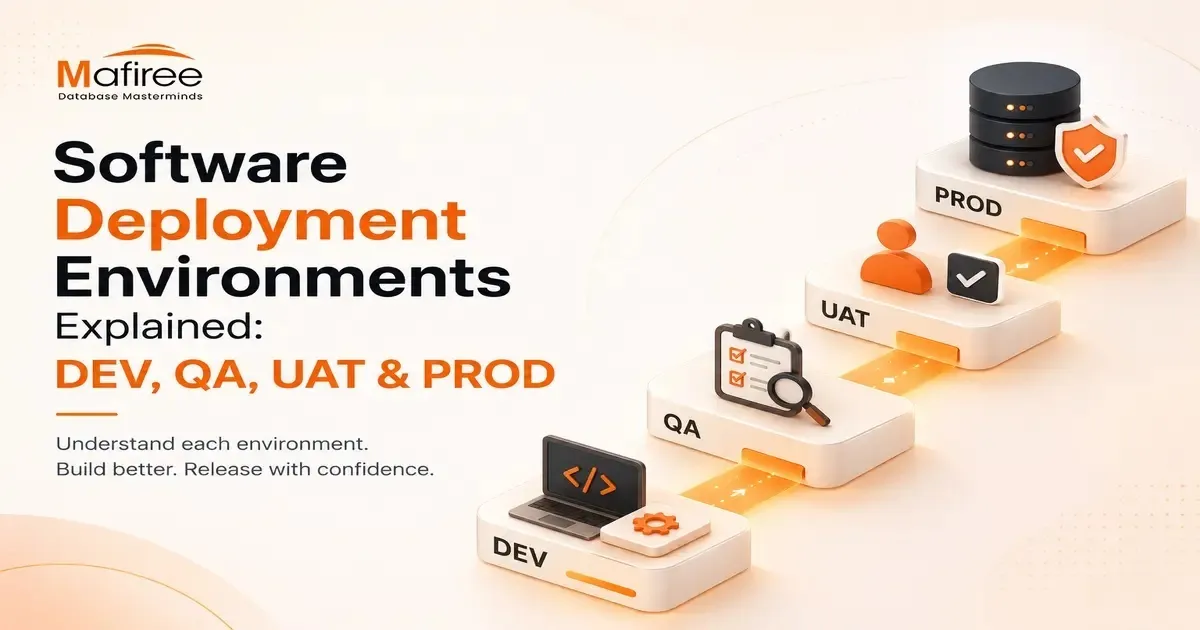

Modern software gets updated all the time, and rolling out changes without properly separated environments can disrupt live users, expose sensitive data, or interrupt important business operations. Software deployment environments solve this by giving developers, testers, and business stakeholders dedicated stages to validate an application before customers see it. Within DevOps and CI/CD workflows, these stages help teams catch bugs earlier, strengthen security compliance, protect production systems, reduce failed deployments, and release updates faster and more safely - something both startups shipping weekly and enterprises running critical systems rely on.
Why Environments Are Kept Separate
Applications generally move through four distinct stages before reaching users: DEV → QA → UAT → PROD. This isn't an unnecessary process - it's what allows teams to move fast without putting real users at risk.
Development (DEV)
DEV is where code is written, features are built, and initial testing takes place. It's fast-paced and experimentation-driven rather than stability-focused, as developers continuously add features, fix bugs, and test how pieces integrate. To simulate real application behavior without needing full infrastructure, teams often use local tools such as Docker, local databases, Minikube (a lightweight Kubernetes environment), virtual machines, and local API servers.
QA / Test Environment
Here, the goal shifts to confirming the software works correctly before business users interact with it. QA engineers perform functional testing, regression testing, API testing, security testing, performance testing, and automated testing to make sure new features work properly and existing functionality hasn't broken.
UAT (User Acceptance Testing) / Staging
UAT is the last checkpoint before production, built to closely mirror the production setup — matching configurations, database structures, load balancers, security policies, and network settings — so teams can catch problems missed earlier. Unlike QA's technical focus, UAT centers on business validation, where stakeholders, product owners, and end users confirm that real workflows like order processing, registration, payments, reporting, and approvals function correctly.
Production (PROD)
PROD is the live environment serving real users, so reliability, security, performance, and availability take top priority since issues here directly impact customers and business operations. Production infrastructure typically includes auto-scaling, load balancers, backups, monitoring dashboards, security tools, and incident response systems. To limit risk during rollout, teams use approaches like Blue-Green Deployments, Canary Releases, Rolling Updates, and Feature Flags. Because failures can lead to revenue loss, reputational damage, security breaches, or compliance violations, production releases follow strict change management with approvals, rollback plans, and close monitoring.
Mafiree's Deployment Flow
Mafiree explains its process using a checkout feature: developers build and test it locally in DEV; QA engineers check payment flows, API behavior, and security in QA; business teams confirm the checkout experience in UAT; and the feature is finally released to live users through a controlled deployment in PROD. This staged process catches problems before customers encounter them.
Security Practices
Recommended safeguards include using separate credentials per environment, avoiding production data in DEV, masking sensitive customer information, restricting production access, enabling logging and monitoring, applying Infrastructure as Code, and using role-based access control. Security becomes progressively stricter as code moves closer to production.
Common Pipeline Challenges
Teams commonly face configuration drift between environments, inconsistent test data, deployment failures, dependency mismatches, weak rollback planning, and slow testing cycles. Automation and solid DevOps practices help address these issues.
Staging vs. UAT
Staging is technically focused, used by developers and testers to detect bugs and rehearse releases through smoke tests. UAT is business-focused, used by clients, product owners, and analysts to validate real-world scenarios. Once UAT is signed off, the release is cleared for production.
Environment Comparison (DEV vs SIT vs UAT vs PROD)
The environments differ across several attributes: stability rises from low to highest, data moves from synthetic to live, users range from developers to end users, deployment frequency shifts from every commit to controlled releases, risk drops from high to zero, monitoring increases from minimal to 24/7, and configuration goes from flexible to strict.
Conclusion
By separating development, testing, validation, and production systems, organizations can reduce deployment risks, improve software quality, protect customer data, speed up release cycles, and maintain business continuity. As DevOps and cloud-native practices continue to evolve, well-managed environments remain one of the core foundations of reliable software engineering.
























Sign in to leave a comment.