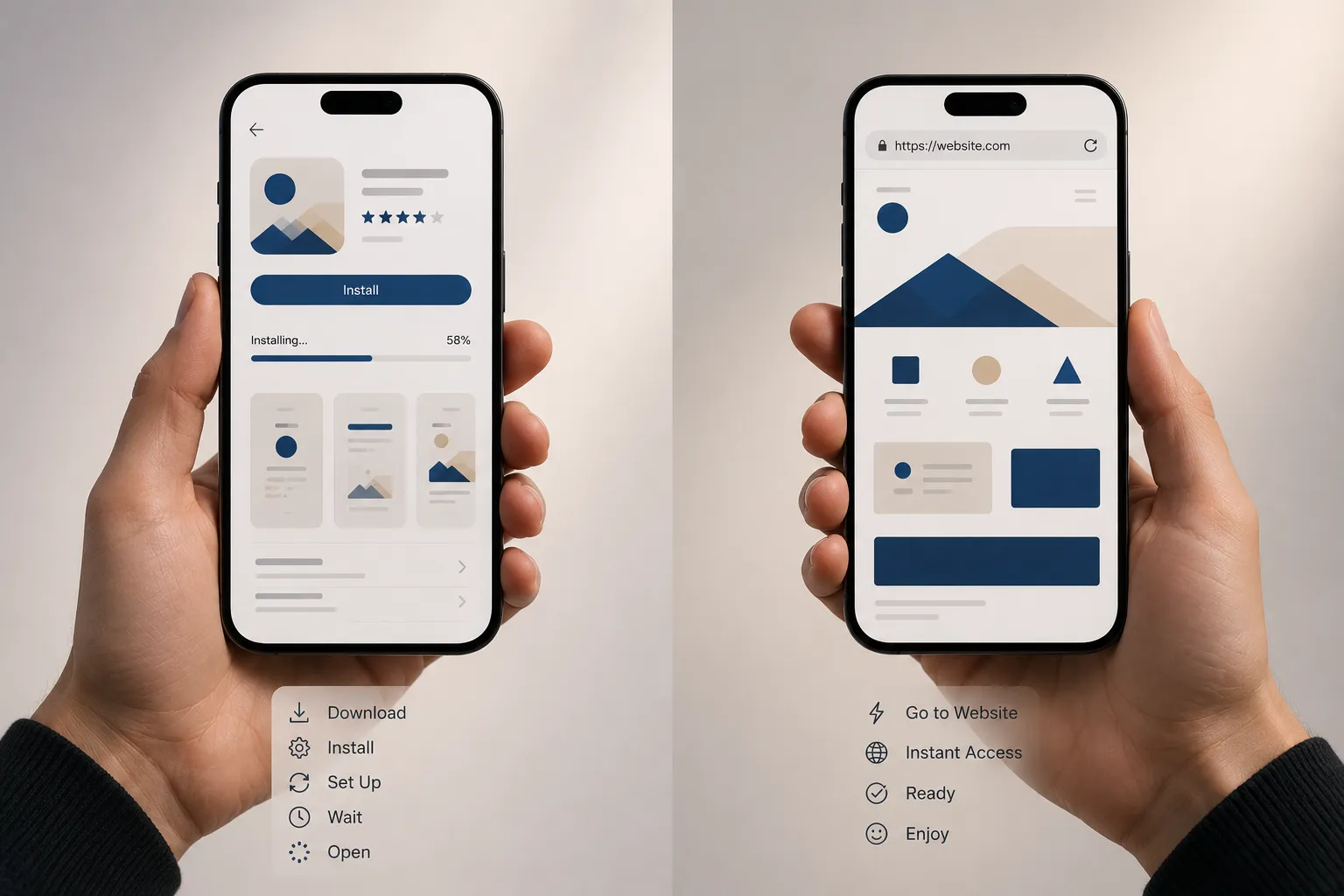

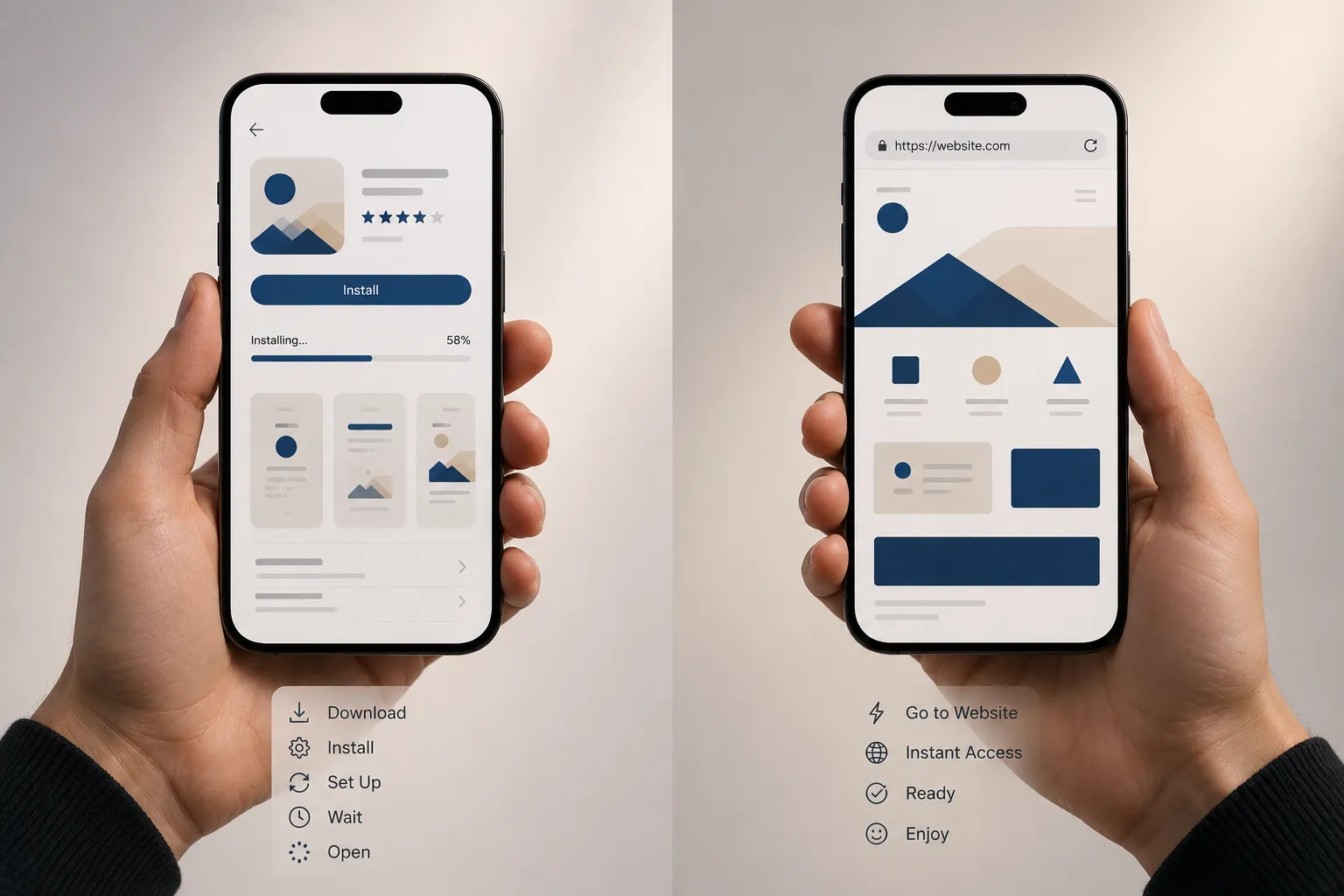
In 2026, the progressive web apps versus native debate has largely resolved in favour of context: PWAs win on cost, reach, and speed-to-market for content, commerce, and business tools. Native retains the edge for hardware-intensive and deeply immersive experiences. The businesses getting this wrong are still defaulting to native app development when the numbers argue clearly against it.
The default assumption for most businesses considering a mobile presence has historically been: build an app. Submit it to the App Store and Google Play. Wait for approval. Maintain two separate codebases indefinitely. Accept the 30% revenue cut on in-app purchases. Live with the update cycle constraints imposed by the platform owners.
This assumption made more sense a decade ago than it does in 2026. Progressive Web Apps have spent the last several years quietly eliminating the capability gaps that made the assumption defensible, and the business case for defaulting to native development has narrowed to a specific set of genuinely demanding use cases.
The companies that catch up to this faster will spend significantly less and reach significantly more people with the same budget.
What PWAs Actually Are in 2026 (Not What They Were in 2019)
A Progressive Web App is a web application built with standard web technologies — HTML, CSS, JavaScript — that uses modern browser APIs to behave like a native application. Service workers enable offline functionality and background processing. The Web App Manifest enables home screen installation without an app store. Web Push delivers notifications to users who've opted in.
The 2019 version of this description came with significant asterisks. iOS support for PWA capabilities was severely limited. Push notifications didn't work on iPhone. Installation prompts were inconsistent across browsers. The "app-like experience" claim felt generous.
The 2026 version is different in meaningful ways. iOS 17+ brought PWA push notifications, home screen install, and offline functionality to Apple's ecosystem. Every major browser now fully supports the core PWA APIs. The install experience has matured to the point where users on both major mobile platforms can add PWAs to their home screens with a single tap.
The perceivable user experience gap between a well-optimised PWA and a native app for typical business applications has shrunk to less than 10%. That's not a gap that justifies the cost and complexity differential in most scenarios.
The Business Case, Quantified (Progressive Web Apps)
The argument for PWAs in 2026 is not primarily technical — it's commercial. The numbers are specific enough to make decisions against.
PWAs reduce development costs 50–70% and reach 3–5x more users compared to native apps in scenarios prioritising accessibility, rapid updates, and cross-platform consistency. A single PWA codebase serves web, Android, desktop, and increasingly iOS, compared to three separate codebases (web, iOS, Android) for a full native presence.
The reach advantage is structural. Native apps require discovery through app stores and a deliberate installation decision. PWAs live on the web, are discoverable through search engines, can be shared via URL, and can be "installed" to the home screen with a single prompt — or used directly in the browser without installation at all. The friction to first use is dramatically lower.
The results from major PWA implementations are well-documented: Pinterest saw engagement increase 60% and ad revenue increase 44% after switching to a PWA. Twitter Lite reduced data usage 70% and increased pages per session 65%. Alibaba's PWA drove 76% more conversions from the browser. Conversion rates increase 36% when users install PWAs compared to mobile web.
These are not small businesses experimenting with emerging technology. They're large-scale operations publishing measurable business results from a strategic technology decision.
The Scenarios Where PWAs Win
Content platforms and media. If your primary offering is content — articles, videos, courses, documentation, news — a PWA is almost always the superior choice. Search discoverability, instant sharing via URL, no installation barrier, and push notifications for re-engagement cover the core business requirements without the cost and friction of native app development.
E-commerce. The e-commerce case for PWAs has strengthened significantly as payment API support has matured. Fast load times (critical for conversion), offline browsing of recently viewed products, home screen installation for repeat customers, and push notification re-engagement cover the high-value use cases. For most e-commerce businesses that don't require complex AR try-on features or deep payment hardware integration, a high-quality PWA delivers better commercial outcomes at lower cost than maintaining native apps.
B2B tools and internal applications. Enterprise field tools, inspection apps, customer-facing portals, booking systems, inventory management interfaces — these are categories where PWAs are rapidly replacing native apps. No app store approval cycle means updates deploy instantly. No installation requirement means adoption friction is near zero. Offline capability via service workers covers the field scenarios where connectivity is unreliable.
Startups and early-stage products. For a product that hasn't yet validated its mobile feature requirements, the ability to iterate a PWA without navigating app store review cycles is a genuine velocity advantage. Build in the open web, learn fast, invest in native depth only when the product proves specific requirements that demand it.
The right web development services partner in 2026 should be able to make this recommendation honestly — including when PWA is the better answer, rather than defaulting to native because it carries a higher development fee.
The Scenarios Where Native Retains the Edge
Intellectual honesty requires acknowledging where native still makes the stronger argument.
Hardware-intensive applications. Apps that require deep access to camera hardware (not just standard photo capture), GPS at high precision, biometric authentication, Bluetooth or NFC in complex configurations, or augmented reality features still benefit from native access to platform APIs that web technologies haven't fully matched. A professional photography app, a medical device interface, or a complex AR application has legitimate native requirements.
Immersive gaming and high-performance graphics. Consumer games with demanding rendering requirements, smooth animation at 60fps+ across all devices, and complex input handling perform better on native. WebGL has closed the gap significantly, and WebGPU is accelerating that further, but the ceiling is still higher on native for genuinely demanding experiences.
App store trust and discovery. In some markets and categories, app store presence confers trust that web distribution doesn't. Finance apps, healthcare applications, and products targeting demographics with lower web-first familiarity may benefit from the validation signal that App Store or Google Play listing provides.
Long-running background tasks. Applications that need to run significant processing in the background — complex synchronisation, real-time audio processing, continuous location tracking — encounter limitations in the web platform that native doesn't face.
For immersive experiences, demanding hardware access, and categories where app stores still shape trust and discovery, native keeps the edge. For search-led products and lean teams, PWAs remain the practical front-runner.
The Sequencing Approach Most Businesses Get Wrong
The most common mistake in mobile strategy is treating PWA versus native as a permanent binary decision rather than a sequencing question.
The right approach for most businesses — particularly those at earlier stages — is to build where users already are, then deepen the stack only when the product proves it needs more.
A PWA launches faster, reaches more users, costs less to build and maintain, and teaches you about mobile usage patterns and feature demand without the investment and commitment of native development. Once the product establishes what its users actually need on mobile — and in some cases, that reveals requirements that do justify native development — you have real evidence to make that investment against, rather than a pre-launch assumption.
Businesses that jump straight to native app development for an unvalidated product are making an expensive bet on their intuitions about what mobile users will want. Businesses that start with a high-quality PWA are learning from actual mobile users at a fraction of the cost.
What to Expect From a PWA Build in Practice
A well-built PWA in 2026 includes: offline capability via service workers (so the app works without connectivity for recently accessed content and functions), home screen installation with a proper Web App Manifest, push notification support for re-engagement, responsive design that works across all screen sizes and orientations, fast load performance (Largest Contentful Paint under 2.5 seconds on mobile), and a secure HTTPS connection (required for service worker functionality).
The development timeline for a PWA is typically shorter than the equivalent native build for the same functional scope — sometimes significantly shorter, because a single codebase is being built rather than two or three. Updates deploy instantly without app store review cycles, which means the iteration speed advantage compounds over time.
The tradeoffs worth planning for: app store distribution is not automatic (Android Play Store accepts PWAs via Trusted Web Activity; Apple App Store requires a native wrapper), and platform-specific design conventions (iOS Human Interface Guidelines, Material Design) require deliberate implementation rather than being provided by the native framework.
FAQs
Q: What's the difference between a PWA and a regular website?
A: A Progressive Web App uses modern browser APIs — service workers for offline functionality and background processing, a Web App Manifest for home screen installation and app-like presentation, and Web Push for notifications — to deliver an experience closer to a native app than a traditional website. The same underlying web technologies are used, but with capabilities that weren't previously available in the browser.
Q: Can a PWA be listed in the App Store or Google Play?
A: Google Play accepts PWAs natively via Trusted Web Activity (TWA). Microsoft Store also accepts PWAs natively. The Apple App Store requires a native wrapper around the PWA, which adds some development work but is achievable. Most PWA deployments prioritise the browser and home screen install path rather than app store distribution.
Q: Do PWAs work on iPhone?
A: Yes, with iOS 17+, push notifications, home screen installation, and offline functionality are supported. Earlier iOS versions had significant limitations. Businesses targeting users on iOS versions below 17 should assess the proportion of their audience affected before committing fully to PWA push notifications.
Q: How much cheaper is a PWA than native app development?
A: Development cost reductions of 50–70% compared to maintaining separate native iOS and Android apps are commonly cited from real implementations. The savings compound over time through simplified maintenance, instant update deployment, and a single development team rather than platform-specific specialists.
Q: Is a PWA good for e-commerce?
A: Yes, for most e-commerce use cases. Fast load times, offline browsing, push notifications for abandoned cart re-engagement, and home screen installation for repeat customers are all supported. The 36% conversion rate increase seen when users install PWAs versus using mobile web is a significant commercial argument.
Q: What's the best way to decide between PWA and native for my business?
A: Map your specific feature requirements against what each approach supports. If your requirements include complex hardware access (advanced AR, biometric sensors, Bluetooth in complex configurations), native is likely necessary. If your requirements are content delivery, e-commerce transactions, forms, data display, and notifications, a PWA delivers those at lower cost and higher reach. If you're uncertain, start with a PWA — it's faster to validate and cheaper to learn from.























Sign in to leave a comment.