
What Are Wireframes?
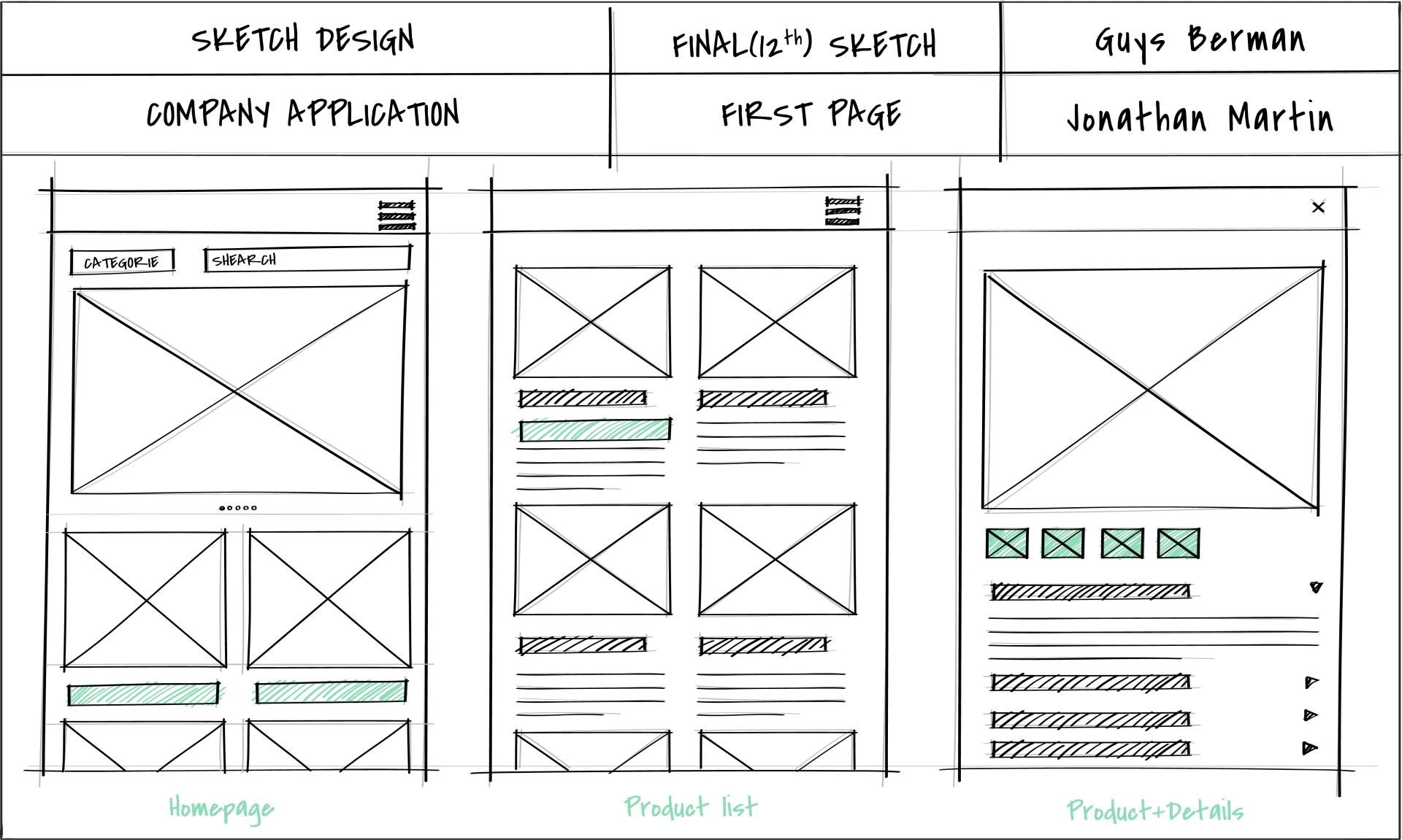
Wireframes are visual blueprints for a website. They showcase the structure, layout, and functionality without focusing on design details like colors or images. This skeletal framework guides designers, developers, and stakeholders during the project lifecycle.
Wireframes are the backbone of any mobile ui design project. They serve as a preliminary visual guide that outlines the structure, layout, and functionality of a website or application. By stripping away the visual design elements like colors, fonts, and images, wireframes focus purely on the foundational aspects of user experience (UX) and functionality
Understanding Wireframes in Depth
1. The Purpose of Wireframes
Wireframes provide a blueprint for a website. They help teams visualize the placement of essential elements such as navigation bars, buttons, headers, and content sections. This step is crucial for defining the website’s hierarchy and ensuring that the user journey is intuitive and logical.
2. Types of Wireframes
- Low-Fidelity Wireframes
- These are basic sketches or digital drafts that focus on structure without intricate details. They are quick to create and perfect for initial brainstorming.
- High-Fidelity Wireframes
- These include detailed layouts and annotations, offering a closer look at the final product. They may also incorporate clickable elements to simulate functionality.
- Interactive Wireframes
- These are dynamic models that mimic the user experience. They allow stakeholders to test and interact with the design flow, providing a real-world feel of the website’s usability.
Why Are Wireframes Essential?
1. Simplify the Design Process
Wireframes provide clarity by organizing the website’s content and features. This helps avoid confusion and ensures a smoother design process.
2. Focus on User Experience (UX)
They allow teams to prioritize user needs. With wireframes, designers can test and refine the navigation and layout for a seamless experience.
3. Save Time and Costs
Wireframes help identify potential issues early. Fixing these problems at the wireframe stage is faster and cheaper than during development.
4. Improve Collaboration
Wireframes act as a communication tool. They align expectations between clients, designers, and developers.
Why Are Wireframes Important?
1. A Clear Visual Representation
Wireframes act as a visual roadmap for the entire team. They ensure that designers, developers, and stakeholders are on the same page regarding the layout and functionality of the site.
2. Focus on Usability
Wireframes highlight user-centric design by emphasizing functionality over aesthetics. They help identify potential navigation issues or content hierarchy problems early in the process.
3. Cost and Time Efficiency
Making changes to a wireframe is far easier and cheaper than revising a fully developed website. They allow teams to test ideas and address challenges before significant resources are invested.
4. Enhanced Collaboration
Wireframes are a universal language for web design teams. They bridge the gap between technical and non-technical stakeholders, facilitating smooth communication and alignment.
Key Components of Wireframes
- Headers and Navigation Menus
- These outline how users will move through the site.
- Content Blocks
- Wireframes indicate where text, images, and videos will appear, focusing on their logical placement.
- Call-to-Actions (CTAs)
- Highlighting buttons or prompts ensures they are strategically positioned to drive user engagement.
- Footer Design
- The footer serves as the concluding element and often contains secondary navigation or important links.
How to Create Wireframes
1. Start with Research
Understand the purpose of the website, the target audience, and the goals of the project. This research will guide the wireframing process.
2. Use Wireframing Tools
Leverage digital tools like Figma, Sketch, or Balsamiq. These platforms make it easy to create, share, and revise wireframes.
3. Incorporate Feedback
Wireframes are meant to be iterative. Collect input from stakeholders and refine the design to meet everyone’s expectations.
4. Test for Usability
Even at the wireframe stage, test the design for ease of navigation and user-friendliness.
Common Misconceptions About Wireframes
- Wireframes Are Just Sketches
- While they often begin as rough sketches, wireframes evolve into detailed plans that guide the entire project.
- Wireframes Eliminate Creativity
- On the contrary, they provide a structured framework that enables creative problem-solving during the design phase.
- They Are Only for Designers
- Wireframes benefit the whole team, including developers, marketers, and clients, by providing a shared understanding of the project.
Steps to Create Effective Wireframes
1. Understand the Project Requirements
Gather information about the target audience, goals, and features. This groundwork shapes your wireframe.
2. Sketch the Layout
Start with rough sketches to determine the placement of elements like headers, footers, and navigation menus.
3. Use Wireframing Tools
Tools like Figma, Adobe XD, or Sketch streamline the process and produce professional wireframes.
4. Test and Iterate
Share the wireframe with stakeholders for feedback. Revise as necessary to ensure it meets project goals.
Common Mistakes to Avoid
1. Overloading with Details
Wireframes should remain simple. Avoid adding unnecessary design elements that detract from functionality.
2. Ignoring Mobile Responsiveness
Ensure your wireframes adapt to various devices. Responsive design is crucial for modern websites.
3. Skipping User Feedback
Test wireframes with real users. Their insights can identify usability issues you might overlook.
Benefits of Wireframes in Web Design
1. Clear Communication
Wireframes bridge the gap between technical teams and non-technical stakeholders. Everyone understands the plan.
2. Enhanced User-Centric Design
They emphasize user needs, ensuring the final product delivers an intuitive experience.
3. Smooth Development Process
Wireframes reduce misunderstandings during coding, making development faster and more efficient.
Conclusion
Wireframes are indispensable in web design. They simplify processes, focus on user experience, and save time and money. By prioritizing this step, you lay a strong foundation for a successful website.






























Sign in to leave a comment.