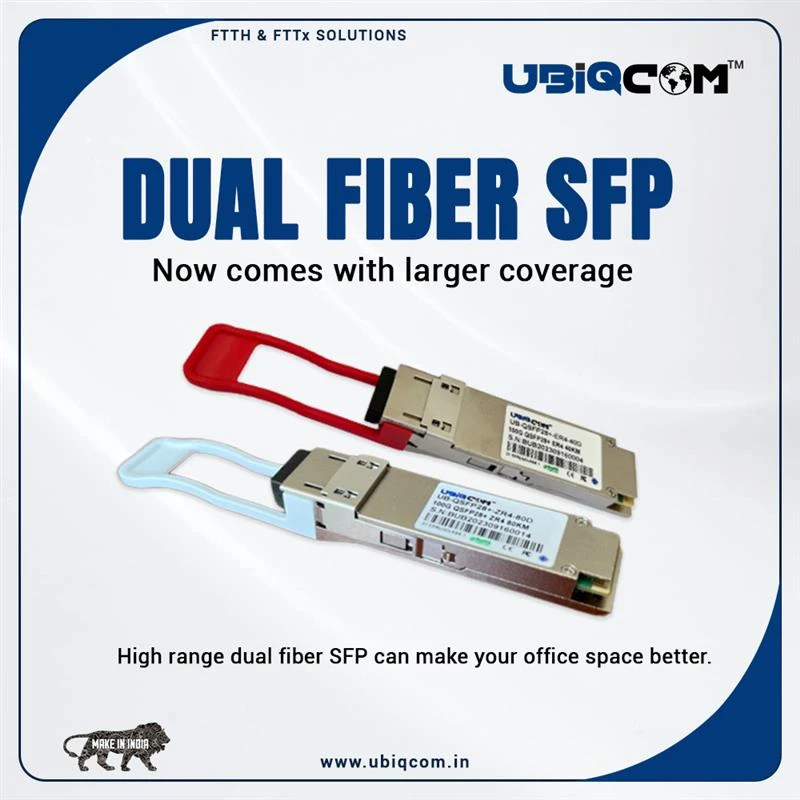

In today’s fast-paced digital world, high-speed and reliable data transmission is essential for businesses and service providers. One of the most critical components that enable this seamless connectivity is the Fiber SFP (Small Form-Factor Pluggable) module. Whether you're managing enterprise networks, data centers, or telecom infrastructures, understanding the role and benefits of Fiber SFP can help optimize your network performance.
In this blog, we’ll explore what Fiber SFP is, how it works, its types, and the key advantages it offers for modern networking solutions.
What is a Fiber SFP?
A Fiber SFP is a compact, hot-swappable transceiver used in network switches, routers, and other communication devices to transmit and receive data over fiber optic cables. It acts as an interface between the network device and the fiber optic cable, converting electrical signals into optical signals and vice versa.
The SFP module fits into the SFP port of a network device and supports a wide range of communication standards such as Gigabit Ethernet, Fibre Channel, and SONET. Fiber SFPs are widely used in both short-range and long-range networking scenarios, offering flexibility and scalability in network design.
Types of Fiber SFP Modules
Fiber SFP modules come in various types depending on the transmission distance, wavelength, and cable type. Below are the common types:
1. Single-Mode SFP (SMF)
- Wavelength: Typically 1310 nm or 1550 nm
- Distance: Up to 120 km
- Use Case: Long-distance transmission such as inter-building or metro networks
2. Multi-Mode SFP (MMF)
- Wavelength: Typically 850 nm
- Distance: Up to 2 km
- Use Case: Short-range transmission like within data centers or campus networks
3. BiDi SFP (Bidirectional)
- Uses a single fiber strand by transmitting and receiving at different wavelengths
- Ideal for reducing fiber infrastructure costs
4. CWDM/DWDM SFP
- Supports Wavelength Division Multiplexing (Coarse or Dense)
- Allows multiple channels on a single fiber, increasing bandwidth
5. 10G SFP+
- Supports 10 Gigabit Ethernet
- Backward compatible with standard SFP ports (at lower speeds)
How Fiber SFP Works
Fiber SFP modules convert electrical signals from a network device into optical signals and transmit them over fiber optic cables. On the receiving end, another SFP module converts the optical signals back into electrical signals. This enables high-speed data transmission over long distances with minimal signal loss and electromagnetic interference (EMI).
Hot-swappable design means you can replace or upgrade SFP modules without powering down the device, making maintenance and scaling much more convenient.
Advantages of Using Fiber SFP
Fiber SFP modules offer numerous benefits that make them an integral part of modern networking infrastructure:
1. High-Speed Data Transmission
Fiber SFPs support speeds from 1 Gbps to 10 Gbps and beyond, making them suitable for high-bandwidth applications such as streaming, cloud computing, and data storage.
2. Long-Distance Connectivity
Single-mode SFPs can transmit data over distances up to 120 km, making them perfect for connecting networks across cities or large campuses.
3. Reduced Interference
Unlike copper cables, fiber optic cables are immune to electromagnetic interference, ensuring cleaner and more reliable data transmission.
4. Scalability and Flexibility
With a wide range of supported standards and hot-swappable capability, SFP modules offer great flexibility for upgrading and scaling networks as per future requirements.
5. Energy Efficiency
Fiber optic transceivers generally consume less power and generate less heat compared to copper-based modules, which contributes to overall energy savings in data centers.
Applications of Fiber SFP
Fiber SFPs are used in a broad range of applications, including:
- Telecommunications: Connecting base stations and transmission towers
- Enterprise Networks: High-speed connections between switches, servers, and storage
- Data Centers: Linking core, distribution, and access layers efficiently
- FTTH (Fiber to the Home): Providing last-mile connectivity
- Industrial Networking: Used in harsh environments for reliable communication
Choosing the Right Fiber SFP Module
Selecting the appropriate Fiber SFP module depends on several factors:
- Transmission Distance: Choose SMF for long-distance and MMF for short-range.
- Data Rate: Ensure the module supports your required speed (e.g., 1G, 10G).
- Connector Type: Common types include LC, SC, and MTP.
- Compatibility: Always verify compatibility with your networking hardware (check vendor specs or use universal-compatible modules).
- Environmental Conditions: For industrial use, opt for SFPs with extended temperature ranges.
Why Choose UBIQCOM Fiber SFP Modules?
If you're looking for reliable, high-performance, and cost-effective Fiber SFP solutions, UBIQCOM offers a wide range of SFP modules designed to meet the demands of modern networking environments. UBIQCOM SFPs are:
- Compatible with major brands
- Certified for quality and performance
- Energy-efficient and durable
- Available in both single-mode and multi-mode options
Whether you’re upgrading an enterprise network or deploying a new fiber infrastructure, UBIQCOM’s Fiber SFP modules provide the speed, stability, and scalability you need to stay connected and competitive.
Conclusion
Fiber SFP modules are indispensable for high-performance and scalable networks. They offer high data rates, low latency, long-distance transmission, and exceptional reliability, making them the ideal choice for modern data-driven environments. With the right Fiber SFP module, businesses can enhance their network efficiency, minimize downtime, and future-proof their infrastructure.





























Sign in to leave a comment.