

Data storage is an essential component of business operations. As your business grows, and an increasing number of digital files is created, storing them in the cloud or on your local servers may no longer be efficient. Network Attached Storage (NAS) is an excellent solution that can help manage your data and improve your business efficiency. However, understanding the intricacies of NAS storage can be a challenge, especially if you’re not an expert in the field. In this article, we’ll take a deep dive into what is NAS storage and cover everything you need to know about it.
What is a NAS, and how does it work?
NAS is a device that connects to your network and provides storage for your data. It functions like a server and provides access to files and applications to authorized users. NAS storage is becoming increasingly popular, as it can help businesses with data protection, backup, and disaster recovery. It can also improve file collaboration and sharing by allowing multiple users to access the same files and folders.
What are the benefits of using NAS storage?
NAS offers several benefits for businesses, including:
Centralized storage: NAS provides centralized storage that can be accessed by authorized users from anywhere in the world. This means that your employees can work remotely from different locations, access the same files and folders, and collaborate effectively.Scalability: NAS allows businesses to expand their storage capacity as their data needs grow. This makes it an excellent solution for businesses of all sizes, from startups to multinational corporations.Data protection: NAS offers built-in data protection features that ensure the security and reliability of your data. It also allows for automation of data backup and disaster recovery processes.User Management: Admins can manage user access, create user groups, and assign permissions to users through the NAS system. This helps prevent unauthorized access and ensures that sensitive data is only accessible to those who need it.What are the different types of NAS storage?
There are two types of NAS storage: traditional and software-defined. Traditional NAS storage devices are standalone hardware devices that require their own storage capacity and operating system. Software-defined storage, on the other hand, uses software to virtualize storage on existing hardware infrastructure. Both types of NAS storage have their advantages and disadvantages, and the choice depends on the specific needs of your business.
What features should you look for when choosing NAS storage?
When selecting a NAS storage device, there are several critical features to consider, including:
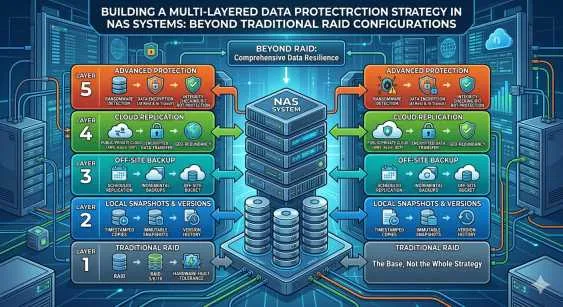
Processor: NAS devices with a faster processor can handle multiple requests and increase file transfer speed.Connectivity: NAS devices must have multiple connectivity options such as Ethernet, Wi-Fi, or USB to ensure compatibility with various devices.Storage capacity: NAS storage can range from a few terabytes to petabytes; you should choose a device with sufficient storage capacity based on your business needs.RAID configurations: NAS devices support multiple RAID configurations, which provides data redundancy and protects against data loss.Conclusion
NAS storage is an excellent solution for businesses of all sizes, as it provides centralized storage, scalability, data protection, and user management. When selecting enterprise NAS storage, consider critical features such as processor speed, connectivity, storage capacity, and RAID configurations. We hope this deep dive into the world of NAS storage has been informative and helpful.






























Sign in to leave a comment.