

Walk into almost any retail store or restaurant today and you'll see the same device sitting at the counter: a touchscreen, a card reader, and a small printer spitting out receipts. That's a POS machine, and it's quietly become one of the most important pieces of equipment a business owns.
The global market for these devices is on track to top $20 billion this year, and that number reflects more than hardware sales. Businesses are paying for a system that connects payments, inventory, and customer data in one place, not just a box that swipes a card.
If you're shopping for your first POS machine or replacing one that's starting to feel outdated, it helps to understand what these devices actually do, what types exist, and which features are worth paying for in 2026.
What a POS Machine Actually Does
POS stands for point of sale, and a POS machine is the device your staff uses to complete a transaction. The hardware side includes a touchscreen, a card reader, and often a built-in receipt printer. The software running underneath is what actually makes the machine useful.
A basic card terminal does one thing: it processes a charge. A modern POS system does much more. It tracks inventory as items sell, generates daily and weekly sales reports, manages staff clock-ins, and keeps a record of what each customer has purchased before.
That shift from simple payment terminal to full business hub is the biggest change in this category over the past several years, and it's why even small, single-location businesses now expect more from their checkout hardware than they did a decade ago.
Types of POS Machines You'll Run Into

Not every business needs the same setup. Countertop terminals are the standard choice for retail counters and quick service restaurants, built to handle a steady flow of transactions at a fixed station.
Mobile and wireless readers travel with the business instead of staying behind a counter. Food trucks, market vendors, and contractors working on-site rely on this format because it pairs with a phone or tablet and skips the need for a dedicated checkout stand.
Smart terminals sit in between. They run a full operating system with apps for loyalty programs, tip prompts, and order management, all built into one handheld or countertop unit. Businesses juggling foot traffic, phone orders, and curbside pickup often find that bundled in-person payments hardware and support causes fewer headaches than stitching together separate tools from different vendors.
Self-service kiosks round out the picture. Quick service restaurants and grocery stores use them to cut wait times and free staff for other tasks, and demand for this format keeps climbing as labor costs rise. Most kiosks now connect to the same backend as the staffed registers, so an order placed at a kiosk shows up in the kitchen or stockroom exactly the way an order rung up by a cashier would.
Features That Matter in 2026
Hardware specs used to decide which POS machine a business bought. Now the software layer matters just as much, sometimes more.
Cloud connectivity is at the top of the list. A cloud-based POS lets an owner check sales numbers from a phone while away from the building, and it pushes software updates automatically instead of requiring a technician to show up.
Security isn't optional anymore. EMV chip support, tokenization, and solid fraud protection guard both the business and its customers from the kind of data breaches that used to make headlines every few months. AI-driven detection tools now catch the large majority of suspicious transactions before they ever clear, a real improvement over the manual review processes merchants leaned on just a few years back.
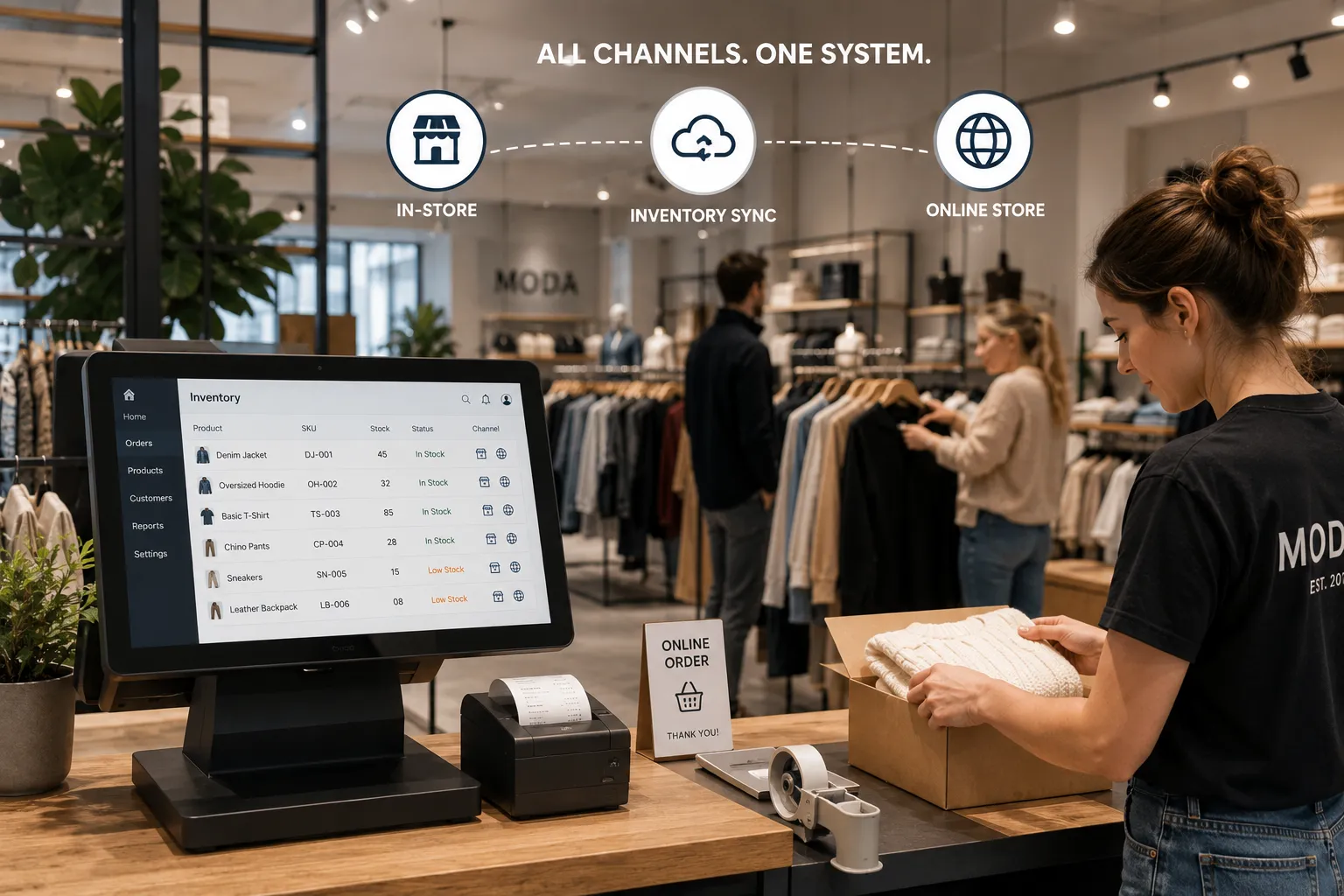
Channel consistency is the other major shift. Customers expect to buy online, return in store, or order ahead for curbside pickup, and the POS machine has to keep inventory and order data synced across every one of those paths. That's the whole point behind omnichannel payments, and businesses that skip this step usually end up with mismatched stock counts and frustrated staff trying to explain the gap to customers.
How a POS Machine Fits Into Your Payment Stack
A POS machine never works alone. Behind every tap, swipe, or chip insert, a payment gateway routes the transaction to a processor, which then communicates with the card network and the customer's bank.
Businesses that also take payments by phone or need to key in a card number manually should pair their physical machine with a virtual terminal. This setup matters for anyone combining in-person sales with phone orders or invoicing, since it keeps every payment method under one merchant account instead of splitting reporting across separate tools and separate logins.
What Chargebacks Mean for Your Hardware Choice
Even with strong fraud protection in place, disputes still happen. A customer claims a charge wasn't authorized, or a transaction gets flagged days after the sale already closed.
How a POS machine captures and stores transaction data has a direct effect on how easily a business can fight back. Signature capture, itemized receipts, and accurate timestamps all become evidence once a dispute lands on someone's desk. Pairing hardware with dependable chargeback management tools gives a business a paper trail to work from instead of a guessing game when a customer's bank starts asking questions.
Choosing the Right Setup for Your Business
There's no single best POS machine for every business. A small boutique with one location has different needs than a restaurant group running dine-in, delivery, and curbside pickup at three locations at once.
Start with how payments actually happen day to day, then work backward from there. A business built around counter sales should prioritize speed and reliability above everything else. A business managing multiple locations or sales channels should prioritize reporting and inventory features that keep the whole operation in sync.
Cost matters too, but the cheapest hardware on the shelf often carries the highest long-term cost once you factor in transaction fees, add-on integrations, and downtime when something breaks. Ask any provider for a clear breakdown of hardware cost, monthly software fees, and per-transaction rates before signing anything.
Support and uptime deserve the same attention as price. A POS machine that goes down during a Saturday rush costs more in lost sales than most owners realize, so ask how fast a provider responds when hardware fails and whether a loaner terminal is available while a replacement ships. A contract with flexible terms also matters more than it seems at first, since businesses change locations, add channels, and outgrow basic setups faster than most contracts anticipate.
Conclusion
A POS machine isn't just a box that takes credit cards anymore. It's the system a staff touches dozens of times a day and the data source behind most of a business's daily decisions.
Whether you're replacing an aging terminal or setting up a first location, take the time to match the hardware and software to how the business actually runs, not just to the lowest price tag on the shelf. Rapid Payments works with retail, restaurant, and service businesses across the country to match them with POS hardware and processing built around real day-to-day operations, backed by transparent pricing with no hidden fees buried in the contract.

























Sign in to leave a comment.