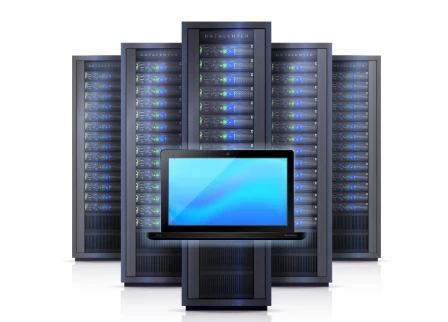

External hard drives served businesses well for decades. Plug in, transfer files, unplug, repeat. But this storage method creates bottlenecks that modern teams can't afford. Files remain trapped on individual devices, collaboration becomes a logistical nightmare, and data security depends on physical device management.
Network Attached Storage (NAS) represents the next evolution in business data management. This technology transforms isolated storage into centralized, accessible systems that support real-time collaboration, automated backups, and enterprise-grade security—all while remaining surprisingly affordable for businesses of any size.
What is NAS Storage?
Let’s understand what is NAS storage? Network Attached Storage connects dedicated storage devices directly to your business network, creating centralized file repositories accessible from any connected device. Unlike external hard drives that serve individual computers, NAS systems provide simultaneous access for multiple users across different locations.
NAS storage operates as a specialized computer designed exclusively for file management. These systems run optimized operating systems that prioritize data handling, network connectivity, and user management over general computing tasks. This focused approach delivers superior performance compared to repurposed desktop computers or basic file servers.
Modern NAS appliances combine high-capacity storage with sophisticated software features. Users access files through familiar network drives, web interfaces, or mobile applications. The underlying complexity remains hidden while providing enterprise-level capabilities through intuitive interfaces.
Core Components That Matter
Effective NAS implementations require three essential elements: storage capacity, network connectivity, and processing power. Storage capacity must accommodate current data volumes plus significant growth projections—most businesses underestimate their data expansion by 200-300% annually.
Network connectivity becomes critical when multiple users access centralized storage simultaneously. Gigabit Ethernet represents the minimum standard for small teams, while larger organizations benefit from 10-gigabit connections for demanding applications like video editing or database operations.
Processing power affects system responsiveness during concurrent access. Modern NAS processors handle multiple simultaneous connections while executing background tasks like backup operations, file indexing, and security scanning without impacting user performance.
Affordable NAS Storage Solutions
Budget constraints shouldn't prevent businesses from accessing professional-grade storage capabilities. Entry-level NAS systems start under $300 and provide substantial advantages over external hard drive collections costing similar amounts.
Two-bay NAS units offer excellent starting points for small businesses. These systems accommodate two hard drives in RAID configurations, providing either doubled storage capacity or built-in redundancy protection.
Four-bay systems provide optimal value propositions for growing businesses. Additional drive bays enable mixed RAID configurations—critical data receives redundancy protection while less important files utilize maximum capacity storage. These systems typically cost $400-800 depending on included features.
Cost Comparison Analysis
Traditional external hard drive approaches create hidden expenses that NAS storage eliminates. Multiple external drives require individual purchases, increasing per-terabyte costs. Manual backup procedures consume employee time that could generate revenue through productive work.
NAS systems consolidate storage expenses while reducing management overhead. Single purchases provide multi-user access, eliminating duplicate storage needs. Automated backup features protect data without ongoing manual intervention, saving hours of employee time monthly.
Long-term costs favor NAS implementations significantly. External drives fail individually, requiring complete replacements. NAS systems use replaceable drives within redundant configurations—single drive failures don't interrupt operations or require complete system replacement.
Performance Advantages Over External Storage
External hard drives create performance limitations that affect entire teams. USB connections bottle-neck data transfer speeds, especially when multiple users need simultaneous access. File conflicts arise when different team members work with separate copies of identical documents.
NAS storage eliminates these bottlenecks through dedicated network connections and centralized file management. Gigabit network speeds exceed most USB connections while supporting multiple simultaneous users without performance degradation.
Centralized storage ensures everyone accesses identical file versions. Real-time updates appear across all connected devices, eliminating version conflicts and reducing collaboration errors. Teams work more efficiently when they trust they're accessing current information.
Concurrent Access Capabilities
Multiple users can access NAS storage simultaneously without the coordination required for external drive sharing. Marketing teams edit campaign materials while accounting departments access financial records from the same storage system.
User permission systems control access levels without restricting legitimate usage. Project-specific folders remain accessible to relevant team members while protecting sensitive information from unauthorized access. These controls operate automatically without manual intervention.
File locking features prevent simultaneous editing conflicts that corrupt documents. When one user opens a file for editing, other users receive read-only access until the original editor saves their changes. This protection operates transparently without disrupting workflow.
Security Features That Protect Your Business
External hard drives provide minimal security beyond physical device control. Lost or stolen drives expose all contained data without protection. Password systems, when present, often use basic encryption easily bypassed by determined attackers.
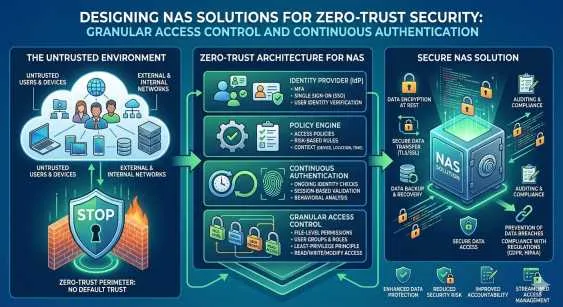
NAS storage implements multiple security layers protecting data through various threat scenarios. User authentication systems require credentials for access, while encryption protects data during network transmission and physical storage.
Access logging tracks all file activities for audit purposes and security monitoring. Administrators can identify unusual access patterns that might indicate security breaches or policy violations. These detailed logs support compliance requirements while enabling rapid incident response.
Network Security Integration
Professional NAS systems integrate with existing network security infrastructure. Virtual Private Network (VPN) connections enable secure remote access without exposing storage systems to public internet threats.
Firewall integration controls which network ports and protocols can access storage systems. These restrictions prevent unauthorized network scanning while maintaining necessary connectivity for legitimate users.
Regular security updates protect against newly discovered vulnerabilities. Major affordable NAS storage manufacturers provide ongoing firmware updates that address security issues and add new protective features without requiring hardware replacement.
Backup and Data Protection Excellence
External hard drive backup procedures require manual intervention that often gets postponed or forgotten. Critical data remains vulnerable during periods between backup activities. Human error during manual backup processes can result in incomplete or corrupted backup copies.
NAS backup systems operate automatically on predetermined schedules. Critical business data receives daily protection while less important files backup weekly or monthly. These automated processes continue reliably without employee involvement or remembering.
Multiple backup destinations protect against various failure scenarios. Local backups enable rapid recovery from common issues like accidental deletion or file corruption. Remote backup copies protect against site-wide disasters affecting primary storage locations.
Version Control and Recovery
Advanced NAS systems maintain multiple file versions over extended periods. Users can recover previous document versions without IT assistance, reducing support overhead while improving productivity. Version retention policies balance storage efficiency with recovery capabilities.
Snapshot technologies capture entire system states at specific points in time. These snapshots enable rapid recovery from major issues like malware infections or system-wide file corruption. Recovery operations restore systems to known-good states within minutes rather than hours.
Point-in-time recovery capabilities allow restoration of specific files from exact timestamps. This precision helps recover from situations where file corruption occurred gradually over time, enabling recovery from before problems began.
Scalability for Growing Businesses
External hard drive collections become increasingly difficult to manage as businesses grow. Adding storage capacity requires individual drive purchases and manual integration. User access coordination becomes complex when multiple drives contain different project files.
NAS systems scale elegantly through various expansion methods. Additional internal drives increase capacity within existing systems. External expansion units connect seamlessly when internal capacity becomes insufficient.
Scale-out NAS architectures support unlimited growth through connected node additions. Each new node increases storage capacity and processing power simultaneously, maintaining consistent performance as business demands increase.
Future-Proofing Your Investment
NAS systems support technology transitions that would require complete external drive replacement. Network connectivity improvements automatically benefit existing installations. Software updates add new features and capabilities without hardware changes.
Migration paths exist for outgrowing current NAS systems. Data transfers between NAS security systems occur over network connections rather than physical drive movement. Business operations continue during migration processes without extended downtime.
Industry-standard protocols ensure compatibility with future technologies and vendors. Businesses aren't locked into specific manufacturers and can choose optimal solutions as requirements evolve.
Remote Access and Mobile Integration
External hard drives limit access to physical locations where drives connect to computers. Remote work scenarios require either physical drive transportation or complex file synchronization procedures that often fail.
NAS storage provides secure remote access through internet connections. Mobile applications enable file access from smartphones and tablets while maintaining security controls. Cloud-like convenience operates from privately controlled infrastructure.
Synchronization features maintain local copies of frequently accessed files on mobile devices. Users work with local copies during offline periods, with changes synchronizing automatically when internet connectivity returns.
Transform Your Business Storage Strategy
Network Attached Storage represents a fundamental improvement over external hard drive storage methods. Centralized access, automated protection, and professional security features provide business advantages that justify the minimal additional investment required.
Start by assessing your current storage challenges. Calculate time spent managing external drives, coordinating file sharing, and recovering from data loss incidents. These hidden costs often exceed NAS system expenses within the first year of operation.
Consider your growth trajectory when selecting storage capacity and features. Systems that accommodate 2-3 years of projected growth provide optimal value propositions. Planning for future expansion prevents premature replacement costs.
Ready to move beyond external hard drive limitations? Explore affordable NAS storage options that transform your business data management while providing enterprise-grade capabilities at small business prices.




























Sign in to leave a comment.